

Chengran (Felix) Guan
2026-07-11 · 7 min read
How to Use AI to Create Listing Videos in Under 10 Minutes
You can create a professional real estate listing video in under 10 minutes with AI. Start with your raw photos and footage, upload them to an AI-powered editor, add music and transitions, and export a polished walkthrough — all without opening a traditional timeline-based editing suite. Here's the exact step-by-step workflow.
Key Takeaways
- AI cuts editing time from hours to minutes — a standard 60-second listing walkthrough that takes 3–4 hours manually can be produced in under 10 minutes with AI tools.
- Your phone photos are enough — you don't need a cinema camera. AI handles exposure correction, color balancing, and smooth transitions from smartphone-grade source material.
- Consistency beats perfection — agents who publish one listing video per week see 4–5x more engagement than those who publish sporadically. Speed makes consistency possible.
- Brand your videos automatically — modern AI tools let you save intro templates, logo overlays, and color palettes so every video reinforces your brand without rework.
Why Speed Changes Your Listing Video Strategy
The biggest reason agents don't create video for every listing isn't skill — it's time. A standard 60–90 second walkthrough with transitions, music, and branded overlays takes 3–4 hours to edit manually. When you have five listings to market, that's a full work week of editing alone.
AI-powered editing changes the math. By automating the time-consuming steps — clip trimming, color correction, audio sync, transitions — you can drop the per-video editing time to under 10 minutes. That means every listing gets its own professional walkthrough, not just the high-commission ones.
According to the National Association of Realtors 2026 Market Outlook, listings with video content receive 403% more inquiries than those without. Yet the same report shows that fewer than 30% of listings include a video tour. The bottleneck isn't demand — it's production speed.
And even if you outsource, the cost adds up fast. Hiring a professional videographer to shoot and edit a single 60-second listing walkthrough typically runs $300–$600 per video. For an agent listing five properties a month, that's $1,500–$3,000 in video production costs alone — before you factor in retakes, revisions, and scheduling delays. With AI, you shoot the photos yourself on your phone and handle the rest in-platform for a fraction of the cost, with no scheduling or back-and-forth.
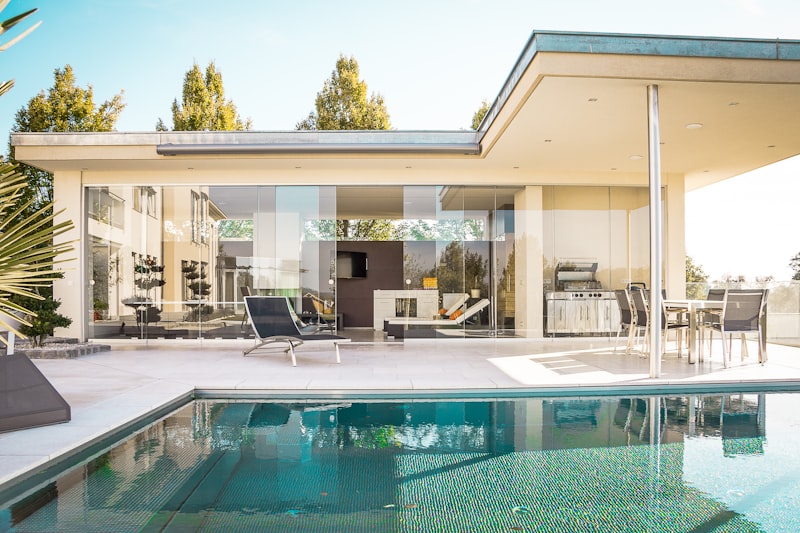
AI video editing tools let agents produce polished walkthroughs from their phone photos in under 10 minutes.
What You Actually Need to Start
You already own almost everything you need. Here's the full gear list:
- A smartphone with a good camera — any flagship phone from the last 3 years (iPhone 13+/Galaxy S22+) takes more than enough photo quality for a polished listing video. Wide-angle mode is ideal for interior rooms. No video-mode required.
- 10–15 photos of the property — exterior front, living room, kitchen, primary bedroom, bathrooms, backyard. That's all the source material you need; the AI converts your still photos into a smooth video walkthrough automatically.
- An AI video editing platform — this is the key piece. Tools like VideoGuru handle everything from photo-to-video conversion to effects, music syncing, and branded templates.
- A 2-minute block of focused time — that's genuinely all you need for the core workflow. Template-based AI editors reduce most of the decisions to picking a style and clicking export.
If you're new to creating listing videos, start by reading our guide on real estate video marketing strategy guide for a broader strategy overview. The workflow below focuses specifically on speed — getting from raw media to finished video in under 10 minutes.
Step-by-Step: Your 10-Minute Listing Video Workflow
Step 1: Gather Your Raw Media (2 minutes)
Pull 10–15 photos from your phone or camera. Include a mix of wide establishing shots and detail close-ups. Keep it simple — good still photos are all the AI needs to stitch together a smooth, professional walkthrough.
Pro tip: If you plan to post on Instagram Reels or TikTok, take your photos in portrait orientation — they'll crop better for 9:16 formats. Landscape works best for YouTube and website embedding. Most AI editors can adapt to different aspect ratios from the same source photos. For more pro tips, see our agent's listing photo shooting guide.
Step 2: Upload to an AI Editor (1 minute)
Upload everything to your AI editing platform of choice. AI tools like VideoGuru accept your photos and automatically detect the best sequence. The AI analyzes each image for composition, lighting, and how rooms connect — then arranges them in a logical walkthrough order.
Step 3: Choose a Template (2 minutes)
Pick a video template that matches the property's style. For luxury homes, choose slow crossfades with cinematic music. For family homes, brighter transitions with upbeat tracks work better. AI editors automatically synchronize transitions and effects to the beat of your chosen music.
This is also where you apply your brand kit — logo overlay, intro animation, contact info. Save these as your default template so every future video is automatically branded. If you want to learn more about the effects available, read our post on AI video effects for property tours.
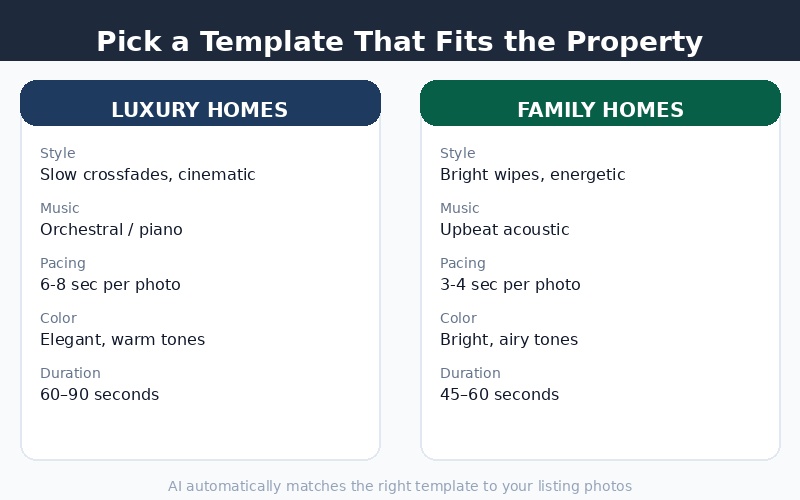
Choose from pre-built templates that automatically adapt to your media — no manual timeline editing required.
Step 4: Customize the Video (3 minutes)
This is where the 10-minute workflow delivers most of its value. Instead of manually dragging clips onto a timeline, you make three quick decisions:
- Music track — pick from the platform's licensed library. Most AI editors have dozens of real estate-appropriate tracks organized by mood (cinematic, upbeat, warm, modern).
- Intro text — add the property address and your name/agency. This takes 15 seconds.
- Effects intensity — choose from AI-powered effects like speed ramping (dynamic slow-mo transitions), color grading, or virtual staging effects. Each is a one-click toggle.
Step 5: Export and Share (2 minutes)
Hit export and choose your target platform. Most AI editors can render multiple versions at once:
- 16:9 landscape — for YouTube, your website, and MLS uploads
- 9:16 portrait — for Instagram Reels, TikTok, and YouTube Shorts
- 1:1 square — for Instagram feed posts and Facebook
Total time: 10 minutes. One finished listing video, ready to publish across every platform your audience uses. For a complete platform-by-platform guide on where to share, check out the real estate video marketing strategy guide.
Before vs After: Manual Editing vs AI-Assisted Workflow
Here's what the time comparison actually looks like for a standard 60-second listing walkthrough video:
| Stage | Manual Editing | AI-Assisted |
|---|---|---|
| Import and organize photos | 15 min | 1 min |
| Arrange and sequence photos | 45 min | Auto (0 min) |
| Color correction and grading | 30 min | Auto (0 min) |
| Add transitions and effects | 30 min | 2 min (one-click) |
| Music and audio sync | 20 min | 2 min (pick track) |
| Branding (logo, intro, outro) | 15 min | 1 min (template) |
| Total | ~3 hours 15 min | ~6-10 minutes |
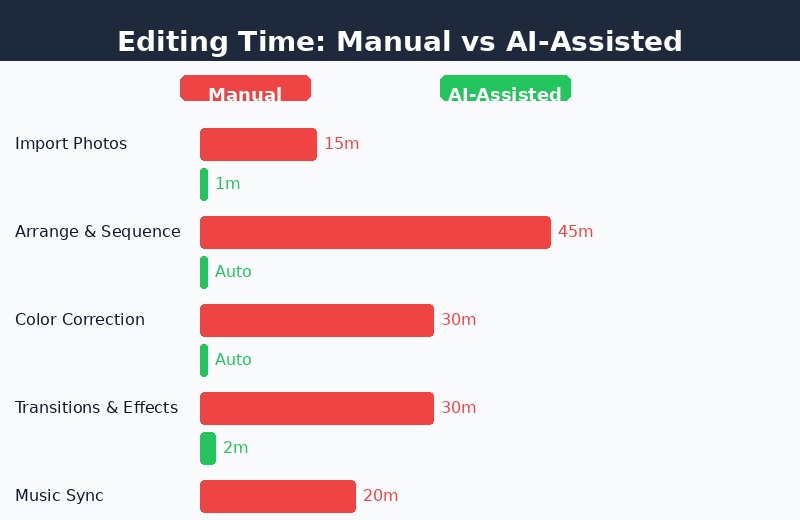
AI-assisted editing reduces a 3+ hour manual process to under 10 minutes per listing video.
What the AI Handles Automatically
Understanding what AI automates helps you trust the output and focus your attention where it actually matters:
- Photo-to-video conversion — upload still photos and the AI creates a smooth Ken Burns-style pan-and-zoom animation, turning static images into a video walkthrough.
- Exposure and color balancing — the AI analyzes each photo and adjusts brightness, contrast, and white balance so all shots in the sequence look consistent.
- Transition syncing — transitions match the beat of the music track. No manual keyframing required.
- Speed ramping — AI-powered dynamic speed changes create cinematic slow-motion moments at key points (like revealing the living room or showcasing a view).
- Aspect ratio cropping — render the same video in multiple aspect ratios from a single source, saving the re-editing work for each platform.
Beyond video, AI tools like VideoGuru also handle AI photo editing for listing stills — one-click enhancements, sky replacement, and decluttering for the photos that accompany your video. The same AI that powers your video walkthroughs also handles your listing photography.
The Real Win: Consistency, Not Perfection
The biggest shift agents experience when they switch to AI-powered video is not video quality — it's publishing frequency. When making a video takes 10 minutes instead of 3 hours, you stop asking "is this listing worth a video?" and start asking "how do I get all my listings on video?"
Research from the National Association of Realtors shows that agents who consistently use video in their listings see 7x more engagement on social media and close listings 68% faster on average. The common thread across these agents isn't cinematic production values — it's showing up with video for every listing, every time.
For a deeper look at what AI video tools cost and how they compare to traditional editing, read our real estate video cost analysis.
Getting Started Today
Here's your action plan for this week:
- Pick a listing — choose a property you're already marketing this week. You have the photos already.
- Sign up for an AI editing platform — VideoGuru's free tier lets you create and export a watermarked video to test the workflow.
- Run the 10-minute workflow — upload, template, customize, export. Time yourself. You'll likely beat 10 minutes on your first try.
- Post it — share on social media and add it to the MLS listing. Track the engagement difference compared to your photo-only listings.
- Make it a habit — block 10 minutes for video creation in your weekly listing prep routine. After two weeks, it will feel like a natural part of the process.
For more inspiration on how other agents and photographers are using AI to scale their output, read the case study on how a photographer went from 5 to 50 videos per week using AI tools.
Final Thoughts
The barrier to listing video has never been lower. You don't need expensive editing software, hours of training, or a dedicated videographer. A smartphone, 10 minutes, and an AI editing platform are all it takes to produce a professional walkthrough that makes your listings stand out.
The agents who win in 2026 aren't the ones with the fanciest editing skills — they're the ones who publish video for every listing, every week, consistently. AI makes that possible. All you need to do is start.




