

Chengran (Felix) Guan
2026-07-10 · 6 min read
How Much Time Do Real Estate Videos Really Take?
A standard 1-2 minute real estate listing video walkthrough takes 3-4 hours to edit manually from start to finish. With AI-assisted tools, that same video drops to under an hour — typically 45-60 minutes. The shooting itself takes 15-30 minutes on site. So the full cycle, from arriving at the property to delivering the finished video, is anywhere from under 2 hours (AI-assisted) to over 4 hours (fully manual). Here is exactly where that time goes and why it matters for your pricing, your turnaround promises, and your sanity.
Key Takeaways
- Shooting: 15-30 minutes on site for a standard property walkthrough.
- Manual editing: 3-4 hours for a polished 1-2 minute video from 15-20 minutes of raw footage.
- AI-assisted editing: Under 1 hour — typically 45-60 minutes including review and polish.
- Total time savings with AI: 60-75% reduction in editing time.
- The bottleneck is always editing, not shooting — which is why editing workflow is where most agents and photographers should invest.
- AI tools handle the heavy lifting (rough cuts, audio leveling, transitions) but color grading and final review are still manual steps.
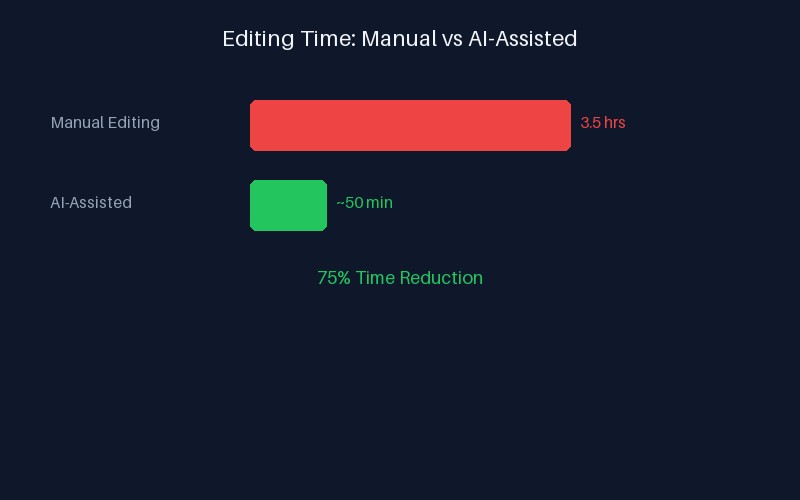
Manual vs AI-assisted video editing timeline: a stage-by-stage breakdown of where the hours go.
The Shoot: Where the Clock Starts
Before any editing happens, someone has to capture the footage. For a standard 2,000-3,000 square foot listing, expect to spend 15-30 minutes on site filming. That includes setting up a gimbal, walking each room at a steady pace, capturing establishing shots of the exterior, and getting detail shots of key features (kitchen island, master bath, backyard). Luxury properties over $2 million or properties with extensive outdoor spaces can take 45-60 minutes of filming.
Most agents outsource the shooting to a photographer or videographer. That means you are also paying for travel time, setup, and the shoot itself — typically $150-$400 depending on your market and the shooter's experience. For a deeper look at pricing, see our earlier guide on real estate video costs and DIY alternatives.
The Editing: Where the Real Time Goes
Editing is where 80% of the total production time is spent. Here is a stage-by-stage breakdown of what happens during those 3-4 hours of manual editing:
- Import and organization (15-20 min): Transferring footage, labeling clips, marking the best takes.
- Rough cut assembly (45-60 min): Trimming each clip, arranging rooms in a logical walkthrough order, removing dead space.
- Audio sweetening (20-30 min): Leveling the voiceover, removing background noise, adding music track. Music licensing alone can take 10 minutes of searching.
- Transitions and effects (30-45 min): Adding crossfades, speed ramps, text overlays for listing details, and any special effects.
- Color correction (30-45 min): Balancing exposure across clips, warming up interior shots shot under mixed lighting, matching exterior and interior color tones. Note: AI color grading for video does not exist yet — this is still a manual step handled by the editor.
- Render and review (20-30 min): Exporting a preview, watching for issues, making final tweaks, re-rendering the final version.
Add it up and you get roughly 2.5 to 3.5 hours of active editing time. With buffer for revisions and client feedback, the total often stretches to 4 hours. For a practical guide on setting up a faster editing pipeline, see how one photographer cut editing time by 80% with AI tools.
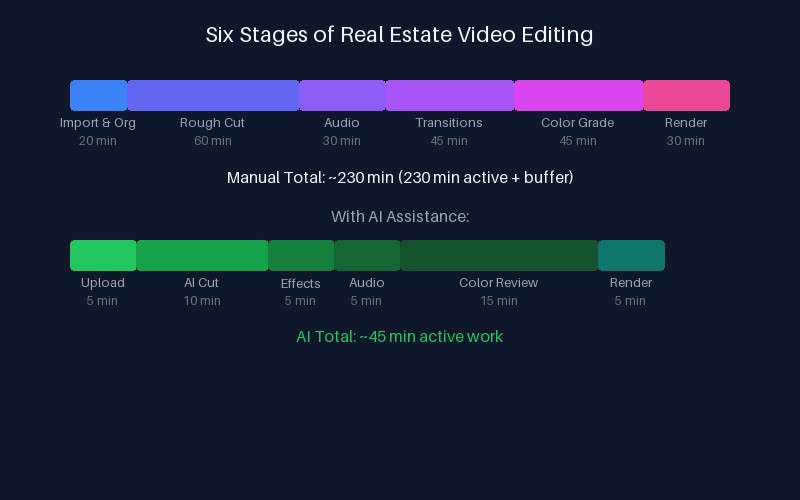
Six stages of real estate video editing with typical time allocations for each step.
The AI-Assisted Editing Pipeline: Under 1 Hour
AI-powered tools like VideoGuru change the timeline dramatically. Here is the same video done with AI assistance:
- Upload and auto-analysis (5 min): Upload the raw footage. The AI analyzes each clip — identifying rooms, detecting motion quality, flagging blurry segments.
- AI rough cut (10 min — automated): The AI assembles a walkthrough order, trims dead space, and selects the best frames for establishing shots. You can review and rearrange.
- One-click effects and transitions (5 min): Apply AI-powered effects — smooth transitions, speed ramping for walkthrough pacing, auto-generated text overlays for address and price. For examples of what these effects can do, see our deep dive on AI video effects for property tours.
- AI music and audio (5 min): The tool suggests licensed music tracks matched to the video's pacing. One click to place and mix. No more searching stock libraries.
- Manual color review (10-15 min): Still manual — AI does not handle video color grading yet. You adjust exposure and warmth yourself, but the AI has already normalized the footage so the adjustments are minimal.
- Render and delivery (5 min): Export in the required format. Most AI tools handle compression and format conversion automatically.
Total: 40-60 minutes of active work. The rest is automated. That is a 75% reduction in editing time — and the quality is consistent because the AI applies the same standards to every video.
What Affects the Timeline
Not every video takes the same amount of time. Here are the key variables:
| Factor | Manual Impact | AI-Assisted Impact |
|---|---|---|
| Property size (1,500 vs 5,000 sq ft) | +1-2 hours editing | +5-10 min auto |
| Footage quality (gimbal vs handheld) | +30-60 min stabilizing | Minimal (auto-stabilize) |
| Number of effects (transitions, overlays) | +15-30 min per effect | +2-5 min (one-click) |
| Client revisions (2 vs 0 rounds) | +1-2 hours per round | +15-30 min per round |
| Drone footage integration | +30-45 min | +10-15 min |
The pattern is clear: AI tools compress variable costs into fixed, predictable time blocks. That predictability is what allows you to quote accurate turnaround times and scale your production without hiring more editors. For a complete strategy on scaling your video operation, see our real estate video marketing strategy guide.
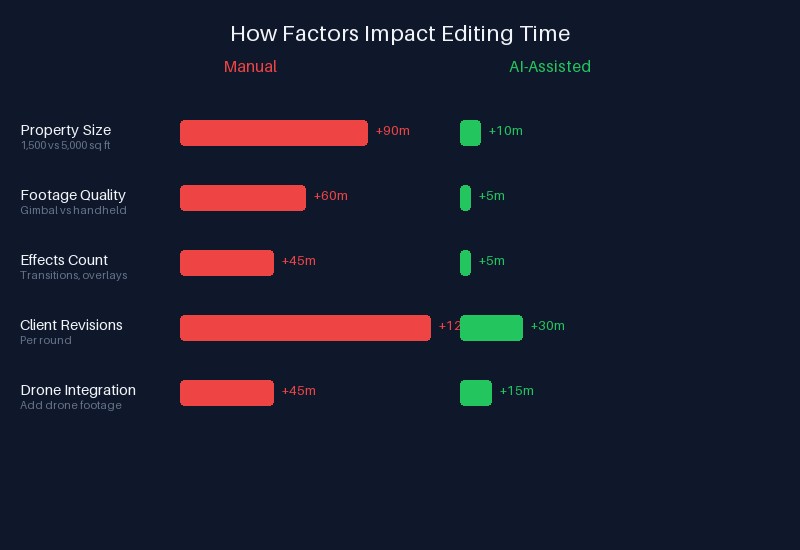
How different factors impact editing time in manual versus AI-assisted workflows.
What This Means for Your Budget
The time breakdown directly affects pricing. When a videographer charges $200-$500 for a listing video, you are paying for 3-4 hours of their editing time — not just the 15 minutes they spent at the property. Understanding this disconnect is critical. Many agents think "it's just a 2-minute video" and balk at the price, not realizing that every minute of finished video represents roughly 90 minutes of editing work.
According to the National Association of Realtors, 73% of home buyers say they would be less likely to consider a listing that does not include video. That statistic has held steady across multiple years, making video a non-negotiable marketing asset. Yet many agents still skip video because they perceive it as too expensive or time-consuming — precisely because they are pricing based on a 3-4 hour manual editing model.
AI-assisted editing changes this equation. When editing drops to under an hour, the per-video cost drops too. For a full breakdown of pricing models, see our comprehensive real estate video cost guide.
Faster Videos Mean More Listings
The real opportunity is not just saving time on a single video — it is unlocking capacity to produce more videos for more listings. A photographer who currently produces 3-5 listing videos per week (limited to one per day given the 3-4 hour editing cycle) can jump to 10-15 per week with AI assistance. That means taking on more clients, offering video as a standard inclusion instead of an upsell, and winning listings from competitors who only shoot photos.
Major brokerages like Compass and eXp Realty have publicly invested in video-first marketing strategies, signaling that video is becoming table stakes rather than a differentiator. The agents and photographers who can deliver video at scale without a proportional increase in editing hours will have a structural advantage in their markets.
For agents looking to improve the videos they already produce, start with our guide to making real estate videos that actually get views.
The Verdict
Real estate video editing takes 3-4 hours manually — that is the industry standard and has been for years. AI-assisted editing cuts that to under 1 hour by automating the repetitive stages (rough cuts, audio, transitions, music selection) while keeping the creative control (color grading, final review) in your hands. The 60-75% time savings is not theoretical — it is what practitioners using tools like VideoGuru are seeing today. Whether you are an agent commissioning videos or a photographer producing them, understanding this time breakdown helps you price accurately, set realistic turnaround expectations, and invest in the right workflow tools.




