

Chengran (Felix) Guan
2026-08-11 · 8 min read
How to Repurpose One Listing Into 30 Pieces of Content
One listing shoot can carry your entire content calendar for a month. Shoot the video walkthrough and photos once, then cut, crop, and repurpose them into 30 or more pieces of content: short clips, carousels, before-and-afters, emails, and social posts. This guide walks through the exact framework agents use to turn a single property into a month of marketing without filming again.
Key Takeaways
- One shoot, many assets: a single walkthrough video plus one photo set can produce 30+ pieces of content.
- Video is the master asset: one full walkthrough cuts into 8–12 short clips.
- Photos are the second stream: carousels, detail shots, and virtually staged alternates fill the gaps between video posts.
- Follow a 7-day schedule: a repeatable posting rhythm keeps every listing active without daily filming.
- Post natively: adapt each piece to the platform instead of uploading the same file everywhere.
The Math of One Shoot: Why Repurposing Wins
The cost of content is almost all upfront. Filming a walkthrough, photographing the rooms, and staging the shoot is the expensive part. Republishing pieces of that shoot to a dozen places costs almost nothing. That is why repurposing multiplies your return on every production dollar.
Here is the rough math. One 90-second walkthrough video gives you a full-length version, plus 8–12 standalone room clips of 8–15 seconds each. A standard 30–40 photo set gives you 4–6 carousel posts, 5–8 single detail shots, and 2–4 before-and-after or virtually staged alternates. Add one email asset and a market update post, and you are already past 30 pieces from a single visit to the property.
Repurposing also matches how buyers actually consume real estate content. Feed-based platforms reward consistent posting, and short-form video is the format that earns the most organic reach. Marketing teams have ranked video among their highest-return content types for years, according to HubSpot’s marketing statistics research. The agents who win the feed are the ones posting every day — and the only sustainable way to post every day is to repurpose what you already shot. A full posting strategy for each listing is covered in our real estate video marketing strategy guide.
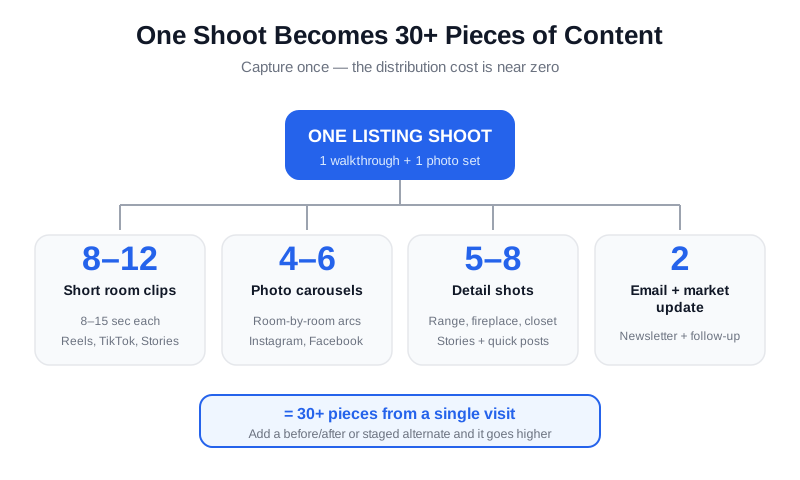
One shoot feeds every channel. The capture cost is paid once; the distribution cost is near zero.
The 30-Piece Framework: What You Can Make From One Listing
You do not need 30 separate ideas. You need 30 pieces drawn from the same raw material. Here is the breakdown most agents use, with ranges so you can adapt to your shoot.
| Output type | Count | Where it goes |
|---|---|---|
| Full walkthrough video | 1 | YouTube, listing page, MLS where allowed |
| Short room clips (8–15 sec) | 8–12 | Instagram Reels, TikTok, Facebook, Stories |
| Photo carousels | 4–6 | Instagram, Facebook, LinkedIn |
| Single detail shots | 5–8 | Stories, quick feed posts |
| Before-and-after or staged alternates | 2–4 | Instagram, listing emails |
| Email asset and market update | 2 | Newsletter, client follow-up |
Counts depend on the shoot, but a single walkthrough plus a standard photo set comfortably clears 30 pieces. If you need a full month of post ideas built around this pattern, our 30 days of real estate video ideas post gives you the day-by-day map.
Start With the Video: Your Master Asset
The walkthrough video is the highest-value asset you will produce all month, because it is the raw material for everything else. One full tour can be cut into a dozen standalone clips: the exterior reveal, the kitchen, the primary suite, the backyard. Each clip is a complete post on its own.
When you cut clips, think in hooks. Open every clip with the most striking visual from that room. Keep clips under 15 seconds for Reels and TikTok, where most viewing happens with sound off — captions matter more than audio. Save the long-form version for YouTube and your listing page, where buyers expect the full tour.
AI editing tools remove the tedious part of this process. With photo-to-video AI, you can even turn a listing photo set into a motion tour when you did not capture video. And when you do have footage, an AI editor can cut, caption, and format clips for each platform automatically, so you are not re-editing the same tour three times. Our guide to AI listing videos in under 10 minutes shows the exact workflow.
Watch how a single walkthrough becomes a week of short-form clips.
Photos: Your Second Content Stream
While video carries the reach, photos carry the details. Carousels are the natural repurposing format for a photo set: build each one with a story arc. Exterior first, then the kitchen, living space, bedrooms, and outdoor area. Each carousel swipe is a new room, and each swipe is a fresh impression.
Detail shots are the easiest wins. A close-up of the range, the fireplace, the walk-in closet, or the view from the deck works as a Story or a short feed post with a one-line caption. You can post one detail shot a day for over a week without repeating a single image.
Empty rooms are also repurposing gold. A vacant living room can become a virtually staged version that shows buyers the potential of the space, and that before-and-after is one of the most-shared listing formats on social media. Beyond video, VideoGuru’s photo editing tools give you one-click virtual staging for still images too — declutter, furniture swap, and decor changes for photos. The same AI that powers your video walkthroughs also handles your listing photography. For agents deciding where the budget goes, our photo vs video priority guide breaks down which listings need which.
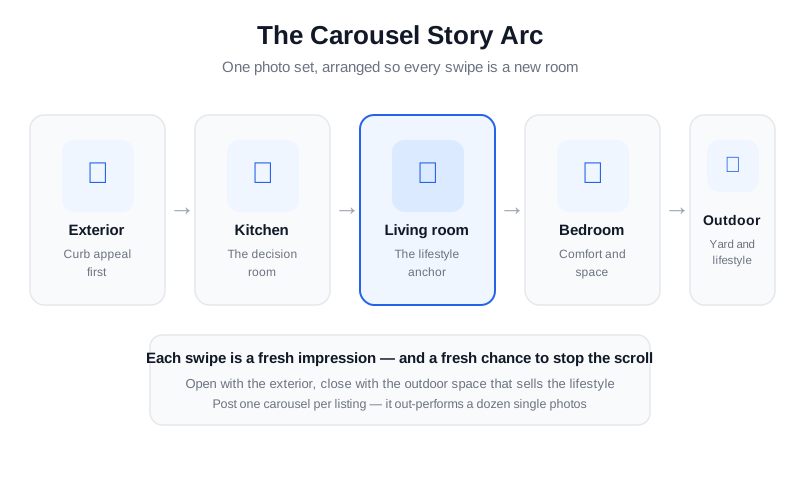
One photo set, arranged into a carousel with a clear story arc.
The 7-Day Repurposing Schedule
A schedule turns repurposing from a one-time burst into a consistent rhythm. This is the week-of-listing template that works for most agents. Adjust the days to match your market and your posting frequency.
| Day | Output | Channel |
|---|---|---|
| Day 1 — listing day | Full walkthrough + first carousel | YouTube, listing page, Instagram |
| Day 2 | 3 short clips (kitchen, primary suite, exterior) | Reels, TikTok, Facebook |
| Day 3 | Detail-shot Stories | Instagram Stories |
| Day 4 | Before-and-after or staged alternate | Instagram, Facebook |
| Day 5 | Market update or neighborhood post | Feed + email |
| Day 6 | Second carousel (different rooms or angles) | Instagram, LinkedIn |
| Day 7 | Recap reel + email digest | Reels, newsletter |
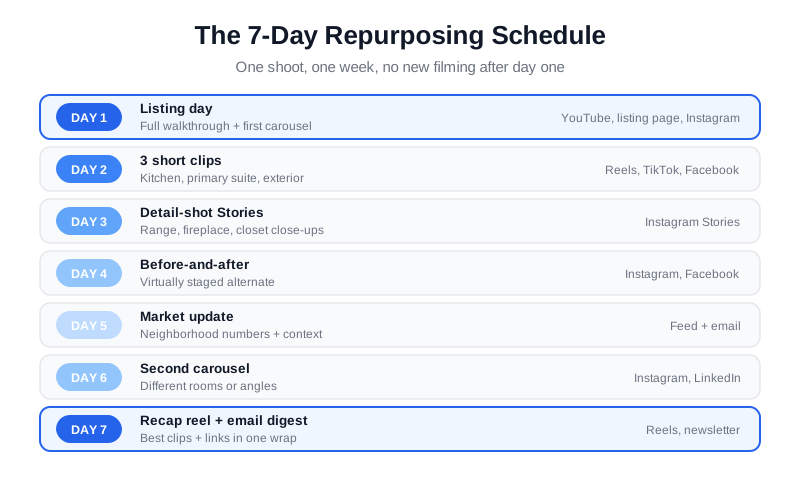
A week of posts from one shoot, with no new filming after day one.
Where Each Piece Goes: Platform by Platform
Repurposing does not mean uploading the same file everywhere. Each platform has its own format, and the same raw clip performs differently depending on how you present it.
- Instagram and Facebook: vertical Reels for clips, carousels for photo sets, Stories for detail shots and quick polls.
- TikTok: vertical clips with punchy captions; the first two seconds decide whether anyone watches.
- YouTube: the full walkthrough, plus a title and thumbnail that state the listing’s best feature.
- Email: one digest with the walkthrough link and the carousel images, sent to your buyer list the week the listing goes live.
- MLS and portals: check the rules before you post. Video and enhanced photos are regulated differently across markets — our MLS video requirements guide covers the details, and Realtor.com’s guidance on listing photos explains why quality images drive buyer interest in the first place.
The rule of thumb: keep the core visual, then re-cut, re-caption, and re-format for each destination. A clip that runs 15 seconds on Reels can carry a longer hook on Facebook and a different call-to-action in email.
Keep Quality High at Volume
Volume only works if the quality holds. Three habits keep repurposed content from looking recycled.
- Lock your brand kit. One font pairing, one color accent, one intro style. When every clip looks consistent, your content reads as a brand, not a feed of reposts.
- Front-load captions. Put the hook in the first line. Buyers scroll fast, and the caption is what stops them.
- Batch the production. Cut all clips for the week in one sitting. A single block of focused time beats spreading the work across five distracted afternoons.
At higher volumes, automation takes over. Media companies producing hundreds of videos per month rely on automated pipelines to cut, caption, and brand every asset consistently — the same approach works for a solo agent with several active listings. NAR’s research and statistics library tracks how buyers engage with listing media, and the direction is consistent: more visual content, consumed in more places. Our case study on automated video production shows what the pipeline looks like in practice.
Frequently Asked Questions
How many pieces of content can I really get from one listing?
A typical shoot clears 30 pieces: one full walkthrough, 8–12 short clips, 4–6 carousels, 5–8 detail shots, 2–4 staged or before-and-after alternates, plus an email asset. The exact number depends on how many rooms you filmed and how many photos you delivered, but 30 is a realistic planning target for a standard shoot.
Do I need to film new video for every social post?
No. The whole point of repurposing is that one filming session feeds weeks of posts. Re-cut the same walkthrough into different clips, lead with different rooms, and change the caption and call-to-action. Save new filming for new listings, open houses, and client testimonials.
Can AI repurpose my listing photos and video?
Yes, and that is exactly what AI real estate media platforms do well. AI editing can cut a walkthrough into platform-ready clips, add captions and branding, turn photos into motion tours, and virtually stage empty rooms for before-and-after posts. VideoGuru covers both sides: AI video editing for your tours and one-click virtual staging, declutter, and furniture swap for your still photos.
Is repurposing the same content on multiple platforms bad for reach?
Not when you adapt it. Posting the exact same file with the same caption on five platforms looks lazy and gets ignored. Re-format the aspect ratio, rewrite the caption for each audience, and change the call-to-action. The visual can repeat; the presentation should not.
How long should each repurposed clip be?
Keep social clips between 8 and 15 seconds for Reels, TikTok, and Stories. Short clips earn more completions, and completions drive distribution. Save the full walkthrough — typically 60 to 90 seconds for a standard listing — for YouTube and your listing page, where buyers opt into longer viewing.
Ready to turn your next listing into a month of content without the editing backlog? VideoGuru’s AI video editing and photo tools can cut your walkthrough into platform-ready clips and stage or declutter your listing photos in minutes — all in one workflow. Start for free at VideoGuru.
Putting It All Together
Shoot once, repurpose relentlessly. The framework is simple: capture a full walkthrough and a complete photo set, cut the video into clips, arrange the photos into carousels, stage the empty rooms, and spread everything across a 7-day schedule. One listing becomes a month of consistent, high-quality content — and consistent content is what keeps you in front of buyers when the next listing comes along.




