

Chengran (Felix) Guan
July 16, 2026 · 6 min read
Photo Editing Pricing for Real Estate:
Per Image, Batch, or Subscription?
If you're a real estate photographer pricing photo editing, the question isn't whether to charge per image — it's which model works best for your business. Per-image pricing, batch processing, and subscription plans all have their place, and the right choice depends on your volume, client mix, and growth goals.
Real estate photographers who switch from per-image pricing to subscription models report fewer billing headaches and more predictable income. Here's how each model works, what the market charges in 2026, and how to choose the right one for your business.
Key Takeaways
- Per-image pricing works best for photographers with low or irregular volume, but caps earning potential.
- Batch pricing (per listing, per project) offers middle-ground efficiency and is the most common model today.
- Subscription pricing provides predictable recurring revenue and rewards photographers who edit at scale.
- Real estate photo editing costs range from $1.50 to $8 per image depending on complexity and volume.
- AI-powered tools like VideoGuru can reduce per-image editing time by up to 80%, making subscription models more profitable.
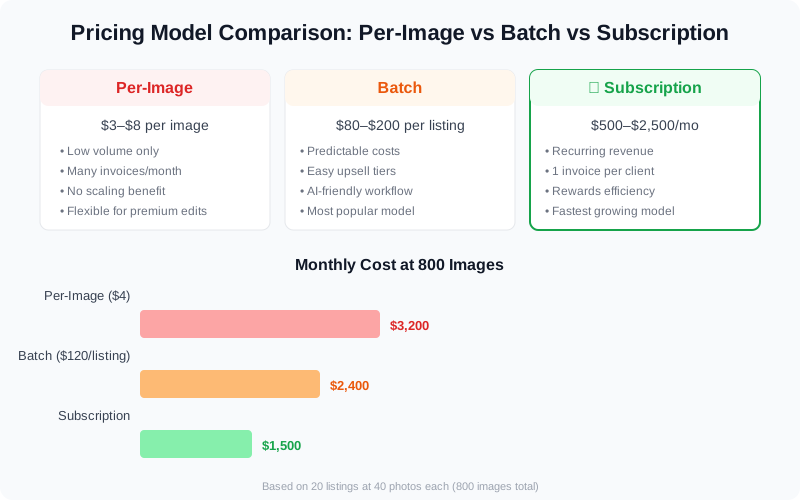
Three common pricing models for real estate photo editing — each suits a different business stage and volume.
Per-Image Pricing: The Traditional Model
Per-image pricing is the simplest: you charge a fixed rate for each edited photo. In 2026, real estate photo editing averages $3 to $8 per image for standard corrections, based on NAR research data and industry photographer rate surveys (exposure, white balance, lens distortion) and $10 to $25 per image for premium services like virtual staging or twilight conversions.
When does per-image pricing work?
- Low volume: If you edit fewer than 50 listings per month, per-image pricing is straightforward and doesn't require complex contracts.
- Inconsistent workflow: Freelancers who take on occasional work benefit from the simplicity of paying only for what they edit.
- Specialized services: Virtual staging, twilight effects, and complex retouching — premium add-ons are easier to bill per image.
The downside
Per-image pricing doesn't scale. If you're editing 20+ photos per listing across 40 listings a month, your costs multiply fast. A photographer editing 800 images per month at $4 each pays $3,200 — and that's before accounting for the photographer's own time spent managing invoices per listing. The administrative overhead alone eats into margins.
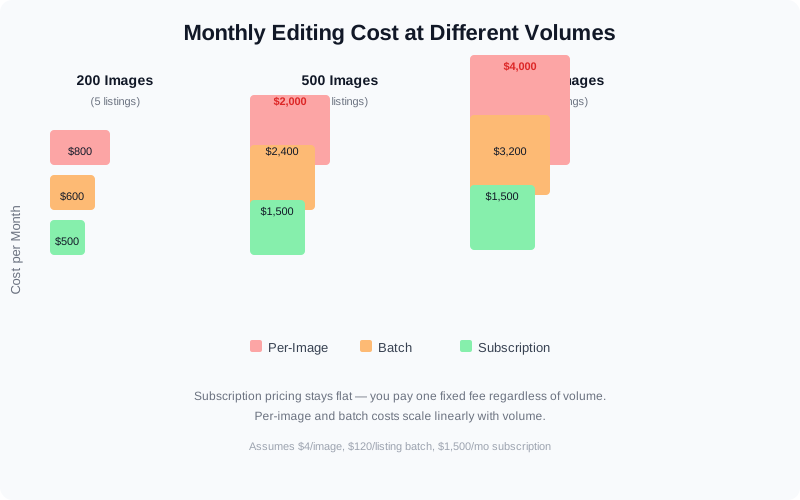
Monthly editing costs at 200, 500, and 1,000 images — per-image pricing quickly becomes the most expensive option at scale.
Batch Pricing: Per Listing or Per Project
Batch pricing bundles editing into a flat fee per listing or project. A typical batch includes 20–40 corrected images with 1–2 hero edits (HDR, sky replacement). In 2026, batch pricing runs $80 to $200 per listing for standard editing and $150 to $400 for premium packages including virtual staging or twilight effects.
This is the most popular model among photographers who serve 10–30 listings per month. It simplifies invoicing, gives agents a clear per-listing cost, and rewards speed — batch processing is where AI editing tools shine.
Why batch works
- Predictable costs: Agents know exactly what they'll pay per listing. No surprise charges for "extra" images.
- Efficient workflows: You process an entire listing's photos in one pass rather than managing individual image orders.
- Easy upselling: Package tiering (Basic, Standard, Premium) naturally drives agents to upgrade.
- AI-friendly: AI tools like VideoGuru's photo editing suite can batch-process an entire listing's photos in minutes, dramatically lowering your per-listing cost.
Subscription Pricing: Recurring Revenue for Scale
Subscription pricing is the fastest-growing model in real estate photo editing. Photographers charge a flat monthly fee (typically $500 to $2,500 per month) for a fixed number of listings or images. In return, agents get predictable costs and priority turnaround.
Subscription models reward efficiency. The faster you can edit each photo, the more profitable each subscription client becomes. This is where photographers who've integrated AI editing tools gain a real edge.
Subscription variations
| Tier | Monthly Fee | Inclusions | Best For |
|---|---|---|---|
| Starter | $500–$800 | 5–10 listings, 25 images each, standard edits | Solo agents with steady volume |
| Growth | $1,200–$1,800 | 15–25 listings, HDR/sky replacement included | Growing teams with consistent pipelines |
| Enterprise | $2,000–$2,500+ | 30+ listings, virtual staging, priority turnaround | Media companies and top producer teams |
Cost Comparison: Which Model Saves You the Most?
The math changes dramatically depending on volume. Here's what a photographer processing 500 images per month (roughly 20 listings at 25 photos each) would pay under each model:
| Model | Monthly Cost (500 images) | Per-Image Cost | Invoicing Overhead |
|---|---|---|---|
| Per image at $4 | $2,000 | $4.00 | 20 invoices |
| Batch at $120/listing | $2,400 | $4.80 | 20 invoices |
| Subscription Growth | $1,500 | $3.00 | 1 invoice |
| Subscription + AI tools | $1,200 | $2.40 | 1 invoice |
Source: Pricing benchmarks from NAR Member Profile data and industry surveys of real estate photography service rates.
How AI Photo Editing Changes the Pricing Equation
AI photo editing tools are reshaping the cost structure for real estate photographers. A human editor might spend 5–10 minutes per image on color correction, lens distortion, and sky replacement. AI tools can do the same work in 30–60 seconds.
This speed advantage makes subscription and batch models significantly more profitable. If you're editing under a per-image model, AI reduces your time cost — but the revenue per image stays the same. Under a subscription model, faster editing means you can serve more clients within the same tier, effectively raising your hourly rate without raising prices.
AI Photo Editing for Real Estate: What Agents Should Know in 2026 covers the specific capabilities — automatic HDR merging, sky replacement, color matching, and decluttering — that make AI editing faster than manual workflows. For photographers, the key insight is that AI tools don't just save time; they unlock pricing models that weren't viable before.
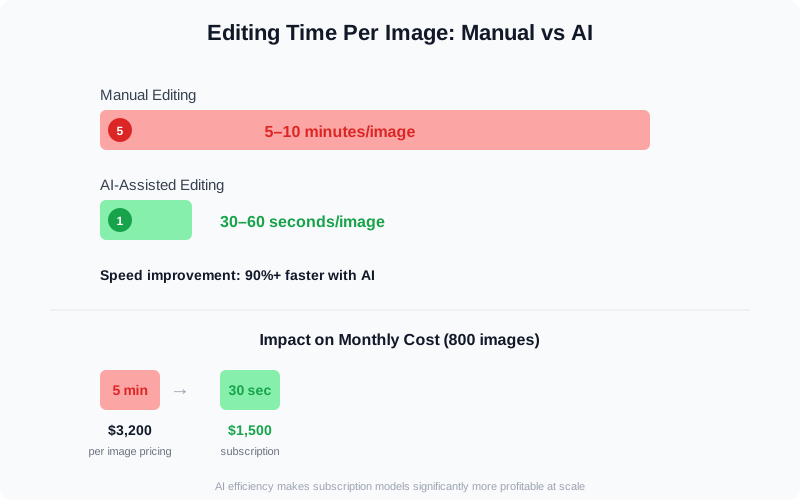
AI-powered photo editing reduces editing time from 5–10 minutes per image to under 60 seconds, making subscription pricing more profitable.
Beyond video, VideoGuru's photo editing tools give photographers one-click virtual staging, declutter, furniture swap, and color correction for still images. The same AI that powers video walkthroughs also handles listing photography — meaning photographers who switch to VideoGuru can offer photo editing alongside video services without maintaining separate toolchains.
How to Choose the Right Pricing Model
There's no one-size-fits-all answer. Here's a decision framework based on your business stage:
Starting out: Start with batch pricing
Batch pricing is the safest starting point. It's easy to explain to agents, compatible with AI editing tools, and flexible enough to grow with you. Studies show that professional photo editing can increase a listing's final sale price by up to 3-5% compared to unedited photos, making pricing models that prioritize quality a direct ROI driver for agents.
For additional benchmarks, Realtor.com research tracks the percentage of agents who invest in professional photography and editing services, giving photographers data to justify their pricing. Offer three tiers (Basic/Standard/Premium) and adjust as you learn your costs.
Consistent volume: Move to subscription
Once you have repeat clients with predictable monthly volume, subscription pricing is the most profitable model. It smooths out revenue, reduces admin work, and rewards efficiency improvements.
Specialized work: Keep per-image for premium services
Virtual staging, twilight effects, and complex retouching are hard to fit into subscription tiers. Keep a per-image rate for these premium services — it protects your margins while keeping the base pricing simple.
Common Pricing Mistakes to Avoid
- Undervaluing your time: Many photographers charge less than $2 per image, which makes every model unprofitable. Your effective hourly rate should be above $50 even with AI tools.
- No tier upgrade path: If every client pays per image, you're leaving money on the table. Introduce tiered packages that encourage volume.
- Ignoring AI costs: AI tools aren't free. Factor subscription costs for services like VideoGuru into your pricing — they should improve your margin, not eliminate it.
- One-size-fits-all pricing: A solo agent shooting 5 listings per month needs different pricing than a team doing 40. Offer tiered options to capture both segments.
For more on building a pricing strategy that covers all your services, read How to Price Real Estate Video Services as a Photographer in 2026 — the video-side companion to this post.
What This Means for Your Budget
The trend in real estate photo editing pricing is clear: photographers who move toward batch and subscription models earn more per client and scale more efficiently. Per-image pricing remains useful for specialized services, but for volume work, flat-rate models paired with AI editing tools deliver the best margins.
Start with batch pricing. Test subscription pricing with your top 3–5 repeat clients. Keep per-image rates for virtual staging and premium edits. And integrate AI tools that make your editing pipeline faster — because the more efficient your workflow, the more every pricing model pays.
Read How to Hire & Manage a Real Estate Photographer for the agent's perspective on pricing and expectations.




