

Sophia
July 19, 2026 · 7 min read
AI Real Estate Photo Editing:
How AI Improves Listing Photos
AI real estate photo editing helps agents improve listing photos faster by cleaning up distractions, improving curb appeal, adding atmosphere, and preparing stronger still images for marketing. Instead of sending every small correction through a slow manual editing process, an agent can use an AI real estate photo editing tool to make useful listing photos look cleaner, brighter, and more buyer-ready.
For buyers, listing photos are often the first filter. Before they read the property description, they scan the images and decide whether the home feels worth a closer look. That makes photo quality a conversion issue, not just a design issue.
VideoGuru supports this workflow by helping agents edit still photos, identify enhanced images, and continue those edited photos into a photo-to-video listing workflow. Virtual staging can be part of the broader product, but this guide focuses on the practical AI edits that improve listing photos before they become listing pages, social posts, emails, or videos.
Key Takeaways
- AI can improve listing photos automatically when the request is specific and realistic: declutter, sky replacement, lawn polish, twilight mood, fireplace warmth, or a focused custom edit.
- The best AI real estate photo editing tool should improve photos without making the listing feel fake.
- VideoGuru connects photo editing with the next marketing step: using edited photos in a property video workflow.
- Virtual staging is useful, but this article keeps the main focus on improving existing listing photos.
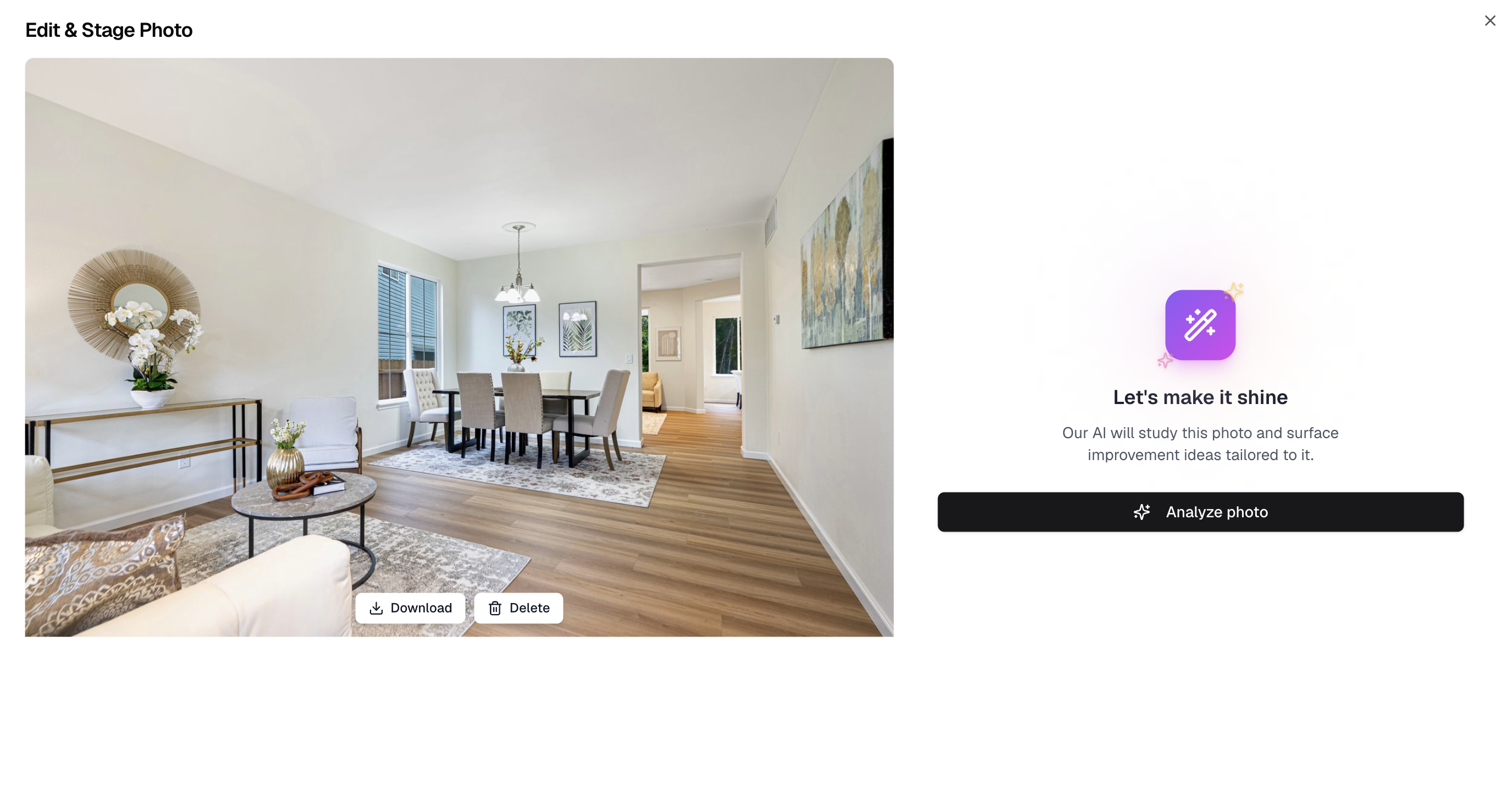
VideoGuru's photo editing entry window helps agents choose practical edits for listing photos.
What Is AI Real Estate Photo Editing?
AI real estate photo editing is the use of artificial intelligence to improve property listing images. It can help agents clean up distractions, improve exterior presentation, add warmth, and make focused corrections while keeping the photo realistic and listing-ready.
A good workflow does not ask the agent to become a Photoshop expert. It starts from the way agents think: this room needs less clutter, this exterior needs better curb appeal, this photo needs a warmer mood, or this one visible issue needs a custom correction.
- Declutter: remove or reduce small distractions so buyers focus on the space.
- Sky replacement: make exterior photos feel brighter and more inviting.
- Lawn enhancement: improve curb appeal when grass or landscaping needs polish.
- Virtual twilight: turn a daytime exterior into a warmer evening-style image.
- Custom edit: describe a specific correction that does not fit a preset.
Can AI Improve Listing Photos Automatically?
Yes. AI can improve listing photos automatically when the source image is already useful and the desired edit is clear. The best results come from realistic requests that enhance the original photo rather than inventing a misleading version of the property.
| Listing photo problem | AI edit | Buyer-facing benefit |
|---|---|---|
| Small distractions pull attention from the room | Declutter or custom cleanup | The room feels more polished and easier to evaluate |
| Exterior sky looks gray or flat | Sky replacement | The listing creates a stronger first impression |
| Yard or landscaping needs polish | Lawn enhancement | Curb appeal looks cleaner without reshooting |
| Daytime exterior lacks mood | Virtual twilight | The property feels warmer and more memorable |
| One visible issue does not fit a preset | Focused custom edit | The agent gets more control while staying realistic |
Why AI Photo Editing Matters for Listing Performance
Listing photos shape the buyer's first impression. Strong photos help buyers understand layout, lighting, condition, atmosphere, and the property's best features. Weak photos create doubt, even when the home itself is strong.
AI does not replace professional judgment, but it can remove friction from common editing work. For agents and small teams, that means faster turnaround, more consistent visuals, and more assets that are ready to reuse across MLS pages, social posts, email campaigns, open house promotions, and videos.
AI photo editing is a marketing workflow, not only an image fix
The best reason to ai edit real estate photos is not to create one nice before-and-after example. It is to make the entire listing campaign stronger. A cleaned-up exterior photo can become the listing hero image, the email thumbnail, the first frame of a short video, and the cover for a seller update.
See VideoGuru's photo editing workflowHow VideoGuru Helps Agents Improve Listing Photos
VideoGuru organizes photo editing around the edits real estate agents actually need. The VideoGuru photo editing workflow shows how agents can stage rooms, clean up photos, improve curb appeal, add warmth, make custom edits, and use edited photos in a video workflow.
1. Clean up the photo
Use cleanup edits when the photo already shows the right space but small distractions are pulling attention away from the property. In VideoGuru, declutter-style edits can help reduce visual noise while keeping the image believable.
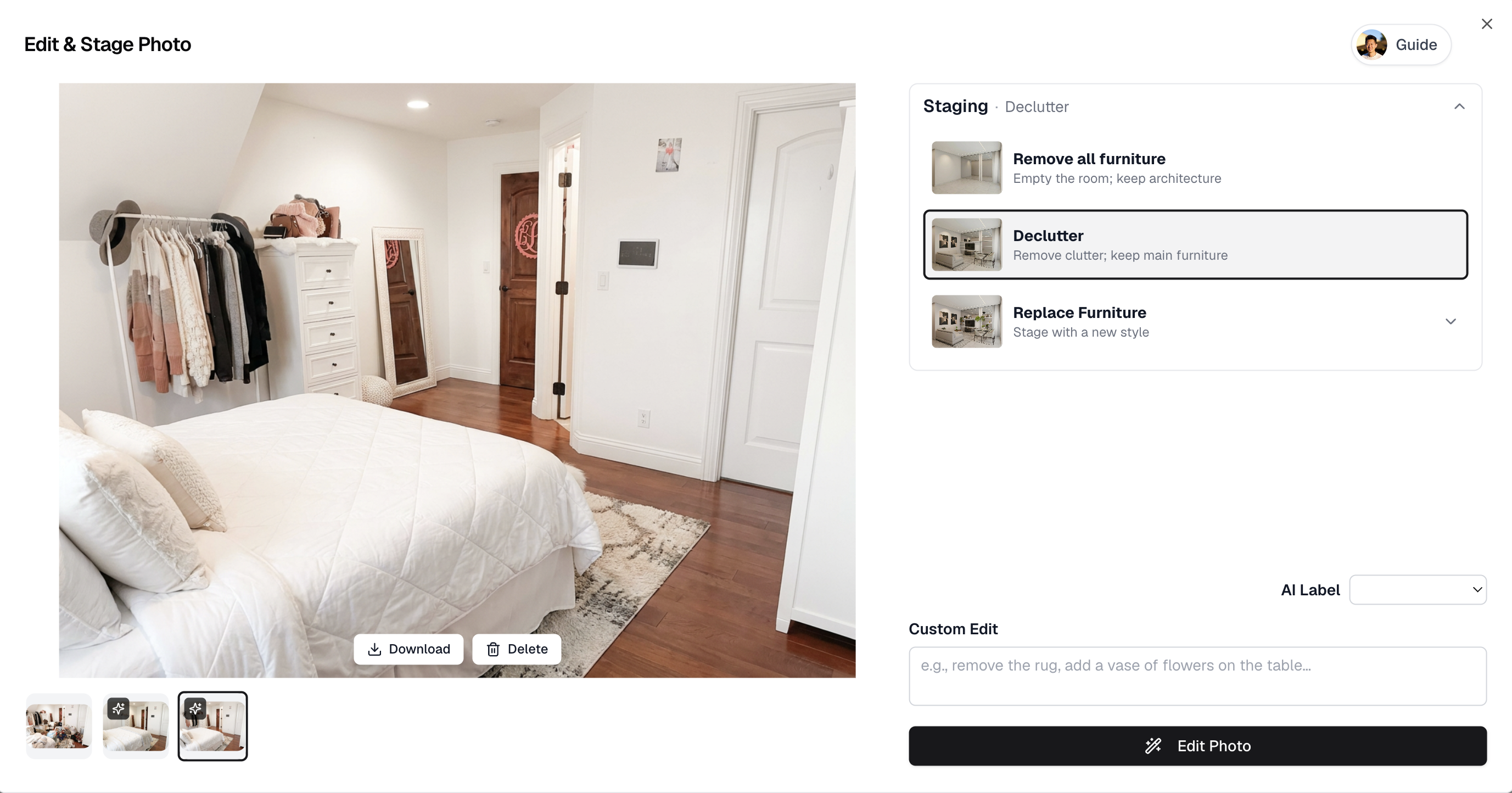
Declutter edits help reduce visual distractions in an otherwise useful listing photo.
2. Improve curb appeal
Exterior photos often decide whether a buyer clicks into the listing. VideoGuru supports curb-appeal edits such as sky replacement and lawn enhancement, which can make a property photo feel brighter and cleaner without requiring another shoot.
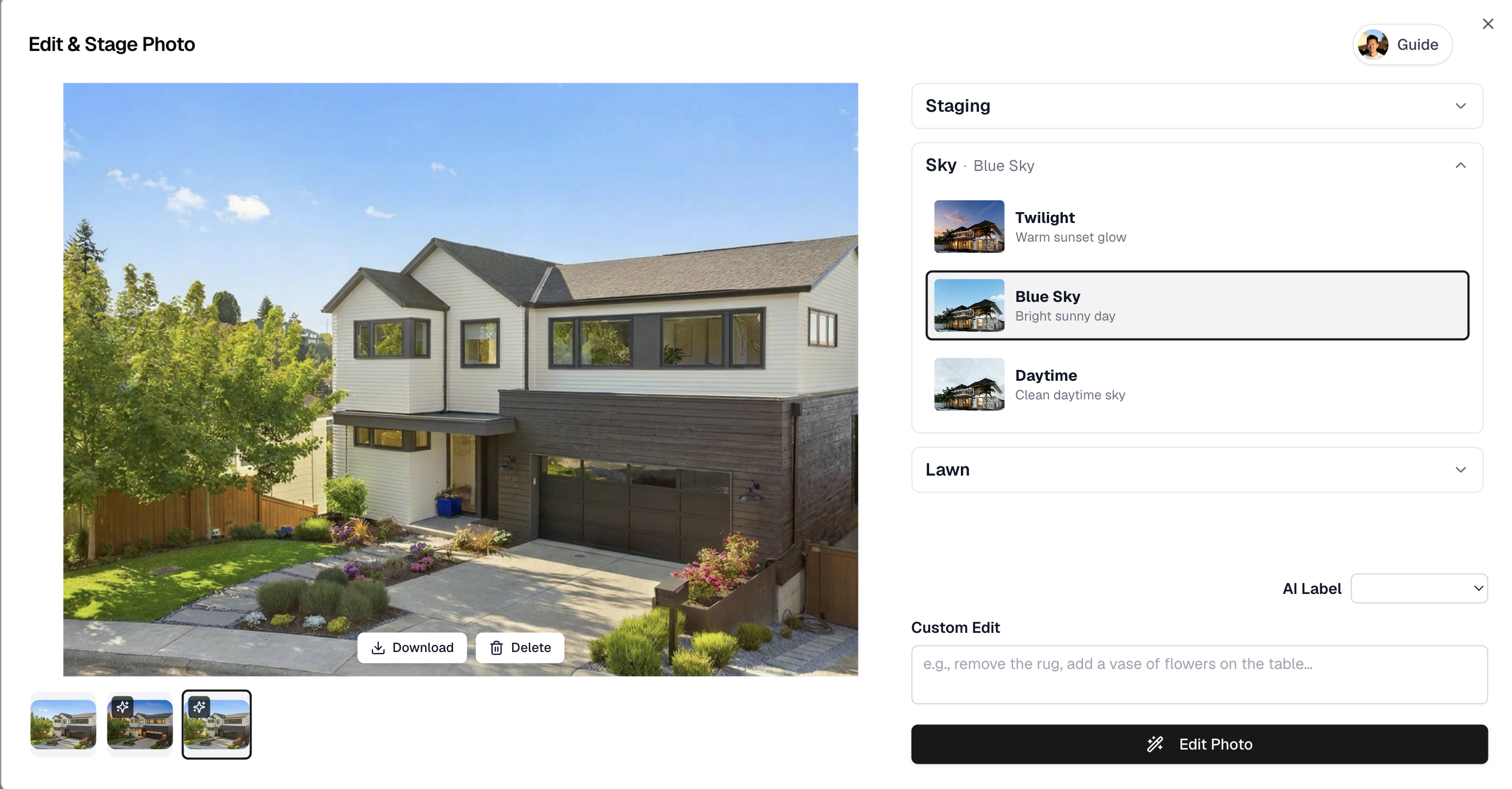
Sky replacement can make exterior listing photos feel brighter and more inviting.
3. Add warmth and atmosphere
Some listing photos need mood more than correction. VideoGuru includes ambience-style edits such as virtual twilight and fireplace enhancement. Virtual staging can be useful for empty rooms, but for this workflow the bigger point is simple: make existing photos feel more inviting while staying listing-ready.
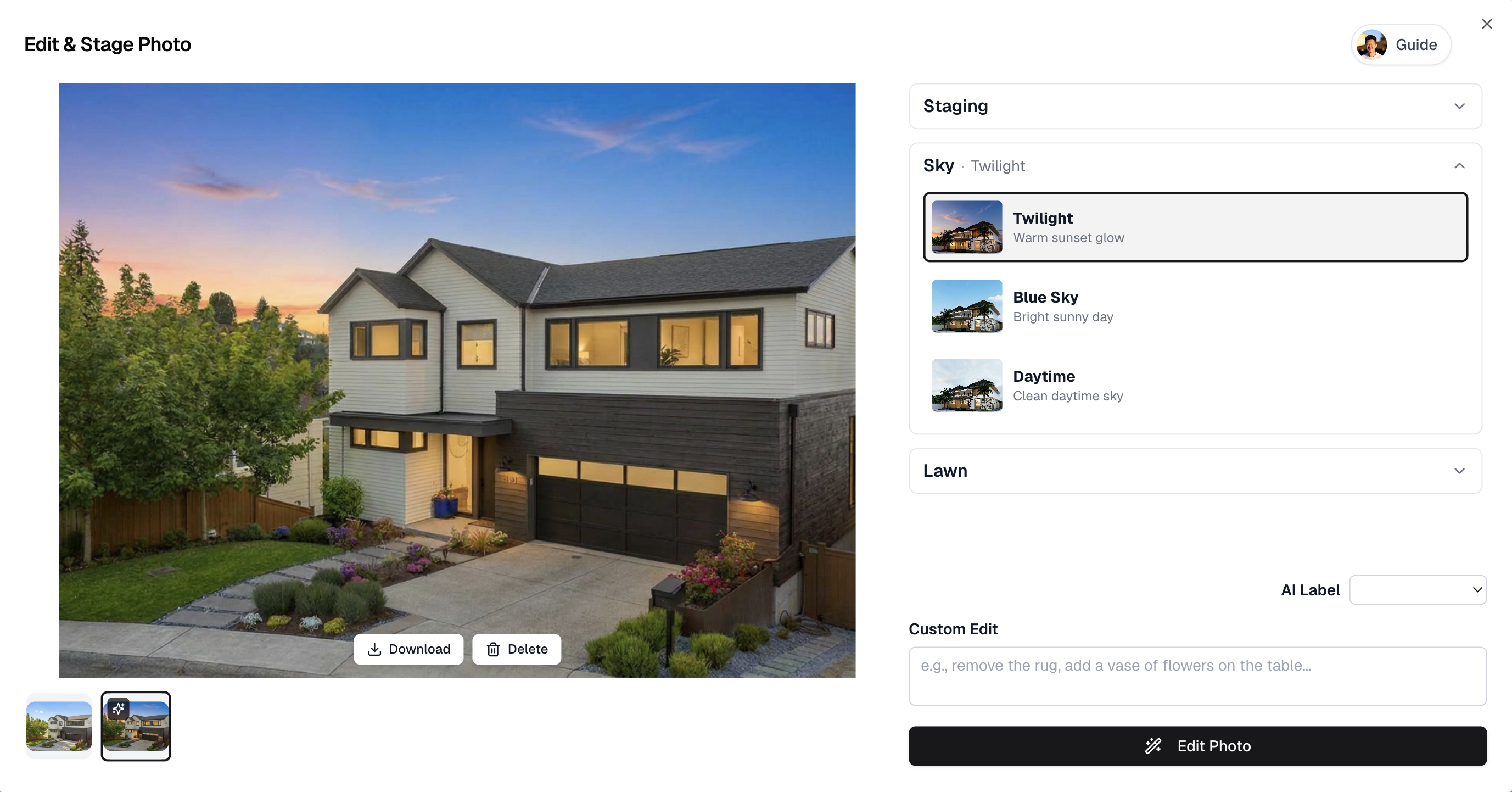
Virtual twilight can give an exterior photo a warmer first impression.
4. Make a focused custom edit
Not every photo issue fits a preset. VideoGuru's Custom Edit option lets the user describe a specific change. The best custom requests are focused, visible, and realistic, such as cleaning up one distraction or improving one part of the image.
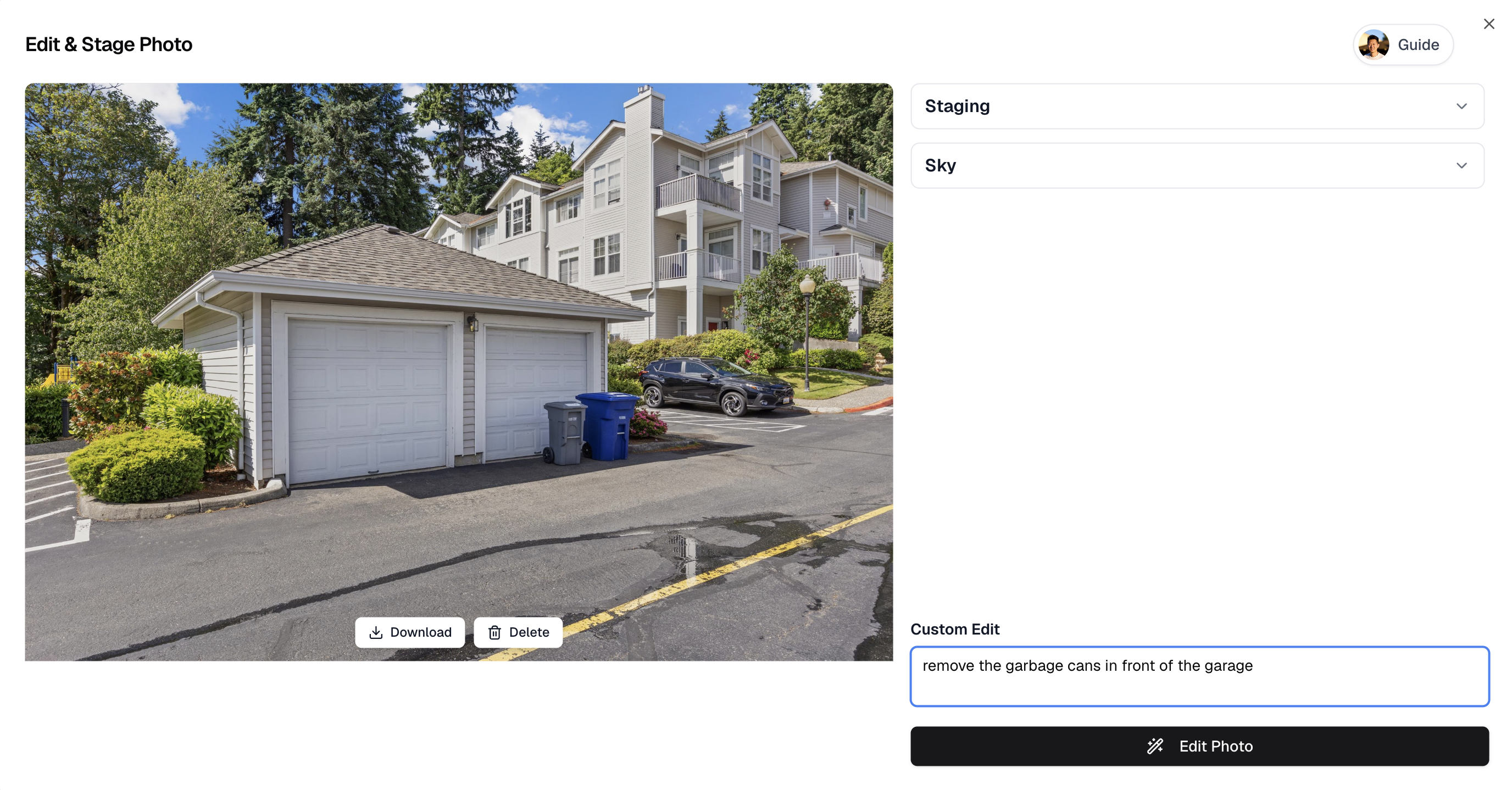
Custom edit gives agents more control when a listing photo needs a specific correction.
What Is the Best AI Real Estate Photo Editing Tool?
The best AI real estate photo editing tool is the one that fits the agent's actual listing workflow. A single impressive before-and-after image is not enough. Agents need a repeatable process for improving photos, reviewing the result, and using the edited images in the rest of the campaign.
| Selection criteria | Why it matters | How VideoGuru supports it |
|---|---|---|
| Real estate-specific edit types | Agents need listing outcomes, not generic photo filters | Declutter, curb appeal, twilight, custom edit, and staging options |
| Realistic output | Listing photos must preserve buyer trust | Workflow encourages focused, listing-ready edits |
| Easy next step after editing | Edited photos should support the whole campaign | Edited photos can continue into VideoGuru's photo-to-video workflow |
| Clear asset management | Agents need to know which photos were enhanced | Edited photos are marked with a star in the workflow |
Turn Edited Listing Photos Into Video
One reason VideoGuru stands out is that photo editing does not have to be the end of the workflow. After the edits are complete, agents can use enhanced photos in the photo-to-video workflow. This matters because the same improved image can become a listing page asset, a social thumbnail, and a clip inside a property video.
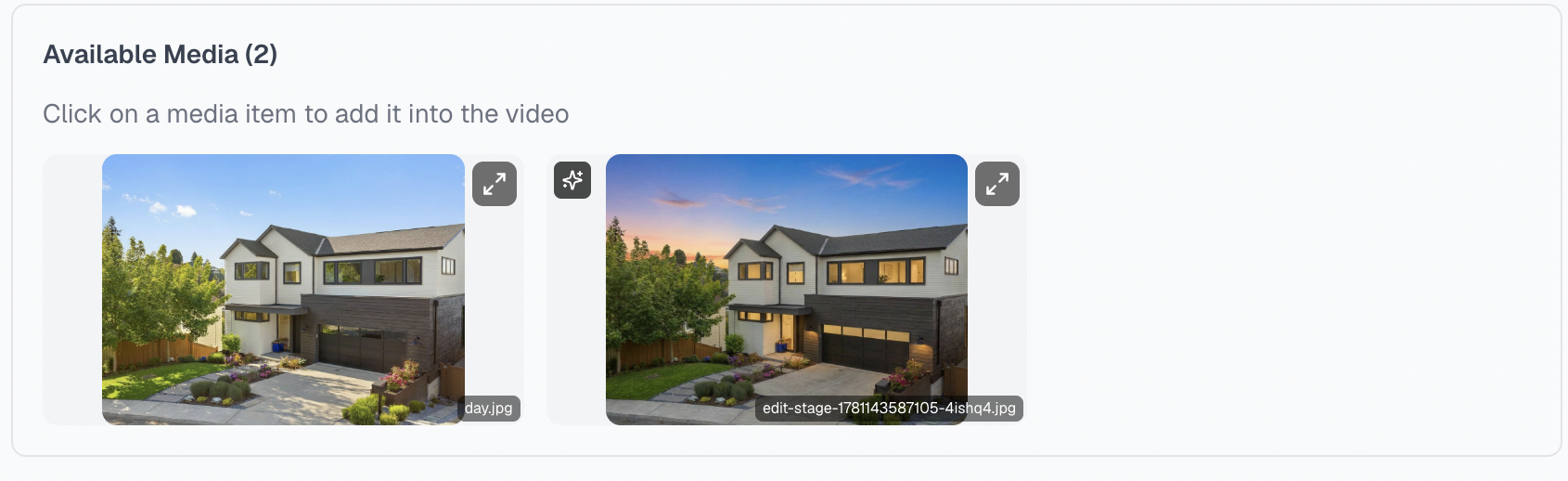
Edited photos are marked with a star so agents can identify enhanced assets when creating a video.
A simple workflow for agents
- Choose the listing photos that already show the property clearly.
- Use VideoGuru photo editing to clean up distractions, improve curb appeal, or add atmosphere.
- Review the edited photos and keep only realistic, listing-ready results.
- Use those edited photos in a property video, social post, email, or listing page.
When to Use AI Real Estate Photo Editing
Use AI real estate photo editing when the original photo is useful but needs a specific improvement. AI works best as a polish layer, not as a replacement for accurate property representation.
- Use it when a photo needs cleanup, not a complete invention.
- Use it when speed matters and the listing cannot wait for a full editing cycle.
- Use it when one shoot needs to feed multiple channels: MLS, social, email, website, and video.
- Use it when you need consistent listing visuals across a full campaign.
Do not over-edit. The goal is to make the listing easier to understand and more appealing, while keeping the result believable for buyers who will eventually see the home in person.
FAQ
What is AI real estate photo editing?
AI real estate photo editing uses artificial intelligence to improve listing photos through practical edits such as decluttering, sky replacement, lawn enhancement, virtual twilight, fireplace enhancement, and custom corrections.
Can AI improve listing photos automatically?
Yes. AI can improve listing photos automatically when the requested edit is specific and realistic. It can clean up distractions, improve curb appeal, add warmth, or make a focused correction while keeping the image listing-ready.
What is the best AI real estate photo editing tool?
The best AI real estate photo editing tool is one that improves photos realistically and fits the full listing workflow. VideoGuru is a strong option when agents want to improve still photos and then reuse those edited photos in property videos.
How should agents ai edit real estate photos without making them look fake?
Agents should ai edit real estate photos by focusing on believable improvements: remove small distractions, improve exterior presentation, adjust mood, and make custom edits that match the visible photo. Avoid edits that misrepresent the property's layout, condition, or permanent features.
Final Takeaway
AI real estate photo editing is valuable because it makes listing visuals faster to improve and easier to reuse. The practical wins are simple: cleaner photos, stronger curb appeal, warmer atmosphere, and better assets for the rest of the listing campaign.
VideoGuru brings those pieces together by helping agents improve still images and continue into video creation from the same listing assets.
Improve listing photos, then turn them into videos
Use VideoGuru to edit real estate photos, identify enhanced images, and continue into a photo-to-video listing workflow.




