

Chengran (Felix) Guan
2026-08-12 · 8 min read
AI Furniture Staging for Real Estate:
Does It Look Real?
Yes. AI furniture staging can look real enough that most buyers — and many agents — cannot tell it apart from a professionally staged room. But “real enough” depends on six checks: lighting direction, shadow placement, furniture scale, texture detail, perspective, and floor contact. Pass all six and the image holds up under scrutiny. Fail any one and buyers notice instantly. This guide shows real estate photographers exactly where AI staging breaks down, how to audit every image before it ships, and how to make disclosure part of your delivery workflow.
Key Takeaways
- Realism is a checklist, not a vibe. An AI-staged image passes scrutiny when lighting, shadows, scale, texture, perspective, and floor contact all line up.
- Failure points are predictable. The same six mistakes show up in 90% of unconvincing AI stages — learn them once and you can spot them in seconds.
- Disclosure is now mandatory in major markets. ARMLS requires a Disclosure of Digitally Altered Images for listings (since May 28, 2026), and California’s AB 723 took effect January 1, 2026.
- QC is your differentiator. Photographers who audit every staged image outperform agents who self-serve AI tools and publish whatever comes out.
- The cost gap is huge. AI staging runs $15–$50 per image versus $500–$2,500+ per room for traditional staging — the tradeoff is quality ceiling, not speed.
What Is AI Furniture Staging?
AI furniture staging — also called virtual staging — uses generative AI to insert furniture, decor, and finishes into photos of empty or sparsely furnished rooms. You upload a shot of a vacant living room and get back the same room with a sofa, coffee table, rug, and art, rendered at the correct angles and lighting. Traditional staging requires renting furniture, coordinating movers, and scheduling a second shoot. AI staging happens in minutes, costs a fraction of the price, and needs no physical inventory.
The economics explain the adoption. Staged listings consistently outperform empty ones: 83% of buyers’ agents say staging makes it easier for buyers to visualize the property as a future home, and 29% of agents report staged homes draw offers 1–10% higher, according to the National Association of Realtors’ 2025 Profile of Home Staging. When physical staging is not an option — vacant homes, long-distance sellers, budget listings — AI staging fills the gap at $15–$50 per image. We broke down the full cost comparison in AI Virtual Staging in 2026, and the ROI math against physical staging in Virtual Staging vs Traditional Staging: ROI Comparison for 2026.
Why the Realism Question Matters More in 2026
Two things changed this year. First, buyers got sharper. AI staging has been mainstream long enough that frequent buyers and their agents can now spot the tells — and when they do, they question the whole listing. Second, regulators got involved. The Arizona Regional MLS now requires a Disclosure of Digitally Altered Images for listings starting May 28, 2026, and California’s AB 723 has required disclosure of virtually staged images since January 1, 2026. If you deliver AI-staged photos without labeling them, you are putting your agent clients at compliance risk — we covered the full legal picture in AI Photo Disclosure Rules 2026.
For photographers this is a positioning moment. Agents who paste their own AI stages onto listings risk publishing images that look fake and violate disclosure rules. A photographer who delivers verified-realistic, properly disclosed, AI-assisted stages is selling trust — and trust is exactly what listing media is for. The question “does it look real?” is no longer a curiosity. It is the quality bar that separates professional media from self-serve output.
Where AI Staging Still Looks Fake: Six Failure Points
After auditing hundreds of AI-staged images, the failures cluster into six predictable categories. Run these checks on every image before you deliver it.
- Lighting direction. The staged furniture must be lit from the same direction as the room’s windows and fixtures. A sofa lit from the left inside a room whose sunlight comes from the right is an instant giveaway.
- Shadows. Every object casts a shadow, and it must land where the room’s light says it should. Missing shadows make furniture look pasted on; wrong shadows make it look like the image was composited.
- Scale and proportion. Sofas that float above the floor, dining tables that dwarf the room, and beds that barely fit the bedroom all break the illusion. Compare furniture size against known references — door heights, window widths, ceiling lines.
- Texture. Low-effort AI staging renders fabric and wood with a flat, plastic sheen. Real furniture has grain, weave, and subtle roughness. Zoom to 100% and look at the upholstery.
- Perspective. Furniture must sit in the same perspective as the room’s vanishing points. A dresser drawn in near-frontal view inside a wide-angle room shot looks like a cutout.
- Floor contact and reflections. Chair legs should touch the floor, and glossy floors should show faint reflections under the furniture. This is the most common failure in cheaper AI output — and the one buyers notice first.
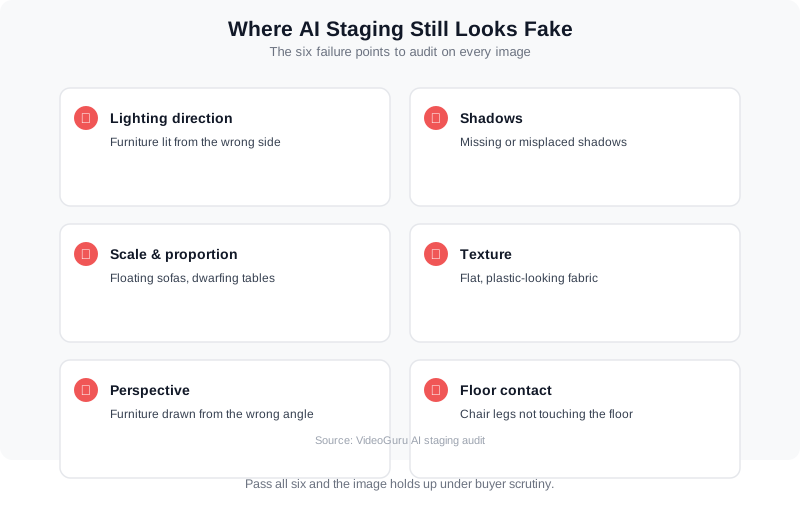
The six failure points that separate convincing AI staging from obvious composites.
A practical look at how staging and virtual staging change the way buyers see a property.
The Photographer’s QC Checklist
You are the last line of defense between an AI model’s output and an agent’s listing. Build a repeatable audit into your workflow — it takes about 60 seconds per image once the checks are muscle memory.
- Zoom to 100%. Check texture and edges. Look for smudged furniture outlines, plastic-looking fabric, and warped geometry around the staged objects.
- Check shadow direction against the room’s windows. If the sun comes through a west window, furniture shadows should fall east. Mismatches fail at a glance.
- Verify scale against fixed references. Doors are about 80 inches tall. If the sofa reaches the door handle, the scale is wrong.
- Look at floor contact points. Legs on the floor, not hovering. Check chair and table legs specifically — the most common AI failure.
- Check reflections on glossy floors and windows. Faint reflections sell realism; their absence is a tell.
- Run a fresh-eyes pass. Put the image down, come back, and look at it as a buyer would. If anything reads as “off,” regenerate or fix it before delivery.
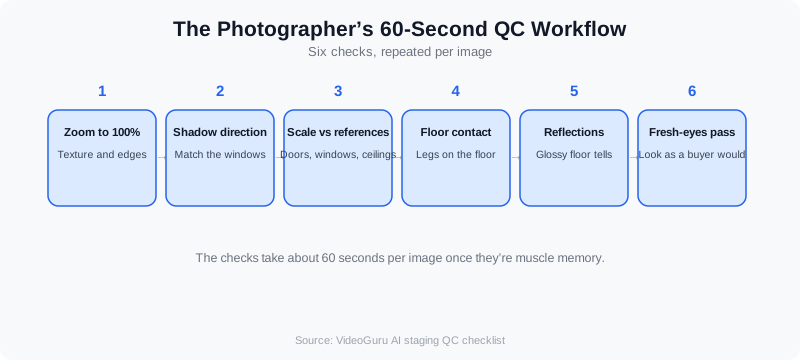
A 60-second QC workflow that catches the six failure points before delivery.
Quality control is exactly the service agents cannot get from a DIY AI tool. When you deliver a staged image, you are also delivering the guarantee that it passed inspection — that is worth billing for. Agents looking to understand what professional AI photo editing can and cannot do should read AI Photo Editing for Real Estate: What Agents Should Know in 2026.
AI Staging vs Traditional Staging: Quality and Cost
The honest framing: AI staging has a lower quality ceiling than a great physical staging shoot, and a much higher floor than no staging at all. Physical staging wins on texture, scale, and realism because it is real. AI staging wins on speed, cost, and flexibility — you can re-stage a room in five different styles in an afternoon.
| Factor | AI Furniture Staging | Traditional Staging |
|---|---|---|
| Cost | $15–$50 per image | $500–$2,500+ per room |
| Turnaround | Minutes per image | Days — booking, delivery, setup |
| Quality ceiling | High when QC’d; fails on the six checks when not | Photoreal by definition |
| Flexibility | Re-style a room endlessly, no re-shoot | One look per shoot; changes cost time and money |
| Best use | Vacant homes, budget listings, quick turnarounds | Luxury listings, occupied homes, signature properties |
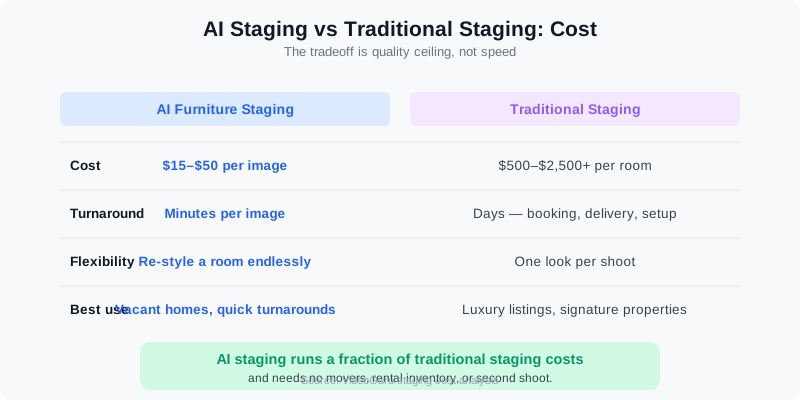
AI staging costs a fraction of physical staging — the tradeoff is the quality ceiling.
For most vacant listings, AI staging is the rational choice. For the $2M+ luxury home where a buyer is paying for finishes and proportion, physical staging still earns its price. The full ROI analysis lives in our staging comparison.
VideoGuru: Staging Photos and Video in One Workflow
AI staging should not live in a separate tool from the rest of your listing media. VideoGuru is an AI real estate media platform that covers both sides — its photo editing tools give you one-click virtual staging for still images, plus declutter, furniture swap, and decor changes, while the video suite handles walkthroughs, effects, and full edits. The same AI that stages your listing photography also powers your video tours, so a staging client can become a video client in the same workflow. See the Photo Editing and Virtual Staging docs for what the photo side can do.
Frequently Asked Questions
Can buyers tell if a listing photo is AI-staged?
Frequently, yes — especially when the image fails one of the six realism checks. Mismatched lighting, missing shadows, floating furniture, and plastic-looking textures are visible at a glance to buyers who have seen enough staged listings. Well-QC’d AI staging is much harder to detect, which is why disclosure matters: the goal is not to fool buyers, but to present a realistic vision of the property honestly.
How much does AI furniture staging cost per image?
AI virtual staging typically costs $15–$50 per image, with turnaround in minutes. Traditional staging runs $500–$2,500+ per room plus logistics and a second shoot. For a five-room vacant listing, AI staging is roughly $100–$250 versus several thousand dollars for physical staging — which is why it has become the default for vacant homes.
Do MLS rules require disclosure of AI-staged photos?
In a growing number of markets, yes. The Arizona Regional MLS has required a Disclosure of Digitally Altered Images since May 28, 2026, and California’s AB 723 has required disclosure of virtually staged images since January 1, 2026. Rules vary by board, so check your local MLS requirements — and treat the original unaltered photo as a required deliverable, not an optional extra.
Is AI staging as good as real staging?
Not in absolute quality — physical staging is photoreal by definition and shows real texture, scale, and light. But AI staging closes most of the gap at a fraction of the cost, and for vacant homes it is dramatically better than an empty room. The professional approach is to use AI staging where it fits, know its failure points, QC every image, and reach for physical staging on the listings where the price point justifies it.
The Bigger Picture
AI furniture staging has crossed from novelty to default in less than two years, and the realism gap keeps shrinking as models improve. But the market is moving in two directions at once: the technology gets more convincing while regulators and buyers get more vigilant. That combination favors the professional. Agents and photographers who treat AI staging as a tool with known failure points, verify every image, and disclose honestly will keep winning listings — while those who publish unverified output will be the cautionary tales buyers remember.
The photographers who thrive in this market are the ones who treat AI output the way they treat their own RAW files: inspect it, correct it, and own the result.
Ready to deliver listing media that looks real and ships fast? VideoGuru’s AI photo editing tools can virtually stage, declutter, and swap furniture in your listing photos in minutes — right alongside your video editing workflow. Start for free at VideoGuru.




