

Chengran (Felix) Guan
2026-08-05 · 8 min read
AI Photo Editing Workflow for Real Estate Photographers:
The Hybrid Pipeline in 2026
Building a real estate photo editing workflow in 2026 means splitting the work between AI and human review — not choosing one over the other. The fastest studios let AI handle the bulk corrections (exposure, white balance, window pulls, declutter) and reserve human judgment for the shots where small mistakes cost listings: architectural close-ups, client photos, anything that gets published large. This guide walks through the hybrid pipeline photographers are adopting this year — what to automate, what to review by eye, and how to keep turnaround fast without letting quality slip.
Key Takeaways:
- The hybrid pipeline wins: AI handles the bulk corrections; humans review the shots that carry the most risk.
- Speed is table stakes: Agents expect delivered photos within 24 to 48 hours, and faster editors win repeat bookings.
- QC needs a checklist: A fixed review pass catches what AI misses — warped lines, invented details, unnatural color.
- Disclosure matters: MLS rules increasingly require labeling AI-edited and virtually staged photos.
Why the Editing Workflow Matters More Than the Tools
Photographers chase the newest editing tools, but the ones who scale chase the workflow around them. A predictable pipeline — shoot, cull, edit, review, deliver — is what lets you take on more listings without more evenings at the desk. The market is moving in one direction: agents compare photographers on turnaround as much as on quality. The National Association of Realtors research hub publishes the market data behind that shift, and it all points the same way — faster, consistent delivery is a competitive advantage, not a nice-to-have.
Your workflow also protects your pricing. When editing is a repeatable system instead of a per-photo grind, you can price packages instead of hours. For the business side, our guide to photo editing pricing models breaks down per-image, batch, and subscription structures. And if you serve agents directly, our guide to AI photo editing for agents explains what the buying side expects from edited photos in 2026.
What AI Photo Editing Handles Well — and What It Doesn't
Before you build a pipeline, you need to know where AI is reliable and where it isn't. That division of labor is the whole game.
The AI bulk pass: exposure, white balance, window pulls
AI editing is at its best on the corrections every listing needs. Exposure balancing pulls a dark living room back to a natural brightness. White balance fixes the color cast from mixed lighting — warm bulbs fighting cool window light. Window pulls recover the view outside a bright window without blowing out the room. These are exactly the edits that take a human editor minutes per photo and take AI seconds.
AI also handles the repetitive cleanup: removing small distractions, straightening verticals, and matching a basic look across a whole set. For photographers who shoot bracketed exposures, AI HDR blending merges frames with fewer artifacts than older tone-mapping methods. This is where the bulk pass pays for itself — 40 photos per listing, handled in one batch, before you look at a single image.
Where human judgment still wins
Humans still win on the photos that will be scrutinized: architectural details, custom millwork, reflections in glass and metal, and any room where the client will recognize a changed detail. AI can invent furniture that never existed, guess at a floor plan, or smooth away a texture that matters. A staged kitchen that looks plausible at thumbnail size can look wrong at full screen.
The rule working photographers use: automate the corrections, review the impressions. Let AI fix the exposure; check the photo yourself before it ships. That split — not all-AI, not all-manual — is the hybrid pipeline.
The Hybrid Pipeline: Step by Step
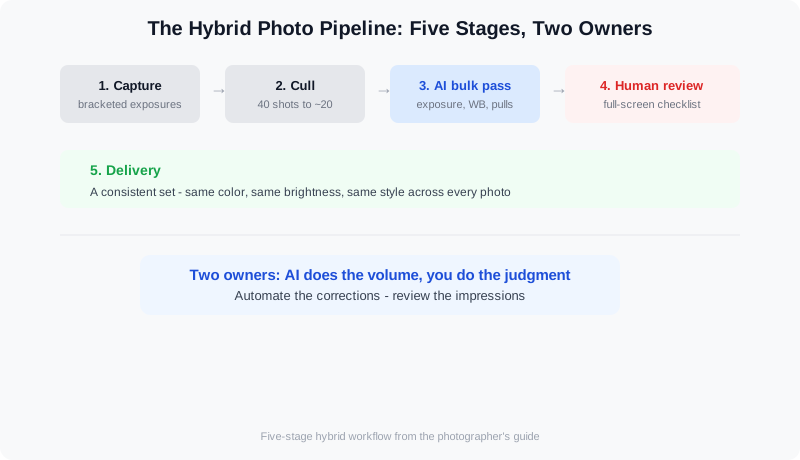
The hybrid pipeline: five stages, two owners. AI does the volume; you do the judgment.
Here is the four-stage pipeline that keeps editing fast without a quality dip. Each stage has a clear owner: the camera, the AI, you, or your client.
Step 1 — Capture and cull
Good editing starts at the shoot. Shoot bracketed exposures for interiors with windows, keep the camera level, and cull ruthlessly before anything touches AI. Every photo you don't take or don't keep is a photo you never have to edit. A 40-photo set should cull to the 20 that matter.
Step 2 — The AI bulk pass
Run the whole set through AI correction in one batch: exposure, white balance, window pulls, basic cleanup. This is the stage that used to eat your evening. With a real estate media platform like VideoGuru, you can also handle the photo work and the video walkthrough in the same place — the same AI that edits your listing photos can cut the listing video, so you're not maintaining two pipelines.
Step 3 — The human review pass
Open every photo, full screen, and work a short checklist: are verticals straight, are reflections natural, did AI add or remove anything that would embarrass you in front of the client, is the color consistent with the previous photo in the set? Most photos pass in seconds. The ones that don't get a manual fix or a re-run.
Step 4 — Delivery
Deliver a consistent set — same color, same brightness, same style across the listing — with filenames and sizes that match what your client expects. Consistency across the set is the quality signal agents notice most, more than any single hero shot.
A practical walkthrough of an AI-assisted editing pass from shoot to delivery.
Turnaround Time: What Agents Actually Expect
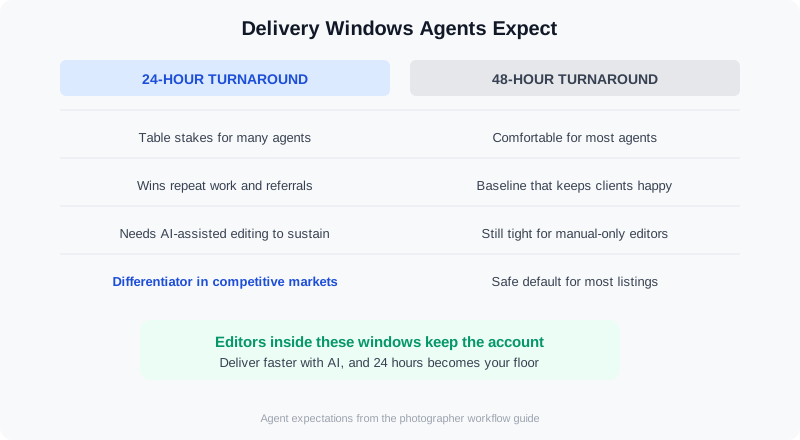
Delivery windows agents expect from their photographer, and what each window implies for your workflow.
Agents work on listing deadlines, and their photographer expectations follow. Twenty-four-hour turnaround is now table stakes for many agents; 48 hours is comfortable for most. Editors who deliver inside those windows get repeat bookings, and agents are candid about why: a listing that sits with unfinished media is a listing that isn't being marketed. The Realtor.com advice hub is full of agent-facing guidance on listing marketing, and the recurring theme is speed of execution.
The hybrid pipeline is what makes fast turnaround sustainable. The AI bulk pass removes the bottleneck, and your review pass keeps the output at a level you can stand behind. A photographer who used to edit for three hours per listing gets that time back as margin — or as capacity for one more listing per day.
Quality Control at Scale: A Review Checklist
When you move from 10 listings a month to 30, quality control becomes the whole business. The studios that scale do it with a fixed checklist, not with more hours.
- Line integrity: verticals straight, no warped door frames or bowed walls.
- Reflections: glass and metal look natural — no duplicated fixtures, no ghost furniture.
- Color truth: white walls read white; wood tones match the real room; no overcooked saturation.
- Detail honesty: nothing added or removed that the buyer would discover at the showing.
- Set consistency: brightness and color match photo to photo across the whole listing.
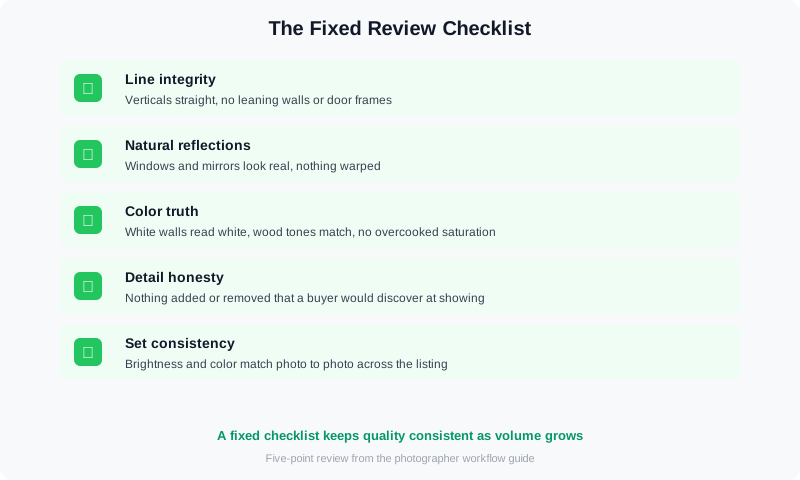
A fixed review checklist keeps quality consistent as your volume grows.
That last point deserves emphasis. Color consistency across a listing set is what separates professional delivery from batch output. Build your AI presets once, lock them, and apply them to every set so the review pass is about exceptions, not the base look. Established photography publications like Fstoppers regularly cover how working pros structure their editing passes — worth reading as you refine your own.
If the QC pass keeps finding the same issue, fix the pipeline, not the photos. That mindset is how photographers go from correcting AI output to shipping it — and it's exactly the journey in our case study of a photographer who added AI photo editing and doubled revenue.
MLS Rules and AI Disclosure: Know Before You Deliver
AI-edited and virtually staged photos raise a disclosure question you need to answer before you deliver, not after. Many MLSs require that virtually staged images be labeled so buyers know the furniture isn't real. The rule exists because an undisclosed staged photo can set up a disappointing showing — and a liability for the agent. Check your local MLS rules, and when in doubt, label the staged shots. The ROI argument for staging only works if buyers trust what they see — the same logic behind our virtual staging ROI comparison.
This is also where the full platform matters: beyond video, VideoGuru's photo editing tools give you one-click virtual staging for still images too — declutter, furniture swap, and decor changes — so the same AI that powers your video walkthroughs also handles your listing photography.
How a Faster Workflow Changes Your Pricing
A repeatable hybrid pipeline changes what you can sell. When editing is a system, you can offer fixed-price packages instead of quoting per photo, and you can take on batch work without renegotiating your evenings. Our breakdown of photo editing pricing models — per image, batch, or subscription — walks through the math.
If you scale past what you want to review personally, the next decision is whether to hire editors or automate further — the outsource-versus-automate question we cover in our white label real estate video editing post. Most photographers land in the middle: AI for the bulk pass, human review for the exceptions, and outsourcing only the overflow.
Frequently Asked Questions
Can AI photo editing replace a professional real estate photo editor?
No — and that's the wrong question. AI replaces the repetitive corrections (exposure, white balance, window pulls) that make up most of an editor's time. Human editors still own the review pass, the client relationship, and the judgment calls on photos where a mistake is expensive. The photographers getting the most value use AI to edit more listings, not to stop editing.
How much time does AI photo editing save per listing?
Most photographers report cutting editing time from hours to minutes per listing with a hybrid workflow, but the exact number depends on your set size and standards. A 20-photo interior set that took 90 minutes of manual work typically takes 15 to 20 minutes with an AI bulk pass and a quick review. The honest answer: measure your own per-listing time before and after, then price accordingly.
Do I have to disclose AI-edited or virtually staged photos on the MLS?
Many MLSs require it, and the requirement is growing. Virtually staged photos in particular must usually be labeled so buyers know the furniture is computer-generated. Check your local MLS rules before delivering staged images — disclosure protects you and your agent clients from a disappointing showing.
What's the difference between AI photo editing and virtual staging?
AI photo editing corrects what's in the photo — exposure, color, cleanup — so the real room looks its best. Virtual staging adds what isn't there: furniture, decor, and styling for empty or dated rooms. They work together: a staged photo still needs the same correction pass before it goes on the MLS.
Ready to cut your editing time without cutting quality? VideoGuru's AI photo editing tools handle the bulk corrections and virtual staging for stills — right alongside your video editing workflow — so you can deliver more listings per week. Start for free at VideoGuru.
Final Thoughts
The 2026 photo editing workflow is a hybrid: AI does the volume, you do the judgment. Build the pipeline once — capture, cull, AI bulk pass, human review, delivery — and it pays for itself on every listing after. The photographers scaling their businesses this year aren't the ones with the most expensive gear or the newest tools. They're the ones with a workflow they trust.




