

Chengran (Felix) Guan
2026-09-25 · 11 min read
Should Your Real Estate Website Have a Video Background? The Data
Yes - your real estate website should have video on the homepage. It should just not be a full-bleed, autoplaying background file. The data points in two directions. Video placed on a homepage earns the highest play rate of any page type on a site, and viewers watch roughly half of it. In Unbounce's own landing-page test, moving the same video into a lightbox modal lifted conversions from 6.5% to 13% - a 100% lift - while the identical video embedded inline lifted them 69%. The catch is speed: a heavy hero video is one of the most common reasons a page misses Google's Largest Contentful Paint target of 2.5 seconds. The setup that wins is a short, compressed, click-to-play or muted-loop video with a poster frame - not a four-megabyte autoplay reel.
Key Takeaways
- Homepage video earns the most plays. In Wistia's State of Video Report, videos on homepages, video galleries, and product pages get the highest play rates of any page type, and viewers generally watch about halfway through.
- Placement beats presence. Unbounce measured a 6.5% conversion rate with no video, 11% with video embedded inline (a 69% lift), and 13% with the same video in a lightbox modal (a 100% lift).
- Backgrounds fit "vibe" pages, not complex offers. Unbounce's conversion team found video backgrounds work when the goal is to convey an atmosphere, and work against you when visitors need to read the offer on the first screen.
- Speed is the tax. Google treats a Largest Contentful Paint of 2.5 seconds or less as good, and an autoplay hero video is a frequent reason a page misses it - on a device set where nearly every buyer starts their search online (NAR).
- You do not need a shoot. A homepage hero built from the listing photos you already delivered takes about 10 minutes, and works out to roughly $8.94-$12.00 per video on an annual VideoGuru plan.
What the Data Actually Says About Homepage Video
Start with the two studies agents quote most, read properly. Wistia analyzed its own video uploads and ranked the ten most common page types by performance. Videos on homepages, video galleries, and product pages pulled the highest play rates, with viewers generally getting about halfway through them. That is a genuinely strong result for the exact spot you are deciding about - and it is a statement about play rate, not about conversions.
Conversion is where the placement question actually gets settled. Unbounce ran a controlled test of the same explainer video in three positions on one landing page. The version with no video converted at 6.5%. The version with the video embedded inline converted at 11%. The version that kept the page visually identical but opened the video in a lightbox modal converted at 13%.
| Page version | Conversion rate | Lift vs. no video |
|---|---|---|
| No video | 6.5% | - |
| Video embedded inline | 11% | +69% |
| Video in a lightbox modal | 13% | +100% |
The takeaway is uncomfortable for anyone who assumes video converts because it is video. Same footage, same page, same offer - a double-digit swing from placement alone. The version that converted best did not put motion in the visitor's face. It put a still frame and a play button in front of them and let them choose. You can read the full breakdown in Unbounce's video conversion case study, and the play-rate benchmarks in Wistia's State of Video Report.
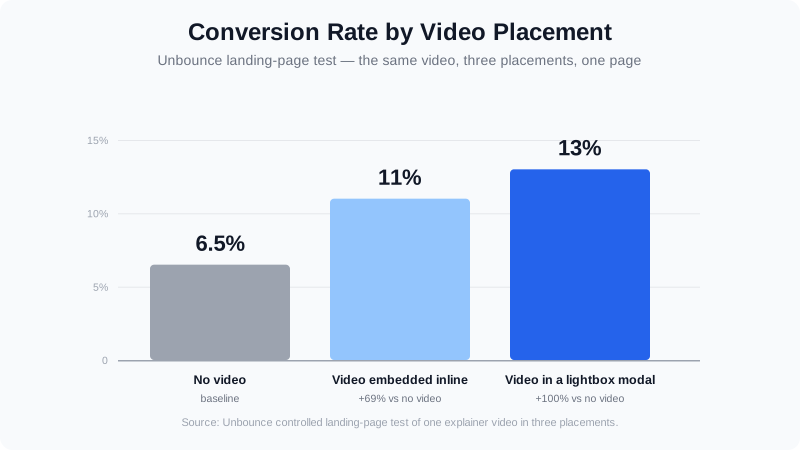
Fig 1 - Same video, three placements, three conversion rates: the lightbox treatment more than doubled the no-video baseline.
When a Video Background Helps - and When It Hurts
A background video is a different animal from an on-page player, and Unbounce has published conversion guidance on it specifically. Their finding: video backgrounds work on pages whose job is to communicate a particular feeling - an atmosphere, a lifestyle, a hard-to-describe experience. They work against you when there is a complex offer that needs explaining in the first screenful, because the motion competes with the copy that has to do the selling.
For a real estate homepage, that draws a reasonably clean line. A luxury listing brand, a new-construction community, or an agent whose whole pitch is local lifestyle and taste - those are atmosphere pages, and a muted hero loop supports them. A homepage whose job is to make a seller understand your pricing, your process, and your marketing plan in the first ten seconds is a text-and-CTA page, and a looping background will actively distract from the thing that converts.
| Use a video background when... | Use a static or click-to-play hero when... |
|---|---|
| The page sells a mood, a neighborhood, or a lifestyle | The page sells a service, a price, or a process |
| Visitors need to feel something before they act | Visitors need to understand something before they act |
| Your headline and CTA are short enough to stay legible over motion | You need more than one line of copy on the first screen |
| You can supply a compressed 5-10 second loop and a poster frame | Your only video is a 2-minute walkthrough |
Two execution rules come out of the same guidance and matter more than the loop itself. Keep the background short - a 5-10 second loop is enough to carry an atmosphere, while a longer file both loads heavier and invites the visitor to stop and watch instead of scrolling. And keep contrast between the motion and your headline: if the words are not legible over every frame of the loop, the video is costing you the click it was supposed to earn. You can read the underlying recommendations in Unbounce's analysis of video backgrounds.
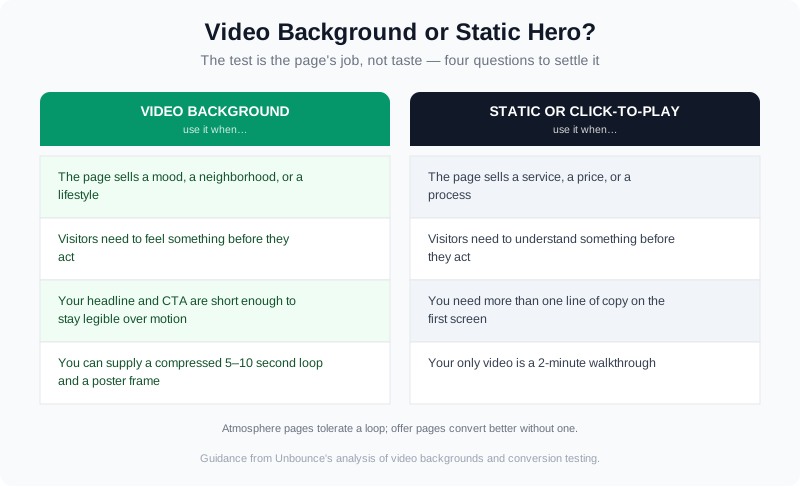
Fig 2 - The test is not taste, it is the page's job: atmosphere pages tolerate a background loop, offer pages convert better without one.
The Page-Speed Tax Google Actually Measures
Everything above assumes the page loads. That is the part video backgrounds break. Google's Core Web Vitals measure Largest Contentful Paint - the moment the biggest element in the first viewport finishes rendering - and a good score is 2.5 seconds or less, with anything past four seconds rated poor. On a hero-led page, the largest element is usually the hero itself. Swap a single optimized image for a video plus a poster frame plus a player, and you have just handed your LCP element a much heavier job.
Unbounce names the same trade-off directly: video backgrounds "can make pages load slower and distract visitors from your Call to Action." That is not a reason to abandon them, it is a reason to treat the hero as a performance budget rather than a design flourish. You can check the threshold and how Google measures it in the web.dev documentation on Largest Contentful Paint.
The audience makes the stakes higher than they look. NAR's Profile of Home Buyers and Sellers has found year after year that essentially every buyer researches online, that most begin on a phone, and that listing photos and detailed property information are the website features buyers rate most useful. A homepage video that adds eight seconds of load time on a mid-tier phone is competing against the exact features buyers came for.
The practical field test is simple and takes one afternoon. Open your homepage on a throttled mobile connection from a browser you do not normally use, and watch the first screen. If the headline or the hero image is visibly waiting on the video, the video is in the wrong slot. If the page paints fast and the motion starts after, you have the ordering right.
Three Ways to Add Homepage Video Without the Speed Penalty
None of this means skipping video. It means choosing a delivery pattern that gets the attention lift without paying for it in load time. There are three that work, in increasing order of effort.
1. Click-to-play hero with a poster frame
This is the pattern that produced the 100% lift in the Unbounce test. The hero shows a single high-quality still with a play affordance; the video itself loads only when someone asks for it. You keep the emotional framing of motion without making the video the LCP element, and you get a measurable signal - play rate on the hero - that tells you whether the video is earning its place.
2. A short muted loop under a hard weight budget
If the page really is an atmosphere page, use motion as texture: a 5-10 second clip, muted, set to loop, compressed aggressively, with a poster frame so the first paint never waits on the file. Ship a static fallback for visitors with reduced-motion preferences set, and do not autoplay audio - browsers block it, and visitors resent it.
3. Build the hero from listing photos you already have
This is the route most agents miss, because it inverts the assumption that homepage video requires a shoot. VideoGuru turns a set of listing photos into a finished walkthrough, and it is an AI real estate media platform rather than a single-purpose video tool: the same workspace handles one-click virtual staging, declutter, furniture swap, and restyle for your stills, so the photography and the video come out of one pipeline. A homepage hero built this way is ready in about 10 minutes.
Two things worth knowing before you plan around it. First, you are not limited to stills - you can mix your own clips into the same video, so a drone pass over the neighborhood or a short talking-head hand-off goes into the walkthrough rather than being cut separately, and that is available on any paid plan, not an add-on. Second, you can put yourself in the video without a second shoot: an AI avatar built from a photo you upload, with your cloned voice narrating, is composited into the property walkthrough as one integrated video - and it ships on any paid plan with no separate avatar subscription. Output is available in 16:9, 1:1, and 9:16, so the same asset covers your homepage and your social cuts.
| VideoGuru plan | Price | Videos per cycle | Max resolution |
|---|---|---|---|
| Free | $0 | 2 / month (up to 15 seconds) | 720p, watermarked |
| Essential | $59/mo, or $30/mo billed annually | ~3 / month (30 / year annually) | 1080p |
| Growth | $129/mo, or $85/mo billed annually | ~10 / month (100 / year annually) | 4K |
| Pro | $249/mo, or $149/mo billed annually | 25 / month (200 / year annually) | 4K |
On the annual plans, using every credit, that works out to an effective $12.00 per video on Essential, $10.20 on Growth, and $8.94 on Pro. Compare that with a single $300-$800 shoot for one listing walkthrough and the homepage-video problem stops looking like a production question. Our 10-minute listing video walkthrough covers the build step by step, and the product docs cover the editing and export side.
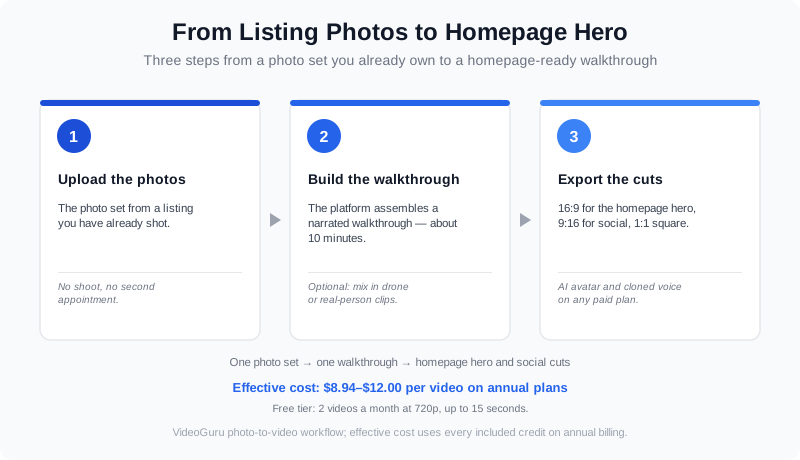
Fig 3 - The photo-to-video route: photos in, one walkthrough out, then reuse the 16:9 cut on the homepage and the 9:16 cut on social.
What Video Should Actually Go on Your Homepage?
The format question is the one agents ask second, right after "should there be one at all." Three answers cover most of it.
How long should a homepage video be?
It depends on the delivery pattern, not on the subject. A background loop should be 5-10 seconds and silent. A click-to-play hero can run 30-90 seconds, because the visitor already opted in. Anything longer than that belongs behind a deliberate click, not on the homepage - a two-minute walkthrough as a background is a load-time liability and a distraction in the same file.
Should a homepage video have sound?
Not on autoplay. Browsers block autoplaying audio by default, so a background video with sound will simply arrive muted - and if you force it, visitors leave. Keep the loop silent with captions for anything spoken, and let sound start when the visitor presses play. The same rule applies to your AI avatar presenter: if the homepage copy is a talking-head, put it behind a click.
Does homepage video help SEO?
Indirectly, and less than most posts claim. Video itself is not a ranking factor; the engagement and dwell time it earns can help, but the LCP penalty from a heavy hero can cancel that out on its own. The defensible move is to host or lazy-load the video so it never blocks first paint, and to make the video findable in its own right. Our guides to video content that converts and to measuring video performance cover the measurement side so you can tell which of the two effects you are actually getting.
A veteran realtor breaks down when short form beats long form - the same format decision you are making when you choose what plays on your homepage.
Which Route Fits You: Solo Agent, Team, or Photographer
| Who you are | What belongs on the homepage | How to get it |
|---|---|---|
| Solo agent | A click-to-play hero: one strong listing walkthrough plus a short intro with your face and voice | Build the walkthrough from listing photos, add an avatar presenter and cloned voice on any paid plan |
| Team or brokerage | A silent brand loop over the local market, with the team's listings in rotation | Batch build per listing, keep Brand Kits locked so every cut matches |
| Photographer or media company | A portfolio reel, plus a page that sells the video service itself | Deliver video as an upsell on shoots you already booked; the same photo set feeds both |
The pattern across all three is the same: the video on your homepage should be something you can produce repeatedly without a second appointment. If every homepage update needs a crew, the homepage quietly stops getting updated.
Frequently Asked Questions
Is a video background good or bad for conversions?
It is conditional, which is why blanket advice on both sides is wrong. Unbounce's testing found video backgrounds help pages whose job is to convey an atmosphere, and hurt pages carrying a complex offer that has to be read. If your homepage needs more than one line of copy above the fold, a static or click-to-play hero will usually convert better - and the 100% lift they measured came from a lightbox, not a background.
How much does it cost to add video to a real estate website?
It ranges from nearly nothing to a few hundred dollars per asset. An AI photo-to-video hero built from photos you already own starts on VideoGuru's free tier - 2 videos a month at 720p with a watermark - and runs $8.94-$12.00 per video on the annual paid plans. A single professionally shot listing walkthrough typically prices at $300-$800, and a recurring retainer arrangement runs into the thousands per month, both of which are hard to justify for a homepage asset you will want to refresh.
Can I get a homepage video without filming anything?
Yes. Photo-to-video builds a finished walkthrough from a set of listing stills, and you can also mix in clips you already have - drone passes, a real-person hand-off - into the same video rather than editing them separately. If you want to appear on camera, upload a headshot to generate an AI avatar and clone your voice, and both are composited into the same walkthrough. That route ships on any paid plan, with no separate avatar subscription.
The Bigger Picture
The homepage video debate is really a staging of a wider shift. A decade ago the question was whether a listing had video at all, and the answer was decided by budget. Now nearly every agent can produce a watchable walkthrough in minutes, which means video presence is becoming table stakes and the differentiator is moving to delivery - where the video sits, how fast the page paints, and whether the visitor feels invited rather than ambushed.
That reframes the decision on your homepage. The interesting question is no longer "video or no video," it is "which job is this video doing, and is it in the slot where it can do it?" Atmosphere belongs in a background loop behind a legible headline. Proof belongs in a click-to-play walkthrough of actual work. Your pitch belongs in a presenter segment the visitor chooses to start. Get the ordering right and the data stops arguing with itself.
You can build your first listing video here - upload the photos from a listing you have already shot, and see what a hero looks like with your own work in it.