

Chengran (Felix) Guan
2026-08-04 · 8 min read
How to Create a Real Estate Photo + Video Content Calendar
A real estate content calendar is a weekly plan that tells you exactly which photos, videos, and posts to publish for each listing — before the listing even goes live. Most agents post when they remember to. The agents who get calls, showings, and listing appointments post on a rhythm: listing video on Monday, photo carousel on Tuesday, market update midweek, sold story on Friday. This guide walks you through a photo + video content calendar you can set up in an afternoon, plan a full quarter at a time, and keep running with tools you already own.
Key Takeaways
- A calendar is a production plan, not a posting plan. It decides what you shoot this week, not just what you publish today.
- One listing shoot should produce 2–3 photo assets and 1–2 video assets. Photos and videos feed the same calendar.
- A sustainable rhythm beats a burst. Posting once a week for six months outperforms posting five times a week and burning out in one.
- Plan a quarter in one sitting. Batch your shoots, batch your edits, batch your captions.
- AI turns photo shoots into video content. Tools like VideoGuru convert listing photos into walkthrough videos, so one shoot fills multiple calendar slots.
Why Agents Need a Photo + Video Content Calendar
Consistency is the entire game. Social platforms reward accounts that post on a predictable schedule, and so do buyers — a buyer who sees a listing video from you every Monday starts associating your name with the market. NAR's research on how agents market listings shows that social media has become one of the primary ways agents promote properties, alongside their own websites and email campaigns (NAR social media research).
The failure mode isn't effort — it's the absence of a system. In a 2026 roundup of agent social media strategy, Luxury Presence's Aaron Grushow makes the point bluntly: post once a week for six months rather than five times a week and burn out in one (10 expert real estate social media strategies for 2026). A calendar is the thing that makes "once a week for six months" survivable, because each slot already has an asset assigned to it.
A good calendar does three jobs at once:
- Consistency. The algorithm and your audience both learn when new content arrives.
- Inventory. You always know which listings have photos, which have video, and which need a shoot.
- Quality. Planning ahead means no 11 p.m. panic posts with a blurry screenshot.
The Building Blocks: What Goes on a Real Estate Content Calendar
Before you fill slots, decide what content types you actually produce. Most agent calendars run on six repeating post types:
- Listing photos — a carousel of the 3–5 strongest shots from the shoot.
- Listing video — a walkthrough, or a photo-to-video reel that moves through the property.
- Market update — a 60–90 second video or simple graphic with local numbers.
- Client testimonial — a quote, screenshot, or short clip from a recent buyer or seller.
- Neighborhood or behind-the-scenes — the local angle that makes you the market expert.
- Sold story — the "just sold" post that feeds your next listing appointment.
Notice the mix: it is roughly half listing content and half social proof plus market commentary. That split is intentional — listing content shows what you sell, while testimonials and market updates show why you're the one to hire. Not every listing needs every format. If you're deciding where to spend your budget, our guide to photo vs video for each listing walks through which properties deserve video and which are served fine by photos alone.
The Weekly Rhythm: A Proven Photo + Video Template
Here is a five-slot weekly template built around a single photo shoot per listing. Each slot has a format and an asset source, so nothing requires you to create from scratch at 10 p.m.
| Day | Content | Asset source |
|---|---|---|
| Monday | New listing video (walkthrough or photo-to-video reel) | Latest shoot, edited with AI |
| Tuesday | Listing photo carousel (3–5 images) | Same shoot, best selects |
| Wednesday | Market update (60–90 second video or graphic) | Monthly template + fresh numbers |
| Thursday | Neighborhood or behind-the-scenes clip | Phone footage, no shoot needed |
| Friday | Sold story or client testimonial | Closing photos or client quote |
Run all five slots, or trim to the three that fit your week — Monday, Wednesday, and Friday. The rhythm matters more than the count. If you want a full month of ready-to-post video ideas mapped to this structure, our 30-day real estate video ideas guide gives you day-by-day prompts.
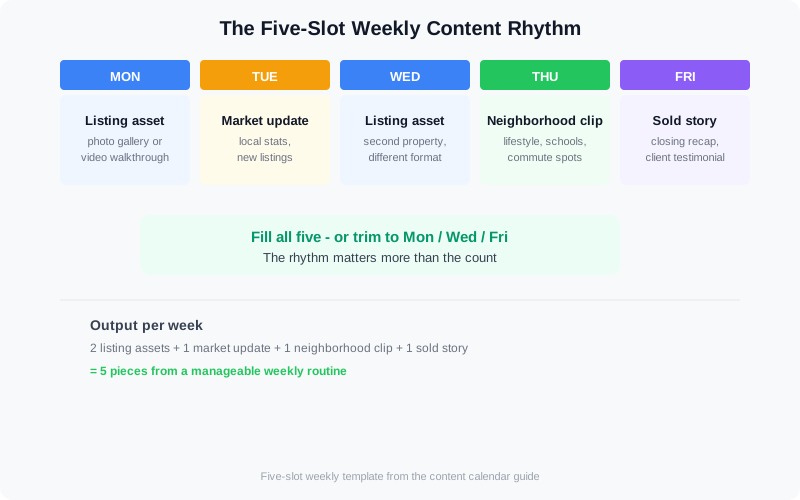
A five-slot weekly rhythm: two listing assets, one market update, one neighborhood clip, one sold story.
How to Plan a Full Quarter in One Sitting
The fastest way to build a calendar that actually survives contact with your week is to plan in batches. Set aside one afternoon every 90 days and work through this sequence:
- List every active and upcoming listing. Include the stage: pre-listing, just listed, showings, pending, or sold.
- Map each stage to assets. Pre-listing gets teaser content; just-listed gets the full photo + video push; sold gets the closer.
- Batch your shoots. Group listings by neighborhood so one outing covers several calendar weeks.
- Batch your edits. Process every shoot in one session so photos and videos come back at the same time.
- Write captions in bulk. Create 10 reusable caption templates (listing reveal, price drop, open house, just sold) and adapt them per property.
- Schedule everything. Drop the posts into your scheduler with dates and times, then forget about daily posting decisions.
The output is a calendar that answers three questions at a glance: what do I have, what goes out this week, and which listing needs a shoot next. For a broader framework on where each piece fits — including platform choice and how often to post — see our real estate video marketing strategy guide.
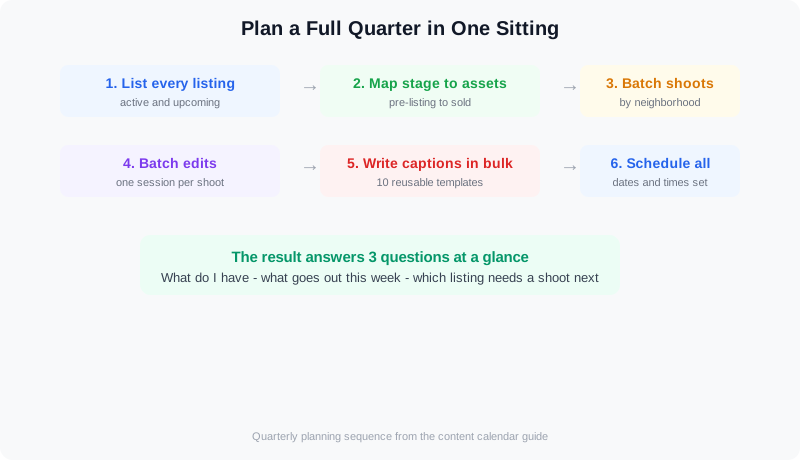
Quarterly planning: listings to stages to assets to scheduled posts — done in one sitting.
One Shoot, Many Assets: How Photos Feed the Video Calendar
The biggest unlock for a photo + video calendar is realizing you don't need a separate video production day. Your listing photo shoot is also a video shoot. A walkthrough clip and a photo-to-video reel both start from the same walk around the property, and AI editing closes the gap between raw footage and a polished deliverable.
Photo-to-video AI is the fastest path to a full video calendar with minimal extra shooting. Upload the listing photos you already have, and the platform animates them into a walkthrough-style video with transitions, music, and branding. It is exactly the workflow described in our guide to turning listing photos into listing videos with AI — and it means the Tuesday photo carousel and the Monday video reel come from the same shoot.
This is where an AI real estate media platform earns its keep. VideoGuru handles the full pipeline: turn your listing photos into branded walkthrough videos, edit drone and walkthrough footage, and apply effects like twilight transitions — all without a timeline editor. Beyond video, VideoGuru's photo editing tools give you one-click virtual staging for still images too, plus decluttering, furniture swap, and decor changes for listing photography. The same AI that powers your video walkthroughs also handles your listing photos, so one shoot fills every slot on the calendar.
A look at turning a single property shoot into a week of listing content.
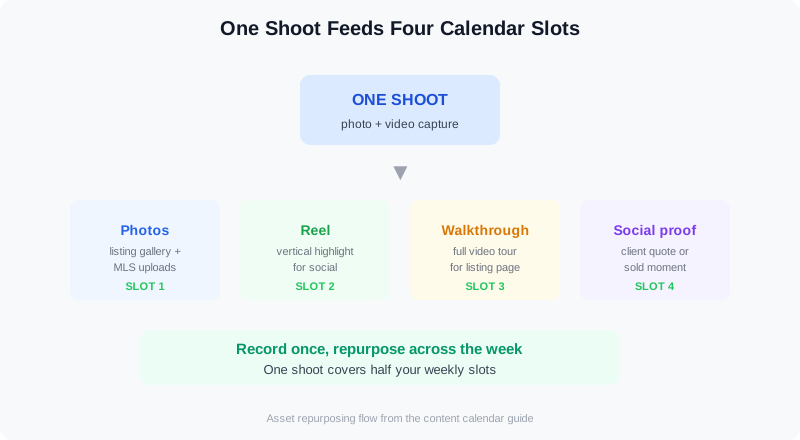
One shoot, four calendar slots: photos, reel, walkthrough, and social proof.
Calendar Tools: Simple Systems That Stick
The best calendar tool is the one you actually open. For most agents, that means a spreadsheet with rows for weeks and columns for the five content slots, or a Notion board with a card per post. The production detail that makes it run: a linked asset column (photo file, video URL, caption draft) so the slot is filled the moment you look at it. That "upload photos, pick a style, download the video, drop it into your scheduler" flow is what turns the hardest slot into the easiest one, as a 2026 walkthrough of building an agent content calendar demonstrates (how to build a real estate social media calendar that runs itself).
Two habits keep the system alive:
- Weekly review, not daily decisions. Fifteen minutes every Monday: check the week's slots, confirm assets exist, fill gaps.
- Schedule in advance. Use your platform's native scheduler or a simple scheduling tool so posting happens even on chaotic days.
And when a video slot needs filling fast — open house tomorrow, no walkthrough filmed — AI is the safety net. Our guide to creating listing videos in under 10 minutes shows the quick path from photos to a publishable reel.
Frequently Asked Questions
How often should real estate agents post photos and videos?
Consistency beats frequency. Posting once a week for six months outperforms posting five times a week for one month, because the audience and the algorithm both learn your rhythm. A realistic agent calendar runs 3–5 posts per week: one or two listing assets, one market update, and one social proof or neighborhood post. Scale up only when the production system — shoots, edits, captions — can sustain it without slipping.
What is the difference between a content calendar and a posting schedule?
A posting schedule says what goes out when. A content calendar also tracks what you have to shoot, edit, and write to make that happen — it's a production plan with dates on it. The calendar is what tells you that next week's Monday video doesn't exist yet and the listing needs a shoot this Wednesday. The schedule is just the final step.
How far in advance should I plan my real estate content?
Plan a quarter at a time, then review weekly. The quarterly session maps listings, stages, and shoots so you know what content exists months ahead. The weekly 15-minute review keeps it honest as closings move, showings cancel, and new listings arrive. Long-term planning handles the inventory; short-term review handles reality.
Can AI really turn my listing photos into videos?
Yes. Photo-to-video AI takes a set of listing photos and produces a walkthrough-style video with motion, transitions, music, and your branding — no filming required. It works best with a clean, complete photo set: 15–25 well-edited images covering every room plus the exterior. The result fills your Monday video slot from the same shoot that feeds Tuesday's photo carousel, which is the core of a sustainable photo + video calendar.
Ready to turn every photo shoot into a week of content? VideoGuru's AI video and photo editing tools can turn your listing photos into branded walkthrough videos in minutes — right alongside one-click virtual staging, decluttering, and photo enhancement for your listing photography. Start for free at VideoGuru.
Putting It All Together
A photo + video content calendar turns marketing from a daily scramble into a weekly system. Start with the five-slot rhythm, plan the quarter in one sitting, and let one shoot fill both the photo and video columns of the calendar. Use AI where it removes friction — photo-to-video reels, one-click photo edits, branded templates — and review the calendar every Monday for fifteen minutes. Do that, and consistency stops being a goal and becomes a default.




