
Chengran (Felix) Guan
2026-09-30 · 13 min read
Creative Real Estate Videos:
15 Ideas Beyond the Standard Tour
A creative real estate video is any listing video that does more than walk through the house - it uses an angle, an effect, or a story the buyer has not already seen a hundred times, and it answers a question they are actually asking. The standard tour is still necessary, but on its own it no longer stops a scroll, because every agent in the market now posts one. This guide gives you 15 formats that go beyond the standard tour, tells you which fit your role, and shows how most of them are produced from the listing photos and clips you already have.
Key Takeaways
- Creativity in real estate video is a format decision, not a budget decision. A one-take walkthrough shot on a phone can outperform a drone montage that says nothing new.
- Fifteen distinct formats are usable today - from the one-take walkthrough and the split-screen staged-vs-empty to the avatar intro and the numbers-over-motion video.
- Most of these need no new footage. An AI photo-to-video tool turns the listing stills you already own into a walkthrough in about 10 minutes, and your own drone or real-person clips mix into the same video.
- Match the format to the question, not to the trend. Vacant listings need staged-vs-empty; relocation buyers need a narrated walkthrough; sellers deciding on updates need the renovation time-lapse.
- AI adoption among agents is now the norm, not the edge. NAR's 2026 technology report found nearly half of agents use AI daily or weekly, and only 12% have not tried it - so the advantage has moved from having video to having a distinctive one.
What Counts as a Creative Real Estate Video?
A creative real estate video is a listing or brand video built around a specific format rather than a generic tour sequence. The format is the whole idea: a camera move, an effect, a comparison, a narration, or a piece of data that gives the viewer a reason to keep watching past the first two seconds.
That definition matters because it gives you a test. Before you produce anything, ask two questions. First, what question does this answer? Buyers ask how big the rooms are, whether the layout works, what the neighborhood feels like, what a renovation would cost, and what an evening in the house is like. A format that answers one of those questions clearly earns attention. Second, what have they not seen? If the answer is nothing, it is a standard tour with better music.
A third test is fit. Creative does not mean complicated. The formats below split into three families: camera and edit formats, effect-led plays, and persona and story plays. You do not need all three families - you need one format per listing that maps to a real buyer or seller question.
Why the Standard Tour Underperforms in 2026
Nothing is wrong with the standard tour. The problem is supply. When every listing in a price band ships with a walkthrough, the tour stops differentiating and becomes the baseline, and buyers screen it the way they screen photos - fast, for information only.
The data on agent behavior has moved in the same direction. NAR's 2026 technology report found that nearly half of agents now use AI daily or weekly, and only 12% say they are not using it and have no plans to - down from 32% who had not tried it in 2025. Among agents who use AI, 55% say it has had a positive impact on their business, and 54% expressed interest in using generative AI for content creation over the next 12 months. Drone photography and video already sits among the six most-used tools at 48% of agents, alongside the MLS at 96% and e-signature at 79%.
Put those numbers together and the conclusion is straightforward: production capacity is no longer the constraint, and neither is access to motion. What is left is format. If everyone can produce a walkthrough this week, the listings that get watched are the ones that look and say something different. That is the entire case for the fifteen ideas below - see the NAR report summary and the underlying REALTOR Technology Survey for the full breakdown. Trade coverage of the same survey reaches the same conclusion: more agents using AI, fewer avoiding it.
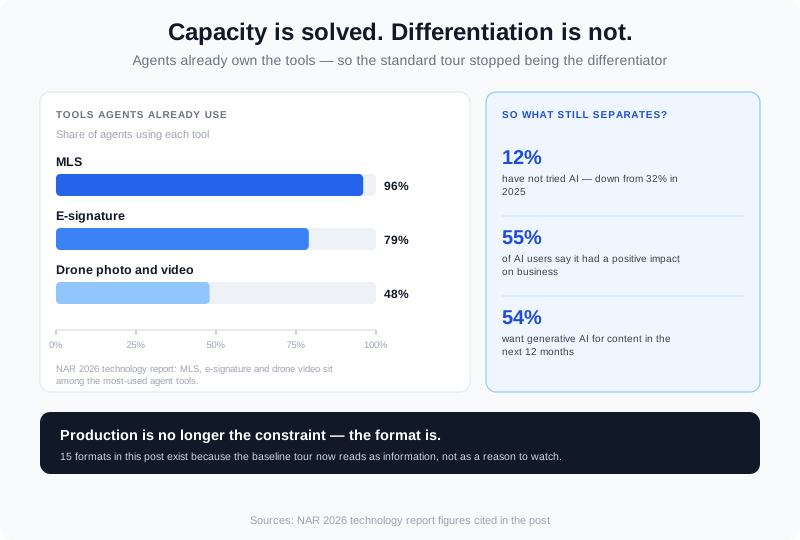
Production capacity is no longer the constraint - the format is. Standard tours have become the baseline rather than the differentiator.
If you want the wider inventory of angles first, our real estate video ideas for social media walks through a 30-day posting calendar, and 27 unique real estate marketing ideas covers the campaign level. This post is about the video format itself.
15 Creative Real Estate Video Ideas
Each idea below is a repeatable format, not a one-off. They are grouped by what they rely on: camera and edit structure, visual effects, and story or persona.
1. The One-Take Walkthrough
A single unbroken camera move from the front door to the back fence. No cuts, no music sting, no narration for the first ten seconds - just footsteps, doors, and the sound of the space. The format works because it reads as proof rather than promotion: a buyer knows a cut can hide an awkward kitchen, but an unbroken move cannot. It is also the fastest format to shoot, because there is nothing to edit afterwards.
2. The 15-Second Room Reveal
One room, one move, fifteen seconds: a slow push toward a doorway that lands on the room behind it, with a match-cut transition so the two spaces feel like one continuous breath. Built for vertical feeds, where a single idea in a short window beats a montage of eight. Shoot each reveal separately, then let the transition carry the story.
3. The Floor-Plan Flyover
Show the plan and the video at the same time. Draw the route onto the floor plan as an overlay, animate the room labels, and let the walkthrough underneath follow the same path. Buyers comparing three homes in one weekend understand a layout faster from a moving plan than from a room order they have to reassemble in their heads.
4. The Split-Screen: Staged vs. Empty
Half the frame is the vacant room as photographed, half is the same room staged - and both halves move together, so the buyer's eye compares continuously instead of remembering a before-and-after still. This is the highest-leverage format for vacant listings, where an empty room reads as smaller and more expensive to furnish than it really is.
5. The Two-Act Video: Hook, Then House
Open with an eight-second hook - the single best shot in the property, a dusk exterior, a kitchen detail, a view - then cut into the tour. Most listing videos open with a title card and a slow approach, which spends the only seconds most viewers ever watch on nothing. Same runtime, same footage, and the retention curve changes completely.
6. The Renovation Time-Lapse
Take one dated room - the 1980s kitchen, the carpeted basement - and show that exact angle after a renovation. Nothing about the property changes except what a buyer can now imagine doing with it, and imagination is what closes a listing that photographs badly. Keep a short on-screen note that the transformation is a visual illustration, not a promise about the property.
7. The Seasonal Shift
Four versions of one exterior or one street corner - spring, summer, autumn, winter - cut together from a locked-off angle. It answers a quiet buyer question, which is what this place looks like when it is not listing season, and it produces four pieces of content from a single setup. Reuse the series every quarter and it compounds instead of expiring.
8. The Room Story: Empty to Furnished
An empty room, then the same room furnished, then the same room furnished differently. This is virtual staging in motion rather than as a still image, because a still asks the buyer to imagine the space while a moving reveal does the imagining for them. It is the fastest way to make a vacant listing feel like a home rather than a project.
9. The Three-Styles Reel
The same room shown in three looks - modern, Scandinavian, warm traditional - with a cut on each change. It works as a seller pitch as much as a buyer one: a seller deciding whether to stage sees three options in fifteen seconds and can simply pick one. Keep the camera locked, so the only thing that changes is the room.
10. The Lifestyle Cut
Show the property being used, not just seen: a table set for dinner, a fire pit lit at dusk, the pool in the evening, a dog on the lawn. Lifestyle beats answer the question every buyer actually asks, which is not what the house looks like but what an evening in it feels like. Use them as closing beats in a longer tour, not as the opening.
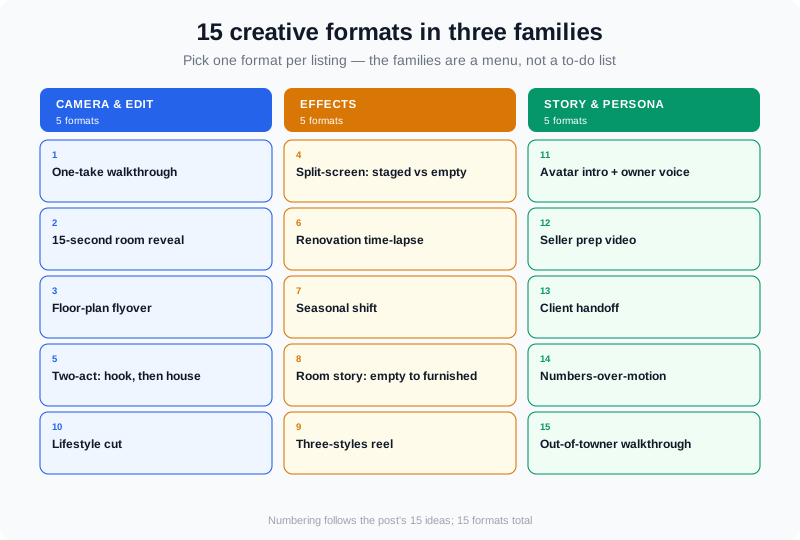
Three families of formats: camera and edit structure, visual effects, and persona or story plays. One per listing is enough.
11. The Avatar Intro + Owner Voice Close
Open with a ten-second introduction from an AI avatar built from the agent's own headshot, and close with the owner's cloned voice describing what they will miss about the house. Both sit inside the same walkthrough - it is one integrated video, not a talking head bolted onto the end. Agents who dislike being on camera get a presenter without a shoot day, and sellers get a story no competing listing can copy.
12. The Seller Prep Video
Walk the property with the seller before it hits the market and name the five fixes that pay for themselves: light bulbs, hardware, decluttering, a wall repaint, a deep clean. Shoot it in their actual house so the advice is specific rather than generic. This is a listing-presentation format rather than a marketing one, and it wins listings more often than any tour does.
13. The Client Handoff
Start with the agent's introduction and end with the buyer's or seller's own words, as one video rather than two. It needs at least one real-person clip, because the whole value is a face and voice that has nothing to gain from the sale. The handoff is the most persuasive sequence in real estate video for exactly that reason.
14. The Numbers-Over-Motion Video
Animate the numbers that decide the purchase - price, price per square foot, days on market, commute time - over moving footage of the property or the block. Numbers alone are a static post and motion alone is a pretty tour; layered, they become something a buyer can act on. It also gives AI search engines a structured set of facts to quote, which is how a listing video earns citations rather than just views.
15. The Out-of-Towner Walkthrough
A narrated tour built for the buyer who is relocating and cannot visit: fewer beauty shots, more specifics about the layout, the storage, what is within a walk, and what the commute costs. This is where a narrator or a cloned voice earns its place, because the format depends on continuous explanation rather than music. It also converts as a follow-up for anyone who asked about a neighborhood you do not personally cover.
How to Produce These Without a Shoot Day
The gap between a good format idea and a published video used to be a shoot day. That gap is now about ten minutes for most of the fifteen formats above, because the input is usually the media you already delivered: the listing photos and, when you have them, your own drone or real-person clips.
Here is the production path in practice. Start from listing photos and turn them into a walkthrough - the platform analyzes the set, sequences the rooms, and generates the motion. Then mix in any real footage you already have. Your drone shots and real-person clips go into the same photo-driven walkthrough, not into a separate edit, which is what makes the seasonal shift, the lifestyle cut, and the client handoff possible from one project. Effects are applied per clip rather than hand-keyframed: twilight for the dusk exterior, renovation for the dated kitchen, seasons change for the locked-off exterior, virtual staging and furniture drop for the vacant room, restyle for the three-styles reel.
If you want a presenter, an avatar can be generated from a headshot you upload, and the voice can be cloned from the owner or from you, then composited into the walkthrough itself. That is one video with a presenter inside it. It is available on any paid plan - there is no separate avatar subscription to budget for, which is usually where per-video costs quietly double. The free tier covers photo-to-video and effects only, at 2 videos per month, 720p, up to 15 seconds, with a watermark.
Output formats matter more than most agents expect: 16:9 for the listing page and YouTube, 9:16 for Reels and Shorts, 1:1 for feeds and email thumbnails. One build, three crops, three placements. On cost, the number worth planning around is the effective per-video cost, not the sticker price - VideoGuru's annual plans work out to roughly $12.00 per video on Essential, $10.20 on Growth, and $8.94 on Pro when every credit in the plan is used, against monthly plans at $59, $129, and $249.
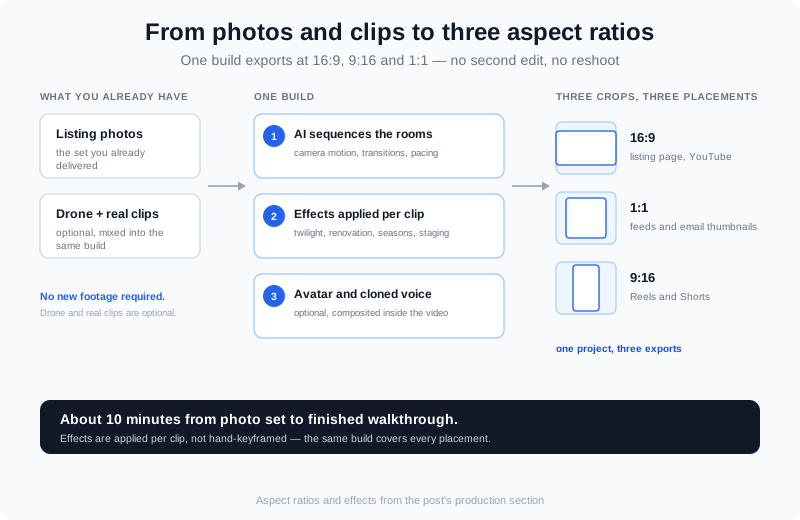
One pass through the photos and clips produces the walkthrough; the same build exports at 16:9, 9:16, and 1:1.
Which Ideas Fit Your Role
The formats are not equally useful to everyone. Match the format to what you already produce.
| Format | Best for | Why it works for them |
|---|---|---|
| One-take walkthrough | Agents and photographers | Proves layout honestly, needs no edit time |
| Split-screen staged vs. empty | Agents, photographers, stagers | Rescues vacant listings that photograph small |
| Renovation time-lapse | Agents pitching sellers, media teams | Makes condition a conversation instead of a discount |
| Avatar intro + owner voice close | Agents who avoid camera, solo Realtors | A presenter without a shoot day, inside the tour |
| Numbers-over-motion | Agents, team leads, commercial brokers | Turns a tour into a citable, comparable fact set |
| Out-of-towner walkthrough | Referral-heavy agents, relocation services | Converts buyers who will never visit before offering |
Photographers and media companies have a second opportunity here: these formats are what turn a per-shoot client into a per-month client, because formats need refreshing and a still package never does. If you already deliver photos, the photo-to-video route is the shortest path to a video line item on your invoice, and real estate reels covers the vertical-first version of the same work.
How to Pick Your First Three Ideas
Do not run all fifteen. Pick by objective, not by excitement, and give each format three listings before you judge it.
- If your listings are getting views but not showings, the layout is the objection. Run the one-take walkthrough and the floor-plan flyover on the next three listings.
- If your listings are vacant, the problem is imagination, not exposure. Run the split-screen staged-vs-empty and the empty-to-furnished room story.
- If you are pitching sellers, run the seller prep video and the renovation time-lapse. Both make you the agent who talks about condition and money rather than exposure.
- If you are building a personal brand, run the avatar intro plus owner voice close and the client handoff. Both put a face and voice into the video without a shoot day.
- If you compete on data, run the numbers-over-motion video. It is the format most likely to be quoted by AI assistants when a buyer asks what a neighborhood costs.
Then measure the right thing. View count tells you the hook worked; click-through to the listing page tells you the format worked; showing requests tell you the listing worked. Track all three separately or you will keep a format that gets watched and sells nothing - our real estate video marketing strategy guide covers the measurement layer in detail, and real estate video examples shows what the finished versions look like.
Frequently Asked Questions
What makes a real estate video creative?
A specific format, not a bigger budget. A creative listing video is built around one idea - a locked-off angle, a staged-versus-empty comparison, an effect, a narration, a data overlay - and answers one buyer question clearly. The test is whether a viewer can describe the video in a sentence afterwards. If the answer is some version of it was a house tour, the format was generic regardless of production quality.
How long should a listing video be in 2026?
Match length to placement rather than to a rule. A vertical hook or a room reveal lives comfortably at 15 to 30 seconds. A narrated out-of-towner walkthrough needs 60 to 90 seconds because the value is the explanation. A full property tour can run two minutes, but only if the opening eight seconds already earned the watch - most viewers never see the rest.
Can you make a creative listing video from photos alone?
Yes for most formats. Listing photos convert into a walkthrough in about 10 minutes, and effects like twilight, renovation, seasons change, and virtual staging are applied to that build rather than to footage you have to film. If you have drone shots or real-person clips, they mix into the same walkthrough, which unlocks the lifestyle cut and the client handoff. Formats that genuinely need real footage - the one-take walkthrough, for example - still need a camera.
Which creative format works best for luxury listings?
The two-act video and the numbers-over-motion format. Luxury buyers skim fast and screen on specifics, so a strong opening hook plus animated facts such as price per square foot, lot dimensions, and days on market outperform a slow cinematic montage. Pair either with a clipped-voice narration for a private-client feel without hiring a presenter.
Putting It All Together
The standard tour is table stakes, not a strategy. Pick one format per listing that answers a real buyer question, produce it from the photos and clips you already own, and give the format three listings before you decide whether it worked. Fifteen formats is a menu, not a to-do list - three of them run consistently will outperform all fifteen run once.
Start from the listing photos you already have with VideoGuru, and see the step-by-step build in the product docs. Pick the format by the objection you hear most in showings, and let the next three listings tell you whether it moved it.