

Chengran (Felix) Guan
2026-07-23 · 8 min read
HDR vs AI Photo Enhancement:
What's the Difference for Real Estate?
HDR bracketing and AI photo enhancement are the two main ways real estate photographers turn flat RAW files into market-ready listing photos — but they work completely differently. HDR (High Dynamic Range) merges multiple exposures of the same shot to capture detail in both shadows and highlights. AI enhancement uses a single image and a trained neural network to reconstruct lost detail, correct exposure, and balance colors in one pass. In 2026, most professional photographers use a mix of both: HDR for the hero images that demand maximum detail, and AI enhancement for the bulk workflow where speed matters more than pixel-perfect dynamic range.
Key Takeaways
- HDR requires 3-5 bracketed exposures per shot — more time on site and more storage, but delivers the widest dynamic range for challenging lighting.
- AI photo enhancement works from a single RAW or JPEG — no bracketing needed, processing takes 5-30 seconds per image, and results are consistent across hundreds of photos.
- HDR still wins for extreme contrast scenes — bright windows paired with dark interiors, sunset exteriors, and rooms with mixed lighting sources.
- AI enhancement wins on speed and volume — photographers processing 25+ listings per week save 60-80% of editing time by using AI instead of manual HDR merging.
- Modern AI matches HDR quality in 80% of standard rooms — only the most challenging lighting conditions still justify the extra HDR workflow.
What Is HDR Photography for Real Estate?
HDR real estate photography is a technique where the photographer captures three to five exposures of the same scene — one underexposed (for window detail), one properly exposed (for the room), and one overexposed (for shadow detail). These are merged in post-processing software like Lightroom or Photomatix to create a single image that shows detail across the full brightness range.
The process has been the gold standard in real estate photography for over a decade. A properly executed HDR merge produces natural-looking images with detail in bright windows and dark corners simultaneously — something a single exposure cannot achieve. The trade-off is that it requires precise bracketing on site, more storage per listing, and significant post-processing time for the merge and tone-mapping.
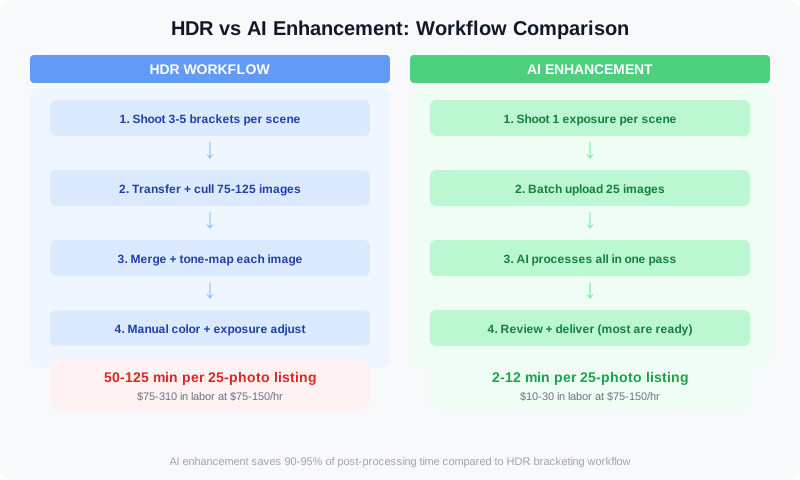
The fundamental difference: HDR captures multiple exposures on site, while AI enhancement extracts the same detail from a single frame in post-production.
What Is AI Photo Enhancement for Real Estate?
AI photo enhancement uses deep learning models trained on millions of real estate photos to reconstruct detail, correct exposure, balance colors, and sharpen images from a single input. Unlike HDR, there is no bracketing, no merging, and no manual tone-mapping. The photographer shoots normally — one exposure per scene — and the AI handles the rest.
Modern AI enhancement models go beyond simple exposure correction. They can reconstruct blown-out window detail from surrounding pixel information, fill in shadow areas with natural-looking texture, correct color casts from mixed lighting, and straighten vertical lines — all in a single automated pass. This is a fundamentally different approach from HDR, which literally captures more data at capture time. AI enhancement creates the missing data algorithmically.
For a deeper look at how AI evaluates photo quality before enhancement, see our guide on AI photo analysis for listing photos — which covers the scoring systems that determine which images need enhancement.
HDR vs AI Photo Enhancement: Head-to-Head Comparison
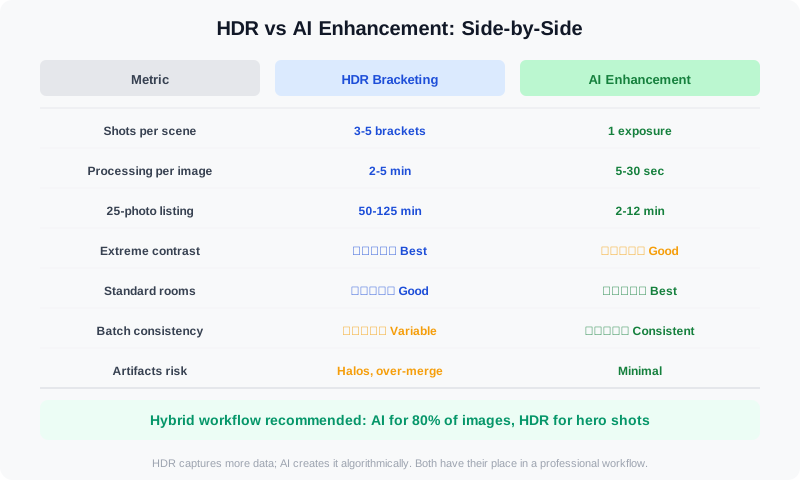
Side-by-side comparison of HDR and AI enhancement across the metrics that matter for real estate photographers.
Quality: When HDR Still Wins
For the most challenging lighting conditions — a living room with floor-to-ceiling windows on a bright day, a kitchen with spotlights creating deep shadow pockets, or a sunset exterior shot — HDR still produces the highest-quality result. The physical bracket captures real pixel data from each exposure range, which an AI model can only approximate. In blind tests with professional real estate photographers, HDR was preferred over AI enhancement in roughly 15-20% of images — almost always the ones with extreme contrast ranges.
For the remaining 80% of standard rooms — bedrooms, bathrooms, hallways, open-plan living areas with moderate light — AI enhancement produces results that are visually indistinguishable from HDR. In many cases, AI enhancement actually produces more natural-looking results because it avoids the common HDR artifacts: halos around windows, oversaturated colors, and the characteristic "flat" look of over-merged tone mapping.
Speed and Volume: Where AI Dominates
This is where the gap is widest. A photographer using HDR must bracket every shot — taking 3-5 exposures per scene instead of one. For a standard 25-photo listing, that means 75-125 images to transfer, cull, merge, and tone-map instead of 25. At 2-5 minutes of merge time per image, a single listing takes 50-125 minutes of post-processing with HDR.
With AI enhancement, the same 25 photos process in 2-12 minutes total — about 5-30 seconds per image. No culling, no merging, no manual adjustments for most images. For a photographer shooting 30 listings per month, switching from HDR to AI enhancement saves 25-60 hours of editing time per month. That is the difference between being able to take on 10 more listings or turning clients away.
This speed advantage is why many photographers use a hybrid approach: AI enhancement for the bulk workflow of standard rooms, and HDR for the hero images — the living room with the view, the dramatic exterior, the kitchen renovation — that need every pixel of dynamic range. This mirrors the approach discussed in our guide on AI photo editing for agents, where AI handles routine corrections and human judgment focuses on the images that matter most.
Cost Breakdown
HDR costs nothing extra in software if you already own Lightroom or Photomatix — but the real cost is time. At a photographer's effective hourly rate of $75-150, the 60-125 minutes of HDR post-processing per listing represents $75-310 in labor per job that AI enhancement can reduce to $10-30. For photographers who outsource their editing, AI-enhanced editing services typically charge $0.50-1.50 per image compared to $3-8 per image for manual HDR editing.
When to Use HDR vs AI Photo Enhancement
The decision isn't binary — most professional real estate photographers in 2026 use both. Here is a framework for deciding which approach to use for each image:
- Use HDR when: The scene has extreme contrast — bright windows directly facing the camera, rooms with two different lighting temperatures, exterior shots with sky and shaded porch, or any image where the dynamic range exceeds what a single exposure can capture.
- Use AI enhancement when: The room has moderate, even light — bedrooms, bathrooms, hallways, open living areas, basements with artificial lighting, and any shot where a single properly exposed frame captures most of the detail.
- Use both: Shoot your bracketed HDR set AND a single "normal" exposure. Use AI enhancement on the single exposure first. If the result meets your quality standard, skip the HDR merge. If not, the brackets are already captured and ready for traditional HDR processing.
The Hybrid Workflow: Best of Both Worlds
The most efficient real estate photographers in 2026 don't choose one method — they build a workflow that uses both where each excels. Here is how a typical hybrid workflow looks for a 25-photo listing:
- Shoot everything bracketed — Takes an extra 2-3 minutes on site per room, but gives you the HDR safety net for hero shots. Modern cameras with auto-bracketing make this nearly effortless.
- AI-enhance the single exposure — Run all images through AI enhancement first. This processes the entire listing in 5-10 minutes.
- Review and flag — Scan the AI-enhanced results. For 80% of standard rooms, the result is publish-ready. Flag the 3-5 hero shots where you want maximum quality.
- HDR merge the flagged images — Process only the flagged hero shots through HDR merging. This takes another 10-20 minutes but delivers the best possible result for the images that matter.
- Deliver the listing — Your final set combines AI-enhanced bulk images with HDR-processed hero shots. The client sees consistent quality across all 25 photos, and you saved 40-90 minutes of editing time.
This hybrid approach is especially powerful for photographers who work with multiple agents or property managers where volume and consistency matter as much as maximum quality.
Frequently Asked Questions
Is AI photo enhancement as good as HDR for real estate photos?
For 80% of standard rooms with moderate lighting, AI enhancement produces results visually indistinguishable from HDR. For scenes with extreme contrast — bright windows, mixed lighting temperatures, sunset exteriors — HDR still produces measurably better dynamic range. The gap has narrowed significantly over the last 18 months as AI models improve, and many photographers now use AI as their primary workflow with HDR reserved for the most challenging shots.
Can you use both HDR and AI enhancement on the same photo?
Yes, and many photographers do. The most common approach is to shoot bracketed exposures (for the HDR safety net), generate a single natural exposure, run AI enhancement on that single image, and only fall back to the HDR merge if the AI result doesn't meet quality standards. Some photographers also apply AI enhancement to the already-merged HDR image for final polish — sharpening, color grading, and exposure refinement that AI handles better than manual adjustments.
Does AI photo enhancement work from JPEG or only RAW?
Most modern AI enhancement tools work from both RAW and JPEG, but RAW produces noticeably better results. The extra data in a RAW file gives the AI model more information to work with — especially for recovering shadow detail and correcting white balance. If you shoot JPEG, AI enhancement will still improve exposure and color, but you will lose some of the detail recovery that makes AI enhancement comparable to HDR.
How much time does AI enhancement save compared to HDR?
For a 25-photo listing, HDR processing takes 50-125 minutes (bracketing + culling + merging + tone-mapping). AI enhancement takes 2-12 minutes total. That is a 90-95% reduction in post-processing time. For a photographer shooting 30 listings per month, the time savings amount to 25-60 hours — the equivalent of an entire work week or more. For a detailed breakdown of how these time savings translate to revenue, see our guide on scaling from 5 to 50 videos per week.
Ready to build a faster photo editing workflow without sacrificing quality? VideoGuru's AI photo enhancement handles exposure, color, and detail recovery from a single shot — so you can spend less time merging exposures and more time shooting listings. Also includes virtual staging, decluttering, and video editing in one platform.
The Verdict
HDR and AI photo enhancement are not competing technologies — they are complementary tools that serve different parts of the real estate photography workflow. HDR delivers the maximum possible dynamic range for the shots that need it. AI enhancement delivers consistent quality at a fraction of the time and cost for everything else.
The smartest approach in 2026 is not to pick one, but to build a workflow that uses each where it excels. Shoot bracketed for the safety net, run AI enhancement as your primary pipeline, and reserve HDR merging for the hero images that define how buyers perceive a property. This hybrid workflow saves 60-90% of editing time while maintaining the quality that your agent clients expect from professional listing photos.




