

Chengran (Felix) Guan
2026-10-08 · 9 min read
Real Estate Marketing Materials:
The Complete Checklist for Agents
The marketing materials every real estate agent actually needs in 2026 fall into four buckets: listing media (photos, video, virtual staging, floor plans), print and leave-behinds (flyers, brochures, postcards), digital assets (listing copy, social graphics, email templates), and brand assets (logo, colours, fonts, headshot, intro and outro cards). Ranked by return, video and professionally edited photos do the heavy lifting; print is a supporting act. This checklist covers what to build, what to skip, what it costs, and how to produce the expensive-looking items — video, staging, restyle — from the listing photos you already own.
Three kinds of readers get value here. The new agent needs to know which three materials to build first. The busy producer wants a repeatable toolkit for every listing. The team lead is standardising what every agent on the roster publishes. The list is the same for all three; where the build differs, this guide says so.
Key Takeaways
- Video and photos are the materials that actually sell the home. Everything printed is a leave-behind that supports them.
- You can produce the high-cost materials without a shoot. Listing photos become a narrated walkthrough through AI photo-to-video in about ten minutes.
- Build a brand kit once, reuse it forever. Logo, colours, fonts, and intro and outro cards applied automatically keep every asset on-brand.
- Match the material to the job. A flyer belongs at an open house; a vertical video belongs on Reels, TikTok, and Shorts; the listing copy belongs on the MLS and the website.
- Disclose AI-generated imagery. Staging, twilight, and avatar presenters should be labelled, and every property advertisement must follow HUD fair housing guidance.
What Marketing Materials Do Realtors Actually Need?
"Marketing materials" is a loose term, so separate it into four working groups. The first group is what sells the home. The other three support the sale and build your name. Get the groups in the right order and the budget sorts itself out; most agents overspend on print and underspend on the listing media that buyers actually judge them by.
1. Listing media (the materials that sell the home)
- Professional photos. Still the single most important asset. The mistakes in listing photos that cost the most showings are fixes, not art.
- A video walkthrough. Assembled from the listing photos plus any drone or real-person clips you have, it becomes the reel, the listing-page video, and the email hero from one project.
- Virtual staging. An empty room furnished in a click — the highest-leverage fix for vacant listings, and the ROI case is well documented in virtual staging versus traditional staging.
- Twilight and season variations. A virtual twilight turns a flat daytime exterior into a golden-hour shot without a second visit.
- Floor plans and a 3D tour. Worth it on larger or higher-priced homes; skip on a straightforward condo.
2. Print and leave-behinds
- A property flyer. One page, big photo, price, three features, your contact. It is an open-house tool, not a mail-merge.
- Just-listed and just-sold postcards. Best used for farming a specific neighbourhood, not blasted to a whole zip code.
- Brochures and open-house signage. Recyclable templates you fill per listing save the most time.
3. Digital assets
- The listing copy. The description that runs on the MLS, the website, and the syndicated portals — see how to write a listing description for the format that works.
- Social graphics and short video. One listing should yield a static post, a Reel, and a Story.
- Email templates. A new-listing announcement, an open-house invite, and a just-sold note cover most of the year.
- A website hero. A short branded loop on the homepage does more than a stock banner image.
4. Brand assets
- Logo, colours, and fonts. Locked into a brand kit so every asset looks like it came from the same agent.
- A professional headshot. The trust signal that appears on every flyer, card, and profile.
- Intro and outro cards. The two seconds that make a video recognisably yours.
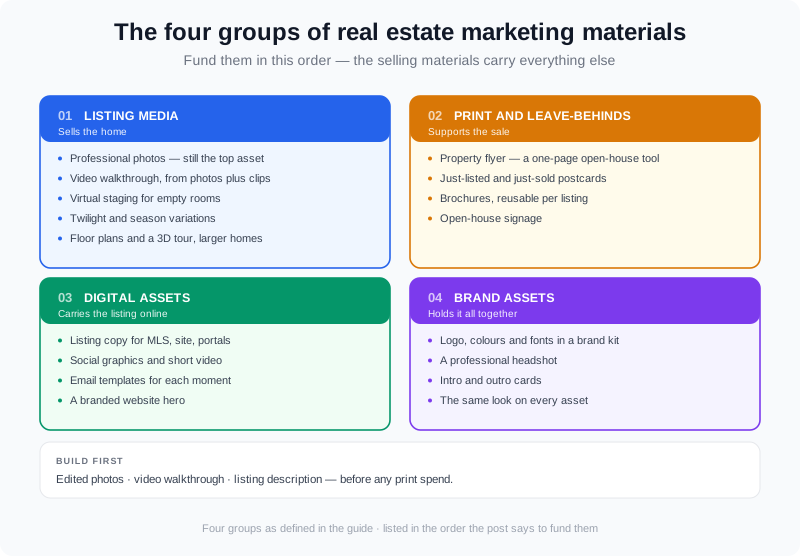
Sort your materials into four groups — listing media, print, digital, and brand — and fund them in that order.
The Materials Worth Your Time, Ranked by ROI
If you can only build a few things this month, build them in this order. The ranking is by how directly each material moves a buyer or seller from "seeing" to "acting," which is the only return that matters for an agent. NAR’s Profile of Home Buyers and Sellers has charted for years how those materials sit in the buyer’s journey — buyers begin online, which is exactly where the photos and video do their work.
| Material | What it does | Priority |
|---|---|---|
| Listing photos (edited) | Decide whether a buyer taps a listing at all | Must-have, every listing |
| Video walkthrough | Highest dwell time; powers social, email, and the listing page | Must-have, every listing |
| Virtual staging | Rescues vacant and dated rooms | High for empty or tired homes |
| Twilight / season effect | Turns a flat exterior into a hero image | High for exteriors |
| Listing copy | Feeds the MLS, portals, and every ad | Must-have, every listing |
| Brand kit (logo, cards, intro) | Makes recycled templates look designed | Build once, reuse |
| Flyers & postcards | Supports open houses and neighbourhood farming | Situational |
| Floor plans / 3D tour | Answers layout questions on bigger homes | Larger homes only |
How to Produce the Video and Photo Materials Without a Big Budget
The two materials at the top of that ranking are the two most agents think they cannot afford. They can. The old cost driver was the shoot and the edit; the newest path removes both. Listing photos can become a finished video: a photo-to-video platform assembles a narrated walkthrough from the images you already have, in about ten minutes, which is the same workflow described in producing a listing video in ten minutes.
VideoGuru is built for exactly this. It turns listing photos into a walkthrough, applies the one-click effects that cover the other materials — virtual twilight, virtual staging, declutter, and restyle — and exports 16:9, 1:1, and 9:16 from a single project, so one listing becomes a landscape video, a feed post, and a vertical Reel without a second edit. You can read the mechanics in how photo-to-video AI works.
Two details matter when you plan the toolkit. First, the photo-to-video route is not photos-only: you can drop in your own drone shots or real-person clips and they are mixed into the same walkthrough. Second, on any paid plan — not the free tier — you can composite your own face and a clone of your voice into that walkthrough, so the presenter-style listings carry your personal brand automatically. There is no separate avatar subscription bolted on top.
Brand Kits lock your logo, colours, fonts, intro and outro cards so every asset comes out consistent without a designer in the loop, and Video Studio lets you update clips, text, and branding without opening the editor. That is the difference between marketing materials you produce once and a toolkit you actually reuse per listing.
| Plan | Price | Videos / cycle | Max resolution |
|---|---|---|---|
| Free | $0 | 2 / month | 720p, up to 15s (watermark) |
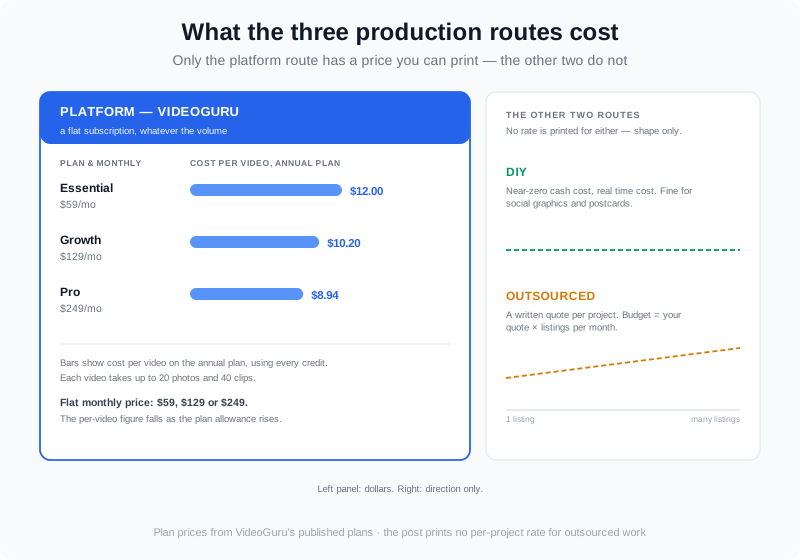
| Essential | $59/mo | ~3 / month | 1080p |
| Growth | $129/mo | ~10 / month | 4K |
| Pro | $249/mo | 25 / month | 4K |
On the annual plans, using every credit works out to roughly $12.00 per video on Essential, $10.20 on Growth, and $8.94 on Pro. Each video takes up to 20 photos and 40 clips, which comfortably covers a full listing and any drone or real-person footage you want mixed in.
What Real Estate Marketing Materials Cost in 2026
Ignore any single "average cost" you see quoted — what a photographer, videographer, or designer charges swings widely by market, home price, and scope, and a number invented for a blog post is worse than useless for your budget. The honest way to price materials is route by route.
- DIY (your phone and a template). Near-zero cash cost, real time cost. Fine for social graphics and postcards; weak for listing photos and video.
- Outsourced. You pay a photographer, editor, or designer a quoted rate per project. Get a written quote for your market and multiply by your listings per month — that is your true annual materials budget.
- Platform (software). A flat subscription that produces the photos-and-video materials in-house. VideoGuru runs $59 to $249 a month before discounts, which on the annual plans comes to the $8.94 to $12.00 per video cited above.
Most agents end up with a hybrid: a photographer for the stills, and a platform for the video, staging, twilight, and social cut that used to require a second vendor and a second invoice. NAR’s Realtor Technology Survey tracks how quickly agents are folding tools like these into their marketing, and the shift is why the software line in the budget keeps growing while the per-listing vendor line shrinks.
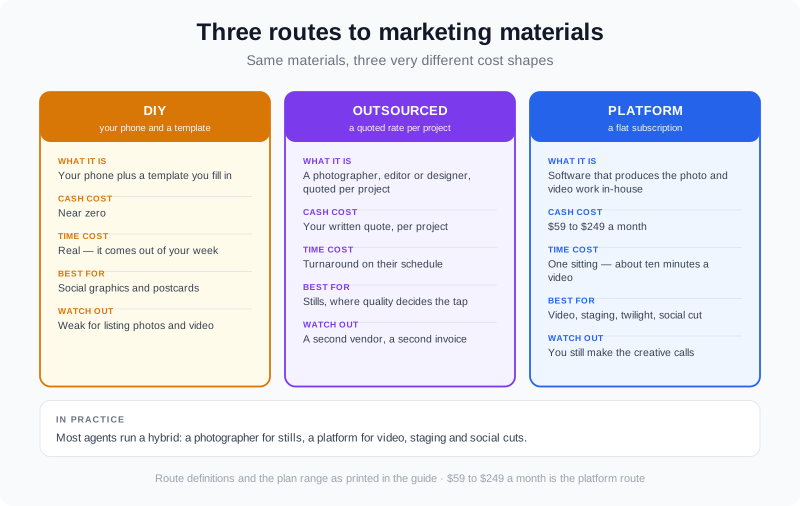
Price your materials by route — DIY, outsourced, or a software platform — instead of chasing a single invented average.
People Also Ask
What marketing materials should a new realtor build first?
Build the three materials that appear on every listing — edited photos, a video walkthrough, and the listing description — before spending anything on print. Those three do the selling. Add a brand kit (logo, colours, fonts, and a headshot) next so everything you make afterwards looks consistent, then layer flyers and postcards on top as open-house and neighbourhood tools.
How much do real estate marketing materials cost?
It depends entirely on the route. Outsourced photography, editing, and design are quoted per project, so the right move is to get a written quote for your market and multiply by your monthly listing count. A software platform replaces the per-project invoices with a flat subscription: VideoGuru runs $59 to $249 a month, or about $8.94 to $12.00 per video on the annual plans. Many agents run a hybrid — a photographer for stills and a platform for video and staging.
Can AI create real estate marketing materials?
Yes, and for the visual materials it is now the fast route. AI photo-to-video turns the listing photos you already have into a narrated walkthrough; one-click effects cover virtual staging, twilight, declutter, and restyle; and on any paid plan you can composite a presenter and a clone of your own voice into the same video. What AI does not replace is your judgement about the property and your market — and any AI-altered image should still be disclosed.
Do flyers and postcards still work for real estate?
They still work, but as supporting materials, not lead generators on their own. A flyer earns its place at an open house where a visitor wants something to take away, and a just-listed or just-sold postcard earns its place when it farms a specific neighbourhood repeatedly. Printed materials sent cold, with no video or follow-up behind them, are the weakest line in the budget.
Do all of my marketing materials need to look the same?
Yes, and consistency is cheaper than it sounds. Locking one logo, one colour set, one font, and one intro and outro card into a brand kit means every flyer, video, and social graphic looks like it came from the same agent without a designer rebuilding each one. That is what turns a pile of one-off materials into a toolkit you actually reuse.
A brand kit plus a platform turns one-off materials into a reusable per-listing toolkit.
Putting It All Together
A complete set of real estate marketing materials is smaller than most agents think: edited photos, a video walkthrough, staging for the rooms that need it, the listing copy, and a brand kit to hold it all together. Build the selling materials first, produce them from the photos you already own where you can, and keep the print as the supporting act. For more ways to stretch each listing across channels, see unique real estate marketing ideas.
You can build the video half of your toolkit from the listing photos you already have. Create a free VideoGuru account to assemble your first walkthrough, and upgrade to any paid plan when you want your own face and voice inside it. The product docs walk through creating a video in ten minutes end to end.