

Chengran (Felix) Guan
2026-09-15 · 11 min read
What Does a Real Estate Video Editor Do (and Do You Still Need One)?
A real estate video editor turns raw property footage into a paced, branded listing video: sequencing clips, cutting dead air, correcting color, mixing music and narration, adding text overlays and titles, and exporting the finished file in every aspect ratio the listing needs. Whether you still need one in 2026 depends on what you already have. If you filmed the property, you either need someone to cut it or you need to cut it yourself. If the home is already photographed, you may not need either — an AI platform can assemble a narrated walkthrough from the listing photos in about 10 minutes. This guide breaks down what the job actually involves, what it costs, and how to decide which of the three routes fits your business.
Most agents search this question twice: first when they get a quote they think is high, and second when their first DIY edit takes a whole evening. Both times the answer is the same shape — it depends on whether you are paying for footage you already have, or whether you need the video itself to be produced from assets you already own.
Key Takeaways
- A video editor is a post-production role, not a production role. Sequencing, pacing, color, audio, graphics, and export — the shoot and the brief are not part of the job unless the editor is hired as a videographer.
- Three routes exist, not two: edit it yourself, hire an editor, or build the video from the listing photos you already have. The third one removes the shoot and the edit at the same time.
- Time is the hidden cost of DIY. A 90-second listing cut is an evening of sequencing and trimming for a novice, and a repeatable 60 to 90 minutes for someone with a template.
- Hiring still wins on footage-heavy projects: drone packages, testimonials, multi-property campaigns, and anything with a shot list that needs taste applied.
- Do the math per listing, not per hour. A per-video cost only matters against how many listings a month you actually produce.
What Does a Real Estate Video Editor Actually Do?
A real estate video editor is the person who takes the material from a property shoot — clips, photos, audio, branding — and delivers the finished listing video. The role is post-production. It starts when the footage lands on a drive and ends when a file is approved and exported.
That distinction matters when you are comparing quotes. A videographer who films and edits is charging for two jobs. An editor alone is charging for one. If a proposal does not make clear which one you are buying, ask before you compare prices.
The Five Stages of a Real Estate Video Edit
- 1. Ingest and select. Review every clip, tag the usable takes, and discard the ones with wobble, dead air, or a lens flare across the kitchen island. On a 40-clip shoot, this is the stage that decides the video's ceiling.
- 2. Sequence and pace. Put the clips in the buyer's walking order — approach, entry, living, kitchen, bedrooms, outdoor — and hold each room long enough to be read. Pacing is the difference between a tour and a teaser.
- 3. Color and exposure. Match white balance across rooms so the paint color does not change shot to shot, recover windows that blew out, and keep the whole video in one consistent look.
- 4. Audio. Music, narration, or both. Whoever cuts the video also levels the music under any voice track, adds room tone to fill gaps, and makes sure the first three seconds are not silent.
- 5. Graphics and export. Address and price overlays, agent card, logo, captions — then export in 16:9 for the listing site and YouTube, 9:16 for Reels and Shorts, and 1:1 if the property is being promoted into feed placements.
Everything after stage five is revision. Ask any editor you consider hiring how many revision rounds are included, because the answer explains most of the price difference between two quotes for the same footage.
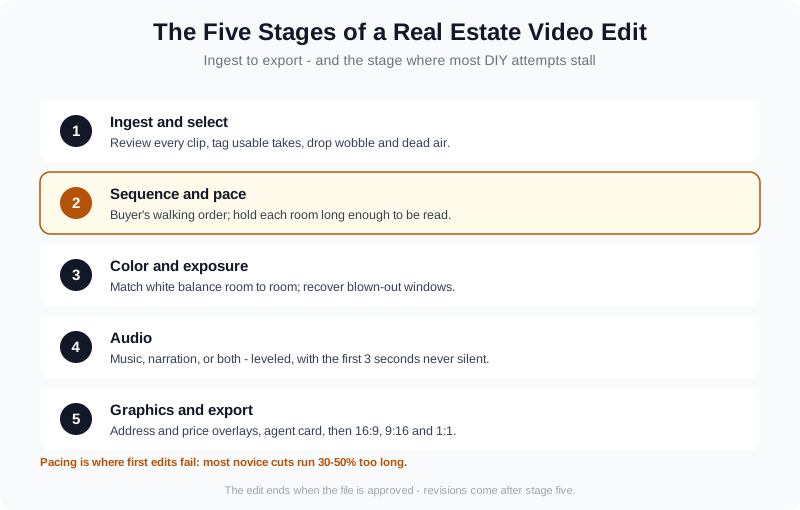
The five stages of a listing edit — and the point where most DIY attempts stall: stage two.
What an Editor Does Not Do (the Four Hidden Jobs)
Most first-time outsourcing problems come from assuming the editor owns work that is actually yours. Four jobs sit outside the edit, and each one costs you a revision if it is skipped.
- The brief. Your route, your must-have shots, your brand colors, your call to action. If the brief is a folder of files, the edit is a guess.
- The selection of the hero shot. Editors find it if they are good, but you know which feature sold the listing. Say it in the brief.
- Compliance. MLS rules on video length, watermarks, and required disclosures are set by your board, not your editor. The MLS video requirements guide covers what changes board to board.
- Distribution. Delivering a file is the end of the edit. Posting it to the listing site, YouTube, and social, with titles and captions, is a separate workflow.
Agents who get burned by outsourcing usually burned on one of these four, not on the cut itself. The breakdown of why outsourcing real estate video editing backfires walks through the recovery step by step.
Do You Still Need a Real Estate Video Editor in 2026?
The honest answer segments by what you already own. Three groups, three different answers.
- Agents who filmed on a phone: you need an editor, or a template and an evening. The footage exists, and the only question is who cuts it. A repeatable template takes the edit from a whole evening to about an hour.
- Photographers and videographers delivering for clients: yes for client-facing work, because the edit is what the client is paying for. Batching the edit is the difference between five and fifty videos a week.
- Agents who only have listing photos: no. The photos are already the raw material, and a photo-to-video platform assembles the tour from them — no shoot, no handoff, no revision loop.
The stakes behind the question are well documented. NAR's Home Buyers and Sellers Generational Trends research has tracked for years how heavily buyers lean on listing media before they ever request a showing, and video is the format that answers the question photos cannot: how the house flows. Whoever produces that video — you, an editor, or a platform — is doing the same job.
That third route is the one most agents miss, because the question is usually framed as "hire or DIY" when the real fork is "do I need new footage at all?" If the photo set is already delivered, the answer is no. An AI real estate media platform sequences the listing photos into a moving walkthrough with music and narration in about 10 minutes. And it takes footage too: your own drone shots or real-person clips are mixed into that same walkthrough, so the material you already have from the shoot gets used rather than parked in a folder.
The same platform covers the stills half of the listing package — one-click virtual staging, declutter, furniture swap, and decor changes for rooms that were photographed empty — which matters when the photo set is doing double duty as both stills and video frames. The photo editing and virtual staging docs show that side of the workflow.
If you want a presenter in the video, an AI avatar generated from a headshot and a real-person voice clone are composited into the property walkthrough itself — one integrated video, not a separate talking-head output. That capacity sits on any paid plan, with no separate avatar subscription bolted on top. You can start that route from the login page.
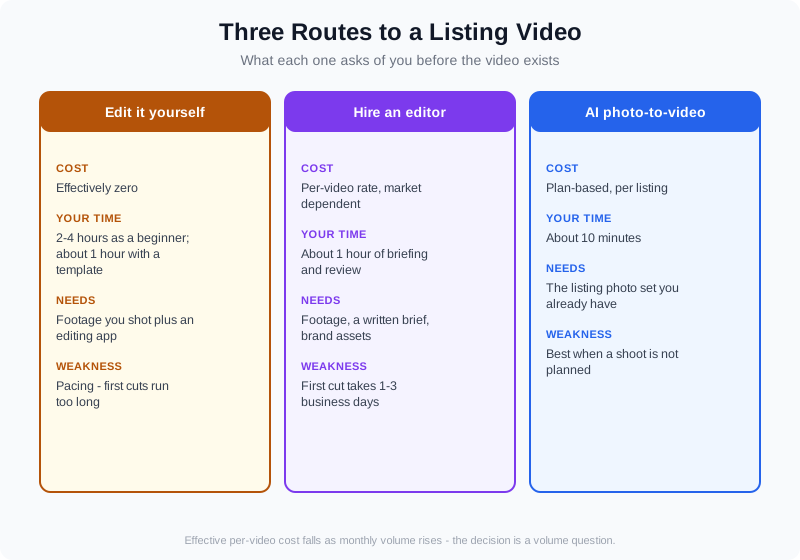
Three routes, compared by what you need to have, what it costs you, and how fast the file lands.
When Hiring an Editor Is Worth It
Hiring is the right call when the material deserves taste you do not have time to apply. In practice, that is a narrower set of listings than most agents assume.
| Situation | Hire an editor | Edit it yourself |
|---|---|---|
| Luxury listing with drone and twilight footage | Yes — the footage cost more than the edit | Only with a locked template |
| Standard resale listing, photos only | Rarely needed | Build from the photos instead |
| Agent intro and testimonial content | Yes — pacing and audio matter | Possible, but slower |
| Multi-property campaign, one brand look | Yes — consistency is the product | Only with a brand kit and a batch workflow |
| Photos delivered, video needed this week | Too slow for the launch window | Build the video from the photos |
The pattern behind the table: hire when the raw material has production value worth protecting, and stop hiring when the listing's raw material is a photo set you already paid for. For the work-rate side of that trade-off, the videographer workflow breakdown shows where the hours actually go and which ones compress.
An orientation to how real estate video work is structured — the formats, the moving parts, and who typically handles which stage.
What Real Estate Video Editing Costs
Editor rates vary far too much by market to quote a single number honestly, so use a model and plug in your own rates. What is consistent is the shape of the trade-off: you are buying hours back at a per-listing price.
| Route | Out-of-pocket | Your time per listing | Best when |
|---|---|---|---|
| DIY edit | Effectively zero | 2 to 4 hours as a beginner, about 1 hour with a template | You filmed it and enjoy the process |
| Freelance or studio editor | Per-video rate, market dependent | About an hour of briefing and review | Production value worth protecting |
| AI photo-to-video | Plan-based, per listing | About 10 minutes | The photos are already delivered |
If you are weighing a platform, the numbers that matter are the per-video cost and how many listings a month you actually produce. VideoGuru's paid tiers start at $59 per month on Essential (~3 videos a month) and run to $249 per month on Pro (25 videos a month, 4K output). On annual billing, using every credit, that works out to about $12.00 per video on Essential ($360/year, ~30 videos), $10.20 per video on Growth ($1,020/year, 100 videos), and $8.94 per video on Pro ($1,788/year, 200 videos). There is a free tier with 2 videos a month at 720p and up to 15 seconds if you want to test the output before paying.
Compare that with a per-video editing rate and the deciding variable is volume. At one or two listings a month, a per-video editor is often the cheaper and better choice. At eight or more, the per-video cost of a plan is the smaller number — and the turnaround stops depending on anyone else's queue. Round out the picture with the realistic time estimates for each route, which breaks the hours down by task.
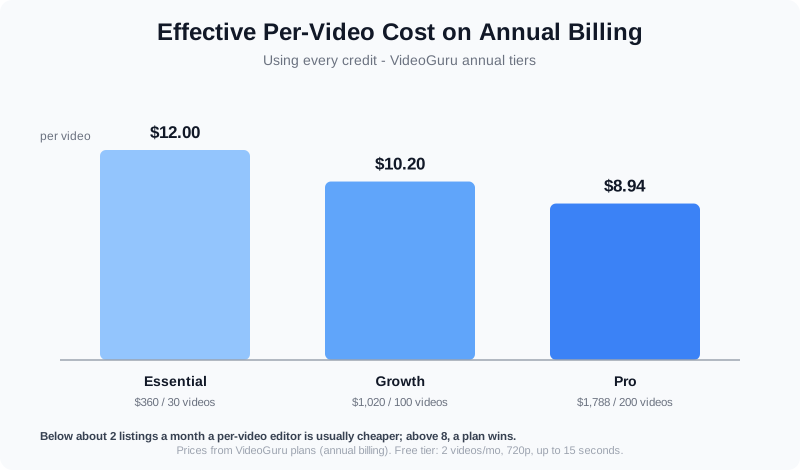
Effective per-video cost falls as volume rises — the point where a plan beats a per-video rate is a volume question.
How to Brief a Real Estate Video Editor
A brief is what separates one revision from four. Send these eight lines with the footage and any editor can work without guessing.
- Address and price overlay text exactly as it should appear, with the spelling of the street and the neighborhood.
- Target length. 60 to 90 seconds for most homes; 2 to 3 minutes only for luxury or acreage.
- The hero feature. One sentence: the view, the kitchen, the lot, the renovation. Editors will weight the cut around it.
- Aspect ratios needed. 16:9 for the listing site, 9:16 for Reels and Shorts, 1:1 for feed placements.
- Music direction. Calm and architectural, upbeat and lifestyle, or no music with narration only.
- Brand assets. Logo files, fonts, colors, and the intro or outro card.
- Revision rounds expected. Get the number in writing before the first cut.
- Delivery format. H.264 MP4 is the safe default for MLS and social uploads.
If you are briefing a platform instead of a person, most of that list is what you set once and reuse: address text, target length, brand kit, and output ratios. That is the real difference between a one-off edit and a repeatable workflow. Whatever route you take, publish the file somewhere it can be found: Google's own video indexing documentation and video structured data guidance spell out what it takes to surface a listing video in search — a descriptive title, a real thumbnail, captions, and surrounding page copy about the same property.
The video marketing strategy guide covers how those repeatable assets fit into a listing's launch week, and the photo-to-video walkthrough covers the platform side end to end.
Frequently Asked Questions
What does a real estate video editor do all day?
A working editor spends most of the day in five tasks: reviewing and selecting footage, sequencing clips into a paced tour, correcting color and exposure across rooms, mixing music and narration, and building graphics and exports. On a standard listing that is roughly two to four hours of work once the footage and the brief are in hand. The visible part — the cut itself — is usually the quickest stage; selection and color matching take the most time.
Do I still need a real estate video editor for my listings?
It depends on what raw material you have. If you filmed the property, you need someone to cut it — an editor, or yourself with a template. If the listing is already photographed and you have no intention of a second shoot, you do not: a photo-to-video platform builds a narrated walkthrough from the existing photos in about 10 minutes, and will mix in any drone or real-person clips you did capture. Photographers and videographers delivering for paying clients should keep an editor in the loop because the edit is the deliverable.
How much does it cost to hire a real estate video editor?
Rates vary too widely by market to quote one figure responsibly, and quotes you receive will depend on footage volume, runtime, graphics, and revision rounds. Treat any quote as a per-listing figure and compare it against how many listings you produce a month. Below roughly one or two listings a month, a per-video editor is usually the cheaper route. Above eight, a plan-based platform typically lands at a lower per-video cost — VideoGuru's annual tiers work out to about $12.00, $10.20, and $8.94 per video at Essential, Growth, and Pro respectively.
Can I edit listing videos myself without experience?
Yes, if you accept the first one or two edits will be slow. Build one template — position of the address overlay, one music bed, one intro card, one export preset — then reuse it forever. The awkward part is not the software, it is pacing: most first edits are 30 to 50 percent too long. Cut until the video feels slightly too short, then add back five seconds.
How long does a real estate video edit take?
A hired editor typically returns a first cut in one to three business days, plus a revision round. A beginner editing their own phone footage should budget two to four hours; with a template that falls toward an hour. A video assembled from listing photos takes about 10 minutes, which is why it fits inside the same day the photos are delivered — during the launch window when the listing gets most of its attention.
Final Thoughts
A real estate video editor is not expensive because editing is hard to learn. It is expensive because good editing is a judgment call made several hundred times: which clip, how long to hold, what to cut. That judgment is worth paying for when you have footage with production value behind it.
But the question most agents are really asking is narrower than it sounds. If your listing is already photographed, the edit is not the bottleneck — the shoot is. Build the video from the photos you have, use the shoot day only for the listings that earn it, and keep an editor for the projects where taste is the product.




