

Chengran (Felix) Guan
2026-09-10 · 14 min read
Real Estate Video Makers Compared:
8 Tools That Fit an Agent's Workflow
The right real estate video maker depends on who is doing the work and how many listings you have to cover. If you are an agent who already has clean listing photos and wants a finished walkthrough the same day, an AI photo-to-video platform such as VideoGuru is the fastest path — a standard listing goes from photo set to exported 9:16 and 16:9 video in about 10 to 15 minutes. If you shoot your own footage and want control over every cut, a free editor like CapCut or a desktop suite like Adobe Premiere Pro fits better. If you are a photographer or media company producing 20 or more videos a month, what you need is batch workflow, not a prettier timeline. And it is no longer photos or footage: VideoGuru mixes your own clips — a drone pass over the lot, a real-person walkthrough — into the photo-driven video, so one platform covers both halves.
Speed is not a vanity metric. The median home sat on the market 28 days in June 2026, according to the National Association of Realtors Monthly Research Update, and existing-home sales were up 2.8% year over year. The NAR Home Buyers and Sellers research has long shown that buyers do most of their filtering online before they ever call an agent, which is exactly the window a listing video is fighting for. When a listing's first 72 hours decide how much attention it gets, a video that ships on day five is a video that ships too late. This guide compares eight real estate video makers by the only thing that matters in practice: which workflow they fit, what they cost, and how long a listing video actually takes with each one.
Key Takeaways
- There is no single best video maker — there is a best fit. Agents who already have listing photos should start with an AI photo-to-video platform — VideoGuru also folds in clips you shot yourself, like a drone pass or a real-person walkthrough, so having your own footage no longer forces you into a template editor; anyone selling cinematic work should stay in a professional editing suite.
- The biggest time difference is at the start, not the edit. Building from photos removes the shoot, the transfer, and the clip-sorting steps that eat the first hour of every manual edit.
- Free tools are genuinely usable, but the cost shows up in hours. CapCut, iMovie, and DaVinci Resolve cost nothing; a first listing video in them typically takes 30 to 120 minutes depending on how polished you want it.
- Listing videos need three exports, not one. Every tool on this list that is worth using gives you 9:16 for Reels and Shorts, 1:1 for feed posts, and 16:9 for YouTube, your website, and email.
- Batch capability is what separates a hobby from a service. If you produce 20 or more videos a month, choose the tool with automation, brand kits, and bulk export — manual editors mathematically cannot keep up.
What "Real Estate Video Maker" Actually Means in 2026
A real estate video maker is any tool that takes the raw material you already have — listing photos, phone clips, drone footage, or a written description — and returns a finished, correctly formatted property video you can post. The category has split into three families, and knowing which family you belong to eliminates most of the confusion:
- AI photo-to-video platforms. You upload the stills from your existing shoot; the platform assembles a paced walkthrough with music, captions, brand elements, and motion. No timeline, no clip sorting. These are the tools built specifically for real estate.
- Template and social editors. Phone or browser apps with ready-made layouts. You drag your photos or clips into a template and adjust text. Cheap, fast once you know the template, and easy to spot if everyone in your market uses the same pack.
- Professional editing suites. Desktop software where you control every cut, transition, and color decision. Maximum craft, maximum time — and the right answer only if video is a paid deliverable for you.
The mistake most agents make is buying the most powerful tool instead of the right one. A subscription to a professional suite does not produce a listing video on a Tuesday afternoon; a workflow that matches how your listing media already arrives does. If your photo package is already in your inbox, that is your raw material, and a photo-to-video AI workflow is the shortest line between it and a published video.
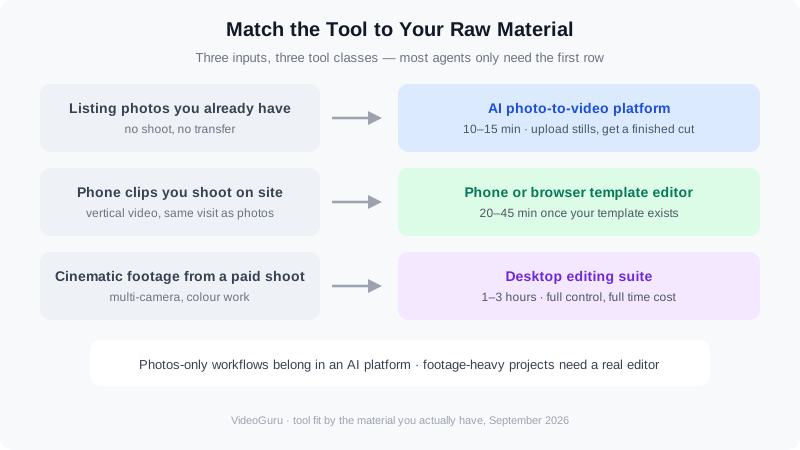
Match the tool to your raw material: photos, self-shot clips, or cinematic footage each point to a different class of editor.
Four Questions That Decide Which Tool Fits
Answer these four questions before you compare features. In our experience reviewing how agents and media teams actually work, they predict the right choice more reliably than any spec sheet.
- What raw material will you have? Photos only, photos plus phone clips, or professionally shot footage? Photos-only workflows belong in an AI platform. Projects heavy on footage used to mean a real editor — but a listing with a drone pass or a real-person walkthrough clip no longer does: VideoGuru takes the clips you already have and mixes them into the same photo-driven video, so you can use real footage without leaving the platform.
- How many listing videos per month? One or two a month fits a template editor. Twenty or more requires batch processing, reusable brand settings, and bulk export.
- Do you want to learn an edit, or buy a result? An editor is a skill you invest in. An AI video platform is closer to a service you run — you review the output instead of building it.
- Who is the video for? Social clips for your own brand tolerate fast, template-driven output. Listing videos for sellers and luxury presentations need pacing, clean transitions, and a look that matches the property's price point.
The 8 Real Estate Video Makers, by Workflow Fit
These eight cover the realistic options for an agent, photographer, or media team in 2026 — from AI platforms that build the video for you to professional suites you drive yourself. They are grouped in the order most agents should consider them.
1. VideoGuru — the AI platform built only for real estate
VideoGuru is an AI real estate media platform: you upload the photos from your existing listing shoot, and it returns a finished property video with pacing, transitions, music, captions, and your brand kit applied — typically in 10 to 15 minutes, with vertical, square, and landscape exports. It is the only tool here designed exclusively for property media, which is why it handles the real estate-specific parts other editors ignore: walkthrough structure, speed ramping for empty rooms, and batch processing across many listings at once. Adobe Premiere Pro or CapCut can do any single video better if you are a skilled editor — but neither knows what a listing is, and neither will produce 30 of them next week. The inputs are not limited to stills, either: upload the clips you already have — a drone pass over the lot, a real-person walkthrough — and it mixes them into the same photo-driven video, on any paid plan. VideoGuru's photo side is worth noting too: the same platform covers one-click photo editing and virtual staging, so the stills you are turning into video can be decluttered, relit, or staged first.
2. CapCut — the free, phone-first default
CapCut is the tool most agents already have on their phone, and for good reason: it is free, it has hundreds of real estate templates, and it exports every aspect ratio you need. You can assemble a listing video from photos or clips, add captions automatically, and publish straight to social. The trade-off is that templates are shared — your video can look like the other agents' videos — and building each one is still manual work, roughly 20 to 45 minutes for a first pass and faster once you reuse a project as your template. A paid tier removes watermarks and unlocks extra effects.
3. Adobe Premiere Pro — the professional ceiling
Premiere Pro is the industry-standard desktop editor, and for a videographer selling cinematic listing films it is still the right answer. You get frame-accurate control over pacing, color, audio ducking, and motion graphics, plus tight integration with the rest of Adobe's suite. What you do not get is speed on a deadline: a polished 60-second listing tour in Premiere is a one-to-three-hour job for someone who knows the software, and considerably longer for someone who does not. For agents filming only occasionally, the learning curve rarely pays back.
4. Adobe Express — the browser middle ground
Adobe Express runs in a browser, which makes it useful on a laptop you borrow at an open house. It has social video templates, brand-kit support, and straightforward resizing between formats, so it is a reasonable step up from a phone app for agents who want consistent branding. It is not a listing-specific tool: there is no property-aware automation, so every video is assembled by hand from a template, and photos-only projects come out as animated slideshows rather than generated motion.
5. Canva — design-first video templates
Canva is the tool of choice for agents who already build their flyers, social posts, and presentations there. Its video editor uses the same template logic, so a listing video can be pulled straight from your existing brand assets, and the free tier covers most social needs. The constraint is the same as any template editor: you are arranging elements by hand, so a listing video takes 20 to 40 minutes, and animated photo slideshows are the ceiling unless you bring in real footage.
6. DaVinci Resolve — pro tools, no subscription
DaVinci Resolve is free in its full-featured version, with a paid Studio edition available as a one-time purchase, and its color grading is the best in the category. For photographer-videographers who shoot their own property footage and want to sell color-controlled cinematic tours, it is the strongest value on this list. It is also the steepest learning curve and the slowest per-listing option, so it makes sense only if video is a paying service line rather than something you squeeze into a listing appointment.
7. iMovie — the Apple starter editor
iMovie ships free on Mac and iPhone and is the least intimidating way to learn basic editing: trim clips, add titles, drop in music, export. For an agent making one or two simple videos a month, it is enough. The limits show up quickly — no brand kit, no batch workflow, no real-estate automation, and no easy path to consistent vertical output across dozens of listings.
8. Descript — text-based editing with AI voice
Descript lets you edit video by editing its transcript, which makes it a strong fit for agent-led, talking-to-camera content: market updates, neighborhood introductions, and listing walkthroughs you narrate yourself. It also generates voiceover from text, useful when you want narration over b-roll without recording it. It is not built for property media specifically, so the listing-specific pieces — scene ordering from a photo set, speed ramping, bulk exports — are manual or absent.
The Comparison Table: 8 Video Makers Side by Side
Time estimates below are practitioner ranges for a standard 30 to 60 second listing video, not vendor claims. Prices are published list prices as of September 2026 and change often — confirm current pricing with each vendor before you buy.
| Tool | Built for real estate | Photos to video | Typical time | Cost | Best for |
|---|---|---|---|---|---|
| VideoGuru | Yes | Yes, automated | 10–15 min | Credit plans | Agents and media teams who need video on every listing — including from drone or walkthrough clips you already shot |
| CapCut | No | Slideshow only | 20–45 min | Free; Pro ≈ $10/mo | Phone-first agents who like templates |
| Adobe Premiere Pro | No | Manual only | 1–3 hrs | ≈ $23/mo | Videographers selling cinematic listing films |
| Adobe Express | No | Basic | 15–30 min | Free tier; Premium ≈ $10/mo | Brand-consistent social cuts from a browser |
| Canva | No | Basic | 20–40 min | Free tier; Pro ≈ $15/mo | Agents already building marketing in Canva |
| DaVinci Resolve | No | Manual only | 1–3 hrs | Free; Studio ≈ $295 once | Photographer-videographers who want color control |
| iMovie | No | Slideshow | 30–60 min | Free (Apple devices) | Beginners making one or two videos a month |
| Descript | No | No | 20–40 min | Free tier; from ≈ $12/mo | Agent-to-camera content and AI voiceover |
What Each Path Costs You in Time and Money
Subscription price is the least important number in this comparison. The real cost of a listing video is hours multiplied by the value of your time, plus whatever you pay per finished asset. A $23 per month editor that consumes three hours per listing is more expensive than a credit-based AI platform that returns the same listing in fifteen minutes — especially at agent commission rates.
A useful way to model it is effective cost per delivered video. Take your hourly value, multiply by the typical time from the table above, and add any per-asset fee. If you bill your time at $150 an hour, a manual edit at two hours carries an implied $300 cost before you touch a subscription. The same listing through an AI photo-to-video workflow, including review time, lands far below that. That is the calculation that decides whether you can afford to put video on every listing or only on the luxury ones — and it is the reason the DIY versus AI cost comparison comes out the way it does at volume.
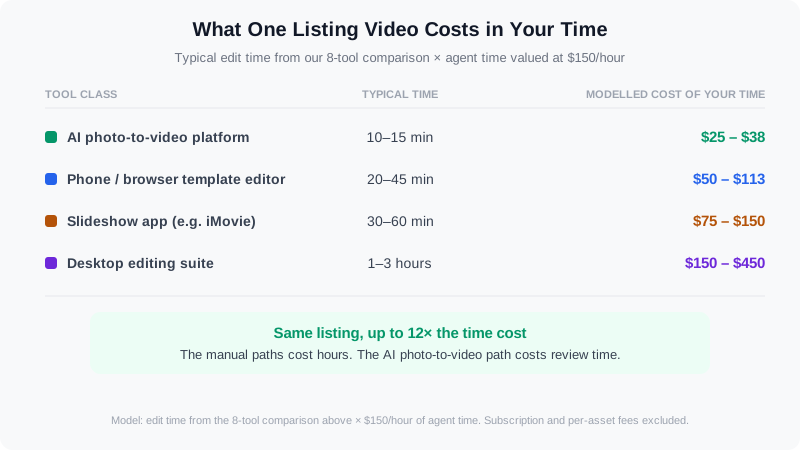
Modelled cost per delivered video: the manual paths cost hours, the AI path costs review time.
What Is the Fastest Way to Make a Real Estate Video?
The fastest method is to skip filming entirely and build the video from the listing photos you already have, using an AI platform that assembles the edit for you. That removes the shoot, the file transfer, the clip sorting, and the timeline work — by far the largest blocks of time in any manual workflow. In practice, a photo set plus a brand kit produces a finished listing video in about 10 to 15 minutes, which is why the 10-minute AI listing video workflow has become the default for agents who want video on every door.
If you must shoot, the second-fastest path is a template editor on your phone: capture vertical clips during the same visit as your photos, then drop them into a saved project. That lands around 20 to 45 minutes once you have built your own template, and it is the right choice when your differentiator is your on-camera presence rather than the property alone.
New to real estate video? Watch the basics and workflow orientation first, then decide which class of tool your listings need.
If You Shoot Listings for a Living: The Photographer and Media-Company Angle
The calculation changes when listing media is your business rather than your marketing. A photographer or media company shooting 20 to 50 properties a month cannot absorb manual editing at any subscription price, because the bottleneck is not software cost — it is the hours, and the hours are the product. What matters at that volume is batch behavior: upload a folder per property, apply the same brand kit, export every format, and move on.
This is also where offering video stops being a separate service line with separate gear. If your stills are already clean, an AI platform turns the same shoot into a video deliverable, which means you can quote photo-plus-video packages without a second site visit or a second edit pass. Media companies that have already made that move report the video add-on as the margin, not the labor — see how photographers doubled revenue by adding video to existing shoots.
The photo side of the platform matters here too. Before the video is built, the same stills can be decluttered, relit, or virtually staged — and staged listings consistently outperform empty ones in engagement. One platform covering both means one upload, one brand kit, and one invoice, instead of one tool for virtual staging and another for the walkthrough. If you are weighing whether to add video services at all, our analysis of what agents actually want from a video editing tool is the demand-side view.
Frequently Asked Questions
Do I need a desktop editor to make real estate videos?
No. Desktop suites like Adobe Premiere Pro or DaVinci Resolve matter when you are selling cinematic, custom-cut listing films and have the time to learn them. For standard listing walkthroughs, social reels, and market updates, a browser-based AI platform or even a phone editor produces a publishable result with a fraction of the effort. The one case where desktop software still earns its place is a listing where the footage itself is the differentiator — drone-heavy estates, architectural films, and luxury presentations above $2M, where buyers expect craft.
Can I make a listing video from photos I already have?
Yes, and for most agents this is the highest-return workflow in the entire category. A standard listing photo set — 20 to 35 edited stills covering the exterior, main living areas, kitchen, primary suite, and any standout feature — is enough for an AI platform to assemble a paced walkthrough with motion, music, captions, and branding. You do not need new gear, a second appointment, or a videographer. The two things that matter are photo quality and coverage: a dark, cluttered, or incomplete set limits the output no matter which tool you use, which is why cleaning up the stills first is usually worth the extra step.
How long should a listing video be?
Between 30 and 60 seconds covers the overwhelming majority of listing videos. That window is long enough to walk a viewer through the main living spaces and short enough to keep completion rates high on Reels, Shorts, and feed placements, where most listing video gets watched. Longer cuts — 90 seconds to three minutes — work for luxury properties, new construction with a story to tell, and narrative-driven walkthroughs where buyers will keep watching. Whichever length you choose, front-load the best two shots in the first three seconds, because that is where viewers decide whether to keep going — Google's own video marketing guidance treats those opening moments as the whole game.
If you want to test the fastest path without buying anything, start a free VideoGuru project, upload the photos from your next listing, and time yourself from upload to export. For most agents the first video is the moment the tool question answers itself — and from there, our roundup of the best AI video editors for real estate covers the feature-level differences between platforms.
The Verdict
There is no universal winner, but there is a clear default. If you are an agent with listing photos in your inbox and a calendar that will not slow down, an AI real estate media platform such as VideoGuru is the fastest way to get a real listing video from material you already paid for. If your differentiator is on-camera content, VideoGuru can put you in the video itself — an AI avatar from a headshot plus your own cloned voice, with real-person clips mixed in alongside the property shots — while CapCut and Descript remain the pick when you want manual cut-by-cut control. If you sell cinematic listing films, stay in Premiere Pro or DaVinci Resolve and price the hours accordingly. And if you produce media at scale, the only question that matters is whether your tool can do the next 30 listings without you — because at 28 days median time on market, the agent who publishes video first is the one buyers see.




