

Chengran (Felix) Guan
2026-10-02 · 12 min read
Real Estate Video Marketing Scripts:
10 Templates You Can Copy
Real estate video marketing scripts are the repeatable templates that turn a listing into a watchable video: a hook in the first three seconds, a short walk through the property, one piece of proof, and a clear call to action. You do not have to write from scratch every time — ten script templates cover almost every situation an agent or photographer faces. The fastest way to use them is to write the script once, then let an AI photo-to-video platform assemble the finished video from photos you already own, in about 10 minutes, in 16:9, 1:1 and 9:16.
Key Takeaways
- A script is a structure, not a performance. Every real estate video that holds attention runs the same four beats: hook, walkthrough, proof, call to action.
- Ten templates cover almost everything. New-listing tease, walkthrough, market update, just-sold, neighborhood, open house, agent intro, price improvement, testimonial, and objection-handling.
- You can write one script and cut it three ways. The same core script reshapes into a 15-second Reel, a 60–90 second walkthrough, and a long-form YouTube upload.
- Week-one time goes into the template; week-ten is nearly free. Agents who keep a swappable script library stop opening a blank page before every listing.
- AI removes the shooting step, not the writing. VideoGuru turns a listing photo set into a walkthrough in about 10 minutes, and a cloned voice reads your script — so the words you write are the part that still matters.
The Anatomy of a Real Estate Video Script
Before the templates, learn the four beats. Almost every effective listing or marketing video is some arrangement of these, and once you can see them you can write any of the ten scripts below in a few minutes.
- 1. The hook (0–3 seconds). One line that names the property and the single most interesting thing about it. “A 1920s bungalow with a backyard most buyers never see” beats “Welcome back to my channel.”
- 2. The walkthrough (3–40 seconds). Move the viewer through the property in the order a buyer walks it: entry, main living space, kitchen, primary suite, standout feature, exterior. One room, one sentence.
- 3. The proof (one beat). A number, a detail, or a line of social proof that makes the claim believable — days on market, price per square foot, a recent comparable, or a past client’s result.
- 4. The call to action (last 5 seconds). Name exactly one next step: “Reply ‘tour’ for a private showing,” “Link in bio for the full listing,” or “DM me for the price.” One CTA per video.
That is the whole engine. The word “script” scares people who picture a teleprompter, but a real estate script is closer to a shot list with talking points. You can read it word-for-word or keep it as four bullets in your phone’s notes app — the structure is what does the work. If you want the deeper strategy behind which videos to make at all, the real estate video marketing strategy guide lays out the calendar this library plugs into.
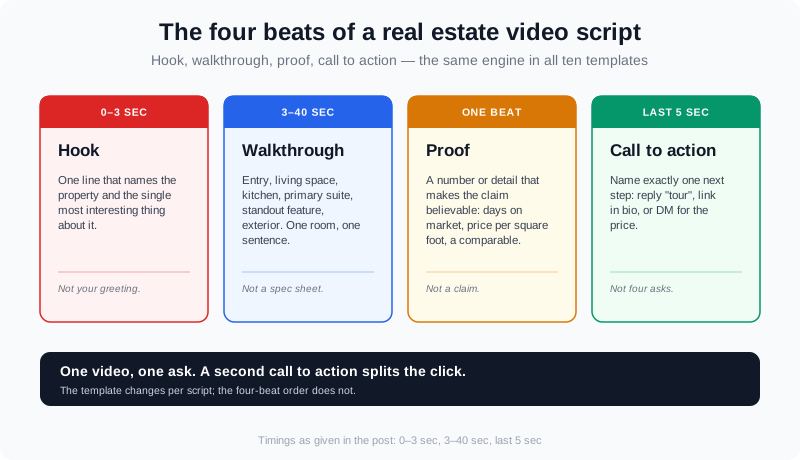
Every script in this post is a rearrangement of four beats: hook, walkthrough, proof, and one call to action.
10 Real Estate Video Marketing Script Templates
Copy these, swap the bracketed details for your listing, and keep the structure. They are written for a single presenter on camera, but every one works as a voiceover track over an AI walkthrough built from listing photos — which is how most agents now produce them without a second shoot.
1. The New-Listing Tease (15 seconds)
“Just listed on [street]. [One standout feature — the view, the acreage, the renovation]. [Beds] beds, [baths] baths, [square feet] square feet, listed at [price]. If this looks like your next home, comment ‘tour’ and I’ll send the full video.” This is the highest-frequency script in the set — it is built to be posted the day a listing goes live.
2. The 60-Second Walkthrough
“Here’s what [X] dollars buys in [neighborhood] right now. [Hook line.] The front door opens onto [feature]. The living space faces [light or view]. The kitchen has [the one upgrade that matters]. The primary suite gives you [detail]. Outside, [the feature buyers ask about]. [Price and one line of proof.] One private tour is all it takes to know — tap the link to book it.” Keep one sentence per room. The full walk-through video playbook breaks down the shot order if you are filming on a phone.
3. The Market Update
“If you own a home in [city], here are the three numbers that matter this month. Inventory is [up/down] [X] percent, days on market is [X], and the median is [price]. What that means for you: [one plain-English takeaway]. Thinking about [buying or selling] this quarter? Message me the word ‘numbers’ and I’ll send your street’s report.” This is the script that wins listings before they are listed. The market update video guide shows how to source the figures so you never guess.
4. The Just-Sold / Proof Video
“This home sold in [X] days for [X] over asking. When the seller called me, the concern was [objection]. We [the specific thing you did — pre-market prep, a twilight photo set, an open-house push]. If your home has sat longer than you expected, send me the address and I’ll tell you honestly what I’d change.” Proof videos answer the quiet question every seller has: will this actually work for me?
5. The Neighborhood / Lifestyle Video
“Here’s the truth about living in [neighborhood]: [three concrete things — commute time, a named park or market, a school district by name]. This listing sits [relationship to those anchors]. Want the full area guide and the walkthrough in one video? It’s linked below.” Describe places and distances, not people. Keep lifestyle claims about amenities, never about who lives there.
6. The Open-House Invitation
“Open house this [day], [time], at [address]. Three reasons to stop by: [feature one], [feature two], and [feature three]. It is a [X]-minute drive from [landmark]. If you cannot make it, send me a message and I’ll walk you through it on video instead.” Post it 48 hours out and again the morning of — the same script, two pushes.
7. The Agent Intro (Brand Video)
“I’m [name] with [brokerage], and I work with [buyers or sellers] in [area]. What that looks like: [how you work differently — weekly video tours, a data report every month, a staging partner]. I keep it simple — one promise: [your single promise]. If that sounds like the agent you have been looking for, follow along.” This one has no listing in it, so it earns its place by being the pin at the top of every profile.
8. The Price-Improvement / Repositioning Video
“New price at [address]. Here is why this one is worth a second look: [the value math — price per square foot versus the block], plus [a feature that is hard to show in stills]. At [new price], the buyer pool just got wider. Book a showing before the weekend.” Lead with the value, never with an apology for the reduction.
9. The Client Testimonial
“My name is [client], and I worked with [agent] to sell our home in [area]. What surprised me was [the specific thing that helped]. We closed in [timeframe] at [outcome]. If you are on the fence, just make the call.” Ask the client these four questions on camera and you will get this script without them having to prepare a word.
10. The Objection-Handling Video
“The most common question I get about [buying now / selling in this market / new construction] is [the real objection]. Here is the honest answer: [your take, backed by one number]. It is not a reason to wait — it is a reason to [the specific next step]. Comment your biggest question and I will answer it in the next video.” Objection videos earn the most saves and replies, because they say the quiet part out loud.
One Script, Three Formats
You wrote the script once. Now cut it three ways instead of writing three scripts. This is where a script library saves the most time, because the platform you publish to decides how long the script should be — not your creativity.
| Format | Length | What you keep from the script |
|---|---|---|
| Reels / Shorts / TikTok | 15–30 sec (9:16) | Hook + one standout feature + CTA. Cut the tour to three rooms. |
| Feed / MLS / website | 45–60 sec (1:1 or 16:9) | Hook + full walkthrough + proof + CTA. |
| YouTube / listing page | 90–120 sec (16:9) | Everything, plus the neighborhood beat and a longer proof section. |
Because the underlying script is the same, you are not producing three videos so much as exporting three aspect ratios of one. VideoGuru renders 16:9, 1:1 and 9:16 from the same project, which is why the writing — not the editing — is the bottleneck worth solving. For the platform-by-platform breakdown, see Real Estate Reels: The 2026 Playbook for Agents.
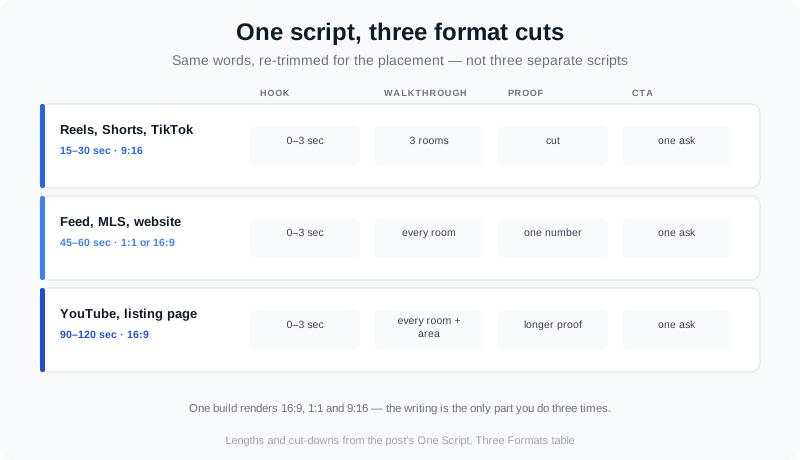
The same core script trims to a 15-second Reel, holds together at 60 seconds for the feed, and expands on YouTube.
7 Script Mistakes That Kill Watch Time
- Talking before you show. The property or the promise goes in the first three seconds, not your greeting.
- Reading the spec sheet. Nobody watches for the water-heater brand. Lead with the one feature that made you want to shoot the home.
- Too many calls to action. One video, one ask. “Follow, like, share AND book” gets you none of them.
- Describing people instead of property. “Perfect for families” and “safe neighborhood” are fair-housing problems, covered below.
- No borrowed credibility. Add one real number — days on market, price per square foot, a comparable — to turn a tour into proof.
- Writing long, shooting short. Write the 90-second script, then cut it to 30 seconds for the Reel rather than rewriting it.
- Never reusing a script. A template you save is a future listing you do not have to think about. Keep every one in a single notes file.
Arguably the most expensive mistake is the fourth one. Fair housing is enforced at the federal level, and a scripted line is still a line — the HUD Fair Housing office and NAR’s fair housing guidance are the two references to keep open while you write. Describe the property, not the ideal resident.
How AI Fits the Script Workflow
The traditional reason agents skip video is not the writing — it is that a script implies a shoot. A shoot means a second appointment, a videographer, a booking window, and a wait for the edit. Every one of those steps is now optional, and the script is what ties the fast path together.
The shift is already measurable. NAR’s 2026 Technology Report found that 48% of agents now use AI at least once a week, and 81% of those adopters cite saving time as the reason. Both figures come from the NAR 2026 Technology Report, the annual read you can follow through the NAR Realtor Technology Survey. Video production is exactly the kind of task agents are offloading first.
Here is the workflow that removes the shoot without changing the script you just wrote:
- Write the script as your voiceover. VideoGuru reads your script with a cloned real-person voice, so the words you write are what the viewer hears. Voice cloning and an AI avatar built from an uploaded headshot are available on any paid plan (Essential, Growth or Pro) — there is no separate avatar subscription on top.
- Turn the listing photos into the walkthrough. The platform assembles a property walkthrough from the photo set you already paid for, in about 10 minutes. If you did capture footage — a drone pass or a real-person clip — it mixes into that same walkthrough rather than becoming a separate edit.
- Paste the presenter into the video. The avatar and the cloned voice are composited into the walkthrough itself, so you get one integrated video, not a talking-head clip to splice in later.
- Match the photos to the script. The photo side of the same platform does one-click virtual staging, declutter, furniture swaps and decor changes, so the stills in the walkthrough support the story the script tells.
- Apply the look the script calls for. One-click effects — virtual twilight, virtual staging, renovation reveals, seasonal change, lifestyle scenes, camera motion — give the walkthrough the mood the writing sets up.
Put differently: the script stays yours and stays human, and the parts that used to require a crew — the shoot, the narration, the edit, the re-export for each platform — collapse into a few minutes of work. If you want to see the same idea applied to the stills themselves, the guide to content that converts walks through the photo and video pairing.
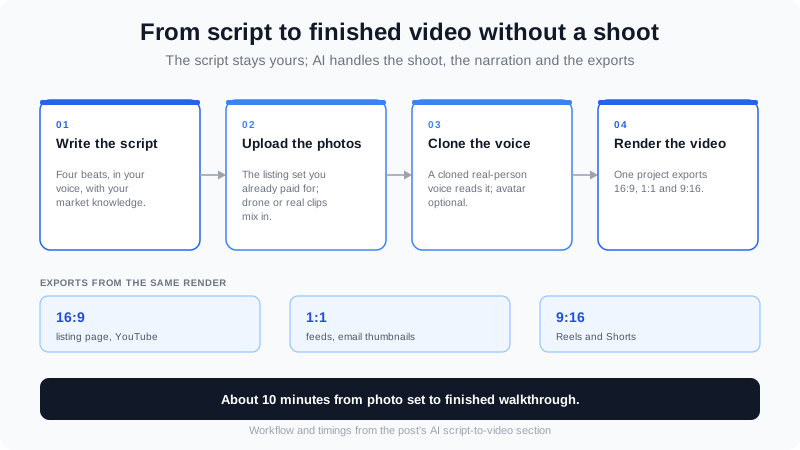
The script is still the only part you write — AI handles the shoot, narration, and per-platform exports around it.
If you would rather hear the format strategy than read it, this is the decision underneath every script length you choose:
How to Tell a Script Is Working
A script is a hypothesis. Judge it on three numbers, not on whether you liked watching it back.
- Three-second retention. If viewers drop before second three, the hook — not the footage — is the problem. Rewrite the first line first.
- Completion rate. A script that holds to the end is one the walkthrough beats are in the right order. If completion is low but the hook holds, tighten the middle section.
- Saves and shares. For proof, testimonial and objection videos, saves are the truest signal — people keep the ones they intend to act on. High saves with low comments usually means the CTA is too vague.
Keep a simple log: date, listing, script used, and those three numbers. After ten videos you will know which of the ten templates your market actually responds to, and you can stop guessing.
Frequently Asked Questions
How long should a real estate video be?
Match length to platform, not to a single rule: 15–30 seconds for Reels, Shorts and TikTok, 45–60 seconds for the feed, MLS and your website hero, and 90–120 seconds for YouTube and a dedicated listing page. Write one script and cut it to each length rather than writing three.
Can you use AI to generate a real estate video script?
Yes, and AI now covers the production around the script too. Agents write the script themselves or with an AI assistant, then use a platform like VideoGuru to turn listing photos into a finished walkthrough in about 10 minutes, add a cloned voiceover reading the script, and export it in 16:9, 1:1 and 9:16. The writing still benefits from your market knowledge — the shoot and edit are what AI removes.
Do I need to appear on camera to use these scripts?
No. Every template works as a voiceover over a photo-built walkthrough, and the AI avatar / voice-clone route lets you present without filming at all. If you are comfortable on camera, you can use the same scripts with footage you shoot yourself — and you can mix real clips, such as a drone pass, into the same walkthrough.
What should a real estate video script avoid?
Avoid describing people rather than property. Lines like “perfect for families,” “safe neighborhood,” or “walking distance” create fair-housing exposure. Describe the home, the amenities and the location facts, and keep one call to action per video.
How much does it cost to produce these videos?
On VideoGuru, paid plans run from Essential at $59/month to Pro at $249/month monthly, or roughly $12.00, $10.20 and $8.94 of effective per-video cost on the annual plans when you use every credit. AI avatar and voice cloning are included on any paid plan — there is no separate avatar subscription. The free tier covers 2 videos a month at 720p with a watermark.
Putting It All Together
A real estate video marketing script is the cheapest leverage in your marketing. Write the four beats once, save all ten templates, and swap the brackets for each listing. Then use AI for the part that used to cost you a shoot — turning the photos you already have into a walkthrough, with your script as the narration.
Start with the two scripts you will post this week: the new-listing tease the day a property goes live, and one proof or market-update video to feed the pipeline. Save both, log their numbers, and let the data tell you which of the ten to make next. To put the whole library to work from a single photo set, create your first walkthrough in VideoGuru, and see the product docs for the exact workflow.
The agents who win with video are not the ones with the best cameras. They are the ones with a script for every situation and a fast way to turn it into a finished video.