
Chengran (Felix) Guan
2026-10-03 · 9 min read
Real Estate Video Presentations:
How to Pitch Listings With Video
A real estate video presentation is a short, scripted video you bring to the listing appointment that shows a seller exactly how you would market their home — and then keeps working for you on social media long after the meeting ends. It is not a 10-minute listing pitch read off a slide deck. It is a 30–90 second story: a hook, a walk through the property, one piece of proof, and a clear next step. According to NAR's technology research, 73% of homeowners say they are more likely to list with an agent who uses video. The most efficient way to build one is to script it once and let an AI photo-to-video platform turn listing photos you already own into the finished video in about 10 minutes.
Key Takeaways
- Video is a listing-winning tool, not just a marketing tool. 73% of homeowners say video makes them more likely to list with an agent (NAR).
- Keep it to 30–90 seconds. A listing pitch video earns attention with a fast hook, a short walkthrough, one proof point, and a single call to action.
- Five formats cover almost every appointment. Appointment reel, "how I'd market your home" walkthrough, seller testimonial, neighborhood spotlight, and data story.
- You do not need footage to make one. Listing photos are enough — and if you do have drone or real-person clips, you can mix them into the same video.
- Produce once, reuse everywhere. One 60-second presentation video cuts into Reels, a YouTube upload, and an email follow-up.
What Is a Real Estate Video Presentation?
A real estate video presentation is the video version of your listing pitch. Where a printed listing presentation argues with slides and statistics, a video presentation shows: here is a property, here is how it will look on screen, and here is the plan that gets it in front of buyers. You can play it at the kitchen table, text it to a seller before the appointment, or post it as proof of your marketing on Instagram.
It is also the fastest way to answer the question every seller is really asking: what will you do for my home that another agent won't? A generic agent says "I'll market it online." A prepared agent plays a 60-second video that already looks like the campaign. The appointment stops being a comparison of commission rates and becomes a demonstration of results.
If the word "presentation" makes this sound like a formal slide deck, drop that. A real estate video presentation should look like your best social content: tight, visual, and built to be watched on a phone. The format is what makes it feel effortless instead of salesy.
Why Video Wins the Listing Appointment
Sellers choose an agent on trust, and trust is easier to win when they can see the work. NAR's ongoing market research and its Realtor Technology Survey and its ongoing technology research keep returning the same signal: video moves sellers. The stat agents quote most is that 73% of homeowners say they are more likely to list with an agent who uses video to market their home. In other words, most of the room is already leaning toward the agent who shows the work.
There is a second, quieter advantage. Most agents still do not use video on every listing, because they assume it is expensive or slow. That gap is exactly where a prepared presentation wins: the seller sees a finished, on-brand video while the other agents show screenshots of their website. For a full breakdown of why video converts — for listings and for your personal brand — see our guide to real estate video content that converts.
| What the seller weighs | Slide-deck pitch | Video presentation |
|---|---|---|
| First impression | A promised plan | A finished example |
| Time to absorb | Several minutes of talking | 30–90 seconds |
| Reusable by the seller | No | Posts directly to social |
| Effort to prepare | Build slides each time | Script once, reuse the template |
The Anatomy of a Listing Pitch Video
Every effective presentation video runs on the same four beats, in the same order. Skip one and the video loses the seller.
- 1. The hook (first 3 seconds). Open on the property, not on your face and not on a logo. A moving exterior shot with one line of on-screen text — "This is how 123 Maple would look to 100 buyers tonight" — earns the next ten seconds.
- 2. The walkthrough (20–60 seconds). Show the property the way buyers will see it: room by room, in a logical path, with your voice explaining what the camera cannot. This is the part that proves you can make their home look good.
- 3. The proof (10–20 seconds). One number, one testimonial line, or one recent result. "Last month this same approach booked 14 showings in four days." One proof point, not five.
- 4. The call to action (last 5 seconds). Tell the seller the next step: "If you want to see your listing look like this, reply to my text." Never end a presentation video on a logo with no instruction.
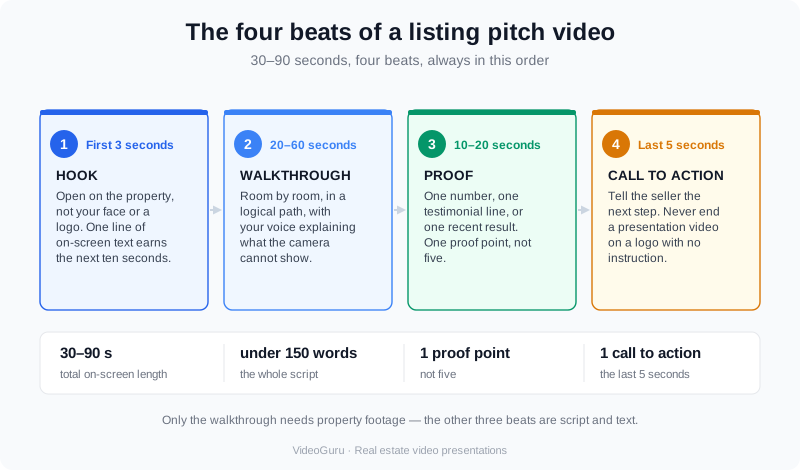
The four beats of a listing pitch video: hook, walkthrough, proof, call to action.
Notice that only the walkthrough needs property footage. The other three beats are script and text, which is why you can build this format even before you have a new listing to show.
Five Video Formats for Your Next Listing Appointment
You do not need a new concept for every seller. Rotate five formats, and match each to the person across the table. If you would rather start from ready-made words, our real estate video marketing strategy break each format into copy-and-paste templates.
- 1. The appointment reel (30–45s). Your single best recent listing, cut fast to music. Use it as proof for a seller who cares about presentation.
- 2. The "how I'd market your home" walkthrough (60–90s). A narrated plan over a sample property. Best for the seller who is comparing agents on strategy.
- 3. The seller testimonial montage (45s). Three past sellers, one sentence each. Best for the trust-first seller.
- 4. The neighborhood spotlight (60s). Lifestyle and community over property detail. Best for a seller who loves their area and worries about who buys next door.
- 5. The data story (45–60s). Recent sales and days-on-market for their price band. Best for the analytical, investor-minded seller.
Walk through a finished listing presentation video, beat by beat.
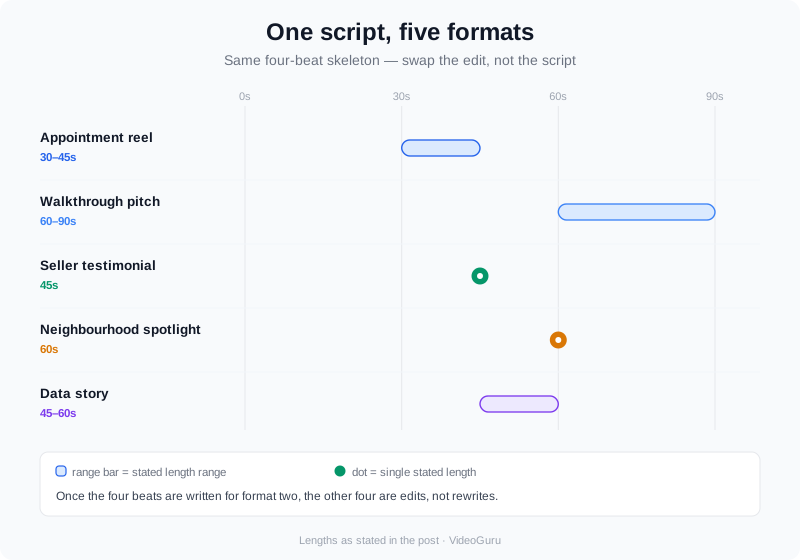
One script, five formats: appointment reel, walkthrough pitch, testimonial, neighborhood spotlight, and data story.
The five formats share a script skeleton, which is the point. Once you have written the four beats for format two, the others are edits, not rewrites. For a deeper look at building a video that holds attention eye-to-eye with a seller, see real estate video brochures and how they are used in practice.
How to Build One From Photos You Already Own
The reason most agents never make a presentation video is production time. That step is now optional. VideoGuru is an AI real estate media platform that turns a set of listing photos into a finished walkthrough video — with motion, transitions, music, text, and a voiceover — in about 10 minutes. You do not have to book a shoot, and you do not have to wait for a new listing to make a sample.
- Gather photos you already own. A recent listing is ideal, but any set of good interior and exterior shots works as a sample.
- Write the four beats. Hook, walkthrough, proof, call to action. Keep the whole script under 150 words.
- Drop the photos in and generate. The platform assembles a walkthrough automatically. If you do have footage — a drone pass over the lot, a selfie intro, a client testimonial clip — you can add those clips into the same video rather than leaving them on your phone.
- Add your face and voice. From a single uploaded headshot, VideoGuru generates an AI avatar, and it can clone your real voice to narrate. The presenter is composited into the property walkthrough, so the result is one integrated video — not a talking-head clip bolted onto a slideshow. This is available on any paid plan, with no separate avatar subscription.
- Polish the stills. Beyond video, the same platform handles your listing photography: one-click virtual staging for empty rooms, declutter, restyle, furniture swap, and virtual twilight. The AI that powers your video walkthrough also cleans up the photos you feed it.
- Export for every screen. Render in 16:9 for YouTube and the appointment TV, 1:1 for feed posts, and 9:16 for Reels and Shorts from the same project.
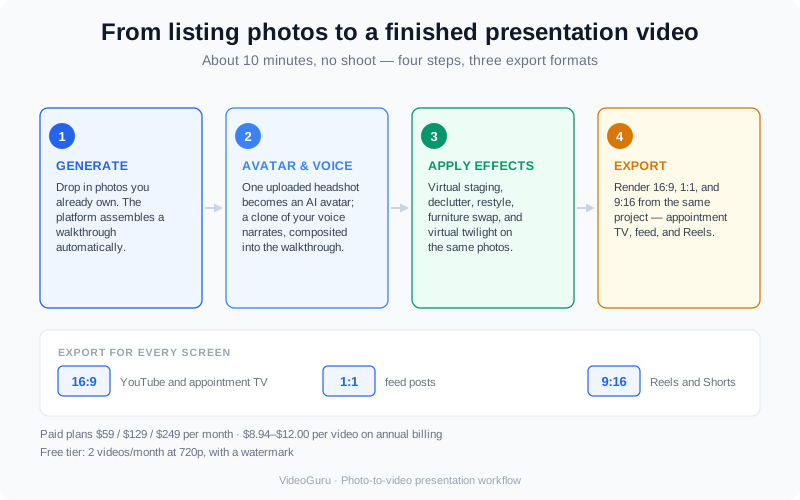
From listing photos to a finished presentation video: generate, add your avatar and voice, apply effects, export in three formats.
On cost, it helps to anchor to real numbers. VideoGuru's paid plans start at $59/month (Essential), run to $129/month (Growth) and $249/month (Pro), and annual billing brings the effective per-video cost down to roughly $8.94–$12.00 when you use the credits. The free tier gives you 2 videos per month at 720p with a watermark, which is enough to build a sample presentation video before you commit. You can see the full workflow in the product docs.
Mistakes That Lose the Appointment
A presentation video can just as easily cost you the listing if it breaks one of these rules.
- Leading with your logo and a music sting. Sellers do not care about your brand for the first three seconds. Open on the property.
- Making it last five minutes. The seller is deciding in the first few seconds whether to keep watching. Cut the middle until the video is 90 seconds or less.
- Showing a property that looks nothing like theirs. Match the sample to the seller's price band and style, or the proof backfires.
- No call to action. If the video does not tell the seller what to do next, it ends as entertainment instead of a pitch.
- Ignoring fair-housing and advertising rules. Language and visuals in your marketing are covered by the Fair Housing Act. Keep scripts neutral on race, religion, family status, and disability, and follow the HUD fair housing guidance and your local MLS advertising rules.
- Promising a result you cannot prove. One true proof point beats three invented ones. Cite numbers you can back up or leave them out.
One more: do not reuse the same video for every seller. Sellers can tell when the "custom" presentation was clearly made for someone else. Swap the opening property shot and the proof at minimum, even if the rest of the structure repeats.
Frequently Asked Questions
How long should a real estate video presentation be?
Keep it between 30 and 90 seconds. The strongest appointment videos land around 60 seconds: a 3-second hook, a 30–60 second walkthrough, one proof point, and a 5-second call to action. Anything past 90 seconds gets skimmed, and a listing appointment is a conversation, not a screening.
Do I need video footage to make a listing presentation video?
No. Listing photos are enough — an AI photo-to-video platform turns a photo set into a moving walkthrough with voiceover, music, and text. If you already have footage, you can add your own clips (drone shots, a self-intro, client testimonials) into that same video, but you never have to shoot anything to make one.
What if I'm a newer agent with no big listings yet?
Use a sample listing or your own home. The point of a presentation video is to show the format and the quality, not to prove volume. A clean 60-second walkthrough of any well-shot property communicates your marketing standard, and you can add real client results as they come. Pair it with a listing video shot list so the first listing you shoot looks professional.
Can I use the same video for Instagram and the listing appointment?
Yes, and you should. Build the 16:9 version for the appointment and export a 9:16 cut for Reels and Shorts from the same project. One script becomes a pitch, a social post, and an email follow-up, which is how a single 10-minute build earns its time back.
Does an AI avatar replace me in the video?
No. The avatar is generated from a headshot you upload and narrates with a clone of your own voice, then composited into the property walkthrough so it is one integrated video. It is a stand-in for a shoot day, not a substitute for you — and it is included on any paid plan, with no separate avatar subscription. Remember that AI avatars should not be presented to buyers in a way that misleads them about who they are talking to; follow your brokerage and MLS disclosure rules.
Final Thoughts
A real estate video presentation is not a bigger project than a listing pitch — it is a shorter, sharper one. Script the four beats once, build the sample from photos you already own, and let the video do the arguing while you sit across the table. NAR's own research says most sellers are already waiting for an agent who uses video; the only question is whether that agent is you.
To turn a photo set into your first presentation video in about 10 minutes, create your account in VideoGuru, and see the product docs for the exact workflow. If photography is part of your pitch, the same platform handles your stills with better listing photos that help win the listing.