

Chengran (Felix) Guan
2026-09-07 · 10 min read
Real Estate Video Production Costs in 2026:
What Listing Videos Actually Cost
A finished listing video is three costs stacked on top of each other: capture, editing, and delivery. In 2026, capture prices have stayed flat while editing — the biggest variable line item — has collapsed for anyone using AI tools. Agents who understand the stack stop overpaying for video, and photographers who understand it stop undercharging for it. This guide breaks down what each layer actually costs, which numbers move, and where AI changes the math for both sides of the transaction.
Key Takeaways
- Editing is the variable cost. The shoot is a fixed line item; the edit scales with footage, revisions, and delivery format. That is where per-video costs diverge.
- Agents buy tiers, not videos. A social clip, a full walkthrough, and a drone-plus-luxury package are three different products with three different cost stacks.
- AI cuts the hours, not the craft. Auto-editing, captions, voiceover, and effects remove the repetitive labor from an edit — but shoot quality and story still decide whether the video works.
- Photographers should price delivery, not time. Once you know your true cost per delivered video at volume, retainers and packages stop being guesswork.
The Real Cost Stack of a Listing Video
Strip any listing video down and you will find the same four layers. Understanding them matters more than any single price quote, because every vendor — freelancer, agency, or software platform — is really just pricing these four layers with different margins on top.
- Capture: the shoot itself. Camera operator time, gear, travel, and any drone or 3D-tour add-ons. This is the layer that has stayed expensive, because a person still has to be on site.
- Editing: logging footage, cutting the story, color, captions, music sync, titles, and brand elements. This is the layer where hours — and therefore dollars — vary the most.
- Rights and assets: licensed music, stock clips, and any fonts or templates that are not owned outright. Small per video, but it adds up across a portfolio.
- Delivery and revisions: export for each platform, thumbnail, file delivery, and the round of changes every client eventually requests.
Industry coverage makes the same point from the buyer's side. When Fstoppers analyzed the photography niches growing in 2026, it found agents now expect a package — stills, drone aerials, floor plans, video walkthroughs, and short-form social reels — rather than a single deliverable. The practical result: video is rarely bought alone anymore. It is bought as one line in a per-listing media package, which is exactly why you need to know what each line costs to produce.
Editing Is the Cost That Moves
Capture pricing is easy to predict: a shoot is a shoot. Editing is where real estate video costs go to diverge. A 60-to-90-second property tour can take an editor several hours by hand once you count logging, cutting to the beat, color matching, captions, and export versions. We mapped that full timeline in how much time real estate videos really take — the short version is that the edit, not the shoot, is what eats the clock.
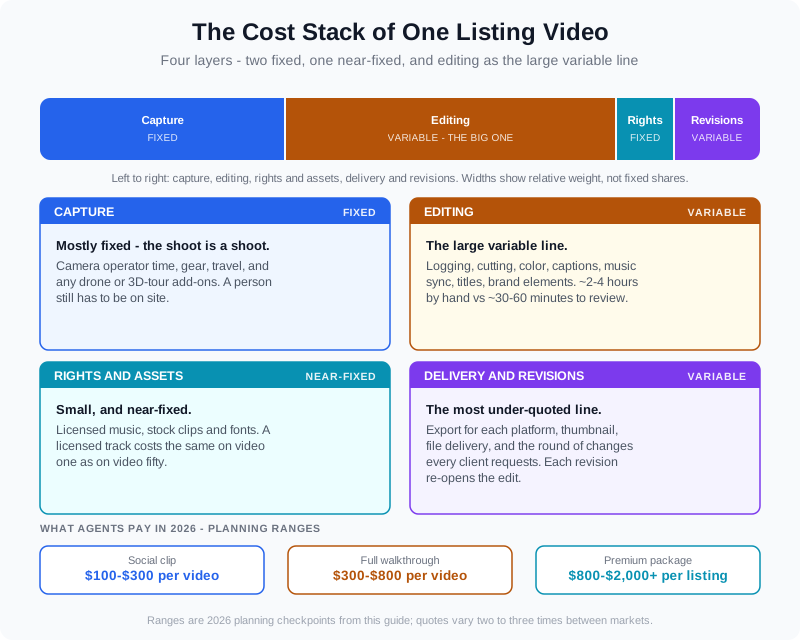
Editing is the layer where hours — and per-video price — vary the most.
That variability shows up in every quote you will ever receive. Some line items move with the property, some move with the client, and one moves with the tooling:
| Cost driver | Fixed or variable? | Why it moves |
|---|---|---|
| Camera operator + gear | Mostly fixed | Same labor whether the home is 1,500 or 5,000 square feet — within reason. |
| Editing labor | Variable | Footage volume, revisions, and the editor's toolchain decide the hours. |
| Drone / 3D add-ons | Variable | Pilot time, licensing, and post for aerials stack on top of the base shoot. |
| Music and rights | Near-fixed | A licensed track costs the same on video one as on video fifty. |
| Revisions and re-exports | Variable | Each round of changes re-opens the edit — the most under-quoted line in the stack. |
Read the table the way a producer does: if you can compress the editing variable, you compress the spread between cheap and expensive video without touching shoot quality. That is precisely the layer AI has been compressing.
How Much Should an Agent Budget for Video in 2026?
Agents rarely ask the useful question. The useful question is not "what does video cost?" — it is "what does the video I actually need cost?" Most agent video falls into three tiers, and the tiers have very different cost stacks. The ranges below are planning checkpoints, not research: quotes vary two to three times between markets, so treat them as a starting grid and calibrate with two or three local vendor quotes.
| Tier | What it is | Typical agent price range |
|---|---|---|
| Social clip | 30–45 second vertical cut for Reels, TikTok, and Shorts. Template edit, captions, music. | Roughly $100–$300 per video |
| Full walkthrough | 60–120 second cinematic tour of the whole property. Custom cut, color, music, agent intro or voiceover. | Roughly $300–$800 per video |
| Premium package | Walkthrough plus drone aerials, 3D tour or floor plan animation, multiple aspect ratios, dedicated shoot day. | Roughly $800–$2,000+ per listing |
Why does one listing video cost twice as much as another?
Usually because they are different products wearing the same label. A vertical social clip edited from iPhone footage on a template is not the same cost stack as a custom cinematic walkthrough with drone coverage and a voiceover. When a quote looks out of line, compare the stack — shoot day? custom edit? revisions included? multi-format delivery? — before comparing the price. If you only need the first product, paying for the second is waste; if you need the second, the first will not do the job.
Volume changes the picture too. A single walkthrough bought per listing is the most expensive way to buy video; a monthly retainer that spreads the shoot and edit across several listings usually lands well below the per-video price. That is the same math photographers use on their side, which we broke down in how photographers price video services in 2026.
What AI Editing Changes — and What It Doesn't
The clearest statement of what changed comes from the production side itself. As one recent industry explainer put it, video used to mean booking a videographer and paying an editor to turn footage into something polished; now the editing layer is automated enough that solo agents and small teams can produce polished property videos for every listing. The shoot still needs a person on site. The edit no longer needs to be the bottleneck.
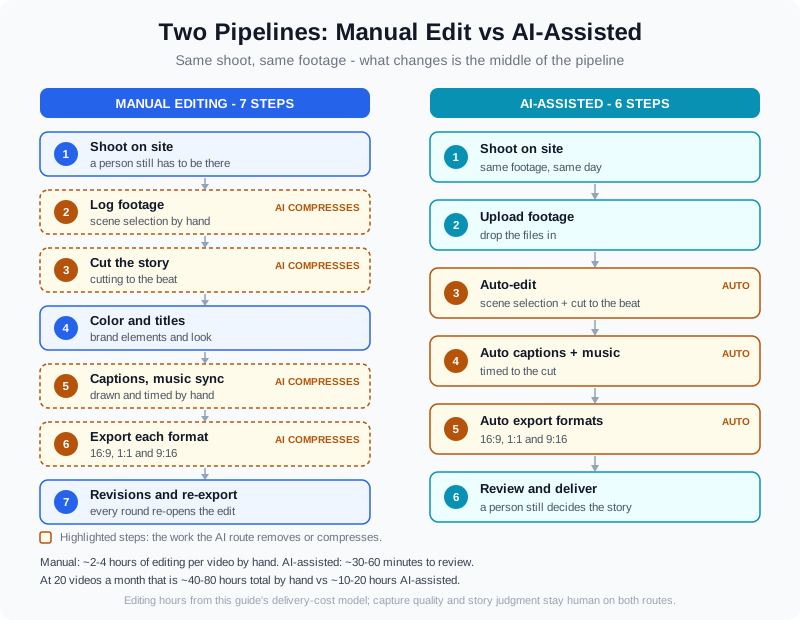
AI removes the middle of the pipeline — the repetitive hours between upload and review.
Concretely, an AI editing workflow collapses four of the most time-consuming steps: scene selection, cutting to the beat, caption generation, and export formatting. What used to take an editor hours happens in minutes, and the agent or photographer reviews the result instead of building it. The practical cost effect is that the editing variable in the table above shrinks toward a fixed platform cost — which is why an AI listing video can go from footage to finished in minutes rather than a same-week turnaround.
Two things do not change. First, capture quality: AI cannot fix shaky handheld footage, bad audio, or a dark kitchen — it can only polish what was shot. Second, judgment: someone still decides which moments tell the property's story, whether the tone matches the listing, and whether the disclosure rules for AI-generated content are met. The honest framing, which we covered in the state of AI real estate video in 2026, is that AI compresses production cost by compressing production labor — the creative decisions remain a human line item.
For real estate media teams, the same platform economics extend beyond video. VideoGuru's AI real estate media platform pairs automated video editing with photo editing tools — one-click virtual staging, declutter, and furniture swaps for stills — so a single listing's full visual package runs through one pipeline instead of three vendors. The same AI that assembles your walkthrough also handles your listing photography, which is what makes the per-listing media package affordable enough to produce for every home, not just the hero listings.
The Photographer's Side: What It Costs You to Deliver Video
If you are the one delivering video, your cost per delivered video — not your hourly rate — is the number that sets your pricing floor. A solo photographer delivering five videos a month by hand has a very different cost structure than a media company delivering fifty, and the difference is almost entirely editing. The table below is a model, not a price list: plug in your own editing time and tooling cost to find your real per-video delivery cost.
| Volume | Manual edit hours per video | AI-assisted hours per video | What the delta means |
|---|---|---|---|
| 5 videos / month | ~2–4 hours each | ~30–60 minutes review | Frees evenings; makes video profitable at current prices. |
| 20 videos / month | ~40–80 hours total | ~10–20 hours total | The difference between hiring an editor and hiring yourself a second shooter. |
| 50 videos / month | Needs a full-time editor or outsourced team | One production manager reviewing outputs | Bulk video becomes a scalable product line, not a staffing problem. |
Two published pieces on this site go deeper on the trade-offs you will hit at each tier. If you are weighing hired editors against automation, the white-label vs automation comparison walks through cost, quality, and turnaround at each model. And if you are deciding what to charge once your delivery cost drops, the pricing guide for real estate video services covers per-video, package, and retainer structures.
A Simple Formula to Estimate Your Real Per-Video Cost
Whether you buy video or produce it, one formula gives you an honest number: per-video cost = (capture cost + editing cost + fixed assets) ÷ videos per month + revision allowance. Run it twice — once with a manual editing workflow, once with an AI-assisted one — and the difference between the two answers is the ceiling on what you should pay (or invest) for editing automation.
Agents can use the same formula to compare a per-listing quote against a retainer. Photographers can use it to check whether a package price clears their real delivery cost at volume. In both cases the goal is the same: know the number before you negotiate, so the price conversation is about value instead of guesswork. For current benchmarks on the buyer side, the National Association of Realtors publishes ongoing research on what buyers actually use when evaluating homes — the best calibration for what your market's video budget should fund.
Frequently Asked Questions
How much does a real estate video cost in 2026?
Most agent video falls into three tiers. A short vertical social clip typically runs in the low hundreds of dollars, a full 60-to-120-second walkthrough typically runs in the mid-hundreds, and a premium package with drone and 3D coverage can run well over a thousand per listing. Prices vary two to three times between markets, so treat those as planning ranges and collect local quotes.
Why is video editing so expensive?
Editing is the largest variable cost in video production because it is the most labor-intensive layer. Logging footage, cutting the story, color, captions, music sync, and export versions can take an editor several hours for a one-minute property tour — and every revision reopens that work. The shoot is a fixed cost; the edit is where hours, and therefore price, accumulate.
Does AI video editing lower production costs without hurting quality?
AI lowers the cost of the repetitive editing work — scene selection, cutting to the beat, captions, and export formatting — which is exactly the labor that made per-video editing expensive. What AI does not replace is shoot quality and creative judgment. Footage still has to be shot well, and a person still decides the story, tone, and compliance. In practice, teams using AI-assisted editing deliver more videos at a lower per-video cost with the same or better consistency.
Should agents buy video per listing or on a retainer?
If you produce video for most of your listings, a retainer or package almost always beats buying per video, because the capture and edit are spread across predictable volume instead of priced per project. If video is reserved for hero listings a few times a year, per-listing buying is simpler. The break-even depends on your volume — run the per-video cost formula both ways before committing.
Ready to see what AI editing does to your per-video cost? VideoGuru's AI platform handles the edit — scene selection, captions, music, and export formats — so you review and deliver instead of logging and cutting, with photo editing tools for virtual staging and declutter in the same workflow. Start for free at VideoGuru.
What This Means for Your Budget
The cost of real estate video in 2026 is a stack, not a single number, and the stack has one genuinely movable layer: editing. Agents who match the tier to the listing — social clip, walkthrough, or premium package — stop overpaying for what they do not need. Photographers who price from delivery cost instead of habit finally know which packages are profitable. And on both sides, AI-assisted editing has turned the largest variable cost into the most controllable one. The math is straightforward once you write it down; the vendors who know their numbers will set the market.




