

Chengran (Felix) Guan
2026-07-24 · 9 min read
How Much Time Do Real Estate Videos Really Take? An Agent's Guide
A single real estate video takes 1.5 to 8 hours from start to finish when edited manually. The exact number depends on the listing type, the footage quality, and the editor's skill. But for most agents and photographers, the biggest surprise isn't the filming time — it's the editing. That's where 60 to 80 percent of the total time lives. And that's exactly where AI video tools change the math.
Key Takeaways
- Manual editing takes 3–8 hours per video: The bulk of production time is post-production, not filming.
- AI tools cut editing time by up to 80 percent: Automated color correction, stabilization, and template-based assembly reduce a 4-hour edit to under an hour.
- Time savings compound at scale: A single agent publishing 4 videos per month saves 12–20 hours. A media company doing 50+ videos per month saves entire work weeks.
- Faster turnaround means more listings: When each video takes less time, you can produce more content, respond faster to new listings, and stay top of mind with buyers.
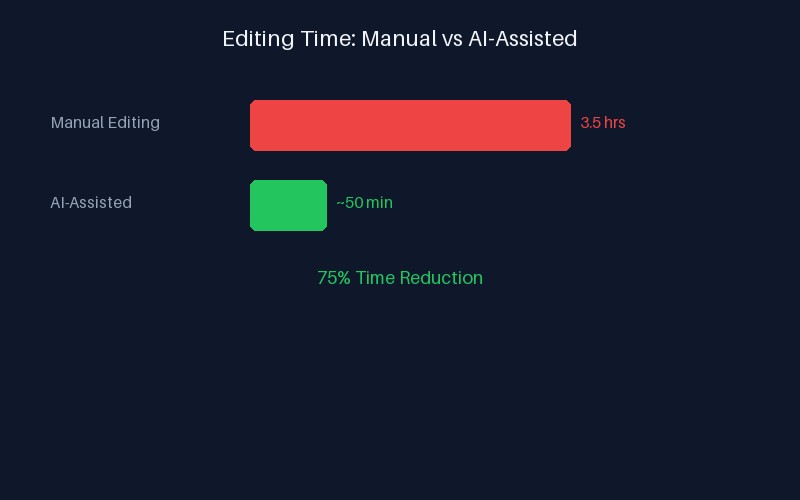
Manual vs AI-assisted video production timeline — editing is where the biggest time savings happen.
What Actually Goes Into a Real Estate Video?
Most agents think a real estate video is just showing up, pointing a camera, and uploading the result. In practice, a professional listing video has five distinct stages. Understanding each one is the first step to understanding why video production costs what it does — and where AI can make a real difference.
According to the National Association of Realtors, 73 percent of home sellers say they are more likely to list with an agent who offers video marketing. But offering video and delivering it efficiently are two very different things — and the gap comes down to production time.
Stage 1: Filming — 30 to 90 Minutes
The shoot itself is the most straightforward part of the timeline. A standard 2,000-square-foot home takes about 30 to 45 minutes to film properly — walking through each room, capturing wide shots, transition spaces, and key architectural features. Larger luxury properties or homes with extensive outdoor areas can take 60 to 90 minutes.
This is the stage most agents are familiar with. It's also the stage that's hardest to compress — you can't rush good footage without sacrificing quality. The good news? Filming is only 15 to 25 percent of the total time investment. The real bottleneck comes next.
Stage 2: Footage Review and Culling — 15 to 30 Minutes
After the shoot, someone needs to review all the raw clips, select the best takes, discard unusable footage (blurry shots, missed focus, bad lighting), and organize the selects in chronological order. For a 45-minute shoot, this means scanning through 15 to 30 individual clips.
Manual culling is tedious but necessary. AI tools can automate this step by analyzing each clip for sharpness, exposure, and motion quality — flagging the best material and discarding the rest without human review.
Stage 3: Editing — Where 60 to 80 Percent of the Time Lives
This is the big one. A professional-quality real estate video edit involves:
- Assembly edit (30–60 min): Arranging clips in the right order, trimming start and end points, creating a rough cut that flows naturally through the property.
- Color correction and grading (20–45 min): Balancing white balance across clips from different rooms, matching exposure levels, and applying a consistent look. Indoor/outdoor transitions are especially time-consuming because the lighting changes dramatically.
- Stabilization (10–20 min): Smoothing out handheld shots. Even with a gimbal, some clips need digital stabilization to look professional.
- Audio mixing (15–25 min): Adding background music, adjusting volume levels, cleaning up room tone, and ensuring voiceovers are synced properly.
- Motion graphics and titles (15–30 min): Adding property address, price, agent contact info, and any on-screen text overlays. Brand-intro and outro sequences.
- Music licensing and metadata (5–10 min): Selecting appropriate background music, trimming to match the video length, and adding video metadata for SEO.
- Export and rendering (15–45 min): Rendering the final video in the correct format, resolution, and bitrate for the target platform (MLS, YouTube, Instagram, or all three).
Add all of that up, and a single standard-definition listing video takes 2 to 4 hours of editing time. A luxury property walkthrough with drone footage, multiple room transitions, and motion graphics can take 5 to 8 hours or more.
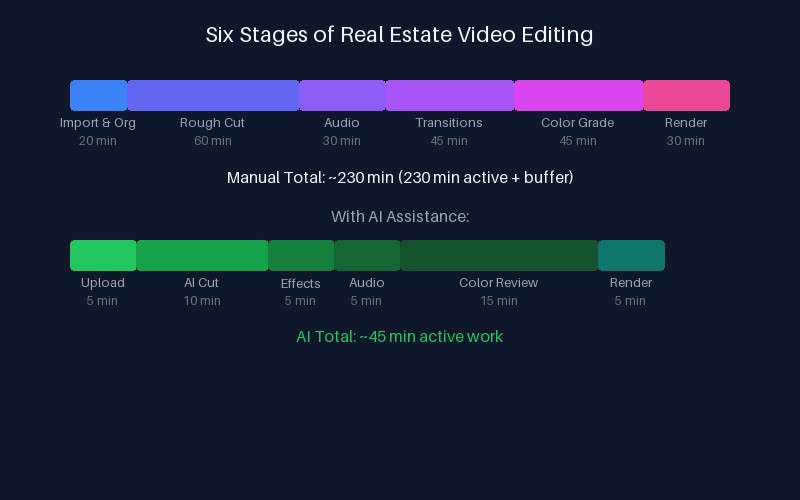
Editing sub-tasks ranked by time investment — color correction and assembly eat the most hours.
The Real Numbers: Manual vs AI-Assisted Timeline
Here's a side-by-side breakdown of a typical 3-minute listing video, comparing manual editing with an AI-assisted workflow:
| Task | Manual Time | AI-Assisted Time | Savings |
|---|---|---|---|
| Filming | 45 min | 45 min | — |
| Culling | 20 min | 5 min | 75% |
| Assembly edit | 45 min | 10 min | 78% |
| Color correction | 35 min | 5 min | 86% |
| Stabilization | 15 min | Auto | 100% |
| Audio + music | 20 min | 5 min | 75% |
| Graphics + titles | 20 min | 5 min | 75% |
| Export | 25 min | 10 min | 60% |
| Total | 3 hr 45 min | 1 hr 25 min | ~62% |
These are conservative estimates based on an average 3-minute walkthrough video. More complex projects — luxury estates, multi-property reels, or listings requiring drone footage and advanced effects — see even larger savings because the editing workload scales faster than the AI processing cost.
What's the Actual Cost of That Editing Time?
Every hour spent editing is an hour not spent on revenue-generating activities. For a freelance photographer or videographer, the math is straightforward. At an effective hourly rate of $75–$150, a 4-hour manual edit represents $300–$600 in labor per video. For agents who outsource editing, white-label editors typically charge $100–$250 per listing video, which covers their own editing time and overhead.
When you multiply that across a monthly production schedule, the numbers add up fast. An agent producing 8 listing videos per month spends roughly 30 hours on editing alone — nearly a full work week. A media company producing 200 videos per month faces an editing workload of 750+ hours, equivalent to four full-time editors.
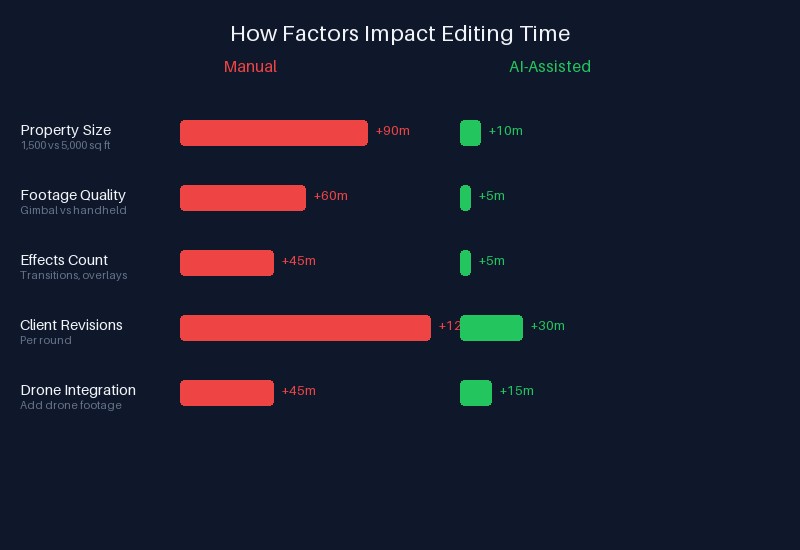
Monthly editing workload by production volume — the gap between manual and AI-assisted workflows widens at scale.
How AI Video Tools Cut the Timeline
AI video editing tools don't just speed up individual tasks — they eliminate entire categories of manual work. Here's where the biggest time savings come from:
Automated Color Correction
Color matching between rooms is one of the most tedious parts of video editing. A sunlit living room and a dim hallway produce wildly different white balance and exposure levels. AI analyzes each clip, identifies the dominant lighting conditions, and applies consistent corrections across the entire timeline — matching every shot to a single reference frame. What takes a human 35 minutes happens in seconds.
One-Click Stabilization
Even gimbal-shot footage can have micro-jitters. Manual stabilization in a timeline editor requires choosing a tracking point, adjusting the crop, and previewing repeatedly. AI stabilization analyzes the entire clip's motion path and applies smooth interpolation with zero manual tuning.
Template-Based Assembly
Rather than building each video from scratch, AI editors use smart templates that learn the structure of real estate walkthroughs — intro with listing address, room-by-room tour, exterior highlights, key features overlay, contact CTA. The editor feeds clips into the template, and the AI arranges them in the correct order, applies transition effects, and generates an initial rough cut. The human's job becomes reviewing and approving, not building from nothing. In fact, you can create a listing video in under 10 minutes with the right AI workflow.
Auto Music and Audio Leveling
AI tools can analyze the video's mood and pacing, suggest appropriate background tracks from licensed libraries, and automatically cut the music to match the video edits. Volume leveling ensures consistent audio across all clips without manual keyframing.
Watch a breakdown of the real estate video production timeline and see where AI automation makes the biggest difference.
The Compound Effect: What 80 Percent Time Savings Means in Practice
Time savings don't just mean less work per video. They change what's possible for your business.
According to a 2026 industry report, AI video tools cut production time by up to 80 percent while increasing buyer engagement by 3x. That combination — faster output with higher quality — creates compounding returns. An agent who could produce 4 videos per month manually can now produce 12 to 16. A photographer who edits 10 videos per week can scale to 40 or 50 without hiring additional staff.
For photographers specifically, the shift from manual to AI-assisted editing means more headroom to focus on client relationships, business development, and creative direction. Many photographers who adopt AI editing find they can cut editing time by 80 percent while maintaining or improving quality.
We've covered this in detail in our real estate video marketing strategy guide, which breaks down how to integrate faster video production into a complete content calendar.
Frequently Asked Questions
How long does a typical real estate video take to produce?
A standard 2–3 minute listing walkthrough takes 3 to 6 hours total when edited manually, including filming, culling, editing, and export. With AI-assisted tools, the same video takes 1 to 1.5 hours — roughly a 60–75 percent reduction in production time. Luxury properties, drone tours, and multi-property reels scale proportionally higher on both scales.
What part of real estate video editing takes the longest?
Color correction and grading is typically the most time-consuming single task, accounting for 25–30 percent of total editing time. The assembly edit (arranging clips in order and trimming) comes second at 20–25 percent. Together, these two tasks consume more than half of the entire editing workflow — and both are tasks that AI automation handles particularly well.
Can AI really cut real estate video editing time by 80 percent?
Yes, for most standard listing walkthroughs. The savings come from automating repetitive tasks — color matching, stabilization, audio leveling, and template-based assembly — that currently consume 60–80 percent of manual editing time. The filming stage (which can't be automated) stays the same, but the post-production pipeline shrinks dramatically. Real-world reports show AI tools cutting editing costs by up to 92 percent while maintaining professional quality.
Is AI-edited real estate video as good as professionally edited?
For standard listing walkthroughs and social media clips, AI-edited video is visually indistinguishable from manual professional editing. The technology has matured to the point where automated color correction, stabilization, and transitions meet professional standards. For complex projects involving creative storytelling, brand narrative, or cinematic effects, a hybrid approach — AI-assisted editing with human oversight — delivers the best results.
Ready to see what AI-assisted video editing can save you in time and cost? VideoGuru's AI video editing platform automates color correction, stabilization, assembly, and export — turning a 4-hour manual edit into a 30-minute workflow. And beyond video, VideoGuru's photo editing tools give you one-click virtual staging, declutter, and color enhancement for still images too. The same AI that powers your video walkthroughs also handles your listing photography. Start for free at VideoGuru.
What This Means for Your Budget
Every hour you save on video editing is an hour you can reinvest in your business — whether that's taking on more listings, improving your marketing, or growing your client base. The decision to adopt AI-assisted video editing isn't just about speed. It's about reallocating your most valuable resource — your time — toward work that generates revenue instead of work that drains it.
For agents, the math is simple: if you're spending 30 hours per month on video editing and AI can cut that to 8 hours, those 22 hours are worth real money. At an agent's effective hourly rate, that's $1,500–$3,000 per month in reclaimed earning potential.
For photographers and media companies, the numbers are even more compelling. Scaling from 10 videos per week to 40 without adding headcount changes the economics of your business entirely. The question isn't whether you can afford AI video tools — it's whether you can afford to keep editing manually.




