

Chengran (Felix) Guan
2026-09-22 · 15 min read
Virtual Home Staging Companies vs. AI Staging Software:
Which Should You Use?
A virtual home staging company sells a finished image: you send the photos, a human designer stages them, and you get MLS-ready files back on a schedule. AI staging software sells the capability: you upload the same photos, pick a style, and stage every room yourself in minutes. Choose a company when the property is high-ticket and the design judgment is worth more than the price per image. Choose software when you stage listing after listing, want a low cost per staged photo, and need the staged stills and the listing video to come from one workflow.
That is the whole decision, and it is not really a quality question. Both routes produce furnished rooms from an empty one. What differs is who does the work, how the price behaves as your volume grows, and what you have to do yourself after the render comes back. This guide compares the two models the way they should be compared — by inputs, cost structure, and the jobs each one actually fits — so you can pick in one sitting instead of ordering two test images and still guessing.
Key Takeaways
- The difference is who does the work, not how good the render looks. A staging company delivers an image and owns the fix if it is wrong. AI staging software delivers a process you run yourself, as many times as you want.
- Service pricing scales with your photo count; software pricing does not. Per-image quotes grow linearly with rooms and listings. A flat subscription with an included allowance makes your cost per staged photo fall the more you use it.
- Compare all-in numbers, not price per image. Minimum orders, re-render fees after the included revisions, and rush charges are what make two quotes for the same property diverge.
- Volume decides it more often than taste does. One or two staged listings a quarter is a service purchase. Staging every listing is a workflow, and workflows belong in software.
- AI staging is generative editing, not a filter. It adds furniture, removes clutter, and restyles a room in a photo you already own — the same file that goes to the MLS.
- Check whether the staged still also feeds your video. VideoGuru stages and de-clutters listing photos and builds the walkthrough from the same photo set, so the staging purchase and the video purchase stop being separate line items.
What a Virtual Home Staging Company Actually Sells
Virtual staging is the practice of furnishing a photo of an empty or dated room digitally — adding furniture, rugs, art, and finishes to the image rather than moving real furniture into the house. Traditional staging puts physical pieces in the property. Virtual staging changes the file. Both exist to answer the same buyer objection, which is that an empty room reads small, cold, and hard to price.
A staging company takes that job off your desk entirely. The managed version of the service looks like this:
- Intake and brief. You upload the photo set and say what the property is: price band, style direction, who it is for.
- Design selection. A human chooses the furniture, palette, and layout for each room — this is the part that is genuinely hard to automate well.
- Editing and rendering. The staged images are produced, usually in a stated number of business days.
- A revision round. You flag anything that looks wrong, and they re-render it. The count of included rounds is a contract term, not a formality.
- Deliverables. MLS-compliant JPEGs at your board's required size, and often add-ons like floor plans or 3D walkthrough stills.
What you are really buying is judgment plus accountability. If a sofa renders at the wrong scale against the ceiling line, someone else notices and fixes it. If your seller's architecturally unusual living room confuses the model, a person works it out. For a property where a badly furnished image could cost a showing, that accountability is the product.
What you still own is everything around the edit: choosing the hero image, briefing the style, confirming disclosure wording for your MLS, and getting the files distributed. A staging order does not include any of that.
What AI Staging Software Actually Sells
AI staging software removes the designer from the loop. You upload a photo, choose the room type and a style, and the image comes back staged. Nothing is ordered, nothing is minimum, and nothing waits for a business day.
The capability set has widened well past "add a couch." On VideoGuru's photo side, the same one-click workflow covers:
- Virtual staging — fill an empty room with tasteful furniture, instantly.
- Declutter — clear countertop and floor clutter so a lived-in room reads spacious instead of crowded.
- Furniture and decor changes — swap a piece that dates the room, or restyle the whole look, modern to Scandinavian, in a click.
- Virtual twilight — turn a flat daytime exterior into a golden-hour shot without a return visit.
The honest limits are worth stating plainly, because they are where service buyers get burned by software and software buyers get burned by services. You are the quality control. You have to lock one style and palette per property or a six-room set looks like six houses. And unusual geometry — mirrors, glass, tight angles — needs a second look before it goes to the MLS. What software gives you in exchange is iteration: if the first render is wrong, you fix it in minutes at no marginal cost rather than emailing a request and waiting.
If you are weighing photo editing as a service line rather than a listing task, the economics of the same tools are covered in our breakdown of one-click photo editing tools for real estate.
Virtual Staging Companies vs. AI Staging Software, Side by Side
Read the "who does the work" row first. It eliminates one column faster than any price table will.
| Decision factor | Managed staging company | AI staging software |
|---|---|---|
| Who stages the photo | A human designer, working from your brief | You, in a self-serve workflow |
| Pricing model | Per image, usually with a minimum order | A plan priced per cycle with an included allowance |
| How cost behaves as volume rises | Rises in step with your photo count | Flat, so cost per staged photo falls the more you use it |
| Turnaround | Business days, scheduled in advance | Minutes, on demand, including revision |
| Revisions | A set number included, then billed per re-render | Unlimited re-renders at no extra cost |
| Style control | Designer proposes, you approve | You choose and lock the style and palette |
| Consistency across a set | Handled by the assigned designer | Depends on you enforcing one style per property |
| Fidelity risk (scale, reflections) | Absorbed by the vendor as a revision | Yours to catch before upload |
| Feeds a listing video | Separate purchase from a separate vendor | Same platform if it also builds video, as VideoGuru does |
| Best fit | High-ticket, low-volume, unusual properties | Steady volume across agents and photographers |
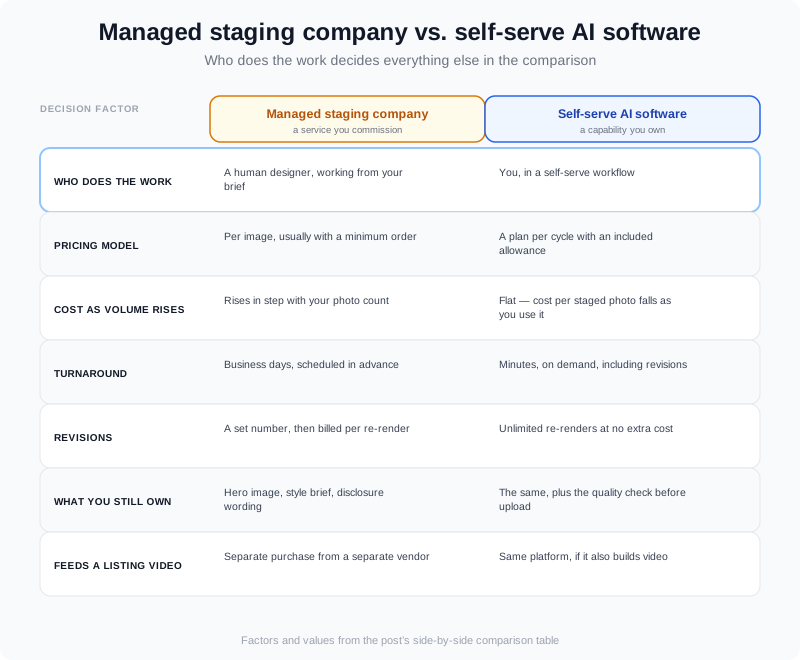
The two models diverge first on who does the work — everything else in the table follows from that.
How the Two Pricing Models Actually Compare
There is no national rate for virtual staging, and a post that hands you one number per image is guessing about your market and your property class. What you can pin down is how each model behaves.
A service quote is a per-image number multiplied by rooms, multiplied by listings. It also carries the clauses that decide what you actually pay: the minimum order, how many revision rounds are included, what a re-render costs after those are used, and whether rush turnaround is priced separately. Two quotes for the same property can differ substantially without either vendor being dishonest, because they are quoting different deliverables. Ask for one all-in figure for your exact list — rooms, turnaround, revision count stated in writing — and compare that.
Software is the opposite shape: one flat price per cycle with an allowance of AI photo edits inside it. That means your cost per staged image is not fixed — it falls as you use more of the allowance. Here is VideoGuru's current pricing, with the per-edit arithmetic done on the included allowance:
| Plan | Monthly | Annual (per month, billed yearly) | AI photo edits per cycle | Max resolution | Price per photo edit if you use the allowance |
|---|---|---|---|---|---|
| Essential | $59/mo | $30/mo ($360/yr) | 20/mo · 130/yr | 1080p | about $2.95 monthly, $2.77 on annual |
| Growth | $129/mo | $85/mo ($1,020/yr) | 80/mo · 800/yr | 4K | about $1.61 monthly, $1.28 on annual |
| Pro | $249/mo | $149/mo ($1,788/yr) | 200/mo · 2,000/yr | 4K | about $1.25 monthly, $0.89 on annual |
That final column is arithmetic, not a promise: it assumes you spend the allowance. If you stage four rooms for two listings a month, eight edits is what you used, and the comparison against a quote is a straight multiplication on both sides. The free tier is a test bench rather than a workflow — 2 videos a month at 720p, watermark, 15-second cap — so treat a paid plan as the real entry point once staging is a monthly habit.
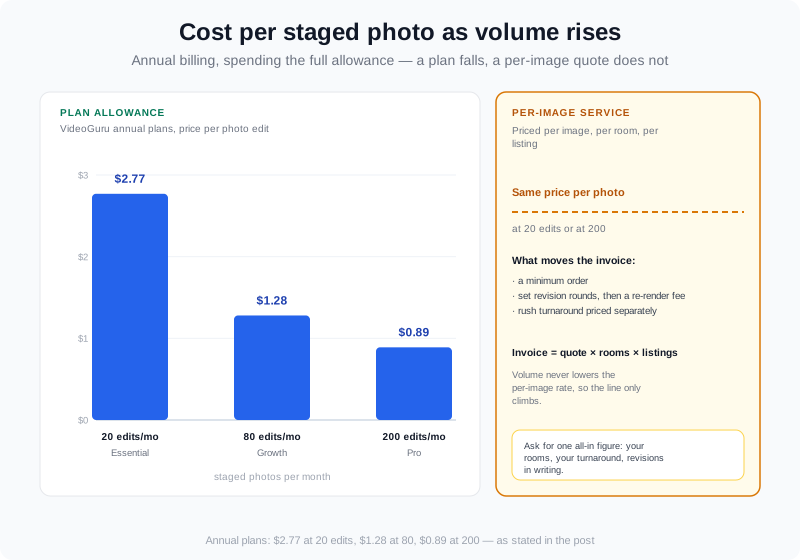
Per-image quotes scale with your volume; a plan allowance makes cost per staged photo fall as usage rises.
For the side-by-side economics of doing this work yourself instead of buying it, our comparison of DIY virtual staging for agents walks through where the hours and the fees actually land.
Where Quality Actually Diverges
Most staging arguments stall on "software looks fake." That is the wrong axis. A poorly briefed human designer also produces a wrong sofa at the wrong scale. Quality diverges in three specific places:
- Judgment in awkward rooms. Angled walls, a wall of glass, a galley kitchen with one usable camera angle. A person can reason about what the room should hold. Software performs best when the geometry is legible.
- Consistency across a set. Six photos should look like six rooms in one house, not six listings. A designer holds that thread; in software, you hold it by locking one style and palette per property.
- Fidelity under scrutiny. Furniture scale against the ceiling line, light direction that matches the existing shadows, and nothing added that the property does not have. This is the one that matters legally as well as visually.
Before any staged image goes to the MLS, run the same short check regardless of which route produced it: does the furniture scale match the room, does the light fall the same way as the original file, is every added object legal to show, and is the image labelled as staged? Our walkthrough of AI photo disclosure rules covers the labelling side in detail.
It is worth remembering what the image is competing for. Buyers form their shortlist online before they ever call, and NAR's buyer and seller research has documented that online listing media drives that shortlist year after year. The first image is doing the work of a showing.
When a Staging Company Is the Better Call
- The property is high-ticket. At the luxury end — $2M and up in most markets — one wrong piece of furniture is a real cost, and a human design pass with a revision round behind it is cheap insurance.
- The architecture is unusual. If the room is hard to read in a photo, the highest-value work is deciding what belongs in it, and that is a design decision before it is an editing one.
- You are running a brand. A brokerage or team that needs every listing to look like it came from the same house style is buying consistency, not pixels.
- You have no spare attention. If the alternative is staging nothing because the week is full, paying someone is the better outcome.
- You need a person on the other end. New construction, developer clients, and marketing departments often want an account to email, not a dashboard.
When AI Staging Software Is the Better Call
- You stage listing after listing. Volume is where flat pricing wins. Five staged properties a month against a per-image quote is a different budget conversation than one.
- You photograph for other agents. Staging as an add-on service priced per property turns an editing cost into a margin line, and turnaround in minutes is what makes it sellable. The revenue mechanics are covered in virtual staging versus traditional staging ROI.
- The listing is vacant or dated, not precious. Empty rooms, cluttered counters, and tired paint are the cases where a fast pass changes the click-through without needing a designer.
- You need it today. A listing going live tomorrow cannot wait on a business-day queue, and most re-renders happen because a seller asked for a change at 9pm.
- The staged still is also your video. If you are producing listing video anyway, staging inside the same platform removes an entire handoff.
The Question Most Comparisons Skip: Does Your Staging Feed Your Video?
Staging decisions are usually made as if the images end at the MLS. Increasingly they do not. The same photo set is the raw material for the listing video, and that changes the arithmetic: a staged still that also becomes a frame of the walkthrough is doing two jobs for one purchase.
This is where a platform beats a pipeline of separate vendors. On VideoGuru, the photo tools and the video build are the same account:
- Stage, de-clutter, and restyle the stills in one-click edits, then build the walkthrough from the same set.
- A video built from up to 20 photos and up to 40 clips. Photo-to-video is not photos-only — your own footage goes into the same walkthrough. A drone establishing shot or a real-person clip of you at the door is mixed into the video rather than assembled as a separate output, so you do not need a second edit to get your aerial into the tour.
- Effects applied on the same timeline — virtual twilight, staging applied to an empty room, declutter, and full restyles, so the video and the stills share one look instead of two.
- A presenter layer if you want one. An AI avatar built from a photo you upload, voiced with a clone of your own voice, composited into the property walkthrough itself rather than exported as a separate talking head. It is available on any paid plan, with no separate avatar subscription on top.
- One build, every format. Output in 16:9, 1:1, or 9:16, with a typical listing put together in about ten minutes.
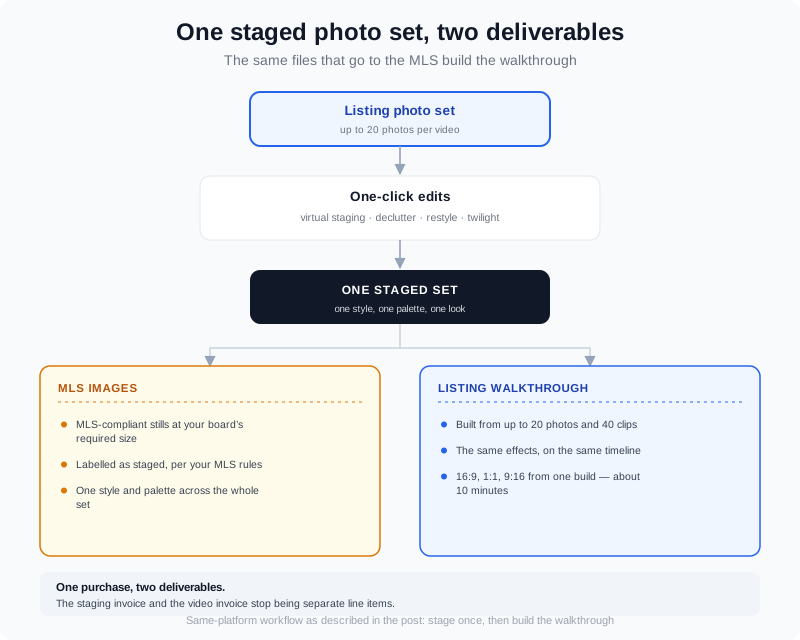
One staged photo set, two deliverables: the MLS stills and the walkthrough built from the same files.
If your staged stills are destined for video, the workflow is the same one described in our guide to turning real estate photos into video with AI. Google's own video SEO guidance is also worth reading before you publish, because the page, the thumbnail, and the structured data are all indexing inputs — a video nobody can find does not help the listing.
Disclosure and Accuracy: What You Must Get Right
Whichever route you choose, the marketing is yours. Most MLSs allow virtually staged images but require that the image be identified as staged, and the exact wording and placement live in your board's rules rather than in a national standard. Check yours before the first upload, not after the first complaint.
The substantive rule is older than the software. The NAR Code of Ethics requires truthful representation in marketing, which means a staged image must not imply a feature the property does not have — no added fireplace, no invented window, no furniture arrangement that hides a defect you are required to disclose.
Keep a simple paper trail: the original file, the staged file, and a note of where the staging disclosure appears in the listing. As provenance standards for AI-edited media mature — the C2PA content credentials work is the one to watch — being able to show which images were generated and from what will get easier, not harder.
How to Choose in Four Steps
- 1. Count 90 days of listings. Not the number you intend to list — the number you actually brought to market. Anything under about four a quarter rarely justifies building a workflow.
- 2. Get one all-in service quote. Your rooms, your turnaround, revision count in writing, re-render fee stated. That is the number you are comparing against.
- 3. Run one vacant listing through the software route. Stage the set, check scale and lighting, label the images, and time it. One property tells you whether the workflow fits your week.
- 4. Ask what else the images feed. If the same set becomes a walkthrough, a Reel, and a social cut, you are not comparing two ways to stage photos — you are comparing two ways to produce listing media.
Frequently Asked Questions
How much do virtual home staging companies charge?
Managed staging is priced per image, usually with a minimum order and a set number of revision rounds before re-renders are billed. Because the deliverables differ, the only meaningful comparison is an all-in quote for your exact list: the rooms you need staged, the turnaround you need, and the revision policy in writing. Software inverts the model — one plan price per cycle with an included allowance of AI photo edits, which makes your cost per staged photo fall as you use more of it. On VideoGuru that allowance is 20 edits a month on Essential at $59/mo, 80 on Growth at $129/mo, and 200 on Pro at $249/mo, with annual billing spreading the same allowance across 130, 800, or 2,000 edits a year.
Is AI virtual staging allowed on the MLS?
In most markets yes, with disclosure, but the rules are set by your MLS or board and they are not uniform. Some allow furnished staging of empty rooms while restricting edits that change the condition of the property; some require the image to carry a visible label; others rely on a description note. Read your board's photo and advertising rules first, and when in doubt ask your broker before you upload rather than after a listing gets flagged.
Do virtually staged photos need to be labeled?
Most boards require it in some form, and honest practice requires it regardless: a buyer should be able to tell that the furniture is not in the house. The label usually goes in the photo description field, the image itself, or both, depending on your MLS. This is also a truth-in-advertising issue rather than a purely technical one — the Code of Ethics obliges you to represent the property accurately, and a staged image that implies a feature the home does not have crosses that line no matter how it is labelled.
Can AI staging software handle a whole listing set consistently?
Yes, and the failure mode to avoid is stylistic drift rather than technical capability. Lock one style and palette per property and apply it to every room, then check the set as a whole before uploading — the same sofa scale in every shot, the same floor and wall treatments, the same light direction. Consistency is the difference between a staged house and a folder of unrelated renders.
Do I still need a staging company if I use AI software?
Not for ordinary listings, once you have a style you trust and a labelling habit. The engagements that still justify the managed version are the ones where design judgment and accountability carry real money: luxury properties, unusual architecture, new-construction campaigns, and brokerage-wide brand consistency. Plenty of photographers and teams run both — software for the listing tier, a designer for the handful of properties a year that need a person.
The Verdict
Buy a staging company when the property justifies human judgment and you want someone else accountable for the result. Buy AI staging software when staging is a recurring part of your listing workflow and you would rather pay a flat plan than a per-image invoice — and especially when the same set of staged photos is also going to become a video. The two are not rivals so much as different scales of the same job: one is a service you commission, the other is a capability you own.
The test that settles it is a single listing. Stage one vacant property through the software route, time it, label the images, and check them against a quote for the same deliverable. Most agents and photographers find the split quickly: software for everything that has to exist, a designer for the few properties where the difference shows. If you want to run that test now, you can start a free VideoGuru account, stage your own listing photos, and build the first walkthrough from the same set — the product docs cover photo editing and video creation step by step.