

Chengran (Felix) Guan
2026-10-04 · 9 min read
Virtual Staging a Bedroom:
Before/After Examples and Costs
Virtual staging a bedroom means digitally adding a bed, furniture, and decor to a photo of an empty room so buyers see a finished space instead of a blank one. It costs a fraction of physical staging, takes minutes with AI instead of days, and it changes how buyers react: 83% of buyers’ agents say staging makes it easier for buyers to picture the property as their future home (NAR). You can stage a bedroom three ways — a per-photo staging service, a DIY design tool, or an AI platform that stages your listing photos and turns them into a walkthrough video in the same workflow.
Key Takeaways
- Virtual staging fills an empty bedroom with furniture, digitally. The room stays exactly as shot — only the pixels change.
- Bedrooms are the room buyers picture themselves in. 83% of buyers’ agents say staging helps buyers see the home as theirs (NAR).
- Staged homes tend to sell faster. 49% of sellers’ agents say staging reduced time on market (NAR).
- Cost turns on the route. Physical staging is a monthly rental; services charge per photo; AI plans bundle photo edits with video.
- You must disclose it. Every major MLS requires virtually staged photos to be labeled as digitally altered.
- One workflow can produce the still and the tour. The same AI that stages the photo can turn the set into a bedroom walkthrough video.
What Is Virtual Staging for a Bedroom?
Virtual staging is photo editing that adds realistic furniture, textiles, and lighting to a picture of an empty or dated room. For a bedroom, that usually means a bed with a headboard, two nightstands with lamps, a rug, artwork, and window treatments. The furniture is rendered in perspective and matched to the light in the original shot, so the room looks professionally styled rather than pasted together.
Two words carry the meaning. Virtual means nothing physical moves into the home. Staging means you are showing the room at its best, the way a professional stager would. Done well, a buyer scrolling listings cannot tell a staged photo from a room that was actually furnished. Done badly — warped furniture, impossible shadows, a bed that floats — it quietly undermines trust in the whole listing.
If staging is new to you, start with our primer on AI virtual staging in 2026 before you stage your first room.
Why the Bedroom Sells the Home
Buyers do not just tour a house — they imagine living in it, and the bedroom is where that imagining happens most, because it is the most personal room in the home. An empty bedroom reads as a box. A staged bedroom reads as my room.
The data supports the instinct. In NAR’s Profile of Home Staging, 83% of buyers’ agents said staging made it easier for buyers to visualize the property as their future home, and 49% of sellers’ agents said staging reduced the time on market. NAR’s release on the same research adds another angle: 31% of buyers’ agents said buyers were more willing to walk through a home they had seen online when it was staged.
That last number is the one that pays for staging. A staged photo earns the click, and the click earns the showing — especially for the empty or dated bedrooms that are hardest for a buyer to read.
Bedroom Virtual Staging: Before and After
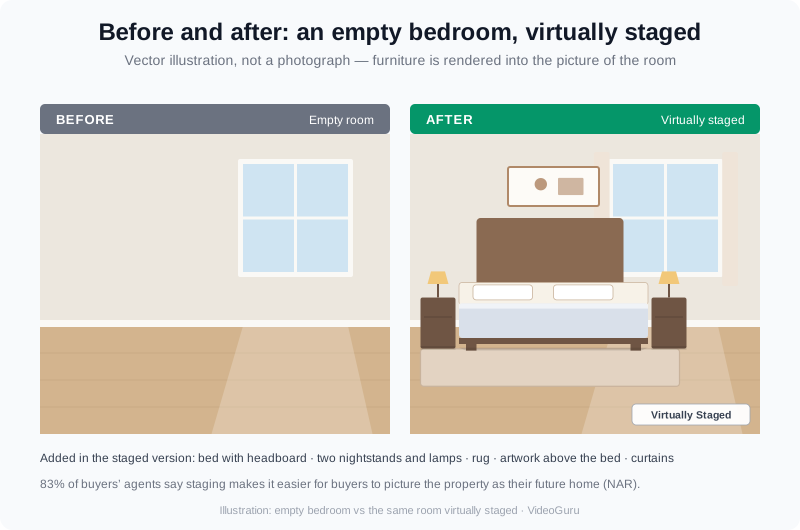
The same empty bedroom, before and virtually staged. Nothing moved into the home — the furniture is rendered in the photo.
Here is what changes in a typical bedroom staging pass:
- Furniture: a bed with a headboard, two nightstands, and a bench or dresser sized to the room — not oversized.
- Textiles: a rug that anchors the bed, layered bedding, and curtains that soften the windows.
- Lighting: bedside lamps, and switched-on fixtures in many rooms so the shot feels warm instead of flat.
- Decor: framed art above the headboard, a plant or two, and a small lived-in detail on the nightstand.
- Cleanup: removing the previous owner’s clutter, or restaging an occupied room around its existing furniture.
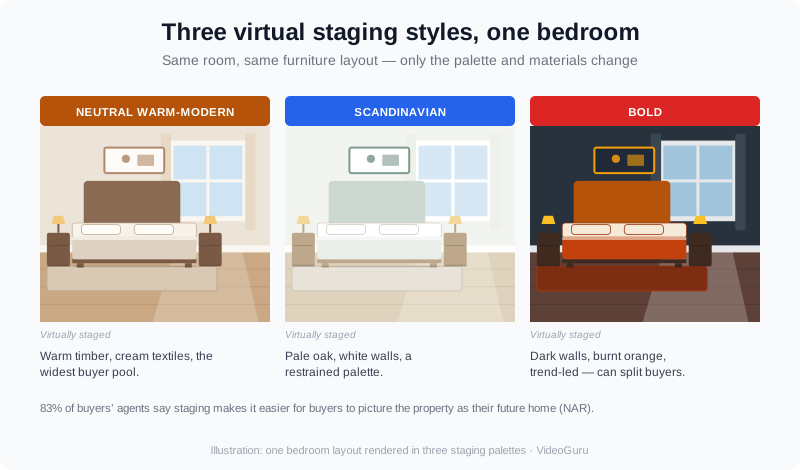
Style matters as much as the staging itself. Neutral and warm-modern photograph well and appeal to the widest pool of buyers.
The style you pick matters as much as the staging. A neutral, warm-modern bedroom photographs well and speaks to the widest audience; a bold, trend-led design can date the listing and split buyers. Match the look to the price point and the neighborhood, and keep it consistent across the whole gallery. Our roundup of AI furniture staging breaks down how the effects differ room by room.
How to Virtually Stage a Bedroom, Step by Step
- Shoot or choose a clean, wide photo. A straight-on, well-lit frame from the doorway works best. If the room is occupied, declutter first.
- Pick your route. A per-photo service sends a designer an image; a DIY tool gives you the controls; an AI platform stages it for you in a click.
- Choose a style and let the AI place the furniture. On VideoGuru you select the virtual staging effect and it fills the empty room with tasteful furniture sized to the space.
- Review and adjust. Check bed scale, shadows, and perspective. Bad staging is worse than no staging.
- Move to video. Once the photo is staged, build a short walkthrough from the same listing photos, so one workflow produces both your stills and your tour.
VideoGuru’s photo tools cover the same basics across a whole listing — one-click virtual staging, decluttering, furniture swaps, and restyling for stills — alongside the video editor for the walkthrough. If you would rather do it yourself end to end, our DIY virtual staging guide walks through the manual options.
What Virtual Staging a Bedroom Costs
Cost turns on which route you pick. Here is how the models compare, with the numbers you can actually lock in today.
| Route | How you pay | What you get |
|---|---|---|
| Physical staging (bedroom) | Monthly furniture rental plus a staging fee, for as long as the home is listed | Real furniture in the home, then photographed |
| Per-photo staging service | A flat fee for each photo you submit | A designer-staged image, one photo at a time |
| DIY design tool | A low monthly subscription | You place the furniture yourself |
| VideoGuru (AI photo edits inside a plan) | Essential $59/mo with 20 AI photo edits; Growth $129/mo with 80; Pro $249/mo with 200 | Staged photos plus the video walkthrough, in one platform |
Run the math on the AI route and it is the cheapest per image by a wide margin. Essential works out to about $2.95 per AI photo edit, Growth about $1.61, and Pro about $1.25 — and those edits cover staging, decluttering, twilight, and the other photo effects. Physical staging is the opposite: a recurring monthly cost that only pays off while the home sits on the market. Our full breakdown of virtual staging vs traditional staging goes deeper on that trade-off.
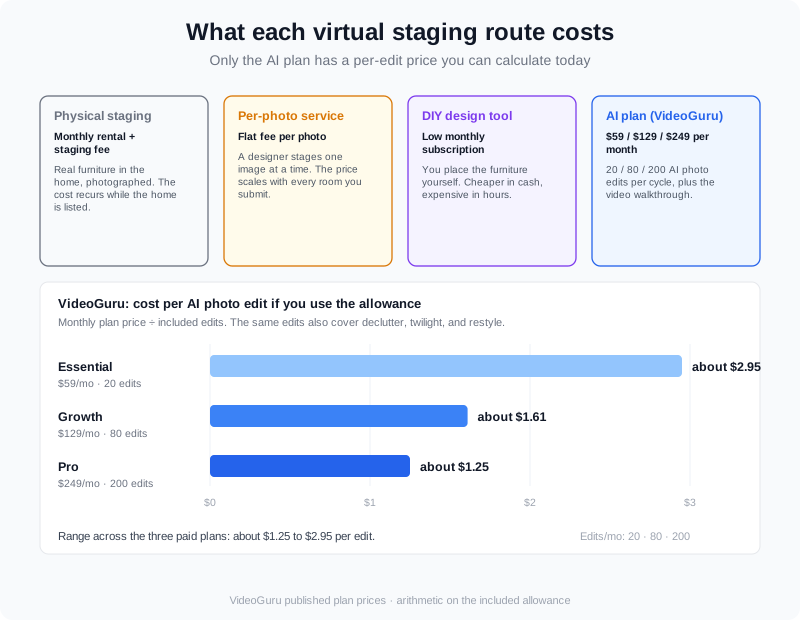
AI photo edits inside a VideoGuru plan land at roughly $1.25 to $2.95 per image — before you add the video walkthrough.
From a Staged Photo to a Bedroom Walkthrough
A staged still does one job: it stops the scroll. A short video does another: it holds attention and shows how the rooms flow together. You do not have to choose between them. Once your bedroom photo is staged, the same platform can turn your listing photos into a walkthrough — and if you have video clips, such as a real-person intro or a drone pass, you can mix those into the same video.
A realtor demonstrates virtual staging on an empty listing — the same empty-to-finished transformation you can apply to a bedroom.
If a set of bedroom photos is all you have, that is enough to start. See how photo-to-video works for what you can build from stills alone, and the twilight effect guide if the bedroom has a good window view worth selling.
The One Rule You Cannot Skip: Disclose Staged Photos
Virtual staging is permitted by every major MLS in the United States — but the photo must be labeled as digitally altered. The principle behind that rule is simple and long-standing: advertising has to be truthful and not misleading, the same standard the FTC applies to any marketing claim. Most boards want a clear disclosure such as “Virtually Staged” on the image or in the listing remarks.
Wording differs by board, so confirm your local MLS’s exact rule. The safe habit is to add a visible “Virtually Staged” label to any photo you have altered, and never present a staged image as the room’s actual condition. That protects your license, your client, and your reputation — and it is a one-line fix that takes seconds.
Bedroom Staging Mistakes That Cost You Showings
- Oversized furniture. A king bed in a small room makes the room look smaller, not grander.
- Wrong scale or perspective. A bed that floats or leans breaks the illusion instantly.
- Trendy, dated styling. Bold themes narrow your buyer pool; neutral ages well.
- One style cloned everywhere. Vary layouts by room type instead of repeating the same bedroom across the gallery.
- Skipping the disclosure. An undeclared staged photo is a compliance problem, not a design choice.
- Stopping at stills. A staged photo set can become a walkthrough video for almost no extra effort.
People Also Ask
Is virtual staging a bedroom worth it?
For most listings, yes. An empty bedroom is the hardest room for a buyer to read, because there is nothing to anchor the space. Staging gives it a bed, furniture, and light so the room reads as a room. In NAR’s 2025 Profile of Home Staging, 83% of buyers’ agents said staging helped buyers visualize the property as their future home, and 49% of sellers’ agents said it reduced time on market. Virtual staging also costs a fraction of physically furnishing the home.
How much does it cost to virtually stage a bedroom?
It depends on the route. Per-photo staging services charge a flat fee for each image, and DIY design tools charge a low monthly subscription. VideoGuru bundles AI photo edits into a plan: Essential is $59/mo with 20 edits, Growth is $129/mo with 80, and Pro is $249/mo with 200 — roughly $1.25 to $2.95 per edit. Physical staging is the most expensive option because its cost recurs every month until the home sells.
Do you have to disclose virtually staged photos?
Yes. Virtual staging is allowed by every major MLS, but the photo must be labeled as digitally altered, usually with wording like “Virtually Staged” on the image or in the remarks. The requirement comes from the same truth-in-advertising principle that governs all real estate marketing: the image cannot mislead a buyer about the home’s actual condition. Check your local MLS for the exact wording it wants.
Can you virtually stage an occupied bedroom?
Yes. For an occupied room, the usual approach is to declutter first, then restage — remove or swap the existing furniture and rebuild the room around a cleaner layout. VideoGuru’s photo tools include declutter, furniture swap, and restyling for exactly this case, so a lived-in room can be shown at its best without moving a single piece of furniture.
How long does virtual staging take?
An AI tool stages a photo in minutes, and you can apply the effect to a listing’s worth of photos in one sitting. A per-photo staging service is slower because a person reviews each image. The larger saving comes from doing staging and video in one workflow, so you are not exporting photos to one tool and building the tour in another.
Putting It All Together
Virtual staging a bedroom is one of the highest-return edits you can make to a listing. It costs far less than furnishing the home, it takes minutes instead of days, and it turns the room buyers care about most from a blank box into a place they can picture themselves in. Pick a style that fits the price point, disclose that the photo is digitally altered, and let the same workflow carry you from staged still to a finished walkthrough.
Ready to stage your next listing? Create your VideoGuru account, pick the plan that matches how many listings you stage each month, and turn your bedroom photos into a staged image and a walkthrough video in one pass.