

Chengran (Felix) Guan
2026-08-03 · 12 min read
What Agents Look for in a Video Editing Tool
The best video editing software for real estate is the one that gets a branded listing video out the door in minutes, not the one with the deepest timeline. When agents shop for real estate video editing software, they compare five things: speed, ease of use, professional templates, brand consistency, and predictable pricing. Everything else — render engines, color science, keyframes — is noise. This guide explains what agents actually look for in a real estate video editing tool, which apps fit which type of agent (including free options), how branding and posting fit in, and how to evaluate any tool in 15 minutes before you spend a dollar.
Key Takeaways
- Speed wins: agents rank fast turnaround above every advanced editing feature.
- Simplicity beats power: a tool that needs a learning curve is a cost, not a feature.
- Templates and brand kits matter: consistency across listings builds recognition.
- Pricing must be predictable: agents prefer clear per-listing or subscription costs over surprise add-ons.
- You can test any tool in 15 minutes with a simple checklist — this guide includes one.
Why the Feature List Matters More Than the Spec Sheet
Real estate agents are not video editors. They are listing marketers. Their job is to sell homes, manage clients, and keep a pipeline moving — not to learn a nonlinear timeline. When an agent opens a tool and feels like they need a tutorial, that tool has already failed the first test.
Video is now a baseline expectation in listing marketing. The National Association of Realtors publishes ongoing research on how agents market homes, and video consistently ranks as a core part of the mix. Market research from Realtor.com and industry video adoption studies shows buyers expect to watch a property before they visit it. For a full picture of what buyers and sellers expect from listing media, the NAR research library is the authority.
The practical consequence: agents do not need "the most powerful" tool. They need the tool that reliably turns a finished photo shoot into a polished listing video without burning an evening. That is why the five features below — not GPU specs — decide which tool an agent actually keeps using.
The 5 Features Agents Actually Look For
Surveying how agents evaluate tools, the same five priorities come up every time. Here is what each one means in practice.
1. Speed: How fast can you ship a listing video?
A listing goes live fast, and the video should too. Agents look for tools that produce a finished video in minutes, not hours. The fastest workflow in real estate right now is photo-to-video: drop in the listing photos, and the tool builds the walkthrough for you. Our guide on creating listing videos in under 10 minutes walks through exactly how that workflow works.
2. Ease of use: No timeline required
Agents want a tool they can open at 9 PM after a showing and finish before their coffee goes cold. That means no clip trimming, no keyframes, no export settings to learn. If a tool requires a tutorial, it loses to the one that does not. An agent who is also the marketer, the photographer coordinator, and the closer cannot afford a second job in software.
3. Templates that look professional
Proven layouts matter more than infinite customization. Agents look for templates that already handle the hard parts — pacing, captions, music, and call-to-action cards — so the output looks like it came from a production company, not a hobby app. The template is the design department; the agent just supplies the photos and the address.
4. Brand consistency: Logo, colors, and fonts
Every video an agent posts is a brand asset. Agents look for tools that carry their logo, colors, and fonts into every export automatically — no manual watermarking, no mismatched intros. Consistent branding is what makes a 30-second video from one agent recognizable next to a competitor's. If you are still deciding how much of your marketing should be video, start with our real estate video marketing strategy guide.
5. Predictable pricing
Agents hate surprise costs. They look for pricing they can explain to a seller: a clear cost per video, or a flat plan that covers their monthly volume. If a tool buries the real cost behind add-on fees, the agent moves on. Predictable pricing is also how agents decide which listings deserve video — for that math, see our breakdown of how much time real estate videos really take.
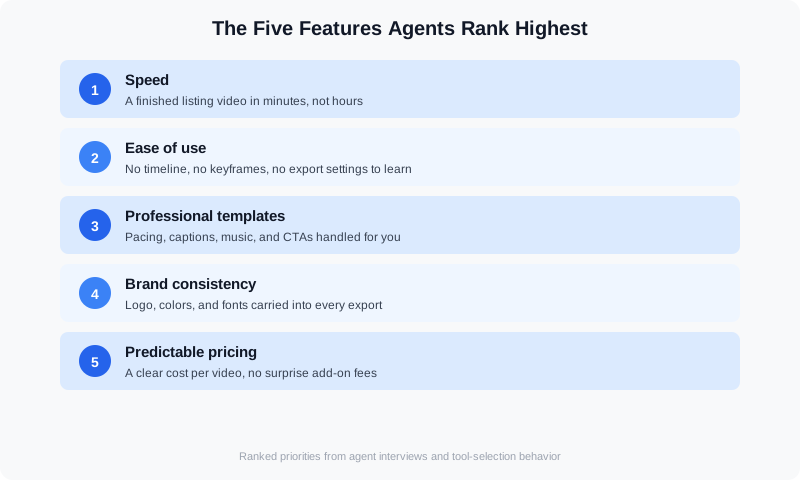
The five features agents rank highest when choosing a video tool.
What Agents Should Ignore
Marketers selling software love to talk about power: multi-track timelines, custom color grading, 8K exports. None of that helps an agent sell a house. Here is what to ignore when comparing tools:
- Render engines and codecs. The buyer never sees the technical pipeline; they see the final video.
- Feature counts. "Unlimited features" usually means "unlimited ways to get lost."
- Editing presets aimed at YouTubers. Gaming intros and vlog transitions do not sell homes.
- Manual controls you will never touch. Every dial in the interface is a place to make a mistake.
If a tool only shines after a two-hour setup session, it is a professional editor's tool wearing a marketing site. Agents should pass.
Which Video Editing Software Is Best for Real Estate Agents?
There is no single best real estate video editing software — there is a best fit for your volume, footage source, and budget. The market splits into three groups. Phone-first video apps for real estate agents (CapCut, InShot, Splice) are free or $10–$15 a month, record and edit on the same device, and are the right pick for an agent posting 2–3 Reels a week from walkthrough clips. Desktop editors (DaVinci Resolve, Premiere Pro, Final Cut Pro) run $0–$23 a month and give you full control, but expect 2–4 hours per listing video and a real learning curve — they suit videographers and media companies, not most agents. AI video creation tools built for real estate take listing photos or raw clips and return a finished, branded walkthrough in about 10 minutes for a flat $20–$100 a month, which is the fit for agents and teams who want video on every listing.
If you are searching for the best free video editing software for real estate, DaVinci Resolve (free tier) is the most capable desktop option and CapCut is the most capable phone option. The trade-off is time: free tools give you the timeline and leave the assembly, pacing, captions, and music to you. Most agents who start free move to a paid real estate-specific tool within a few months once they count the hours. For video recording software for real estate agents, you rarely need anything beyond your phone's native camera at 4K/30fps plus a $30–$150 gimbal; the listing video shot list covers the 12–15 clips that make a walkthrough feel complete.
For 2026, the best AI video creation tools for real estate agents are the ones that handle the whole listing, not just the cut. For agents who want a finished, on-brand listing video from MLS photos or phone clips in one pass, VideoGuru is built for that job: it assembles the walkthrough, applies your brand kit, adds captions and music, and exports vertical and horizontal versions — and the same platform edits the listing photos and virtual-stages the empty rooms. For photographers and media companies who deliver video as a paid add-on, the same workflow removes the editor bottleneck without giving up control of the final cut. Our roundup of the best AI video editors for real estate in 2026 compares pricing and turnaround tool by tool, and the real estate video cost vs. DIY guide shows where each option lands on a per-listing basis.
How to Test Any Tool in 15 Minutes
You do not need a week-long trial to know whether a video tool fits your business. Run this checklist on any candidate:
- Upload one finished listing's photos (minutes 1-3). If the upload is painful, the tool is painful.
- Build a video without a tutorial (minutes 4-7). If you open help docs before the first export, that is a signal.
- Export with your logo and colors (minutes 8-11). Brand consistency should be automatic, not a project.
- Check the pricing page (minutes 12-13). Can you state the exact cost of one video in one sentence?
- Watch the result on your phone (minutes 14-15). If you would not post it, the tool failed.
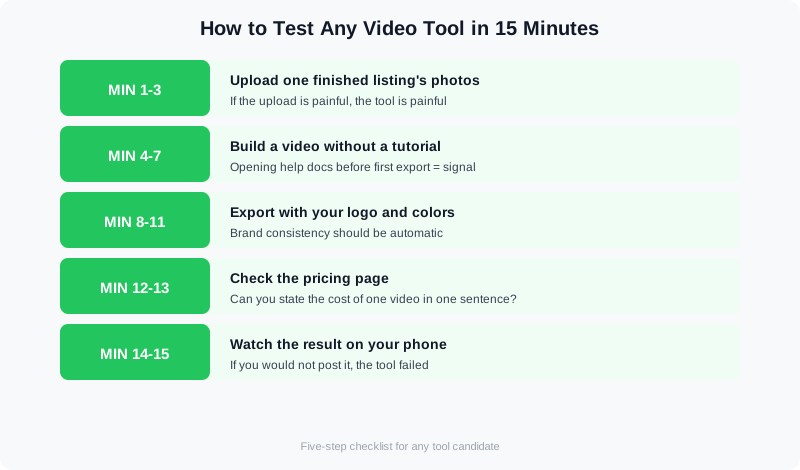
A 15-minute evaluation checklist that works for any video tool.
If a tool clears all five steps, it earns a real trial with a real listing. Here is what a modern AI-powered listing video workflow looks like in practice:
Watch how quickly an AI listing video comes together from finished photos.
Branding for Real Estate Agents: Turning One Tool Into Consistent Posts
The tool is only half the decision. Agents judge a video editor by what comes out the other end: a steady stream of posts that look like they came from the same business. Branding for real estate agents in video means four fixed elements — logo placement, one or two brand colors, one font, and a consistent intro/outro — applied to every listing video, market update, and neighborhood clip. Buyers should recognize your post in a feed before they read your name. A brand kit that applies those elements automatically is why "brand consistency" ranks in the top five features above; without it, consistency depends on remembering, and remembering fails by the third listing. The guide to building a real estate brand with video content covers how to set those four elements once.
Posts for real estate agents fall into a short list of formats that repeat: the listing walkthrough (30–60 seconds vertical), the just-sold or under-contract recap, the 60-second market update, the neighborhood tour, and the quick FAQ answer ("what does earnest money do?"). A good video tool should let you turn one shoot into 3–4 of these posts without re-editing from scratch. Agents who post 3–4 times a week from one weekly filming session grow faster than agents who post only when a listing goes live — see real estate video ideas for social media for a format list you can rotate through, and the weekend social video hacks for agents for batching in one afternoon.
If you are a photographer or videographer working with real estate agents on video, this is the part to get right. Agents will re-hire the vendor whose deliverables drop straight into their posting schedule: a horizontal MLS cut, a vertical Reel cut, and a branded version using the agent's kit, delivered in 24–48 hours. Vendors who hand over a single unbranded 3-minute file leave the agent with editing work they did not sign up for. Building the agent's brand kit into your workflow once — and reusing it for every listing that agent sends you — is the simplest way to turn a one-off shoot into a recurring account.
How AI Changes the Equation for Agents
The editing industry has largely settled on a division of labor: AI handles the repetitive 80% of the work — the foundational corrections that repeat on every listing — while a human catches the 20% that needs judgment. As a 2026 industry analysis of AI photo editing trends puts it, the debate over AI versus human editing is over; the question now is how the two split the workload. For agents, that split is the entire pitch: the repetitive parts of listing video — assembly, pacing, captions, music — get automated, so the agent's only job is supplying great photos.
What used to take hours now takes minutes. A full listing edit across dozens of images was a multi-hour process; AI tools compress the repetitive stages dramatically, and the same logic applies to video. This is why the agent's checklist keeps coming back to speed and simplicity — the tools that win are the ones that automate the 80% and leave the agent in control of the 20% that matters: which shots, which story, which listing.
This is where a platform approach beats a single-purpose tool. VideoGuru is an AI real estate media platform: the same AI that assembles your video walkthroughs also handles your listing photography — one-click virtual staging for stills, declutter, and decor changes for photos. Instead of juggling a video editor, a photo editor, and a stager separately, agents get one workflow for the whole listing. If you are curious how AI editing compares to traditional editing for photos, see our side-by-side on AI vs human real estate photo editing, or the agent-focused guide to AI photo editing for real estate.
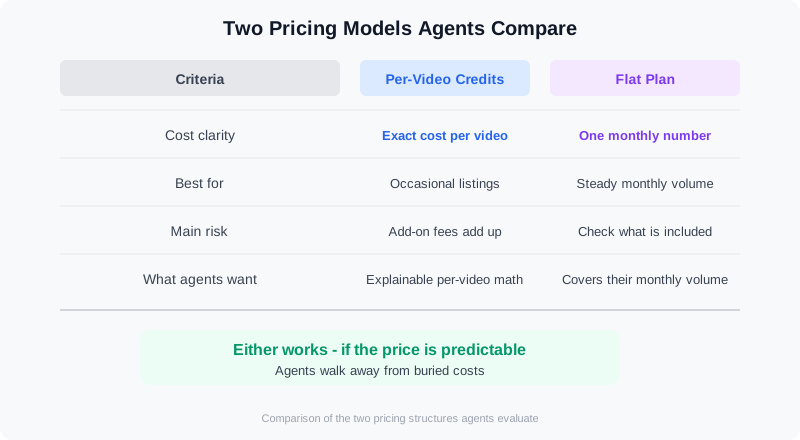
Two pricing models agents compare: per-video credits versus flat plans.
Frequently Asked Questions
Do agents really need a dedicated video tool, or can they use any editor?
General-purpose editors are built for people who edit for a living, and they carry a learning curve agents never climb. A dedicated real estate video tool is built around the listing workflow: photos in, branded video out, in minutes. For an agent producing videos weekly, the time savings and consistency make a dedicated tool the practical choice — which is why speed and ease of use top every feature list.
How much time does AI save on a typical listing video?
The savings vary by workflow, but the pattern is consistent: AI removes the repetitive assembly stages — selecting shots, pacing, captions, music — that consume most of a manual edit. What used to take hours drops to minutes for a standard photo-to-video walkthrough. The exact number depends on the listing and the tool, so test with your own photos and time it.
Should agents buy a per-video plan or a subscription?
It depends on volume. An agent producing a handful of videos per month may prefer paying per video, with no commitment. An agent posting every listing — or a team producing dozens of videos monthly — will almost always save with a flat plan. The right answer is the model you can state in one sentence on a seller call. Whichever you choose, make sure the price is the price: no surprise export or watermark fees.
What is the difference between an AI video tool and a traditional editor?
A traditional editor gives you a timeline and expects you to do the work. An AI video tool treats the final video as the deliverable: you supply the photos and the branding, and the tool handles assembly, pacing, captions, and music. For listing marketing, the AI approach is usually the better fit because the agent is the client, not the editor. If you want to understand what the manual process actually involves, our guide to real estate video content that converts covers the strategy side.
What should I look for when hiring real estate video editors?
Judge editors on the same five things you judge software on. Ask for turnaround in business days (24–72 hours is standard for a listing video; a week is too slow for a live listing), a per-video price you can state in one sentence ($75–$300 per edit is the typical freelance range, $500+ for agency work), and at least two real estate samples so you can check pacing and color on interiors, not wedding footage. Confirm they will use your brand kit and deliver both a horizontal and a vertical cut, and ask how many revisions are included. If you are weighing an editor against an AI tool, the story of an outsourced editing setup that backfired shows the failure points to check for before you commit.
Is there a real estate video editing tutorial for agents who have never edited?
Yes, and it is shorter than most agents expect. A basic listing video edit has five steps: pick 12–15 clips in the order a buyer would walk the home, trim each to 3–5 seconds, add a title card with the address and price, add captions and one music track, and export a 9:16 vertical cut and a 16:9 horizontal cut. In a phone app that is a 30–45 minute job the first time and 15–20 minutes once you have a template. In an AI real estate tool the same steps collapse to uploading the clips or photos and choosing a template, with the edit done in about 10 minutes. Our guide on how to make real estate videos that get views walks through each step with examples.
Ready to try a video tool built around the way agents actually work? VideoGuru's AI real estate media platform turns listing photos into polished, on-brand videos in minutes — with templates, brand kits, and predictable credits, alongside AI photo editing and virtual staging for the same listing. Start for free at VideoGuru.
Final Thoughts
Agents do not need to become editors to win with video. They need a tool that is fast, simple, professional, consistent, and honestly priced. When you evaluate software, run the 15-minute checklist, ignore the spec sheet, and trust the workflow. The tool that gets out of your way is the tool you will still be using next year — and the one that makes video a habit instead of a chore.




