

Chengran (Felix) Guan
2026-08-19 · 8 min read
AI Color Grading for Real Estate Photos:
What You Need to Know
AI color grading for real estate photos matches color and exposure across an entire listing set in minutes, not hours. It takes the white balance, tone, and contrast of one strong reference photo and applies the same look to every image in the shoot. For photographers delivering 30 to 80 images per listing, that consistency is what turns a collection of good photos into a professional gallery.
This guide covers what AI color grading actually does, where it still needs a human eye, and how to build a color workflow that scales from a single condo to a full portfolio.
Key Takeaways
- Color correction and color grading are different jobs. Correction fixes casts and exposure; grading sets the look. AI handles both.
- Consistency beats perfection. Buyers scroll a gallery fast — matching color across images matters more than any single hero edit.
- AI scales the repetitive work. White balance, exposure matching, and reference-based color transfer on 50 or more images go from a multi-hour pass to minutes.
- You keep creative control. AI proposes; you approve, adjust, and set the style direction.
- Truthful representation still rules. Grading that changes how a property actually looks may trigger MLS disclosure requirements.
What Is Color Grading in Real Estate Photography?
Color correction is the technical pass: fixing white balance, exposure, and color casts so each image is neutral and accurate. Color grading is the creative pass: shifting tone and color to create a consistent mood — warm and inviting, bright and airy, or cool and architectural.
In real estate, the two usually happen together. An interior shot lit by mixed sunlight and recessed LEDs carries a yellow or green cast. Correction neutralizes it. Grading then decides whether the room reads as warm, bright, or dramatic.
AI tools now do both in one pass. They detect the cast, neutralize it, and apply a style reference across the whole set. The important part is that they work per image while matching a set-wide target — exactly what a photographer used to do manually, one frame at a time.
Why Color Consistency Matters Across a Listing Set
Buyers judge a home from the gallery, not the showing. The National Association of Realtors' annual buyer research consistently ranks photos and video tours as the most useful features of a listing — ahead of floor plans, descriptions, and agent commentary. See the latest findings in the NAR Research and Statistics hub.
Here is what buyers experience with inconsistent color: the kitchen looks warm in one photo and gray in the next, white trim shifts blue between shots, and the exterior never matches the interior. The brain reads that as "something is off" even when the rooms themselves are beautiful.
Matching color across 30 to 80 images is also the fastest way to make a home look more valuable. Photographers talk about a "color story" for each property — one consistent look that carries the buyer from the front door to the backyard. AI enforces that story across the entire set without you touching every image.
The same consistency now carries into video. If you deliver photo and video packages, the walkthrough should match the stills. That is why turning listing photos into listing videos starts from the same graded, color-matched set.
How AI Color Grading Works
AI color grading for real estate photos runs on a few repeatable operations:
- White balance detection. The model finds the color cast from mixed lighting and neutralizes it.
- Exposure matching. Frames from the same room — or the same time of day — get pulled to the same brightness.
- Reference-based color transfer. You grade one photo, and the AI applies its tone and color profile to the rest of the set. This is the same idea as color matching in professional video workflows.
- Local adjustments. Sky, grass, flooring, and countertops get individual attention so the grading does not wash out detail.
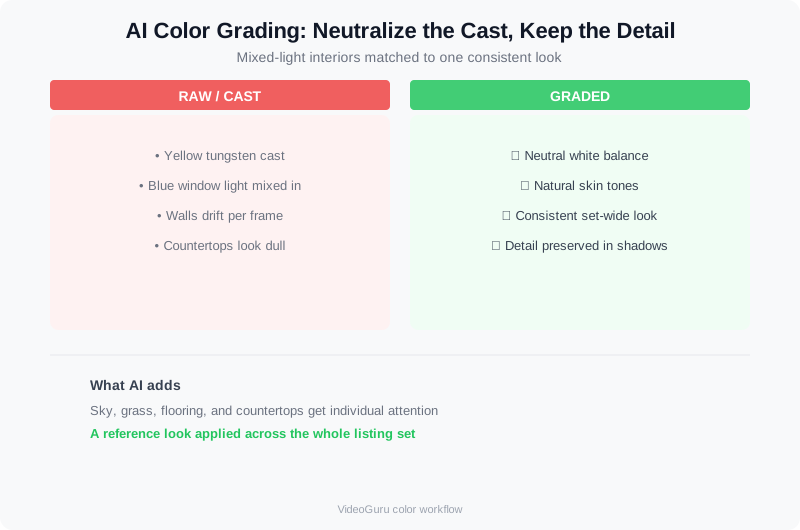
AI color grading neutralizes mixed-light casts and matches the image to a set-wide reference look.
Where the Human Eye Still Matters
AI still cannot decide whether a client's staging style should read warm or cool, whether a twilight hero shot should be dramatic, or how aggressive a look should be. Those are creative calls. The practical workflow is: AI does the mechanical matching at scale, you set the reference and approve the result.
A practical color grading workflow for listing photography.
AI Color Grading vs the Traditional HDR Workflow
Traditional HDR means bracketing exposures, blending them, and then correcting color image by image. It produces excellent results — but it is slow, and color drifts between frames. AI color grading changes the pipeline in three ways:
| Step | Traditional HDR | AI Color Grading |
|---|---|---|
| Capture | Bracket 3 to 5 exposures per room | Single shot works for most rooms; bracket only high-contrast scenes |
| Color pass | Manual white balance and tone per image | Reference image matched across the whole set automatically |
| Consistency | Depends on the editor's discipline | Set-wide by design |
| Time on a 40-image set | Hours | Minutes, plus review time |
Neither approach is wrong. Photographers who want full manual control over every pixel still bracket and blend. Photographers who shoot multiple listings a week let AI handle the mechanical pass and keep their eye on composition and client direction. For the full side-by-side on capture technique, see our guide to HDR vs AI photo enhancement.
Building a Color Workflow for a 50-Photo Listing
Here is a practical sequence that works across a typical listing set:
- Shoot with a reference in mind. Pick the image that best represents the home's actual light — usually the main living area — and grade it first.
- Set your style target. Neutral and true-to-life for most listings; warmer for luxury interiors; cooler and cleaner for modern properties.
- Run the AI match. Apply the reference image's color profile to the rest of the set.
- Spot-check the hard rooms. Kitchens, bathrooms, and window scenes can fight the color science — verify those individually.
- Export one consistent profile. Deliver all images in the same color space so nothing shifts when the MLS or the client's platform reprocesses them.
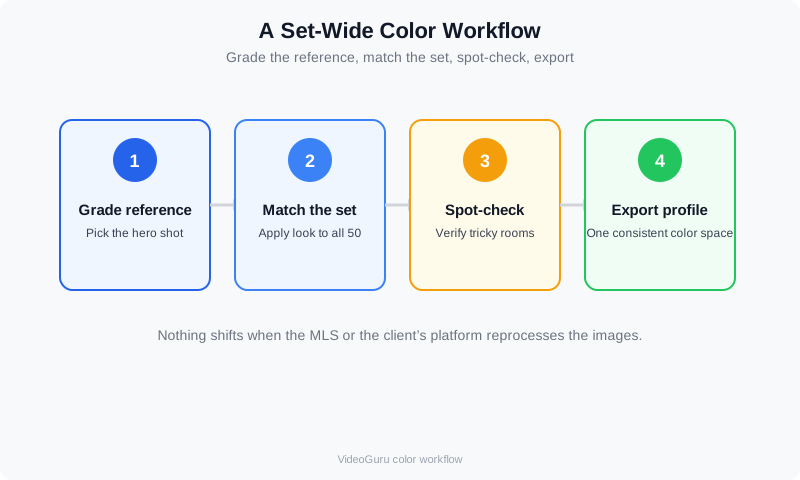
A set-wide color workflow: grade the reference, match the set, spot-check, export.
Color space matters here. sRGB is the safe default for MLS and web galleries, and it is worth understanding how color spaces convert before you export. Cambridge in Colour's color space tutorial explains the conversions clearly, and the International Color Consortium publishes the color management standards behind them.
If you deliver video walkthroughs from the same shoot, grade stills and video against the same reference so the listing tells one color story. VideoGuru's platform handles both sides of that pipeline — the same AI that matches your photography also powers your listing videos. See how in our guide to real estate photo to video AI.
Color Grading, Disclosure, and MLS Rules
Grading for a consistent look is standard practice. Grading that changes what the property actually looks like — replacing a gray sky with a sunset, changing wall colors, or adding furniture — crosses into content that many MLSs now require you to disclose as altered. Several states have passed or proposed AI disclosure rules for real estate media, and photographers are the ones on the hook for compliance. See the current landscape in our breakdown of AI photo disclosure rules for 2026.
Practical rule: if the edit makes the property look materially different from reality, disclose it and keep the original alongside the graded version. Making a well-lit room look consistent is not the same as making an empty room look furnished — our comparison of virtual staging vs traditional staging ROI covers where that line sits.
What AI Color Grading Does to Your Pricing
Because AI compresses the mechanical part of the edit, you can price for outcomes instead of hours. Photographers who move color work to AI tend to quote per delivered asset or per package rather than per editing hour — the same shift happening across photo editing generally. Our guide to photo editing pricing models breaks down per-image, batch, and subscription approaches.
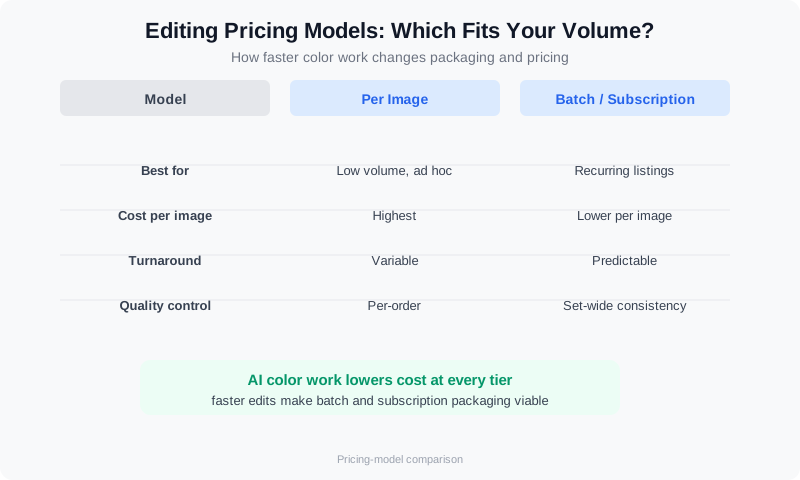
Faster color work changes how you can package and price your editing.
Beyond color, AI photo editing now handles decluttering, furniture swaps, and virtual staging for still images — the same AI that powers video walkthroughs can handle listing photography. Agents see the value immediately: a consistent, gallery-grade set is a premium deliverable. For the agent side of the conversation, our guide to AI photo editing for real estate agents explains what to promise clients.
Frequently Asked Questions
Can AI color grading replace a professional editor?
For the mechanical pass — white balance, exposure matching, set-wide consistency — yes, it replaces the most repetitive work. For creative direction, client communication, and final approval, no. The strongest workflows pair AI volume with a human eye on the hero shots.
Does AI color grading work on HDR bracketed sets?
Yes. AI handles the blend and the color pass together, and it is especially effective at keeping exposure and color consistent across the set. Photographers increasingly skip bracketing for most rooms and reserve HDR for high-contrast scenes like bright windows and sunsets.
Is AI color grading allowed on MLS listings?
Grading that represents the property accurately is standard and widely accepted. Edits that materially change the property's appearance — sky replacement, wall color changes, added staging — increasingly require disclosure. Check your MLS rules and keep the originals on file.
How long does AI color grading take on a typical listing?
On a 40-image set, the mechanical matching runs in minutes once you set a reference image. The overall edit drops from a multi-hour manual pass to roughly the time you spend reviewing the AI's work and fine-tuning the hero shots.
What color space should I deliver real estate photos in?
sRGB for MLS, web, and most client platforms. If a client needs print or high-end marketing, export a wider-gamut profile from the same master. Delivering the whole set in one consistent color space prevents shifts on the buyer's screen.
Ready to deliver consistent, gallery-quality color on every listing without the multi-hour edit? VideoGuru's AI photo editing tools match color and exposure across your whole set — and handle decluttering, virtual staging, and video walkthroughs in the same workflow. Start for free at VideoGuru.
Final Thoughts
Color is the quiet differentiator in real estate photography. Buyers cannot name it, but they feel it: a gallery that holds one consistent look reads as a more valuable home and a more professional photographer. AI color grading does not remove your creative eye — it removes the hours of repetitive matching that used to stand between you and the look you already knew you wanted. Set your reference, let the machine match the set, and spend your time where it still matters: the hero shots, the client, and the next listing.




