

Chengran (Felix) Guan
2026-09-02 · 15 min read
AI Voiceover for Real Estate Videos:
How to Add Professional Narration in 2026
Yes — AI voiceover now sounds good enough for real estate video, and it takes minutes instead of a studio session. Modern text-to-speech converts a listing script into a natural, professional narration track that you can drop over a walkthrough or photo tour in about the time it takes to brew coffee. For agents and videographers in 2026, the question is no longer whether AI narration sounds robotic — it is which videos deserve narration, how to script them, and how to keep the audio honest. This guide covers how AI voiceover works, when it outperforms music-only edits, the five-step production workflow, and the disclosure rules you need to know.
Key Takeaways
- AI narration is production-ready: neural text-to-speech voices are natural enough for listing walkthroughs, market updates, and relocation tours when scripted well.
- Narration serves specific videos: it adds context and story to walkthroughs and updates, while music-only edits stay stronger for teasers and drone montages.
- The workflow is five steps: script room-by-room, pick a warm mid-tempo voice, generate in short takes, sync each take to its scene, then mix narration under the music at a consistent level.
- Consent and disclosure still apply: cloning a real person's voice requires permission, and AI-generated audio should follow the same disclosure discipline as AI-edited photos.
- Voiceover pairs with AI editing: narration is the finishing layer on top of an automated edit — the visuals, captions, and effects still do the heavy lifting.
What Is AI Voiceover, and How Good Is It in 2026?
AI voiceover, also called text-to-speech narration, is software that reads a written script aloud in a synthetic but human-sounding voice. The current generation of neural voice models does not stitch together pre-recorded syllables the way old robotic voices did. Instead, the model learns the rhythm, emphasis, and breath patterns of real speech, then generates audio from your text in that style.
The quality jump matters for real estate specifically. Listing narration is short, factual, and delivered in a calm, descriptive register — exactly the kind of audio modern text-to-speech handles best. A 60-second walkthrough script with room names, measurements, and neighborhood context is far easier for a voice model than dramatic advertising copy. Practitioners who test current tools report that most buyers cannot tell the difference between a well-generated AI track and a voice actor for this use case.
There is one important distinction to keep straight. Standard AI voiceover generates a brand-new voice from a script. Voice cloning is different — it copies a specific real person's voice from samples. Cloning raises consent questions that ordinary text-to-speech does not, and it is covered separately later in this guide.
Why Add Narration to a Listing Video at All?
Video already dominates how buyers research homes. NAR's home buyer research consistently reports that about 97% of buyers use the internet to search for homes, and video tours are one of the most-used listing features buyers seek out. Wyzowl's annual video surveys show that roughly nine in ten businesses now use video as a marketing tool, and viewers consistently say video helps them understand products better than text or photos alone.
But a music-only walkthrough leaves questions unanswered. The viewer sees a gorgeous kitchen and wonders: is it original to the home? Is it open to the family room? What about the neighborhood? Narration answers those questions inside the video, so the buyer does not have to scroll back to the listing description. That context is what moves a viewer from "nice video" to "book a showing."
Narration also carries your brand voice. The same warm, informed tone across every listing builds recognition faster than any logo — which is why a growing number of agents treat a consistent narration style as part of their personal brand, right alongside their video branding strategy.
When Narration Helps — and When Music-Only Is Better
Not every video needs a voice track. Adding narration to the wrong video makes it feel slower and more produced than the platform wants. Use this quick filter:
- Narrate walkthroughs and tours. Room-by-room listing videos are the strongest fit — the voice guides the viewer through the flow of the home.
- Narrate market updates and new-listing alerts. These explain data or changes, and a clear voice beats on-screen text for time-pressed buyers.
- Narrate relocation and lifestyle videos. Out-of-town buyers need context about commutes, schools, and neighborhoods that music alone cannot deliver.
- Keep teasers and drone montages music-only. Short, atmospheric videos are about feel, not information. A voice track can undercut the impact.
- Keep social-first loops mostly visual. Most social feeds autoplay muted, so a narrated video needs captions to work there. If you cannot caption it, narration is wasted on that platform — see the platform-by-platform video guide for which formats carry audio.
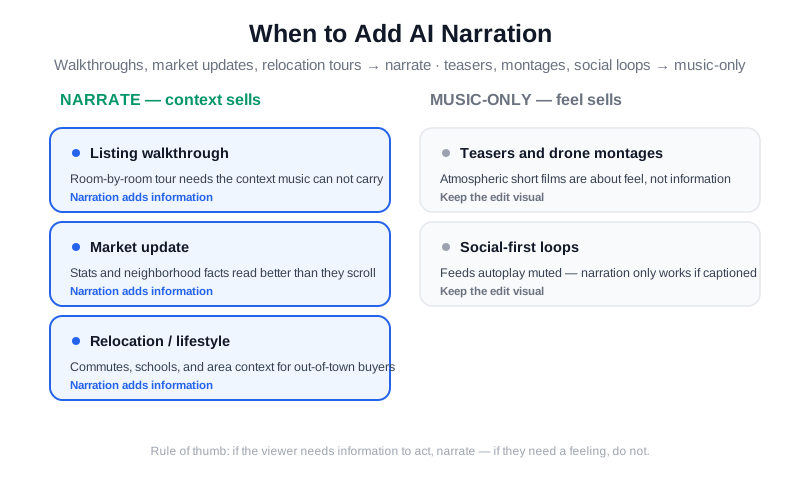
Walkthroughs, market updates, and relocation tours benefit most from narration; teasers and montages stay stronger music-only.
Where Voiceover Fits: Commercial Real Estate Videos, Video Mailers, and Promo Videos
Narration is not one decision — it changes with the format. A listing walkthrough needs a light touch. A commercial real estate video needs the opposite: investors and tenants want the numbers spoken plainly, because the footage of an empty 12,000-square-foot warehouse says nothing on its own. Script commercial real estate videos around square footage, ceiling height, dock doors, parking ratio, zoning, and traffic counts, and keep the voice flat and factual. A 90-second commercial video usually carries 180–220 words of narration, about 40% more than a residential tour of the same length, because the facts are the product.
A real estate video mailer is a different animal. Video mailers are short, personal clips sent by text or email to one person — a seller you met at an open house, a past client on their home anniversary, an expired listing. They run 30–60 seconds and work best with your own voice, or an AI clone of it (with consent, see below), because the whole point is that it feels one-to-one. Agents who send 20–30 real estate video mailers a week report reply rates of 15–25%, versus 2–5% for a plain text follow-up. Use AI voiceover here only to batch the parts that repeat — the intro and the market line — and record the personal sentence yourself.
Real estate promo videos and real estate sales videos sit in the middle. A promo video sells you or your team (a 45–60 second brand piece for your website and ads); a sales video sells one property and closes with a direct ask — book a showing, request the offering memorandum, join the open house. Both benefit from a confident narrator and a scripted call to action in the last five seconds. For the visual side, the listing video shot list covers what to film for each format, and the guide to real estate video content that converts shows which formats actually produce inquiries.
The Five-Step AI Voiceover Workflow
A professional-sounding narrated video is 80% scripting and 20% voice generation. Here is the production workflow that works across every AI voice service:
Step 1 — Script room-by-room, in video order. Walk through the video's scene sequence and write one or two sentences per scene. Lead with the room's best feature, keep measurements only when they impress, and end the video with the neighborhood or the call to action. A 20-scene video should produce roughly 150 to 200 words — about 60 to 75 seconds of speech.
Step 2 — Choose a warm, mid-tempo voice. Skip the "announcer" presets. The voices that work for listings are conversational: medium pace, warm tone, neutral accent. Most services let you preview a sentence in each voice before you commit. Listen for how the voice handles numbers — "2,800 square feet" and "three bedrooms, two baths" should sound like a person quoting them, not reading a spreadsheet.
Step 3 — Generate in short takes, not one giant file. Paste the script as separate blocks that match your scenes (one take per room). Short takes make it trivial to re-generate a single flubbed line or fix a mispronounced street name without touching the rest of the audio. This is the single biggest time-saver in the workflow.
Step 4 — Sync each take to its scene. Place the audio for each room on the timeline where that room appears. If you built the video with an automated tool, this is where you confirm the scene order matches the script order before exporting. Watch the pacing: if the narration finishes early, hold the shot longer; if it runs long, trim the tail of the clip — never rush the voice.
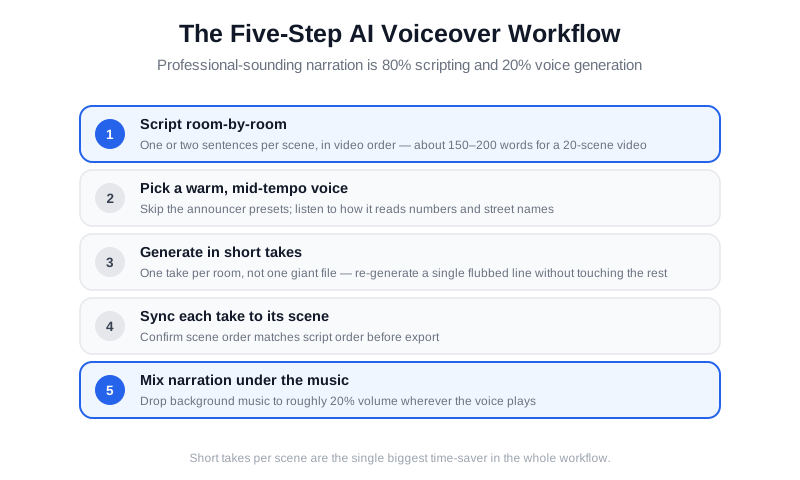
Script per scene, generate per scene, then sync each narration take to its matching footage.
Step 5 — Mix narration under the music. Lower the background track to roughly 20% of normal volume wherever the voice plays, and keep the narration at a consistent level across the whole video. A common beginner mistake is leaving the music at full volume, which makes even a great AI voice sound muddy and distant. If you are producing this as part of a larger content operation, the same pipeline that turns listing photos into videos in minutes can carry the narration layer — this 10-minute AI listing video workflow shows how fast the visual side moves.
Real Estate Video Scripts You Can Hand to an AI Voice
Every AI voiceover starts with a script, and most weak narration is a script problem, not a voice problem. Good real estate video scripts follow one rule: about 130–150 spoken words per minute of video, written in short sentences a person would actually say. A 60-second listing tour gets 120–150 words. A three-minute luxury walkthrough ($2M+) gets 350–420 words with deliberate pauses. If you write more than that, the AI voice will race and the video will feel like an auction.
Here is a skeleton you can reuse. Hook (5 seconds): one sentence with the neighborhood and the single best feature — "This Tudor on Maple Street has the largest lot on the block." Body (one line per room): lead with what the camera is showing, name the feature, skip the adjectives. Neighborhood (10 seconds): two facts a buyer would ask about — commute time, school, the walkable coffee shop. Close (5 seconds): price if you disclose it, then the call to action. Swap the body for a numbers block and you have a commercial script; swap the hook for the recipient's name and you have a video mailer script. Keep the templates in a shared doc so your team's tone stays consistent — the reusable listing content template kit includes a scripting page built for this.
Two practical tips for AI voices. Write numbers the way you want them read ("twenty-eight hundred square feet", not "2,800 sq ft"), and spell out street names phonetically if the voice mispronounces them on the preview. Both fixes take seconds and remove the most common tell that a script was machine-read.
Making AI Narration Sound Human: The Quality Checklist
AI voices fail in predictable ways, and every failure is fixable at the script or edit stage:
- Pronunciation errors: street names, neighborhoods, and architectural terms trip up voice models. Spell tricky words phonetically in the script, or use the service's pronunciation dictionary.
- Run-on pacing: long sentences force unnatural breath patterns. Keep sentences under 20 words and add a comma pause where a human would breathe.
- Flat emphasis: every sentence ending on the same tone sounds robotic. Vary sentence length and put the emotional word mid-sentence, not always at the end.
- Numbers read wrong: "lot 12,000 square feet" can come out as "twelve thousand" or "one-two thousand." Spell out how you want figures spoken when the default is wrong.
- No room to breathe: narration that starts the instant the scene cuts feels frantic. Leave half a second of silence at the start of each take.
The fastest quality test is brutal and simple: export the video, close your eyes, and listen to the narration alone. If you would not send that audio to a seller, fix it before you send the video. Re-generating one take costs thirty seconds; re-shooting a video costs a day.
Voice Cloning, Consent, and Disclosure Rules
Ordinary AI voiceover generates a synthetic voice that belongs to no real person, which makes it a low-risk marketing tool. Voice cloning is a different category: it replicates a specific individual's voice, and using someone's voice without permission raises real legal and ethical problems. The FTC's AI guidance is explicit that cloning a person's voice to deceive consumers — including in marketing — is fraud territory, and several states have passed laws restricting unauthorized voice clones.
Three rules keep you safe in practice. First, only clone a voice you have written permission to use, and keep that permission on file. Second, if you clone a colleague's or seller's voice for a video, disclose that it is AI-generated in the video description or on screen. Third, follow the same disclosure discipline your photo workflow already uses — the AI photo disclosure rules guide lays out the 2026 landscape, and audio disclosure is converging on the same standards as MLSs add AI-content policies.
When in doubt, use a fresh synthetic voice instead of a clone. A synthetic narrator carries zero consent risk, sounds consistent across every video, and cannot be tied to a real person whose reputation you would be borrowing.
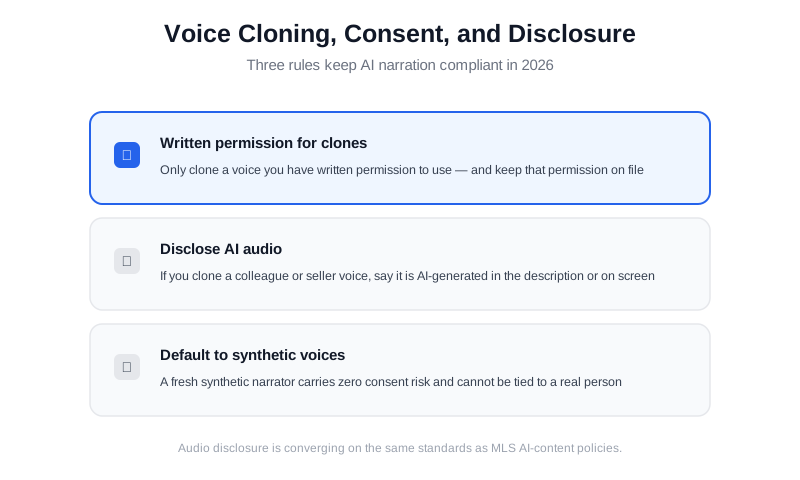
Consent for clones, disclosure for AI audio, and a synthetic-voice default keep narration compliant.
Which AI Real Estate Video Generator or App Handles Voiceover Best?
An AI real estate video generator takes your listing photos or phone clips and assembles the cuts, motion, music, and titles automatically. The question for this article is whether it also handles the audio. Tools fall into three groups. General template apps like Animoto and Canva make slideshow-style real estate videos quickly and cheaply ($15–$40 per month), but voiceover means recording into your microphone or uploading a file you generated elsewhere — there is no listing-aware script step. Dedicated real estate video apps read the MLS data, know what a kitchen scene looks like, and increasingly generate the narration from the listing description in the same pass. Standalone text-to-speech services (ElevenLabs, Google, Amazon Polly) give you the best voices and the most control, at the cost of syncing the audio yourself. Real estate platforms with built-in voice are the newest option: VideoGuru clones a real person's voice and generates the narration inside the video it builds from your listing photos, so there is no separate audio file to sync at all.
The best AI video generator for real estate depends on who you are. Agents who want a narrated listing video from their phone in about ten minutes should use a real estate video app that handles both picture and voice — VideoGuru builds the video from your photos or clips, and can clone your own voice to narrate the cut — the voiceover is generated inside the video, so there is no separate TTS tool and no audio to sync — without opening an editor. Photographers and media companies producing 20–200 videos a month need batch export, brand presets, and a consistent voice across clients; they typically pair a real estate video generator with one chosen TTS voice per client. Teams should pick whatever the least technical member will actually use. Our roundup of the best AI video editors for real estate in 2026 compares pricing and turnaround, and the real estate video maker guide covers the photo-to-video generators in detail.
One finishing detail that separates amateur from professional output: color. Real estate video LUTs (look-up tables) are preset color grades that give every clip the same warm, bright, true-to-white look, and most real estate video generators now apply one automatically. If yours does not, a single neutral daylight LUT applied to every listing does more for perceived quality than any narration tweak — the same logic covered in the AI color grading guide for real estate photos. Match the grade and the voice, and the video reads as one brand.
AI Voiceover vs. AI Avatar Presenters: What's the Difference?
The two most confused AI video features in real estate are voiceover and avatar presenters. An AI voiceover is audio only — a narrator you hear but never see. An AI avatar is a digital person on screen who appears to speak, often used for market updates and new-listing announcements. AI avatar videos for real estate are a strong fit when you want a recognizable on-camera presence without filming; voiceover is the right tool when the property itself should stay the star of the screen.
Many teams use both: an avatar presenter opens a market update and hands off to a narrated walkthrough of the featured home. Because the two features serve different visual jobs, they coexist cleanly in a monthly content plan.
Frequently Asked Questions
Does AI voiceover sound natural enough for luxury listings?
Yes, for narrated walkthroughs and descriptive tours. Modern neural voices handle the calm, factual register that listing narration requires. The naturalness depends more on your script than the voice model — short sentences, phonetic spellings for tricky names, and natural pauses make any AI voice sound significantly more human. For a $2M+ listing where the seller expects a cinematic feel, pair the voice with high-end visuals and keep the narration understated; the voice supports the imagery rather than dominating it.
How long does it take to add AI narration to a listing video?
For a typical 60-to-90-second walkthrough, plan on 15 to 25 minutes total after you have done it a few times: about 10 minutes to write and tighten the script, 2 to 3 minutes to generate the takes, and 5 to 10 minutes to sync and mix. The first video takes longer while you learn your voice service's quirks; by the third or fourth listing you will have a reusable script template that cuts the scripting time in half.
Do MLS rules require disclosing AI voiceover?
Most MLS rules that address AI today focus on images and virtual staging, but policies are expanding to audio as AI content becomes common. When your narration uses a synthetic voice, disclosure is low-risk and increasingly expected; when you clone a real person's voice, disclosure is essential. Check your MLS's current AI-content policy before publishing, and when in doubt, note in the video description that narration is AI-generated.
Can AI voiceover replace hiring a voice actor?
For standard listing narration, AI voiceover replaces a voice actor for most agents and small media teams — the quality gap has closed to the point where buyers rarely notice. Voice actors still earn their fee for emotional brand campaigns, live-read commercials, and any spot where a recognizable human personality is the product. For daily listing content, the economics favor AI: no booking, no retakes, no per-video studio cost, and instant re-generation when a price changes.
Does AI voiceover work for photo-to-video tours?
Photo-to-video tours are one of the best use cases for narration. When a video animates still photos with pans and zooms, the voice provides the continuity that motion would otherwise supply. Script each photo's narration before generating, then sync every take to the scene where that photo appears. The real estate photo-to-video AI guide walks through building the visual side of exactly this format.
Ready to add professional narration to your listing videos without booking a studio? VideoGuru's AI editing platform builds the visual side — turning your photos and clips into a polished, captioned walkthrough — and it can narrate it too: clone your own voice and the voiceover is added into the video itself, so there is no audio track to sync and you ship a finished narrated tour the same day. Start for free at VideoGuru.
Can a real estate video app add AI voiceover from my phone?
Yes. Most dedicated real estate video apps now generate the video from your listing photos or clips and let you add a text-to-speech narration track in the same session, so an agent can go from photos to a narrated 60-second listing video in roughly 10–15 minutes on a phone. General slideshow tools like Animoto still require you to record or upload the audio separately. Whichever app you use, write the script first and generate the voice in short takes so a mispronounced street name costs you one line, not the whole track.
The Bigger Picture
AI voiceover is part of a broader shift in real estate media: the last expensive, schedule-dependent part of video production is becoming a self-serve step. Ten years ago a narrated property video required a videographer, a voice actor, and a studio booking. Today the same output starts from a script an agent writes on the drive home from the listing appointment. The winning teams are not the ones with the best tools — they are the ones with the clearest scripts, the most consistent brand voice, and a workflow that lets them ship narration on every listing that needs it. Voice is simply the newest layer of the AI real estate video stack, and it is the layer that finally makes automated video feel like a person made it.




