

Chengran (Felix) Guan
2026-09-05 · 13 min read
Listing Video Shot List:
The 8 Shots That Sell Any Home
A listing video earns the next view when it mirrors the tour a buyer would take in person: approach the house, walk through the entry, flow from kitchen to living spaces, see the primary suite, step outside, and end on the reason to book a showing. That sequence — eight shots in a fixed order — is the shot list. Film it and even a phone-shot walkthrough holds attention. Skip it and buyers click away, usually within the first ten seconds, because a tour with no logic feels longer than a tight one.
Buyers watch listing media inside a long decision window. The median home search lasted 10 weeks in the 2025 Profile of Home Buyers and Sellers from the National Association of REALTORS, and the search most often begins online — which makes your video the buyer’s first tour of the home. The same research found 88 percent of buyers ultimately purchased through an agent, and NAR’s summary of the 2025 findings is blunt about what that means: the listing that gets the showing request wins, and media decides which listings get requests. HubSpot’s compiled video marketing data reaches the same conclusion from the marketing side — video is one of the highest-performing formats for holding attention and generating leads, but only when the structure gives viewers a reason to stay.
Key Takeaways:
- Buyers decide in seconds, so listing video structure matters more than gear.
- The eight-shot sequence mirrors an in-person tour: exterior, entry, kitchen, living spaces, primary suite, secondary rooms, outdoor living, hero close.
- Each shot runs three to five seconds, so the full listing video lands between 60 and 90 seconds.
- Shoot in tour order and AI handles the assembly — pacing, captions, music, and format.
- One capture session yields the main tour, a vertical reel, and a 15-second teaser.
Does Video Help Sell Real Estate? What the Listing Advertising Numbers Show
Yes — the evidence points one way, and it is why video has become the default for real estate listing advertising. The 2025 Profile of Home Buyers and Sellers reports a median search of 10 weeks that starts online, so your video is the buyer's first tour and the first ten seconds decide whether the rest of your listing advertising gets seen at all. On the marketing side, Wyzowl's State of Video Marketing has found for years running that roughly 9 in 10 marketers say video gives them a positive return on investment, and a clear majority report it helps them generate leads.
For listings the pattern repeats: brokerages that track media performance consistently report 3–4x more inquiries on listings with a professional video tour than on photo-only listings in the same price band, and shorter days-on-market. Video never sells the house by itself — price, condition, and location still close the deal — but it decides which listings earn the showing request, and the showing request is where the sale begins. If you want to prove it with your own data rather than trust industry averages, the real estate video analytics guide maps which views, saves, and shares actually predict a lead.
Why a shot list earns more showings
On listing portals and in social feeds, your video plays next to comparable homes. Buyers reward listings that are easy to watch: an establishing exterior, then a logical path through the home. When a video jumps from bedroom to backyard to kitchen with no through-line, the viewer has to rebuild context after every cut — and every cut is a reason to leave.
A shot list also fixes the two classic failure modes of agent-produced video. The first is missing coverage: you get back to the office and realize you never filmed the backyard or the primary bath. The second is bloat: 90 clips of everything, hours of footage, and no clear ending, so the video never gets made. The shot list turns “make a video” into a 25-minute capture task with a defined start and end.
- Coverage: the rooms buyers weight most appear in every tour, every time.
- Speed: capture takes about 25 minutes, so it happens on listing day instead of never.
- Pacing: short, purposeful shots keep the finished edit inside the 60-to-90-second range buyers actually watch.
- Reusability: tour-order footage cuts into any format — a 16:9 listing tour, a 9:16 reel, or a 15-second teaser.
The eight shots that sell any home
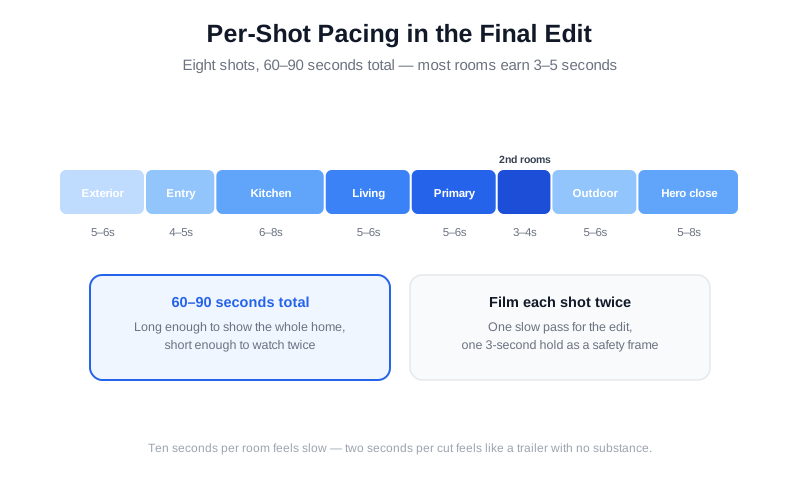
Shoot in this order on every listing. The second column is the capture target — these are per-shot screen-time goals in the final edit, not instructions to linger. Film each shot twice: one slow pass for the edit, one static three-second hold as a safety frame.
| Shot | Capture | Why it earns the next shot | Edit |
|---|---|---|---|
| 1. Approach & exterior | Full front elevation from the curb, car-free street, hero angle | Sets the property and the neighborhood; doubles as the cover frame | 5–6s |
| 2. Entry & flow | Front door open, threshold, sight line through the main level | Invites the viewer inside; establishes the floor plan | 4–5s |
| 3. Kitchen | Widest angle from a corner, clean counters, sight line to the yard | The most-compared room in the house; buyers pause here | 6–8s |
| 4. Living spaces | Main gathering room in natural light, furniture arranged, connection to outdoor | Shows how the home is lived in; light sells | 5–6s |
| 5. Primary suite | Bed made, curtains open, window light, one nod to storage | Buyers picture themselves here; make the bed matter | 5–6s |
| 6. Secondary rooms | Office, flex space, second bath — one clean frame each, only if presentable | Answers the “what else” question before it is asked | 3–4s |
| 7. Outdoor living | Patio or deck, yard, and any view — the payoff room of the video | Extends the home’s square footage on screen | 5–6s |
| 8. Hero close | Best exterior angle again, or a defining interior detail, with room for on-screen text | Ends on the image buyers remember and the call to action | 5–8s |
The three shots agents rush (and buyers notice)
The exterior. Shoot from the curb, straight on and wide, with no cars in the frame. The best light is the first hour after sunrise or the last hour before sunset; if the listing is vacant, shoot the exterior first and again at the end of the session when the light has shifted. This frame becomes the cover frame on portals and feeds, so treat it as the most important shot of the day, not the warm-up.
The kitchen. Clear the counters of small appliances before you start — a cluttered kitchen is the fastest way to make a $750,000 home look like a rental. Shoot from the corner with the widest angle you have, open any window coverings, and let the frame end on the sight line to the backyard, which visually doubles the size of the room.
The primary suite. Make the bed, open the curtains, and hide the laundry basket. One establishing frame of the whole room plus one detail — a window seat, a vaulted ceiling, the spa shower — is enough. Buyers compare primary suites across every listing they view this week; yours just needs to look calm.
Pacing and tour order: why 90 seconds wins
Most rooms earn three to five seconds in the finished video. That sounds short because you filmed for twenty minutes — the edit is where listing videos are won. Hold a room for ten seconds and the video feels slow; cut every two seconds and it feels like a trailer with no substance. The 60-to-90-second range works because it is long enough to show the whole home and short enough to watch twice.
Two mechanical rules. First, move slowly when you film and let the AI or editor cut on the movement — never zoom, and never whip-pan; shaky speed is what makes phone footage look amateur. Second, film everything horizontal at 4K, then crop to vertical for reels and stories. Horizontal masters give you both formats; vertical masters give you only one.
How to Choose a Real Estate Listing Video Maker
A real estate listing video maker is any tool that turns your raw footage or listing photos into a finished tour — and the right one depends on your volume. Solo agents filming one or two homes a month need a maker that assembles phone clips in minutes with captions and a brand intro, not a full timeline editor. Teams and brokerages need batch tools that keep every listing on-brand without an editor per agent. Photographers and media companies want a maker they can point at a day of shoots to deliver a consistent product at scale. Whatever you pick, it should export both a 16:9 tour for the portal and a 9:16 reel for social — the two formats buyers actually watch.
The line between a video maker and a video editor has blurred. Traditional editors give frame-level control but add hours per listing; AI makers like VideoGuru take your clips in tour order and handle pacing, captions, music, and branding in one pass, then export horizontal and vertical cuts. For an agent who wants an eight-shot tour without opening a timeline, that is the practical choice — and for photographers it is a way to add video as a productized service. Our rundown of the best real estate video makers compares pricing and turnaround across the options.
Assembling the cut without opening a timeline
This is where AI does the heavy lifting. Upload your clips in tour order to VideoGuru and the platform paces the footage to music, keeps your sequence intact, adds captions, and applies your brand colors and logo — then you review and export. The 10-minute listing video workflow walks through the exact steps, and if you captured stills instead of motion, the photo-to-video walkthrough shows how AI turns a photo set into the same tour structure.
The stills matter as much as the footage, because the same photo set feeds the portal listing, the cover frame, and the video’s opening frames. VideoGuru’s photo editing tools clean up the same shoot — one-click declutter, lighting correction, and virtual staging for the rooms that need it — so the video and the listing photos tell the same story. Do the photo pass first, then drop the finished stills into the video project.
A videographer shows how to keep the frame clean when filming a property tour — footage that cuts together fast with nobody to edit out.
One line for every shot: the 60-second script
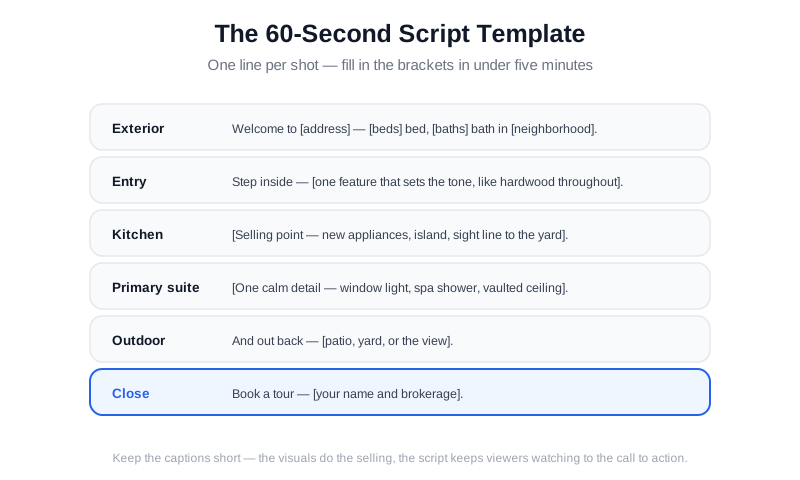
Voice-over is optional. On-screen captions are not — most buyers watch with the sound off. Write one line per shot, keep it under ten words, and reuse the same lines as captions. A template that works for any listing:
- Exterior: “Welcome to [address] — [beds] bed, [baths] bath in [neighborhood].”
- Entry: “Step inside — [one feature that sets the tone, like hardwood throughout].”
- Kitchen: “[Quartz counters, new appliances, open to the backyard] — the kitchen is the heart of this home.”
- Living: “A great room built for hosting — [light, views, fireplace].”
- Primary: “The primary suite — [vaulted ceiling, spa bath, walk-in closet].”
- Secondary: “And [a flex room, office, or bonus space] ready for how you live.”
- Outdoor: “Outside — [patio, yard, view] made for [coffee, dinner, weekends].”
- Hero close: “Book a tour before this one is gone.”
The last line is the only line that has to sell. The rest of the script exists to keep viewers watching long enough to hear it — the same principle behind the listing video content that converts. Fill in the brackets with the home’s real details and the script writes itself in under five minutes.
Real Estate Video Reels and Hosting: Where the Tour Goes Next
The eight-shot master is one asset, not the whole campaign. Cut a real estate video reel — a 15-to-30-second vertical edit of the best three shots plus the hero close — for Instagram Reels, TikTok, and Facebook. Reels are the highest-reach format for putting a listing in front of buyers who are not actively searching yet, and a local viral reel is one of the few ways a single home gets seen by thousands of buyers in a weekend. The same footage re-cut to 60 seconds works as an ad, a story, and a DM reply when a buyer asks if it is still available.
Hosting matters just as much as the edit. Your listing video needs a home that loads fast and embeds cleanly: YouTube for search and long-form, Vimeo for ad-free embedding on your site, and the MLS plus portal uploads for the actual listing. Upload natively everywhere buyers look instead of linking across platforms, because every platform's algorithm favors native video. To turn one shoot into every format without re-editing, see our guide to repurposing listing content and the real estate video ideas for social media list of formats that perform.
Before you publish: a 60-second review
- The cover frame is the exterior wide shot — it is what shows in portal cards and feed previews, so export it deliberately.
- Captions are on, readable in two seconds, and free of typos in the address.
- You exported both formats: 16:9 for the listing and portal, 9:16 vertical for reels and stories.
- The title and description include the address and “video tour,” and the listing link is in the description and your profile.
- It goes live the same day the listing goes live — a video published two weeks late is a video nobody sees.
- You kept a 15-second teaser cut for stories and DM replies.
Format specs differ by platform — the real estate video platform guide covers lengths, ratios, and posting cadence for each one, so the same eight-shot master becomes the right cut everywhere.
Frequently Asked Questions
How long should a listing video be?
Between 60 and 90 seconds for the main tour. Buyers decide whether to keep watching in the first few seconds, and most listing videos compete in feeds and portal carousels where attention is measured in seconds. If a home needs more time — a large property, a complex floor plan, or an acre of land — keep the main tour at 90 seconds and let a separate, longer cut live on YouTube for the buyers who want depth.
Do I need a videographer to make a listing video?
No. A modern phone with stabilization, lights on, blinds open, and the eight-shot structure produces a watchable tour — publish a phone video on time beats a professional video that ships after buyer interest peaks. Professional help pays for itself on your highest-priced listings and on properties where the sellers expect cinema-grade marketing, but the shot list works the same way whether a human editor or an AI assembles the cut.
Can I make a listing video from photos alone?
Yes, and it is better than no video. AI photo-to-video tools animate a still photo set into a paced tour with camera moves and music, which covers listings where you never got motion footage. The trade-off is honesty: motion footage shows the flow of a home — the sight line from kitchen to yard, the scale of the great room — and stills cannot fully fake that. Use stills-based video for quick turnarounds and reserve real footage for the listings buyers will compare hardest.
Which listings deserve the full eight-shot video?
Start with the listings that face the most comparison: new construction, recently renovated homes, unique layouts, and anything in a competitive price band where buyers are weighing three similar floor plans. For those, the eight-shot video is not a luxury — it is the differentiator that gets your tour request sent. For straightforward listings in a slow market, a strong photo set plus a 15-second teaser is a reasonable floor; a shot list simply tells you which listings are worth the 25 minutes.
What are the best home video companies for real estate?
It depends on what you need. Full-service home video companies like WellcomeMat and RealEstateShows pair a videographer with portal-ready delivery and typically run $500–$2,500 per listing. Template editors such as Animoto, Promo, and InVideo build listing videos from your photos and clips for a low monthly fee, and BombBomb covers video follow-up messages to leads. For hosting, YouTube and Vimeo are the standards. Agents who want the whole shoot-to-publish loop in one place use an AI maker like VideoGuru, which sits between template editors and a hired crew on cost and speed. Compare at least three before you commit.
What should go in a real estate agent profile video?
Unlike a listing video, a real estate profile video sells you, not the home. Keep it 60–90 seconds and cover three beats: who you are and the neighborhoods you serve, one client result with a number (homes sold, days-on-market, or offer-over-ask), and a single reason to call you. Shoot it once and refresh it yearly, and reuse the same brand intro, music, and lower-third as your listing videos so your whole feed looks like one brand. See our guide to building real estate brand video content for a template you can film in an afternoon.
Ready to turn your next listing into an eight-shot video? VideoGuru’s AI editing can assemble your walkthrough, add captions and music, and export both horizontal and vertical cuts — and its photo tools clean up and stage the stills that anchor the cover frame, all in one workflow. Start for free at VideoGuru.
Final Thoughts
Buyers do not reward expensive footage; they reward tours they can follow. Eight shots in tour order — exterior, entry, kitchen, living, primary suite, secondary rooms, outdoor living, hero close — give every listing the same structure that professional tours use, whether you shot it on a phone or hired a crew. Capture in 25 minutes, assemble with AI, publish the day the listing goes live, and let the video do the one job that matters: getting the showing request.




