

Chengran (Felix) Guan
2026-08-13 · 15 min read
Real Estate Photo Editing Workflow:
Batch Processing Guide for 2026
A real estate photo editing workflow that runs on AI batch processing can move a full listing shoot from upload to delivery in under 24 hours. Agents expect it: around 67% of real estate agents want photo turnaround within 24 hours or less, according to Imagen AI's 2026 workflow analysis. Batch editing with AI — not faster manual retouching — is how photographers meet that standard without working nights.
This guide walks through a complete batch processing workflow for real estate photos: how to set it up, where AI saves the most time, where you still need human judgment, and how to scale from one listing to a full portfolio. It is written for photographers, media companies, and agents who edit their own listing photos — and for anyone who has ever promised a client "photos by tomorrow morning" and meant it.
Key Takeaways
- 24 hours is the standard: Roughly two-thirds of agents expect photo delivery within a day. A batch AI workflow makes that turnaround reliable instead of heroic.
- Batch beats single-image editing: Processing a whole shoot in one pass keeps exposure and color consistent across the set, which is exactly what listing presentation demands.
- AI handles the repetitive 80%: Sky replacement, HDR blending, color correction, and decluttering are the tasks AI does fastest — and the tasks that consume most manual editing time.
- Human QC is still non-negotiable: AI gets you to 90% in minutes; a quick human pass catches the artifacts and brand misses that damage trust.
- The same pipeline scales to video: Photo-to-video workflows and AI video editing extend the batch model, so one shoot produces both deliverables.
What Is Batch Photo Editing in Real Estate?
Batch photo editing means applying the same correction pipeline to an entire set of images in one pass, instead of opening and adjusting each photo individually. For a typical listing — 30 to 50 interior and exterior shots — the batch approach is the difference between a 90-minute edit session and a 15-minute one.
In a real estate batch workflow, the pipeline usually runs in this order: white balance and exposure correction, window pull and HDR blending where needed, vertical and perspective correction, sky replacement for exteriors, color grading, and finally a resize-and-sharpen pass for delivery. AI tools now automate every step in that chain. The photographer's job shifts from executing each step to approving the results.
The defining benefit is consistency. When every photo in a set passes through the same AI pipeline, the set looks like it was shot in one session under one light. That matters more than any single hero shot: buyers scroll through the gallery as a whole, and a mismatched set reads as careless — even when the individual photos are strong.
Why the 24-Hour Turnaround Standard Exists
Agents work on listing schedules, not photo-editing schedules. A home hits the market, and the marketing clock starts immediately — the photos, the video tour, the social posts all need to exist before the first showing. That is why turnaround expectations have hardened: Imagen AI's 2026 workflow analysis found that around 67% of agents expect photo delivery within 24 hours or less.
The pressure is not arbitrary. Buyers judge listings quickly, and photos are the first thing they see. The National Association of Realtors has consistently found that listing photos rank among the most valuable features buyers use when evaluating a home — which is why agents push so hard for fast, high-quality delivery. You can review the underlying buyer research at NAR Research and Statistics.
The business implication for photographers is simple: whoever reliably delivers in 24 hours wins the repeat client. Photographers who cannot hit that window either lose listings to faster competitors or quietly eat their evenings catching up. AI batch processing changes the math — the fixed time per shoot drops so far that the 24-hour promise becomes the baseline, not the exception.
Step-by-Step: Build a Real Estate Photo Editing Workflow That Delivers in 24 Hours
Here is a batch workflow that works whether you are a solo photographer or a media company processing dozens of listings a week. The principle at every step: do the work once for the whole set, never photo by photo.
- Capture with consistency in mind. Shoot bracketed exposures for interiors with windows and keep a fixed white balance on exteriors. The more consistent the capture, the better the batch result — AI pipelines amplify good input and can't invent missing detail.
- Ingest and organize the set. Import the full shoot into your editing tool as one batch. Rename files by room order so the gallery tells the story of the home. This is a five-minute step that saves thirty minutes of hunting later.
- Run the AI batch pass. Apply your saved preset or AI pipeline to the whole set: exposure, color, window pull, sky replacement, perspective correction. The AI processes every image against the same standards, which is what produces the uniform look buyers expect.
- Handle special cases individually. A few photos will need manual attention — a room with mixed lighting, a reflection to remove, an odd angle. Flag them in the batch pass and fix them after, not during. Trying to hand-tune every image in the main pass defeats the entire point of batch editing.
- Quality-check the set, not the singles. Scroll the finished gallery top to bottom once, checking consistency of color and exposure across the set. Look for AI artifacts: warped furniture edges, unnatural shadows, over-smooth textures. This pass takes five minutes and protects your name.
- Deliver in the format the client needs. Export full-resolution for the listing, compressed versions for social media, and crops for specific platforms. Batch export means the client gets everything in one link, ready to use.
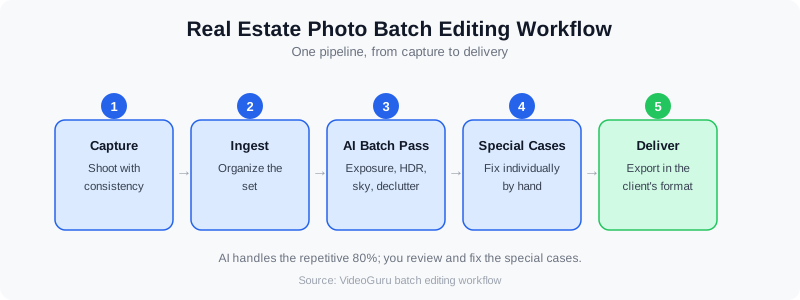
The six-step batch workflow: capture, ingest, AI pass, special cases, QC, delivery.
How long does real estate photo editing take with AI?
With a batch AI workflow, a 40-photo listing typically moves from upload to export in 15 to 30 minutes of active time, plus rendering time. Manual editing of the same set runs two to three hours for an experienced editor. The AI does not make the set perfect — you still review and fix special cases — but it removes the bulk of the repetitive work, which is where the hours actually go.
Watch a real estate photo editing workflow in action, from raw shoot to delivered set.
Batch Processing vs Single-Image Editing: What Actually Changes
The difference is not just speed — it is the outcome. Editing photos one by one optimizes each image in isolation. Batch editing optimizes the set, which is the thing the client actually buys. Here is how the two approaches compare on a typical 40-photo interior listing:
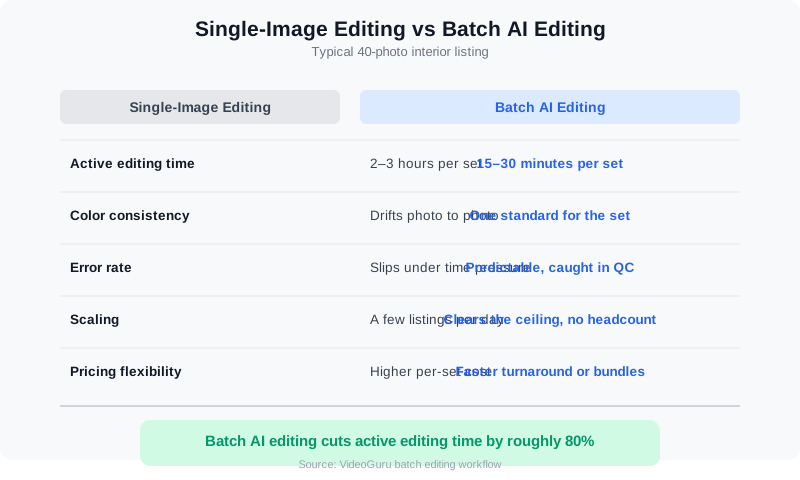
Single-image editing vs batch AI editing on a 40-photo listing.
- Active editing time: Single-image editing runs two to three hours for a full set; batch AI editing runs 15 to 30 minutes.
- Color consistency: Single-image editing drifts from photo to photo as you re-judge each exposure; batch editing applies one standard to the whole set.
- Error rate: Manual edits slip on reflections, window pulls, and edge cleanups under time pressure; AI artifacts are predictable and caught in one QC pass.
- Scaling: A single editor tops out around a few listings per day; a batch workflow clears that ceiling without adding headcount.
- Pricing flexibility: Lower per-set editing cost means you can offer faster turnaround or bundle photo and video packages — see how photographers price these services in our guide to photo editing pricing models.
Real Estate Photo Editing Companies vs Freelancers vs AI: Who Should Edit Your Photos?
You have three ways to get a residential real estate photo edit done, and the batch workflow above works with all of them. The difference is cost per image, turnaround, and how much of your brand's look you can lock in. Real estate photo editing companies (BoxBrownie, PhotoUp, Styldod, and similar) run offshore editing teams and charge roughly $1–$2 per image for standard enhancement, $2–$4 for HDR blending or window pulls, and $15–$30 per image for virtual staging. Turnaround is usually 12–24 hours, with rush options for a surcharge. BoxBrownie real estate photo editing is the best-known name because it is pay-per-image with no subscription; the trade-off is that every photo ships out and comes back, so your 24-hour clock starts only when their queue does.
Freelancers are the second route. Fiverr real estate photo editing gigs advertise $5–$50 for a small set of photos, and many of those sellers are the same Vietnam and Philippines editors the larger companies use. Vietnam real estate photo editing studios in particular have built a reputation for fast, consistent HDR and sky replacement work at $0.50–$1.50 per image when you commit to volume. The upside is price; the downside is that quality depends entirely on the individual editor, communication runs across time zones, and one editor going offline can stall a full listing. If you go this route, send a written style guide and a 10-image test batch before you trust them with a paid shoot.
AI batch editing is the third route, and the one this guide is built around. It is the fastest real estate photo editing option because there is no queue: a 40-image listing set processes in minutes, not hours, and the preset stays identical from the first shoot to the five-hundredth. For photographers who shoot 3+ listings a week, in-house AI usually beats a top real estate photo editing company on both cost and speed once you pass a few hundred images a month. For a media company that already has an editing team, AI works best as the first pass that cuts their per-image time in half. Our comparison of AI vs human real estate photo editing breaks down exactly which shots still need a person.
Which one wins for you: if you deliver under 200 images a month and want zero setup, a per-image company is fine. If you deliver more than that, or you sell same-day turnaround as a differentiator, run AI in-house and keep one freelancer or company on call for the 5% of shots that need hand retouching. Photographers who want the batch pipeline without building it can use VideoGuru's photo editing for enhancement, sky replacement, decluttering, and virtual staging on the same platform they use for listing video — one upload, one style, one delivery.
Where AI Saves Time — and Where It Doesn't
AI photo editing is not magic; it is automation of the predictable. Understanding exactly where it wins keeps you from over-trusting it where it can't help.
- Fast and reliable: Exposure and white balance correction, HDR blending from bracketed shots, sky replacement, vertical correction, color grading, and decluttering. These are repetitive, rules-based tasks — the ideal AI workload.
- Needs human judgment: Choosing which rooms to feature, deciding how aggressive a cleanup should be, matching the aesthetic a client expects, and catching weird artifacts in furniture or shadows. The AI has no taste; your client trusts yours.
The practical split: AI handles roughly 80% of the work in a real estate edit — the corrections every photo needs — and the photographer owns the remaining 20% where judgment matters. That ratio is why the time savings are so consistent. If you want to see the same logic applied to the video side of the business, our case study on how a photographer cut editing time by 80% with AI video tools walks through the before-and-after workflow in detail.
Which Real Estate Photo Editing App Should You Use?
The best photo editing app for real estate depends on how many images you touch and whether you shoot brackets. Adobe Lightroom Classic ($10–$23 per month in the Photography plans) is still the foundation for most photographers: it handles RAW, HDR merge, and lens correction, and its sync-settings feature is the manual version of the batch workflow above. Photomatix and Aurora HDR ($40–$100 one-time) are HDR-specific tools for bracket blending. Imagen, Aftershoot, and Luminar Neo add AI culling and AI-applied presets on top of Lightroom for $10–$30 per month. Phone apps like Snapseed and Lightroom Mobile are fine for an agent fixing one photo before a showing, but they are not built for 40-image sets with matching color.
For a real estate photo editing app that does the property-specific work — sky replacement, window pulls, lawn greening, twilight conversion, virtual staging, and decluttering — you want a purpose-built AI real estate editor rather than a general-purpose photo app. Agents who edit their own MLS photos should pick the tool that does the most in one click; photographers should pick the one that accepts a full batch and keeps a saved style. Our roundup of one-click photo editing tools for real estate compares the current options, and the HDR vs AI photo enhancement guide explains when you still need the bracket merge.
If you are looking for AI real estate photo editing free of charge, be realistic about what free gets you. Most AI editors offer a free tier of 5–20 image credits or a 7–14 day trial, which is enough to test a preset on one listing but not enough to run a business on. Free general-purpose tools (GIMP, Darktable, Canva's free plan) can do exposure and color, but not window pulls or staging. Treat free credits as your test batch: upload the same 10 images to two or three apps, compare the results side by side, and pay for the one whose output you would send to a client without touching it.
A short real estate photo editing tutorial for any of these apps follows the same five moves, in this order: (1) cull to the 25–40 images you will deliver, (2) apply lens correction and verticals so every wall is straight, (3) set white balance once and sync it across the set, (4) fix exposure and windows, either by HDR merge or AI window pull, (5) do sky, lawn, and declutter fixes only on the exterior and hero shots. Learn those five in whatever app you choose and the batch workflow in this guide will transfer. The step-by-step AI photo editing workflow for photographers walks through the same sequence with screenshots.
A Quality Control Checklist That Protects Your Brand
Batch AI editing only works if clients never see the artifacts. Build a fixed QC routine so quality does not depend on how tired you are on any given day. Run this checklist on every set before delivery:
- Consistency: Do all interior shots share the same color temperature and exposure character? Do all exteriors match?
- Verticals: Are walls straight and horizons level across the whole set, not just the hero shots?
- Windows: Are window pulls clean, without halos or washed-out frames?
- Artifacts: Any warped furniture legs, doubled edges, or plastic-looking textures from AI processing?
- Clutter and reflections: Did the AI remove everything it should, and did it accidentally remove something real — like a light fixture or a door handle?
- Deliverables: Are filenames in order, resolutions correct for each platform, and the full set present? A missing photo is the worst QC failure of all.
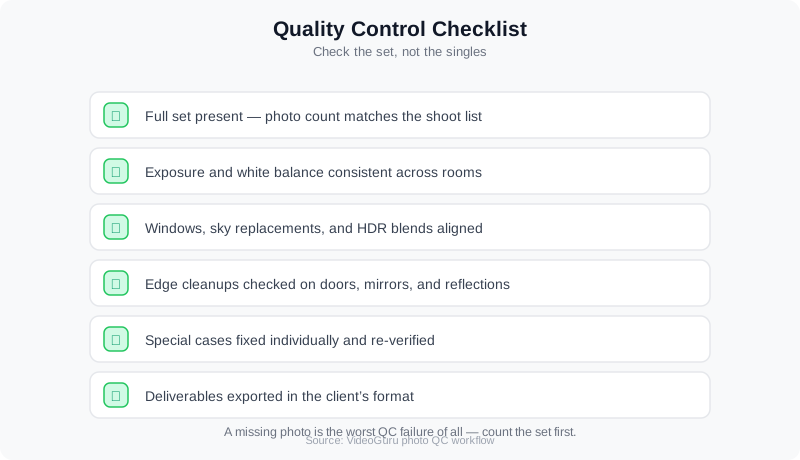
A short QC pass on the finished set catches the artifacts that cost you repeat business.
Agents judge photo quality every time they list a home, and the bar keeps rising. If you are an agent managing this yourself, our guide to AI photo editing for real estate explains what the technology can fix, what it can't, and how to brief a photographer or editor to get consistent results.
Scaling Beyond Photos: Virtual Staging, Enhancements, and Video
Once the batch pipeline is running, the same model extends to higher-value work. Virtual staging is the clearest example: AI-generated furniture and decor turn an empty room into a styled one at a fraction of the cost of physical staging. Industry coverage from HousingWire notes that AI staging has finally become reliable enough for mainstream listing use — which is why more photographers now offer it as a standard add-on rather than a novelty.
Beyond video, VideoGuru's photo editing tools give you one-click virtual staging for still images too — plus decluttering, furniture swap, and decor changes, all processed through the same AI that powers the platform's video suite. The same AI that handles your listing photography can also handle your walkthrough videos, which is what makes a full photo-plus-video package practical for a solo operator. The pipeline we described for photos — batch pass, special cases, QC — maps directly onto video editing: drop in your footage, let the AI assemble and grade the tour, review, and deliver. Virtual decluttering in real estate photo editing deserves its own mention: it removes the seller's personal items, cluttered counters, and stray furniture from an occupied home so the listing reads as clean without a physical cleanup. It typically costs $5–$15 per image from an editing company, or runs as a one-click step in an AI editor, and it pairs well with virtual staging when a room needs to be emptied first and then furnished. One rule for both: disclose the edit in the listing remarks, and keep the original photo on file. Our guide to AI photo disclosure rules covers what MLSs now require.
If you already shoot photos and want to add video without relearning everything, our guide to turning listing photos into listing videos with AI shows how the photo set you already deliver becomes the source material for the video deliverable. Two products from one shoot, one batch workflow.
Frequently Asked Questions
Can AI batch editing replace a human photo editor?
Not entirely — and it doesn't need to. AI batch editing replaces the repetitive correction work that makes up the bulk of a real estate edit: exposure, color, HDR blending, sky replacement, and decluttering. The human still chooses the aesthetic, handles unusual shots, and makes the final quality call. Most successful photographers treat AI as a pipeline that gets the set to 90% fast, then apply their judgment to the remaining 10%.
How much time does batch AI editing save per listing?
On a typical 40-photo interior set, manual editing runs two to three hours; a batch AI workflow takes 15 to 30 minutes of active time plus rendering. That is roughly an 80% reduction in hands-on editing time per listing — which is why photographers who adopt it can take on more listings, offer faster turnaround, or spend the reclaimed time on higher-value work like video and virtual staging.
Does AI photo editing work with HDR bracketed shots?
Yes — HDR blending is one of the strongest uses of AI in real estate photo editing. AI tools merge three to five bracketed exposures and balance bright windows against interior detail with fewer artifacts than older tone-mapping methods. Because window pull and exposure balancing are exactly what every interior shot needs, they fit naturally into a batch pipeline.
How do I keep photo quality consistent across a whole listing set?
Consistency comes from processing the set as one unit with one pipeline, not from editing each photo separately. Apply the same AI preset or correction profile to every image in the batch, then do a full-gallery QC pass checking color temperature, exposure, and verticals across the set. Fixed capture habits on shoot day — consistent white balance and bracketing — make the batch result dramatically more uniform.
Ready to build a photo editing workflow that delivers every listing in under 24 hours? VideoGuru's AI photo editing tools can enhance, declutter, and virtually stage your property photos in minutes — right alongside your video editing workflow. Start for free at VideoGuru.
Is there a free AI real estate photo editing option that is good enough for MLS?
For a single listing, yes: most AI real estate photo editing apps give you 5–20 free image credits or a short trial, and the output on standard exposure, color, and sky fixes is MLS-ready. For ongoing volume, no — free tiers run out after one shoot, and free general-purpose editors do not handle window pulls, decluttering, or virtual staging. Budget $0.50–$2 per image for AI or offshore editing companies, or a flat monthly plan if you deliver more than a few hundred images a month.
Final Thoughts
The 24-hour turnaround is not a future expectation — it is the current baseline, and roughly two-thirds of agents already hold you to it. The photographers and media companies that hit that window consistently are not editing faster; they changed the workflow. Batch AI processing turns a 40-photo listing into a 30-minute job, keeps the set visually consistent, and frees the hours that make photo-plus-video packages, virtual staging, and a growing client roster possible.
Start with one listing. Run your next shoot through a batch pipeline, do the QC pass honestly, and measure the time. Once you see the set come out consistent in a fraction of the usual hours, the question stops being whether to adopt the workflow — it becomes how many more listings you can take on with the time you just got back.




