
Chengran (Felix) Guan
2026-10-07 · 9 min read
Where to Find Real Estate Stock Footage (and When to Shoot Your Own)
Stock footage is the B-roll you drop into a real estate video when you do not have, or do not need, original film of the exact subject — city skylines, aerial neighborhood shots, generic interiors, lifestyle cutaways. The best free sources are Pexels, Pixabay, and Videvo; the strongest paid libraries are Pond5, Storyblocks, Artgrid, and Envato Elements. But one rule matters more than any source list: never use a stock clip to depict the property you are actually listing — that is misrepresentation. Use stock for market updates, neighborhood intros, and brand pieces; shoot your own when the footage must show a real place; and generate a walkthrough from the listing photos you already have when the schedule is the real problem.
Three kinds of readers use this guide. The agent who needs B-roll for a market update or a community video. The photographer or videographer building a brand film that is not tied to one house. And the marketing team assembling a listing video and wondering whether a stock clip can stand in for a room they never shot. The answer changes by use case, and this guide draws the line clearly.
Key Takeaways
- Stock footage is generic B-roll. It illustrates a mood or a place in general — never the specific property you are selling.
- Free libraries are genuinely usable. Pexels, Pixabay, and Videvo release real clips, but read the licence and check whether any model or property releases are included.
- Paid libraries add depth and cover. Pond5, Storyblocks, Artgrid, and Envato Elements bring 4K and aerial catalogs plus indemnification if a clip is challenged.
- Royalty-free is not public domain. You are buying a permission, not the copyright, and you still cannot use a clip in a way that misleads a buyer.
- Shoot your own when the location is the point; use AI photo-to-video when the property is the point but the schedule is not on your side.
- VideoGuru builds a narrated walkthrough from your listing photos, and on any paid plan you can mix in your own drone or real-person clips and add your cloned voice and avatar inside the same video.
What Counts as Stock Footage (and What It Is Not)
Stock footage, also called stock video or B-roll, is pre-recorded, licensable video of generic scenes: skylines, streetscapes, drone aerials, empty rooms, people walking through a doorway. What makes it "stock" is that it is licensed for reuse by anyone rather than commissioned for one project. That is exactly what makes it useful for a market update and exactly what makes it dangerous inside a listing.
- Royalty-free: pay once, or use for free, and reuse within the licence terms — the creator keeps the copyright.
- Rights-managed: licensed per use, often with limits on medium, territory, or time.
- Public domain / CC0: no copyright restrictions, but genuinely rare for professional real estate clips.
- Editorial use: cleared for commentary and news, not for advertising or listing promotion.
Keep those four terms straight and most licensing confusion disappears.
Where to Find Real Estate Stock Footage for Free
Free does not mean low quality. Several libraries release clips that are every bit as sharp as paid ones for neighborhood and skyline B-roll; the trade-off is a smaller, less predictable catalog and licence terms you have to read yourself.
- Pexels — a large, well-curated library under the Pexels licence (pexels.com/license). Strong on city and lifestyle B-roll, lighter on true real estate interiors.
- Pixabay — a similar model under its own licence (pixabay.com licence summary); solid on generic interiors and exteriors.
- Videvo — a mix of free and premium clips, so check the terms on each individual clip rather than the site as a whole.
- Coverr and Mixkit — smaller, high-quality collections aimed at web and social video.
Read the licence on every clip. "Free to download" and "free to use in a commercial listing video" are not the same promise.
Where to Find Premium Real Estate Stock Footage
When a clip has to stay sharp on a large listing page or run inside a paid ad, the premium libraries earn their subscription. They add 4K and higher frame rates, deeper aerial catalogs, and — importantly — indemnification if a model or property claim surfaces.
- Pond5 — a deep real estate and aerial catalog with clip-by-clip pricing.
- Storyblocks — a subscription library with a broad catalog and business indemnity.
- Artgrid — cinematic, high-production footage built for brand films.
- Envato Elements — one subscription across video, music, and templates.
- Adobe Stock and Shutterstock — enterprise-grade libraries with clear editorial and commercial splits.
For a business that publishes constantly, an annual subscription usually beats buying clips one at a time.
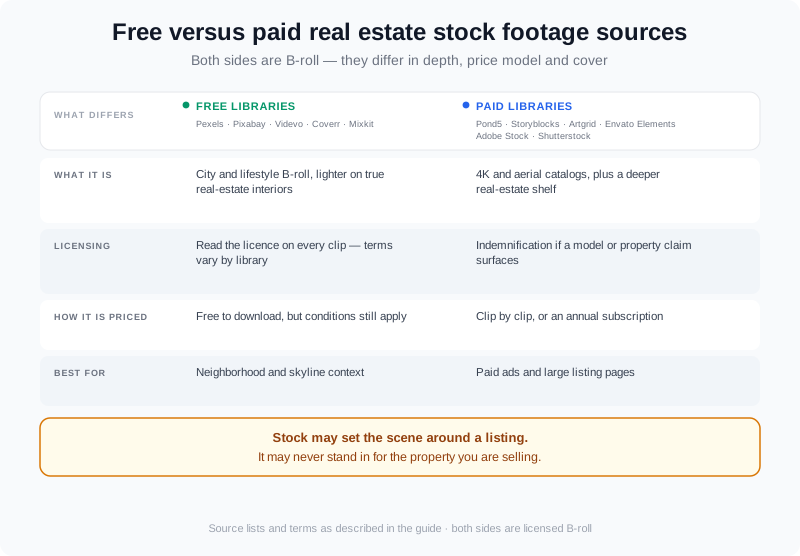
Free libraries cover the common B-roll shots; premium libraries add 4K depth, aerial coverage, and indemnification for paid campaigns.
The Licensing Rules That Apply to Real Estate Video
Every clip carries a licence, and every licence settles three things: where you can use the work, how you must credit it, and whether the people and property in it are cleared for commercial use.
- Royalty-free is not public domain. The creator still owns the clip; you are buying a permission, not the copyright (U.S. Copyright Office FAQ).
- Releases matter. A clip of a recognisable person or a private home may need a release before it can promote a product, which is why commercial-use terms differ from editorial ones (FTC advertising guidance).
- Creative Commons is a spectrum. CC0 is unrestricted, while CC BY and CC BY-SA require credit, and some add share-alike terms (Creative Commons licences).
- Trademarks and logos. An open skyline is fine; a close-up of a brand storefront is a different level of risk.
What You Cannot Do: Stock Footage and Listing Misrepresentation
This is the line that keeps agents out of trouble. A stock clip may set the scene around a listing — the town, the season, the lifestyle — but it may never stand in for the property itself.
- Never show stock interiors or exteriors as if they were the listed home. Buyers assume every frame of a listing video depicts the real property.
- Disclose anything a viewer could mistake for real: virtual twilight, AI staging, and stock B-roll used around a listing.
- Follow your market's MLS and IDX rules. Some prohibit non-original footage in a listing's primary media.
- Keep fair housing in view. Stock scenes must not imply a preferred buyer, family type, or neighborhood demographic (HUD fair housing guidance).
For the specifics on what each marketplace allows, read the MLS video requirements guide.
Shoot Your Own or Use Stock? A Simple Decision
Ask one question: does the clip need to show a real, specific place?
| Scenario | Best source |
|---|---|
| Market update, brand film, or community intro | Stock footage |
| Neighborhood or lifestyle B-roll around a listing | Stock, clearly framed as context |
| Interior or exterior of the listed property | Your own footage — never stock |
| Narrated walkthrough on a tight deadline | AI photo-to-video from your listing photos |
| B-roll of a real neighborhood you can reach | Shoot it yourself in one trip |
Shoot your own when the location is the point, use stock when the mood is the point, and reach for AI when the property is the point but the schedule is not on your side.
The Third Option: Build the Video From the Photos You Have
Most listing videos stall in the editing bay, waiting on footage that will never be shot. That is the gap AI photo-to-video closes. A platform like VideoGuru assembles a narrated walkthrough from the listing photos you already own — no second shoot, and no stock clip standing in for a room that actually exists.
Two details make it flexible. First, the photo-to-video route is not photos-only: you can drop your own drone shots or real-person clips into the same walkthrough, so the aerials you did fly and the agent intro you did record sit inside the same video as the photo-driven rooms. Second, on any paid plan — Essential, Growth, or Pro, not the free tier — you can composite your own face and a clone of your real voice into that walkthrough, with no separate avatar subscription bolted on top. Here is how photo-to-video AI works, and this walkthrough shows how to build one in about ten minutes.
VideoGuru also handles the photo side of the same job: one-click virtual staging, declutter, furniture swap, and restyle for stills, plus effects such as virtual twilight and renovation. The same AI that builds the video can polish the listing photographs you are already publishing.
A Workflow That Combines Stock, Original, and AI Footage
You rarely use just one source. A practical build for a single listing runs in six steps:
- Start with the property. Build the narrated walkthrough from the listing photos so the real home is always the spine of the video.
- Add your own footage where you have it — drone shots and real-person clips mixed into the same walkthrough. See adding drone footage to listings.
- Fill context with stock. Open with a skyline or neighborhood clip that sets the location, keeping the property footage for the property.
- Apply a consistent look. Brand kit, titles, and effects across every clip so stock and original footage feel like one film.
- Caption and disclose. Subtitle the video and label any AI or stock element a viewer could mistake for the real home.
- Export once, publish everywhere. Render 16:9, 1:1, and 9:16 from the same project, then repurpose the clip across channels.
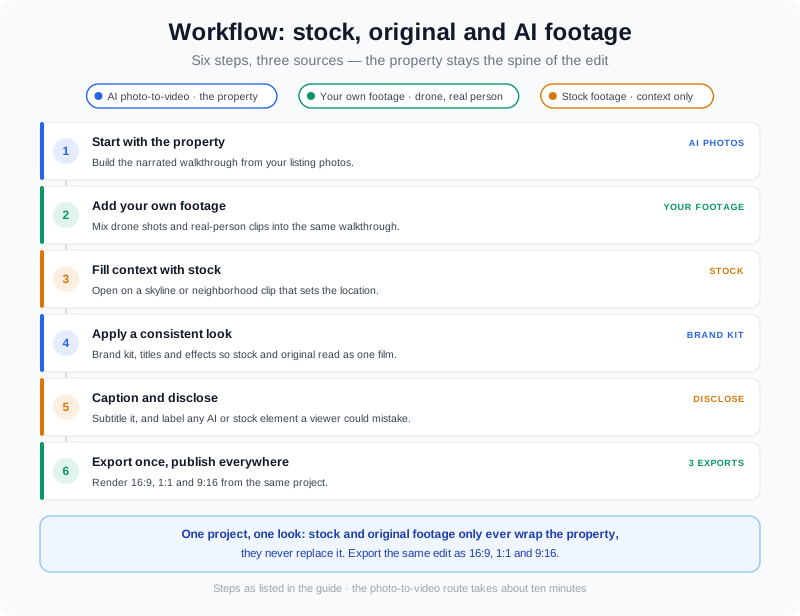
Photos for the property, your own footage where you have it, and stock only to set the scene — then one export in every aspect ratio.
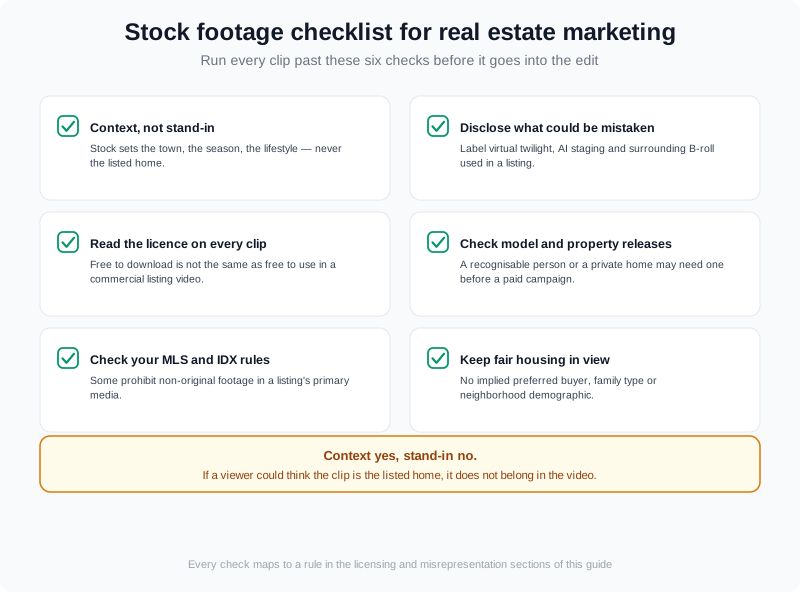
A short pre-publish checklist keeps a stock clip on the right side of the line: context yes, stand-in no.
People Also Ask
Can I use stock footage in a real estate listing video?
Yes for context, no for the property itself. You can use stock clips to set the scene around a listing — the surrounding neighborhood, the season, the lifestyle — but a clip that depicts a different home must never appear as if it were the listed property. When in doubt, treat every frame of the actual house as original-footage-only, and disclose any AI or stock element your viewer could mistake for the real thing.
Is stock footage free for commercial use?
Some of it is, but "free" always comes with conditions. Libraries such as Pexels and Pixabay license their clips for commercial use under their own terms, while Creative Commons clips range from unrestricted (CC0) to credit-required (CC BY). Read the licence attached to the specific clip, keep a record of it, and check whether the footage includes model or property releases before you put it in a paid listing campaign.
What is the difference between stock footage and original footage?
Stock footage is pre-recorded generic video licensed for reuse; original footage is what you shoot for this project. Original footage shows the actual property and its real surroundings, which is why it belongs inside listing media. Stock footage costs less and takes no time to capture, which is why it belongs in market updates, brand films, and surrounding-context shots. The strongest listing videos often use both — original for the property, stock for the world around it.
Do I still need to film if I use AI photo-to-video?
No — filming is optional, not required. A good photo-to-video platform builds a narrated walkthrough from the listing photos you already have. That said, you are not locked out of your own footage either: on VideoGuru you can mix the drone shots and real-person clips you did capture into the same video as the photo-driven rooms, so you can start from photos and add footage only where it strengthens the story.
Final Thoughts
Stock footage is a tool, not a shortcut. Used for context — the skyline, the season, the neighborhood — it makes a listing video feel bigger than one house. Used to stand in for the property itself, it is a misrepresentation risk no clip is worth. Match the source to the job: stock for mood, your own camera for the real location, and AI photo-to-video when the property is the subject and the clock is the constraint.
You can build the property spine of that video from the photos you already have. Create a free VideoGuru account to assemble a walkthrough in minutes, and move to any paid plan when you want your own voice and face — and your own drone and person clips — inside it. The product docs cover creating a video in ten minutes end to end.