

Chengran (Felix) Guan
2026-07-25 · 10 min read
Weekend Project:
Build a Reusable Content Template Kit for Your Listings
You can build a complete reusable content template kit for your listings in one weekend — and never start from scratch again. Most agents waste 20 to 30 minutes per listing recreating social media posts, intro cards, and photo watermarks that should be one-click placeholders. A template kit gives you brand-consistent photo layouts, video intro cards, social media carousels, and watermark overlays that you can drop into any listing in under two minutes. This guide walks you through building your own kit using free design tools and AI-powered platforms like VideoGuru — a repeatable system for real estate content creation that keeps every listing on-brand.
Key Takeaways
- A template kit cuts listing content creation time by 70%. Pre-built templates eliminate repetitive setup work.
- Four core components — video intro/outro cards, photo watermark overlays, social media carousels, and logo assets.
- Build once, reuse hundreds of times. A single weekend of template work pays back every time you list a property.
- AI tools can automate the assembly. Platforms like VideoGuru insert your templates automatically during video and photo processing.
What Real Estate Content Creation Actually Includes — and Where a Template Kit Fits
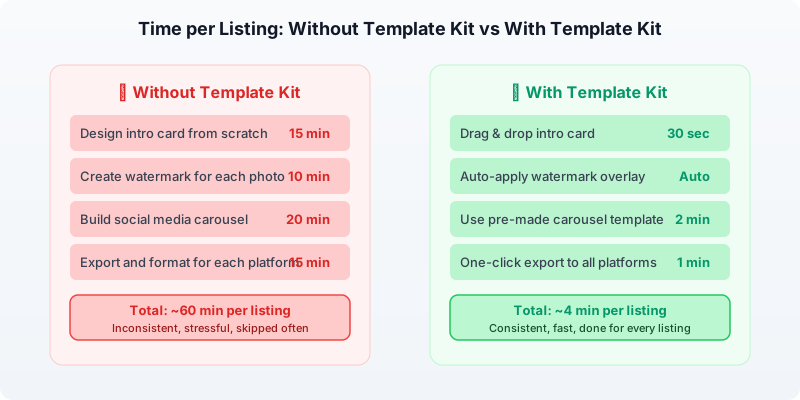
Real estate content creation is every asset you publish to market yourself and your listings: listing photos, walkthrough videos, Instagram Reels, carousels, market-update graphics, and email announcements. Most agents produce it all by hand, one listing at a time, which is why so many spend 20 to 30 minutes per listing rebuilding posts that should be reusable. A template kit turns that scattered work into a system — you design each format once, then swap in new photos and text in under two minutes per listing.
The mix changes by role. Solo agents usually need a walkthrough video, one Reel, a photo carousel, and a "just listed" email graphic for every property. Teams and brokerages add market updates and neighborhood guides on a fixed calendar. Photographers and media companies package the same assets as a productized deliverable for their clients. In every case the template kit is what removes the bottleneck — it is how a one-person operation publishes at the volume of a team. For how this fits a monthly plan, see our guide to real estate content marketing.
Why Every Agent Needs a Template Kit
Consistency builds trust. When a buyer sees three of your listings in their Instagram feed and each one uses a different font, color scheme, and layout, your brand looks amateur — even if the properties are stunning. A template kit ensures every piece of content you publish carries the same visual identity, whether it is a photo, a video walkthrough, or a market update graphic.
According to the National Association of Realtors, 85% of homebuyers consider photos the most critical factor when evaluating a property online. And listings with video attract four times as many inquiries as those without. But creating all that content from scratch for every listing is where most agents fall off — only 26% of agents consistently use video for every listing, according to NAR’s Real Estate in a Digital Age report.
The barrier is not cost or skill. It is setup time. A template kit removes that barrier.

A template kit keeps your brand consistent across every listing — photos, videos, and social posts.
The Four Core Components of a Listing Template Kit
Before you open any design tool, know exactly what you are building. A complete listing template kit has four parts:
1. Video Intro and Outro Cards
Your video walkthroughs need a branded opening and closing. An intro card should include your logo, your tagline, and a clean background. An outro card should include your phone number, website, and a call to action — "Schedule your showing today."
Build these as transparent PNG overlays or as separate video clips. If you use an AI platform like VideoGuru, you can upload these overlays once and the tool inserts them automatically into every video you create. This alone saves 5 to 10 minutes per video.
2. Photo Watermark and Brand Overlay
When you share listing photos online — on social media, your website, or in email campaigns — a subtle brand overlay protects your work and builds recognition. The key word is subtle. A small logo in the bottom-right corner or a thin branded border is enough. Avoid large watermarks that distract from the property itself.
Create your overlay as a PNG with a transparent background. Save versions for both horizontal and vertical images. Then use them as a batch preset in your photo editing workflow. For agents using AI photo editing tools, this overlay can be applied automatically during enhancement.
3. Social Media Carousel Templates
Instagram carousels and Facebook albums are the most engaging listing content formats. Build a reusable carousel template with:
- Cover slide — Property address + your logo + "Just Listed" or "New Listing" badge
- Feature slides — A clean layout that crops photos to a consistent aspect ratio with room for a caption overlay
- Details slide — Beds, baths, square footage, price — formatted the same way every time
- CTA slide — Your contact info + link in bio prompt
Create these in Canva using a 1080 x 1350 px canvas (Instagram portrait) and save them as a multi-page template. Swap photos and text for each new listing — about 3 minutes of work per carousel instead of 20.
4. Logo and Brand Asset Kit
Your logo is the foundation. Export it in multiple formats and color variations:
- Full color on transparent — for most uses
- White on transparent — for dark background videos
- Icon-only version — for watermark overlays and social avatars
- Horizontal and stacked versions — for different aspect ratios
Store these in a single folder that is accessible from all your devices. Cloud storage (Google Drive, Dropbox, or iCloud) works well because you can access the same assets from your phone, laptop, and any AI tools you use.
A consistent carousel template makes every listing instantly recognizable as yours.
CapCut and Reels Templates for Real Estate: Ready-Made vs. Build-Your-Own
If you do not want to design every card from scratch, CapCut and Instagram Reels both ship with ready-made templates you can adapt for listings. Open CapCut's template gallery and search "real estate" to pull up a capcut real estate template with transitions, captions, and text styling already set — then drop in your own footage and update the address and price. Instagram's Reels templates work the same way: pick a real estate reels template, add 3 to 5 property clips, and post. The catch is that most stock templates are styled for lifestyle creators, so budget 5 to 10 minutes per video to make the text and pacing look like yours.
A CapCut template for real estate saves the most time when you standardize it yourself: build one template with your intro, outro, and brand colors, save it in CapCut, and reuse it on every listing instead of hunting for a new one each time. That is the same reuse principle behind this whole kit. For agents who would rather skip the editing entirely, VideoGuru applies your branded intro, outro, and watermark automatically to every video and photo, so output stays consistent with no template hunting. For more formats that perform, see our list of real estate video ideas for social media.
Your Weekend Timeline: Build It in Two Days
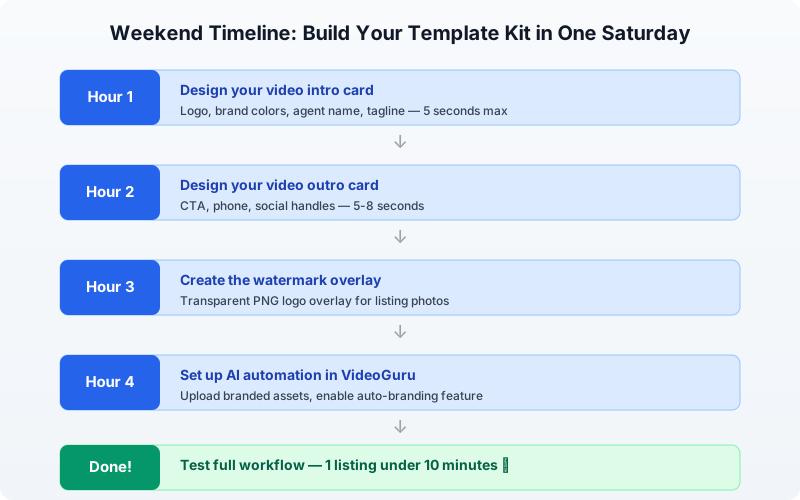
Here is a realistic schedule for building your template kit over a Saturday and Sunday, using free tools like Canva and existing assets you already have.
Saturday (3-4 hours)
- Hour 1 — Gather your logo files, brand colors, and fonts. Export your logo in all needed formats. Create a brand color palette (3-5 colors) and save the hex codes.
- Hour 2 — Build your video intro card (5-10 second duration) in Canva or your video editor. Export as MP4 with a transparent background if possible, or on a solid brand color background.
- Hour 3 — Create your photo watermark overlay as a transparent PNG. Test it on a sample photo to ensure visibility without distraction.
- Hour 4 — Build the social media carousel template. Set up the cover slide, feature slide layout, details slide, and CTA slide as a multi-page Canva template.
Sunday (2-3 hours)
- Hour 1 — Create your video outro card. Include a clear CTA, your phone number, and social media handles. Make it 5-8 seconds.
- Hour 2 — Set up your AI tools. In VideoGuru, upload your intro/outro clips as branded overlay assets. Enable auto-branding so every new video project starts with your templates already placed.
- Hour 3 — Test the full system. Run through one complete listing content creation workflow — photos with watermark overlay, video with intro/outro, and a social carousel — and time yourself. The first test run should take under 10 minutes.
One focused weekend is all it takes to build a template kit that saves hours on every listing.
How AI Tools Handle Template Assembly for You
Once your templates exist, the fastest way to use them is with an AI platform that automates the assembly. Instead of manually layering your watermark onto each photo or splicing your intro into every video, you configure the templates once and let the software apply them.
VideoGuru’s branded overlay system, for example, lets you upload your intro and outro clips, logo watermark, and brand colors. Every video you create with the platform automatically includes these elements — no manual dragging, no re-exporting, no forgotten add-ons. The same applies to photo processing: upload your watermark PNG and set it as a default overlay for all listing images.
For agents who want to go further, VideoGuru also handles listing video creation in under 10 minutes, combining your template assets with AI-powered editing. This is what makes a template kit powerful — not just the templates themselves, but the automation layer that builds content around them.
Watch how a template kit streamlines listing content creation — from photo overlays to video intros.
Frequently Asked Questions
What tools do I need to build a listing content template kit?
You only need two tools: Canva (free tier is sufficient) for designing photo overlays, carousel templates, and graphic assets, plus a video editing platform like VideoGuru for video intro/outro templates. If you already have a brand logo and color palette, you can build everything in a weekend with no new software purchases.
Will templates make my content look generic?
Not if you design them well. The template handles the frame — your logo, colors, and consistent layout. The property itself fills the content, and every property is unique. Buyers respond to the listing media, not the border around it. What a template does is remove the friction of starting from zero, so you actually publish content for every listing instead of skipping it because it takes too long.
How long should my video intro and outro be?
Keep the intro between 3 and 5 seconds and the outro between 5 and 8 seconds. The total template time should not exceed 13 seconds combined. Since real estate video content that converts prioritizes the property footage, your branding should appear quickly and then get out of the way. Any longer and viewers start skipping ahead or scrolling past.
Can AI tools maintain brand consistency across photos and videos?
Yes. The best AI real estate media platforms let you upload brand assets once — logo, colors, overlay templates — and apply them automatically to every piece of content. This is how you maintain consistency at scale without hiring a designer or spending 15 minutes per listing on manual formatting. VideoGuru’s platform does this for both photos and videos, so your brand stays consistent across all listing media without extra effort.
Can I use CapCut templates for my real estate listing videos?
Yes. CapCut's template gallery is searchable, and typing "real estate" or "property" surfaces ready-made templates you can apply in a few taps — then swap in your own clips and update the address and price text. Budget 5 to 10 minutes per video to adjust pacing and branding, since most stock templates are styled for lifestyle creators rather than listings. For consistent output without the hunt, save your own branded template in CapCut, or let an AI platform like VideoGuru apply your intro, outro, and watermark automatically.
What is the fastest way to make a real estate Reel from a template?
Pick a real estate reels template from Instagram or CapCut, then drop in 3 to 5 short property clips and keep the whole Reel under 30 seconds for the best reach. Update the template's text with the address, price, and one standout feature — the full edit should take under 10 minutes from start to post. Reusing the same template for every listing is what makes your feed look intentional instead of random.
Final Thoughts
A reusable content template kit is the single highest-leverage weekend project a real estate agent can take on. It costs nothing but a few hours of setup time, and it pays back in faster listing launches, consistent branding, and higher-quality content across every property you market.
The agents who consistently use video and high-quality photos for every listing are the ones winning the marketplace — NAR data shows listings with video get four times more inquiries. A template kit makes that consistency achievable for every agent, not just those with design teams or large budgets.
Ready to stop rebuilding the same content from scratch for every listing? VideoGuru’s AI media platform can help you apply your branded templates automatically — to photos and videos — so every listing launches with professional, consistent content. Start for free at VideoGuru.




