

Chengran (Felix) Guan
2026-09-20 · 12 min read
12 Real Estate Video Examples That Actually Won Listings
The real estate videos that actually win listings are not the prettiest ones — they are the ones a seller can watch in 60 seconds and instantly understand what you will do for their house. In practice that means three things: a video that leads with the property's best 5 seconds, a video that shows your face and your voice so the seller knows who they are hiring, and a video that keeps producing leads after the open house is over. Everything below is a format that does one of those three jobs, described so you can build it from still photos in about 10 minutes — no film crew, no second shoot.
Which example fits you depends on your role. If you are an agent competing for a listing, the seller-facing formats (the coming-soon teaser, the agent-intro walkthrough, the market update with their street's numbers) do the work. If you are a photographer or media company adding video to your packages, the production formats (twilight reveal, drone-to-doorstep, one-video-four-cuts) are what justify the upsell. Most agents and photographers settle on a handful of these rather than all twelve.
Key Takeaways
- Winning a listing and selling a listing are two different videos. The pitch video proves your marketing; the walkthrough sells the house. Run both, and do not try to make one video do both jobs.
- Your first 5 seconds decide everything. A seller scanning three agents' videos stops on the one that opens on the best frame, not the one that opens on a logo card.
- Face and voice close the listing. Sellers hire a person. A short intro where you speak — or where your AI avatar and cloned voice handle the talking for you — converts better than a silent montage.
- One photo set can produce all twelve. Photo-to-video builds a walkthrough from your stills, and you can mix your own drone or real-person clips into the same video. That is what makes a weekly video rhythm possible for a solo agent.
- Re-market, don't just market. The price-drop, re-launch and open-house recap formats are the ones sellers mention when they explain why they stayed with an agent.
Why These Formats Win Listings (And Pretty Videos Don't)
A seller interviewing three agents is not judging your cinematography. They are asking one question: "who will get my house in front of the most qualified buyers, and who will keep trying if it doesn't sell?" Video answers that question faster than any listing presentation binder, because it is proof of work rather than a promise of work. The National Association of Realtors' research library tracks why sellers pick the agent they pick, and every listing appointment comes back to the same thing: sellers want proof of how their home will be marketed, before they sign.
The trap is that most agents make a video that is beautiful and silent about the agent. It opens on a drone shot, plays a licensed track for 90 seconds, and never shows a human being. It might sell the house. It will not win the next listing, because the seller watching it cannot picture who they would be working with. The formats below fix that by pairing the property with the person.
One transparency note before the list: listing videos tend to disappear when the house sells, so instead of linking to yesterday's URLs, each example below is described by format — what it is, why it wins the listing, and how to make it. These are the twelve shapes that show up again and again in the videos agents and photographers use to win business.
The 12 Real Estate Video Examples
1. The coming-soon teaser
What it is: a 15–30 second vertical video that drops before the listing goes live — one exterior push-in, one hero interior, a date, and "details on request." Why it wins the listing: it starts the seller's marketing before the sign is in the yard, which is precisely the timeline sellers are afraid of losing. How to make it: pick the two strongest images from the shoot, animate one camera move on each, and add a text overlay with the launch date.
2. The twilight exterior reveal
What it is: a daytime exterior transformed into golden hour, used as the opening frame or the closing beat. Why it wins the listing: it is the frame sellers forward to family and the one buyers stop scrolling for, and sellers judge marketing by how their house looks on the best possible evening. How to make it: apply a virtual twilight effect to the exterior photo, then build the reveal as a 5-second before-to-after morph. If you want the full breakdown of when twilight helps and when it looks fake, see our guide to the twilight effect in real estate.
3. The empty-room-to-staged walkthrough
What it is: a walkthrough of a vacant home where every empty room is virtually staged before the video is assembled. Why it wins the listing: vacant and estate listings are the hardest to market and the easiest to lose to a competitor who promises to "handle the look." Showing the seller their empty living room furnished is the most persuasive thing you can put on a screen. How to make it: stage the stills first with one-click virtual staging, then run the same photos into a walkthrough. VideoGuru's photo editing side handles the staging, declutter and furniture swap on the stills that the video is built from.

The agent intro is the 20 seconds that turns a property walkthrough into a listing pitch.
4. The agent-intro walkthrough
What it is: a property walkthrough that opens with 15–25 seconds of the agent talking — their face, their voice, the neighborhood, then the house. Why it wins the listing: the seller is hiring a human, and this is the only format where the human shows up before the door opens. How to make it: you do not need to be on camera. VideoGuru generates an AI avatar from an uploaded headshot and clones your real voice from a sample, then composites that presenter into the same walkthrough — one video, not a separate talking-head clip. It is available on any paid plan, with no separate avatar subscription.
5. The "three things buyers ask about" video
What it is: a 45–60 second video that answers the three questions every buyer asks about that property — the school boundary, the commute, the HOA rules, the flood zone, the renovation permit. Why it wins the listing: it sounds like a professional CMA, not an advertisement. Sellers notice when an agent explains their own house back to them accurately. How to make it: three captioned stills with one spoken sentence each; the visual is almost incidental, the answer is the product.
6. The open-house recap
What it is: a 30-second recap posted the same evening — the turnout, the two features buyers kept touching, the next open time. Why it wins the listing: sellers measure effort in updates. A recap the same day proves the open house was worked, not just held. How to make it: mix 3–4 quick clips or photos from the event into a short cut, then post while the seller is still thinking about it. Our open house video tips cover what to capture while you are there.
7. The neighbor mailer video
What it is: a 40-second video about one street — this house, plus what the last two sales on that street went for. Why it wins the listing: it is the only format that markets to the next seller rather than the current one. Someone on that street will move in the next year or two, and you are the agent who already showed up with numbers. How to make it: reuse four stills from the listing plus two text cards with the comps; no new shoot required.
8. The drone-to-doorstep walkthrough
What it is: a drone push-in over the lot that hands off to a ground-level walkthrough of the interior. Why it wins the listing: it establishes setting and price bracket in the first three seconds, which is exactly the context luxury sellers want established. How to make it: this is the format where your own clips belong. VideoGuru's photo-to-video route accepts your video clips — drone footage, real-person clips, agent footage — and mixes them into the same photo-driven walkthrough, so the aerial and the interior live in one video.
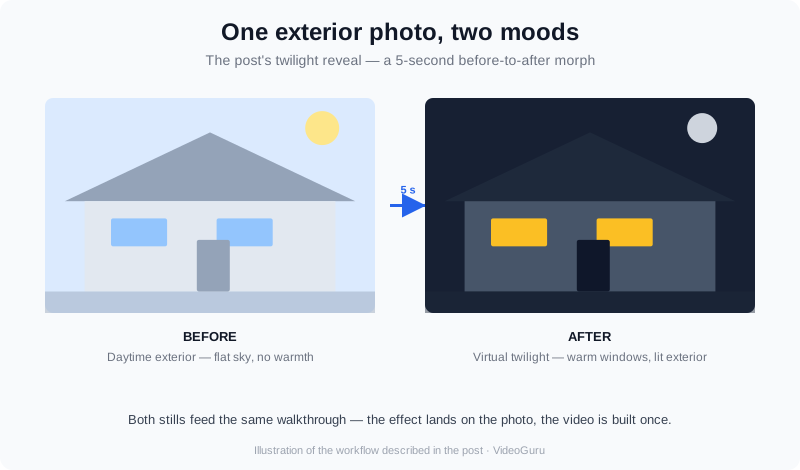
Twilight, staging and declutter are photo-side effects that feed the video — the same AI handles both.
9. The price-drop re-launch
What it is: a re-cut of the original walkthrough with new framing — "here is what changed, here is what it means for you." Why it wins the listing: this video only exists if the agent is still working a stale listing, and sellers remember the agent who came back with a plan instead of silence. How to make it: same photo set, new opening card and a new voiceover line; a 10-minute rebuild, not a reshoot.
10. The street-level market update
What it is: a 60-second video where the property's listing photos are intercut with the neighborhood's month in numbers — days on market, list-to-sale ratio, one recent comp. Why it wins the listing: it demonstrates that you track the micro-market, which is the thing sellers cannot verify about an agent from a business card. How to make it: one photo, one number per card, your cloned voice reading it. If you want the version that runs as a recurring series, see our market update video guide.
11. The client hand-off testimonial
What it is: 15 seconds of your last client, filmed on a phone at the closing table, cut onto the end of a listing video. Why it wins the listing: third-party proof beats first-party promise, and it costs you nothing but the ask. How to make it: this is a real-person clip, and it can be mixed into a photo-based video as a closing beat rather than exported as a standalone file. Keep it under 15 seconds or the seller stops watching.
12. The one-video, four-cuts repurpose set
What it is: one photo set exported as 9:16 for Reels, 1:1 for feed, 16:9 for YouTube and the listing page. Why it wins the listing: it lets you show a seller — in one screen — every place their house will appear. Reach is the argument that beats commission friction. How to make it: build the walkthrough once, then export the same edit in all three aspect ratios instead of re-editing for each platform.
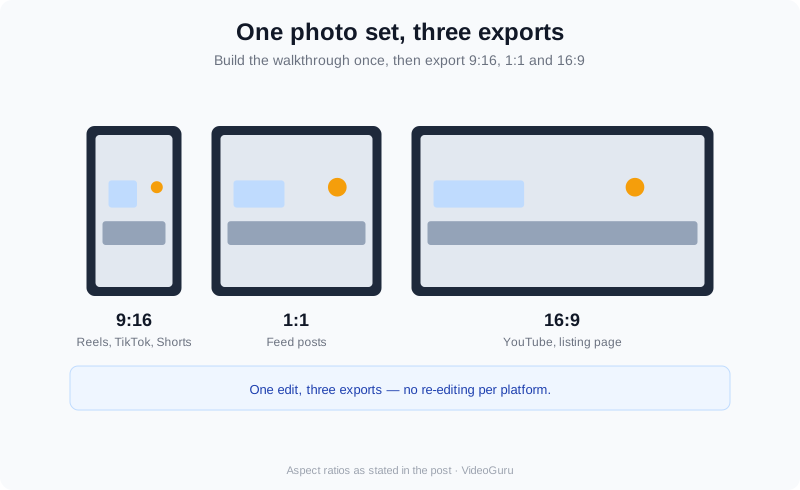
Build once, export three ways: vertical, square and widescreen from the same edit.
How to Produce All 12 Without a Film Crew
The reason most agents run two video formats and abandon the rest is production load. If every listing video requires an editor, a music license, a turnaround and a reshoot, you will do it twice and stop. The workflow that makes twelve formats sustainable is to build them all from assets you already have: the photo set, the drone card, the phone clips from the open house, and one voice sample.
VideoGuru is built around that reality. It is an AI real estate media platform, not just a video tool: the same AI that turns your listing photos into a walkthrough also handles your still photography — one-click virtual staging, declutter, furniture swap and decor changes — so the twilight shot and the walkthrough come out of one workflow. The walkthrough itself is generated from photos in about 10 minutes, and you can drop your own drone or real-person clips into the same video rather than switching tools. Brand kits lock your logo, colors, fonts and intro and outro cards so every one of the twelve formats comes out recognizably yours.
Cost is the other reason formats get dropped. On VideoGuru, the paid tiers are $59/mo for roughly 3 videos a cycle at 1080p, $129/mo for roughly 10 at 4K, and $249/mo for 25 at 4K; billed annually, those work out to about $12.00, $10.20 and $8.94 per video. Every paid plan includes 20 photos and 40 clips per video, and no watermark. The free tier produces 2 videos a month at 720p with a watermark — enough to test the workflow, not enough to run a listing calendar.
Three Mistakes That Kill a Listing Video
- Opening on a logo instead of the property. The viewer is scrolling; your intro card is the exact moment they leave. Put the logo at the end.
- Making it too long. YouTube's own documentation asks creators to judge uploads by retention, and it gives you a tool to see exactly where viewers drop off — see YouTube's audience retention report. If your audience dies at 30 seconds, your 3-minute video is a 30-second video.
- Publishing nowhere you own. A video that only lives on social is rented ground. Publish it on a page you control with written context around it — Google's video SEO guidance covers what a search engine needs in order to surface it.
If you want the ranking mechanics in full — titles, descriptions, VideoObject structured data and publishing rhythm — the technical walkthrough is in our real estate video SEO guide. The short version is that the video has to exist on a page with words.
Frequently Asked Questions
How long should a real estate listing video be?
Between 30 and 90 seconds for the property-focused videos, and 15 to 30 seconds for the vertical social cuts. Long enough to cover the rooms and the setting, short enough that a seller or buyer watching on a phone in a parking lot finishes it. Anything past two minutes is a tour for people who already want the house, and that audience is small relative to the people deciding whether to keep watching.
Can I make these videos if I only have photos, not footage?
Yes. The photo-to-video route builds the walkthrough from your still images, so a completed photo shoot is a sufficient input. If you do have footage — a drone pass, phone clips from an open house, a client testimonial — those clips get mixed into the same video, which is what makes formats like the drone-to-doorstep walkthrough and the testimonial hand-off possible without a second shoot.
Do I have to appear on camera to use the agent-intro format?
No. VideoGuru generates an AI avatar from a photo you upload — a headshot works — and clones your real voice, then composites that presenter into the property walkthrough as part of the same video. You are not exporting a separate talking-head clip and stitching it on. This is available on any paid plan, essential, growth or pro, with no separate avatar subscription.
How many of the twelve formats should an agent actually run each month?
Start with three: the coming-soon teaser, the agent-intro walkthrough and the open-house recap. Those cover the whole arc of a listing — before it launches, while it is live, and after the first event. Add the market update and the neighbor mailer once you are comfortable, because they win the next listing rather than the current one. The remaining formats are there for specific situations: vacant homes, luxury price points, stale listings and referrals.
Putting It All Together
The agents who win listings with video are rarely the ones with the best footage. They are the ones with a repeatable set of formats they can ship from a photo set in an afternoon, week after week, for every listing they take. Pick three formats, build them from the photos you already have this week, and add one more each month. Sellers do not count your gear — they count how often they see you working their house.
If you want the workflow that makes it sustainable, the photo-to-video route on VideoGuru turns a listing photo set into a finished walkthrough — with your own clips, your avatar and your cloned voice inside it — starting from a free account. The product docs walk through creating the first video in about 10 minutes.