

Chengran (Felix) Guan
2026-09-19 · 11 min read
Real Estate Video SEO:
How to Rank Listing Videos on Google and YouTube
To rank a real estate listing video in 2026, you have to satisfy two systems at once. YouTube reads your title, description, transcript and — above all — how long people actually watch. Google reads the page the video sits on: the written text around it, the embed, and the VideoObject structured data behind it. Get both right and one walkthrough can surface in YouTube search, Google video results, AI Overviews and your Google Business Profile at the same time.
Most agents only do half the job. They upload to YouTube with a title like "Beautiful Home Tour!" and never publish the same video on a page with real written content. That is why agents with better-looking videos lose to agents with better-organized ones. This guide covers the exact title formula, the description template, the technical 10 minutes on your own website, and the publishing rhythm that makes it repeatable.
Key Takeaways
- Lead with the location keyword. "3-Bedroom Home for Sale in [City] (2026 Video Tour)" beats "Beautiful Home Tour!" every time, because the searcher types a place, not a compliment.
- Retention past 30 seconds is the real ranking lever. YouTube weights watch time heavily, so a 60-second video people finish beats a 4-minute video people abandon.
- Publish the same video on a page you own. A YouTube upload alone is rented ground. An embedded video plus 500+ words of written context gives Google something to index.
- Add VideoObject structured data. It is a copy-paste block that makes your page eligible for video-rich results and thumbnail appearances in Google Search.
- Volume is the input SEO needs. One video per listing rarely moves a channel. AI photo-to-video turns the stills you already shot into a publishable walkthrough, which is what makes a weekly cadence realistic.
- Measure per video, not per month. Track impressions and average view duration for each upload so you learn which titles your local market actually clicks.
How YouTube Decides Which Listing Videos to Show
YouTube is not a library, it is a recommendation engine with a search box attached. For local listing videos, five signals do almost all the work:
- Title match. Does your title contain the words the viewer typed — the neighborhood, the city, the property type?
- Click-through rate. Of the people who saw the thumbnail, how many clicked? This is where listing videos die: a dark exterior at dusk with no address looks like every other video.
- Retention in the first 30 seconds. If viewers leave immediately, YouTube stops showing the video to anyone else.
- Watch time. Total minutes watched matters more than views for a listing video, because it signals genuine interest.
- Description and transcript. YouTube reads the text you write and the speech it auto-captions. A spoken walkthrough is searchable content; a silent slideshow is not.
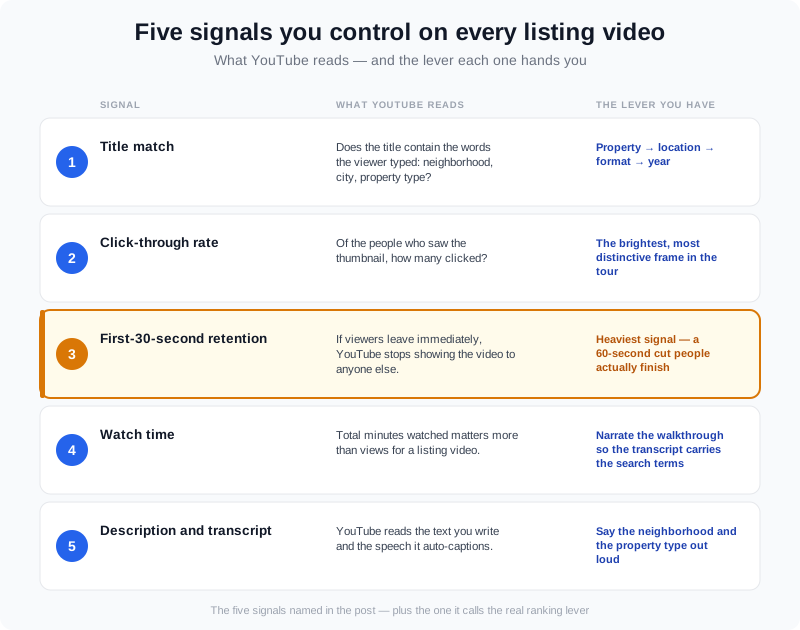
The five signals you control on every listing video — and the one that carries the most weight.
Notice what is missing from that list: upload frequency, subscriber count, and luck. A brand-new channel with a clean title and a video people finish will outrank a large channel with a vague one. That is the whole reason a solo agent can still win locally.
The Title Formula That Ranks a Local Listing Video
YouTube allows up to 100 characters in a title, but search results and mobile feeds truncate long titles — so the geographies and property words belong in the first few words. Use this order: property → location → format → year.
| Weak title | Strong title | What changed |
|---|---|---|
| Beautiful Home Tour! | 3-Bedroom Home for Sale in [City] (2026 Video Tour) | Property type, city, year |
| Open House This Weekend | Open House: [Neighborhood] Bungalow, Saturday 1–4 PM | Neighborhood and time |
| New Listing | New Listing: 4-Bed [City] Home With Pool — Full Walkthrough | Beds, city, differentiator, format |
Two rules keep titles honest and findable. First, never put the address number in the title if you re-upload the same tour for a price change — the title becomes wrong and the watch history resets. Second, keep the city name spelled the way buyers search it, which is usually the plain name and not the MLS subdivision name.
What Goes in the Description (Copy This Template)
The first two lines of a description are the only ones most viewers see, and YouTube treats early text as a stronger signal than anything below the fold. Put the answers there in plain sentences:
- Line 1 — what and where. "A 3-bed, 2-bath home in [City] with an updated kitchen and a fenced backyard."
- Line 2 — who it suits. "Good fit for first-time buyers who want to be walking distance from downtown."
- Then the details. Square footage, lot size, school district, notable upgrades, and what the video walks through.
- Then a link. Send viewers to the listing page or your booking link — and keep it consistent so the URL builds recognition.
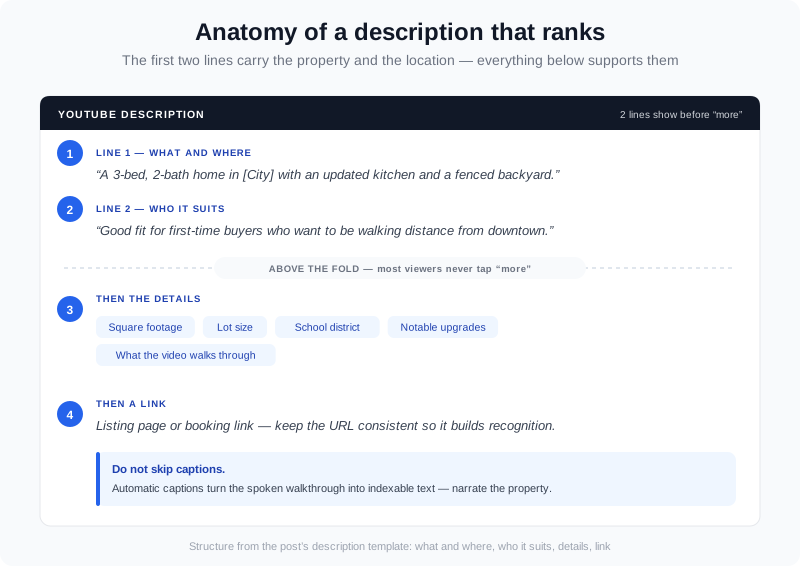
How to structure the description: the top two lines carry the property and the location, the rest supports them.
Do not skip captions. YouTube's automatic captions turn your spoken walkthrough into indexable text, so narrating the property is a ranking decision, not just a presentation choice. Say the neighborhood, the street type and the standout features out loud. If you narrate with your own cloned voice instead of recording on site, the transcript still lands — the words are what get indexed.
Thumbnails: The 3-Second Test
A thumbnail has one job: make a buyer stop scrolling. For property video, the winning image is almost always the brightest, most distinctive frame in the tour — a kitchen with daylight, a pool at dusk, a wide exterior with clean curb appeal. Avoid:
- Agent selfies and team photos — buyers are shopping the home, not the headshot.
- Dark, over-processed HDR frames that look muddy at phone size.
- Heavy text overlays that get cut off in mobile feeds.
If your listing photos are bright, twilight-enhanced and decluttered, your thumbnails are already solved — you are just picking a frame. That is one practical reason to handle the photo editing in the same place as the video instead of splitting the job across two vendors.
The Google Side: Where Listing Videos Actually Appear in Search
YouTube is owned by Google, and Google increasingly shows video in the places buyers look first. One well-optimized walkthrough can surface in several spots at once — which is why the same 60 seconds of footage is worth publishing in more than one place.
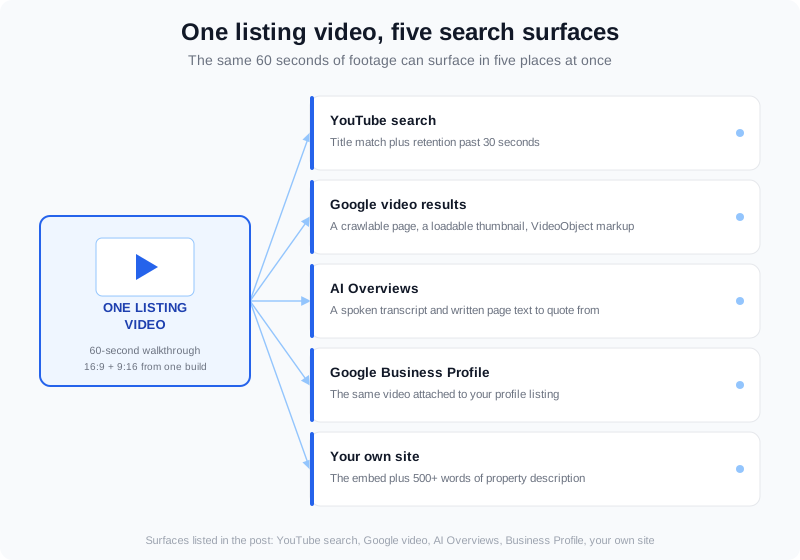
One listing video, several search surfaces: YouTube search, Google video results, AI Overviews, your Google Business Profile and your own site.
Google's own documentation is unusually clear about what it needs. Google can only index a video it can find and process: the video has to be reachable on a page Google can crawl, with a thumbnail image it can load, and ideally with structured data describing it. Google also documents VideoObject markup — the schema that makes a page eligible for video results and video thumbnails.
The 10-minute technical piece most agents skip
On your own listing page, add a VideoObject block alongside the article schema your site already runs. It needs a name, a description, a thumbnail URL, an upload date and the content URL. That is it — no developer required if your site builder accepts custom code. If your site cannot take custom markup at all, the fallback is still worth doing: write 500+ words of property description below the embed, because Google needs text to understand the page even when it cannot read the video itself. The general principles in Google's SEO Starter Guide apply to video pages exactly as they do to text pages.
What Are the Best Strategies for Real Estate Agents to Grow Their YouTube Channels?
The honest answer depends on which of three roles you are in — and the strategy looks different for each.
- If you are a solo agent filming your own listings: do not try to run a channel. Publish one walkthrough per listing and one 30–60 second vertical cut for social. Your goal is the long tail — a buyer searching "homes for sale in [your town]" six months from now. Short vertical cuts of the same footage do the reach work while the walkthrough does the search work.
- If you are a team or brokerage: you need a naming system, not more effort. Group videos into playlists by neighborhood or zip code, use the identical title pattern on every upload, and hand the thumbnail selection to whoever edits. Consistency is what makes a channel look like a local authority instead of a folder of one-offs.
- If you are a photographer or media company: your channel is a portfolio, and your prospects are agents. Publish walkthroughs that show the finished product — the twilight exterior, the staged empty room, the drone pass mixed into the interior sequence — and title them by property type so agents can find examples of what they would get.
In all three cases the bottleneck is the same: getting enough finished videos published to have anything to optimize. A channel with four uploads cannot learn which titles work. That is the problem AI photo-to-video solves — more on that below.
Real Estate YouTube Marketing: A 30-Day Publishing Rhythm
You do not need a content team to run this. You need a rhythm that survives a busy month:
- Weeks 1–2: publish one full walkthrough per new listing, each with its own titled page on your site. Use the title formula. Write the description from the template.
- Weeks 3–4: cut each walkthrough into one vertical short and stagger the uploads — the short drives discovery, the long video catches the searcher.
- Repeat, and check the numbers monthly. Compare impressions and average view duration per video. Keep the title patterns that get clicks and drop the ones that do not. If your analytics workflow is thin, start with the metrics that actually predict lead flow.
Local keyword research without paid tools
Start YouTube's search box and type the first half of what a buyer would type: "[your city] homes for", "condo for sale [your neighborhood]", "[school district] houses". The autocomplete list is free keyword research showing exactly what people search. Write those phrases into your titles and the first two lines of your descriptions — not stuffed into one sentence, but each one used where it fits naturally. The National Association of Realtors' research library is the other useful input, since it shows which questions buyers arrive with before they ever call you.
Frequently Asked Questions
Should I post listing videos on YouTube or social media first?
YouTube first, then adapt. YouTube is the only platform where people arrive with buying intent and type a location into a search box, and it feeds Google video results. Social platforms reward recency, so a short cut posted there early has a short life; a YouTube walkthrough keeps collecting views for months. Upload the full walkthrough to YouTube, then cut a vertical version for Shorts and Reels within the same week.
Can I rank a listing video for a specific neighborhood?
Yes, and neighborhood terms are usually easier to rank for than city terms because fewer agents target them. Put the neighborhood name in the title, say it out loud in the walkthrough so it lands in the transcript, and publish the video on a page whose written text also names the neighborhood. Agents who only ever write the city name compete with every other agent in the market.
Do video descriptions actually matter for rankings?
They matter, but not the way keyword-stuffing tutorials suggest. Descriptions help YouTube understand what the video covers, they give Google text to contextualize the page, and they set viewer expectations, which supports retention. A description that answers "what is this home and where is it" in the first two lines does more for you than 300 words of hashtags.
Where should the video live — YouTube, my website, or the MLS?
All three, in this order: upload to YouTube for discovery, embed the same video on a dedicated page on your own site for the text-and-schema signals, and link the tour in the MLS where the rules allow. The mistake is treating them as alternatives. Each surface reaches a different buyer at a different moment, and the same file serves all of them. For a wider look at how the platforms differ, see our platform guide.
How AI Photo-to-Video Changes the SEO Math
Everything above assumes you can produce videos fast enough to have a channel worth optimizing. For most agents and photographers, that is the actual constraint — not the strategy. AI photo-to-video removes it.
VideoGuru takes the listing photos you already shot — up to 20 photos per video — and assembles them into a property walkthrough with camera motion and AI effects like twilight, virtual staging, declutter and room restyling. You are not limited to stills, either: your own drone footage or real-person clips can be mixed into the same walkthrough, which matters if you already film exteriors or agent intros. The finished video exports in the aspect ratios the platforms need — 16:9 for YouTube, 9:16 for a Short or Reel — so one project covers both surfaces.
The cost math matters for SEO because volume is the input. On annual plans, VideoGuru works out to roughly $8.94 to $12.00 per video depending on tier, and every plan includes 20 photos and 40 clips per video. Free tier produces 2 videos a month at 720p with a watermark — fine for testing, not for a publishing rhythm. Paid plans also add an AI avatar and voice cloning on any paid tier, with no separate avatar subscription, composited into the same walkthrough rather than exported as a separate talking head. That gives you narration and a transcript for free, which is exactly the indexable text YouTube wants.
The workflow that follows is simple. Shoot photos as you always have. Edit them once — the same platform handles one-click virtual staging for empty rooms, decluttering and twilight conversion you would otherwise pay a separate editor for. Assemble the walkthrough. Publish it to YouTube, embed it on a titled page, and add the structured data. Then cut the vertical version. What used to be one deliverable becomes four surfaces from a single shoot.
Final Thoughts
Real estate video SEO is not a technology problem, it is a repetition problem. The agents who get found are the ones who publish the same kind of video, with the same kind of title, often enough that YouTube and Google learn what their content is about. Fix the title formula, copy the description template, spend ten minutes on structured data, and then make the publishing volume possible.
Start with your next listing. Take the photos you already have, turn them into a walkthrough, and publish the first one this week — the second upload is where the pattern starts to show.