

Chengran (Felix) Guan
2026-09-21 · 13 min read
Real Estate Video Editing Services:
Outsource, Hire, or Automate?
There are three ways to get a real estate video edited: outsource it to an editor or an editing service, hire an editor in-house or on retainer, or automate the edit on an AI platform that builds the video from material you already own. Outsourcing buys craft applied to footage you filmed. Hiring buys repeatable capacity at volume. Automating removes the shoot and the manual edit at the same time, because the listing photos are the raw material. Which one is right for you comes down to two questions: how many listings you produce a month, and whether the footage already exists.
Most agents and photographers search this question at one of two moments. The first is when a quote comes back higher than expected and there is no clear way to tell what is being charged for. The second is a month later, when the edit has eaten a weekend and the listing went live without video. Both moments point at the same decision, and it is not "which editor" — it is which of the three production models your business actually needs right now.
Key Takeaways
- A real estate video editing service is post-production, not production. Sequencing, pacing, color, audio, graphics, and aspect-ratio exports are the job. The shoot is a separate purchase unless you buy both from one vendor.
- There are three routes, not two. Outsource the edit, hire an editor, or automate the build from photos and clips you already have. The third route is the only one that does not require a shoot.
- Compare quotes per listing, not per hour. An outsourced quote is a per-deliverable number, so the real comparison is quote multiplied by your monthly volume against a flat plan price.
- Automation no longer means "a filter over a slideshow." A photo-to-video platform assembles a paced, narrated walkthrough, applies effects, and exports every aspect ratio the listing needs.
- VideoGuru's paid plans start at $59/mo (Essential, 1080p, roughly 3 videos per cycle), $129/mo (Growth, 4K, roughly 10), and $249/mo (Pro, 4K, roughly 25). Billed annually, the effective per-video cost is $12.00, $10.20, and $8.94.
- The revision loop is where budgets die. Ask how many revision rounds are included in a quote before you compare it to anything else.
What Real Estate Video Editing Services Actually Cover
A real estate video editing service takes the material from a property — clips, stills, audio, branding — and delivers a finished, publishable video. The work starts when the files land and ends when the export is approved. Everything in between is one of six tasks:
- Selection and sequencing. Choosing the usable takes and ordering them in the buyer's walking route: approach, entry, living, kitchen, bedrooms, outdoor.
- Pacing and trimming. Cutting dead air, holding each room long enough to be read, and keeping the opening five seconds strong enough to survive a scroll.
- Color and exposure matching. Making sure the wall color does not shift from room to room, and recovering blown-out windows.
- Audio. Music, narration, or both, leveled so the voice sits above the track and the first seconds are never silent.
- Graphics. Address and price overlays, agent card, logo, captions, and any required disclosures.
- Exports. 16:9 for the listing site, 9:16 for Reels and Shorts, 1:1 for feed placements — from one edit.
Exports are not cosmetic. Google’s video SEO best practices treats the video page, the thumbnail, and structured data as indexing inputs, which is why a cut delivered only in 16:9 quietly leaves the vertical placements uncovered — the format someone actually posts is part of the deliverable, not a follow-up favour.
The distinction between an editing service and a video service matters when you compare quotes. An editing service works on footage you supply. A video service supplies the shoot and the edit, and charges for both, which is why its price looks higher against a pure edit quote. Our breakdown of what a real estate video editor does covers each stage in more detail.
Four jobs sit outside the edit and are the usual source of friction: writing the brief, choosing the hero shot, confirming board compliance, and distributing the file. If those four are not settled before the handoff, the project loses a revision round every time. The most common version of this failure — and the fix — is documented in our walkthrough of why outsourcing real estate video editing backfires.
The Three Routes Side by Side
Each route solves a different problem. Read the "what you must already have" column first — it eliminates a route faster than any price comparison will.
| Route | What you must already have | Who does the work | Cost structure | Best for |
|---|---|---|---|---|
| Outsource the edit | Footage from a completed shoot, plus a brief and brand assets | Freelance editor or editing agency | Per finished video, per finished minute, hourly, or a monthly package | Footage-heavy projects: drone packages, testimonials, multi-property campaigns |
| Hire an editor | Steady weekly volume — enough work to keep a person busy | Contractor, part-time hire, or an internal team member | Hourly, retainer, or payroll plus management time | Photographers and media companies producing video every week |
| Automate the build | Listing photos, plus any phone, drone, or real-person clips you already shot | The platform, with you setting brand and direction | Flat subscription with a video allowance per cycle | Agents and photographers who need a video per listing, every listing |
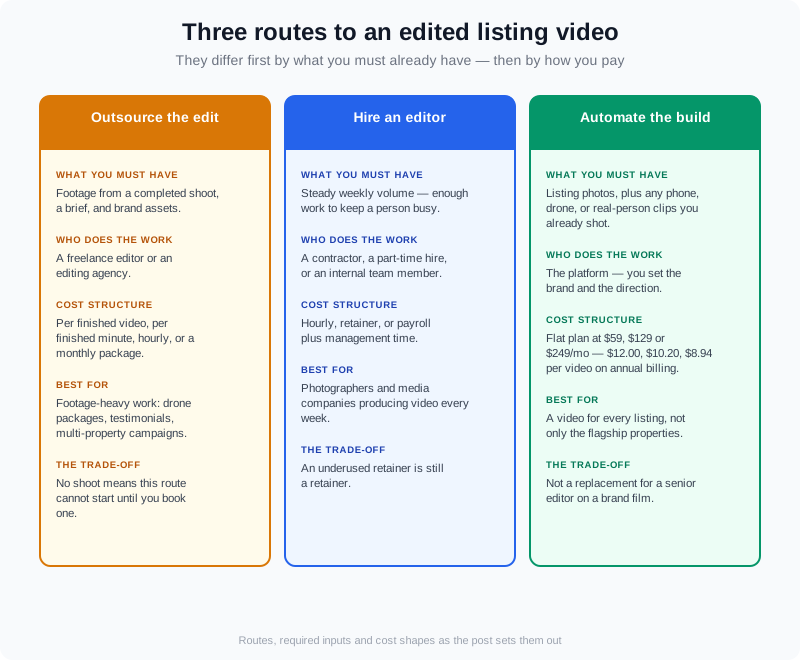
The three routes differ first by inputs, not by price: a shoot, a person, or a photo set.
Route 1 — Outsource the Edit
This is the traditional model and still the strongest one for craft. You finish the shoot, upload the files, and pay someone to turn them into a listing video. The quality ceiling is the highest of the three routes because a good editor makes editorial decisions a template cannot: which clip earns the open, where the walkthrough breathes, and which feature the seller actually cares about.
Quotes come in four shapes, and knowing which one you are being given explains most of the variance between two bids for identical footage:
- Per finished video. One price per deliverable. The easiest to compare and the easiest to budget against listings.
- Per finished minute. Common for brand films. A 60-second cut and a three-minute tour are priced differently even though they use the same footage.
- Hourly. Shifts the risk of a messy shoot onto you. Best when you already know the material is clean.
- Monthly package or retainer. Usually the lowest per-video rate and the highest commitment. It only pays off if your volume is real.
Two clauses decide whether the quote you accept stays the quote you pay. First, revision rounds: "unlimited revisions" usually means unlimited rounds of small changes, not a re-edit. Second, whether the price includes the aspect-ratio exports. A cut delivered only in 16:9 is not finished — someone still has to produce the vertical version you actually post.
Where this route breaks down is not the editor. It is the inputs. If the footage is wobble-heavy, underlit, or missing the kitchen in daylight, no edit recovers it, and the fix is a re-shoot at your cost. And if there was no shoot at all — because the property was photographed and never filmed — this route cannot start until you book one.
Route 2 — Hire an Editor In-House or on Retainer
Hiring is outsourcing with a standing commitment. Instead of paying per video, you reserve a person's hours: a contractor at a set number of hours a month, a part-time hire, or a role inside a growing media company. The pitch is throughput — work goes in and comes back on a schedule you set, without re-briefing a stranger every listing.
It wins when three things are true: your volume is steady rather than lumpy, your footage is similar listing to listing, and your brand rules are stable enough to be learned once. Photographers who deliver for other agents hit that state quickly, because their week has a rhythm and the deliverable repeats. The operational version of this — where an editor's hours go, and what changes when the round trips come out — is covered in our guide to the videographer AI workflow.
The costs to weigh are the ones that do not appear on the invoice: management time, training, and single-point-of-failure risk. A retainer that sits underused for two months is still a retainer. If your volume is four listings a month with three quiet weeks, you are paying for capacity you did not use. For the pricing side of selling video as a service, see how to price real estate video services.
Route 3 — Automate the Build
Automation in 2026 is not a filter stack over a slideshow. It is the assembly of a paced, branded walkthrough from material you already own, and for most listing work that material is the photo set — the same images already edited and already approved for the MLS.
On VideoGuru, a listing video is built from up to 20 photos and up to 40 clips per video. That clip allowance matters more than it sounds: photo-to-video is not photos-only. You can drop your own footage into the same walkthrough — a drone establishing shot, a real-person clip of you at the door, a handoff at the close — and it is mixed into the video rather than assembled as a separate output. You do not need a second edit to get your aerial into the tour.
The same platform also covers the two things that used to force an outsourced order. Effects run on the same timeline: virtual twilight, virtual staging for empty rooms, declutter, and full restyles that swap a room's look. And the presenter layer is built in — an AI avatar created from a photo you upload, voiced with a clone of your own voice, composited into the property walkthrough itself rather than exported as a separate talking head. It is available on any paid plan and there is no separate avatar subscription on top. Output lands in 16:9, 1:1, or 9:16 from one build, and the platform's own walkthrough of creating a video puts a typical listing at about 10 minutes.
This is a mainstream move rather than an edge case. NAR’s real estate technology resources track how quickly media tooling is adopted across the industry, and listing video is one of the categories that moved first, because the raw material already existed on every photographed property.
What this route does not do is replace a senior editor on a brand film. A two-minute narrative with interviews, licensed music, and a story arc still belongs with a human. The distinction is the same one that separates photo-to-video for listings from production work, and it is why the two routes coexist in the same business rather than competing.
The time comparison is the honest argument for automating the listing tier. Our breakdown of how long real estate videos take with AI walks through where the hours actually go — and how much of them were never the edit.
What the Edit Costs per Listing
There is no national rate for editing a listing video, and any post that hands you a single number for it is guessing about your market. What you can pin down is the structure of the comparison. An outsourced quote is a per-deliverable number, so your monthly editing spend is that quote multiplied by listings. A subscription is flat, so your cost per video falls as volume rises. The crossover point is the only number that matters, and it moves entirely with your volume.
VideoGuru's plans, from the platform's current pricing:
| Plan | Monthly | Annual (per month, billed yearly) | Videos | Max resolution | Effective per-video cost (annual) |
|---|---|---|---|---|---|
| Essential | $59/mo | $30/mo ($360/yr) | ~3/cycle monthly · 30/yr annual | 1080p | $12.00 |
| Growth | $129/mo | $85/mo ($1,020/yr) | ~10/cycle monthly · 100/yr annual | 4K | $10.20 |
| Pro | $249/mo | $149/mo ($1,788/yr) | ~25/cycle monthly · 200/yr annual | 4K | $8.94 |
Every paid plan includes 20 photos and 40 clips per video and no watermark. The free tier produces 2 videos a month at 720p with a watermark and a 15-second cap — enough to test the workflow on one listing, not to run a listing calendar. Annual plans also roll unused credits for 12 months against 3 months on monthly billing, which is what makes the effective per-video figure above realistic rather than theoretical.
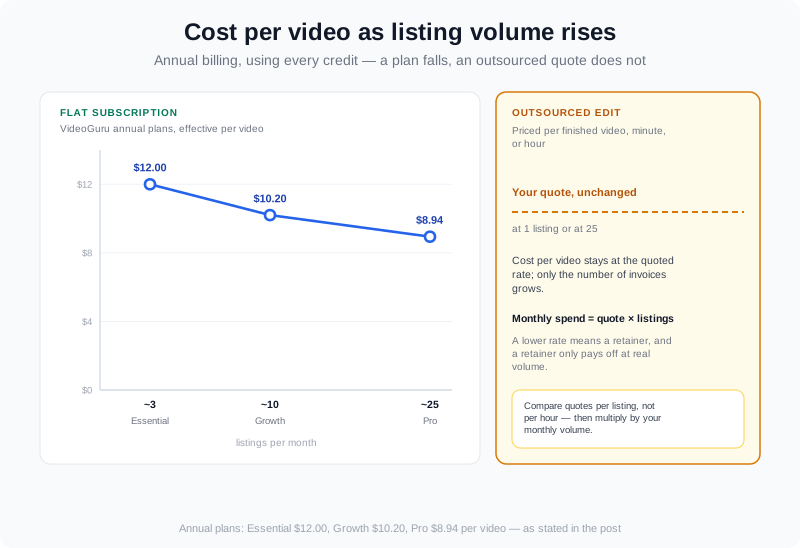
Effective per-video cost falls as volume rises; the crossover with an outsourced quote is a volume question, not a quality question.
For the wider picture — where editing sits inside the total cost of producing real estate video — see our breakdown of real estate video production costs in 2026.
Which Route Fits You
Persona changes the answer more than budget does, because each group starts with different raw material. Buyer behaviour is the reason the listing tier exists at all: NAR's research library has tracked for years how heavily buyers lean on listing media before they ever request a showing, and video is the format that answers what stills cannot — how the house flows room to room.
- Agents with 1-3 listings a month: automate. There is no volume here to justify a retainer, and a per-video quote multiplied by three is the most expensive way to buy three videos. Essential covers roughly three videos a cycle at 1080p; if you want 4K listing tours and a wider effect set, Growth covers about ten.
- Agents with 4-10 listings a month: hybrid. Automate the listing tier so every property gets a tour, and spend outsourced budget only on the one or two properties a quarter that justify a filmed brand piece.
- Photographers delivering 5 or more videos a week: automate the assembly, keep an editor for client-facing films. The per-listing build is the repetitive half of the work; the senior edit is the half clients actually pay a premium for. Pro's roughly 25 videos a cycle and 200 a year at $8.94 effective is the tier this arithmetic points at by mid-volume.
- Media companies and teams: run both, deliberately. A retainer editor owns branded and testimonial work; the platform owns the listing tier that would otherwise queue behind them.
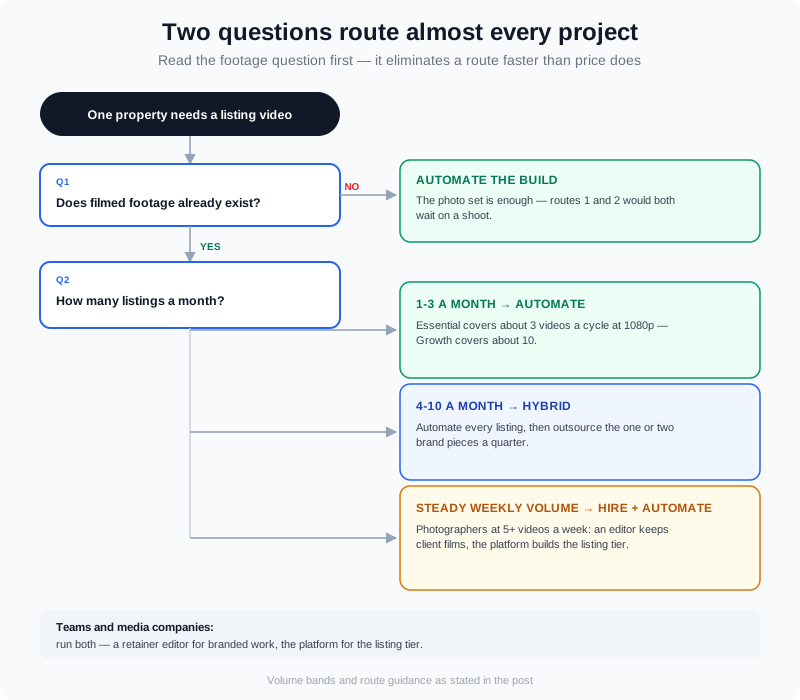
Two questions — monthly volume and whether footage exists — route almost every project correctly.
How to Choose in Four Steps
- 1. Count 90 days of output. How many listings and how many videos actually went live. The number you produce is the number you should plan for — not the number you intend to produce.
- 2. Answer one question about footage. For the next five properties, does filmed material already exist? No means routes one and two both wait on a shoot.
- 3. Get one real quote for the same deliverable. Same length, same aspect-ratio exports, and the revision count stated in writing.
- 4. Run one listing through two routes and compare hours. Not opinions — hours, from photo set to published file. One listing is enough to see the shape of your year. Then check what happened after it published: YouTube Help’s own guide to thumbnail impressions and watch time shows how to read whether the opening seconds and cover frame earned the click or lost it.
Frequently Asked Questions
How much do real estate video editing services cost?
Editing quotes vary by market and by deliverable, so the useful comparison is structural rather than a single rate: most editors quote per finished video, per finished minute, hourly, or as a monthly package, and each shape prices a different risk. Get one quote for an identical deliverable — same runtime, same set of aspect-ratio exports, revisions counted in writing — and multiply it by your monthly listing count. That product, not the headline rate, is what an outsourced editing habit costs you per year.
Is it cheaper to outsource editing or automate it?
It depends on volume. An outsourced quote is charged per deliverable, so cost scales linearly with listings; a subscription is flat, so the per-video cost falls as volume rises. On VideoGuru, billed annually, the effective per-video cost is $12.00 on Essential, $10.20 on Growth, and $8.94 on Pro. Automation wins on listings and repetitive weekly output; outsourcing wins on the projects where an editor's taste is the product — brand films, testimonials, and campaigns with a story to tell.
Can I mix drone or phone clips into a video built from listing photos?
Yes. Photo-to-video is not photos-only — you can add your own clips, including drone shots and real-person footage, and they are mixed into the same property walkthrough rather than treated as a separate project. On VideoGuru that budget is up to 40 clips per video alongside up to 20 photos, so a drone establishing shot at the open and a handoff clip at the close sit in the same edit as the room stills.
Do I need to film anything to get a listing video?
No. Filming is optional, not required. If the property has been photographed, those images can carry the video: the platform builds the walkthrough from the photo set and applies effects such as virtual twilight, virtual staging, and declutter. If you also want a presenter, an AI avatar created from an uploaded photo and voiced with a clone of your own voice can be composited into that same walkthrough on any paid plan — no camera, no studio, and no separate avatar subscription.
The Verdict
Outsource when the footage exists and the project needs taste. Hire when the volume is steady enough to keep a person busy. Automate when the video has to exist for every listing and the raw material is already sitting in your photo folder. Most established photographers and busy agents end up running two of the three at once — and the ones who keep every listing video on the outsourced route are usually paying the most for the half of the work that is least differentiated.
If you want to test the automated tier on one live listing before you change anything, you can start a free VideoGuru account and build the first video from your existing listing photos; the product docs walk through creating a video, editing it, and exporting in each aspect ratio. Compare the hours it takes against the hours your current process takes, on the same property. That comparison is the only quote you need.